HTTP/3, built on QUIC, enables multiplexing without reconnection for faster resource access. Enable HTTP/3 with Global Accelerator (GA) to reduce latency and improve user experience in high-packet-loss or unstable network conditions.
Overview
QUIC and HTTP/3 features
QUIC (Quick UDP Internet Connections) is a UDP-based, low-latency transport protocol that addresses TCP and TLS performance bottlenecks in high-latency and multiplexed connections.
QUIC is the transport layer for HTTP/3 and is widely adopted by major browsers and web servers.
HTTP/3 use cases
-
Web browsing: Reduces page load times for resource-heavy pages through multiplexing.
-
Real-time communication: Benefits latency-sensitive applications (instant messaging, video conferencing, online gaming) with fast error recovery.
-
Mobile devices: Connection migration handles network switches gracefully, maintaining stable connections.
-
Streaming media: Reduces buffering and interruptions for video and audio playback.
-
High concurrency: Multiplexing handles large numbers of concurrent requests without HTTP/2's head-of-line blocking.
Supported protocol versions and client requirements
GA supports h3. Ensure your client supports a compatible HTTP/3 version:
-
Google Chrome 87 or later. For other browsers, verify HTTP/3 support.
-
For other clients (such as self-developed apps), integrate a QUIC-compatible network library such as lsquic-client, Cronet, ngtcp2, or quiche.
How GA and clients negotiate HTTP/3
HTTP/3 is negotiated automatically during the TLS 1.3 handshake — no explicit configuration is needed.
HTTP/3 is a standalone protocol based on QUIC, not an extension of HTTP/1.1 or HTTP/2. Modern clients handle protocol negotiation and fallback automatically.
GA and a client negotiate an HTTP/3 connection as follows:
-
After the Maximum HTTP Version of an HTTPS listener in a GA instance is set to HTTP/3, GA will announce support for HTTP/3 to the client. The support is announced in the Alt-Svc HTTP response header, and the value of the Alt-Svc header is:
Alt-Svc : h3=":$quic_port"; ma=3600. -
The client attempts to establish an HTTP connection with GA. Note the following:
-
If the client cannot establish an HTTP/3 connection, it always falls back to HTTP/1.1 or HTTP/2.
-
The client supports caching cookies related to HTTP/3.
-
An HTTP/3 connection may fail for the following reasons:
-
The HTTP/3 version supported by the client is not compatible with the version supported by GA.
-
GA detects that UDP traffic is blocked or rate-limited, which prevents HTTP/3 from working.
-
The client does not support HTTP/3 and therefore does not attempt to negotiate an HTTP/3 connection.
-
-
-
Enabling or disabling HTTP/3 support in GA does not affect basic client connectivity because clients automatically fall back to HTTP/2 or HTTP/1.1.
Example scenario
A company deploys a video service on a server in Germany (Frankfurt). Clients are in the China (Beijing) region.
Challenges:
-
Upgrade from HTTP to HTTP/3 to improve service quality.
-
Unstable cross-border network with frequent latency, jitter, and packet loss.
HTTP/3 with GA leverages QUIC to reduce latency, improve connection reliability, and optimize data transmission in poor network conditions.
Combined with HTTPS encryption, this solution ensures secure access for users in China (Beijing) through GA nodes.
Limitations
-
To use HTTP/3 with GA, you must select Maximum HTTP Version for Maximum HTTP Version when configuring an HTTPS listener.
-
Only standard pay-as-you-go GA instances support HTTP/3. Standard subscription GA instances and basic GA instances do not support this feature.
If your pay-as-you-go GA instance does not provide the option to configure the Maximum HTTP Version, your instance may be running on a version that does not support this feature. To use this feature, contact your account manager to request an instance upgrade.
Prerequisites
-
The application server is deployed and serving HTTP traffic publicly.
-
A registered domain name with ICP filing completed. Register an Alibaba Cloud domain name. ICP filing process.
-
An SSL certificate purchased or uploaded to SSL Certificates Service and associated with your domain name. Enable HTTPS access for a web service by using an official certificate.
Procedure
Step 1: Configure GA and enable HTTP/3
-
Log on to the GA console.
-
On the Instances page, click Create GA Instance > Pay-as-you-go Standard Instance in the upper-left corner.
-
On the Basic Instance Configuration page, enter a name for the GA instance. Then, click Next.
-
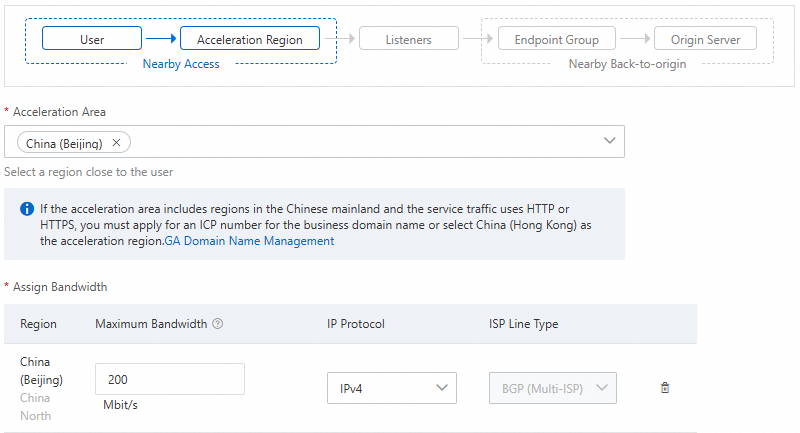
On the Configure Acceleration Area page, select China (Beijing) for Acceleration Area. You can use the default values for other parameters or adjust as needed. Then, click Next.
ImportantIf the peak bandwidth is set too low, throttling may occur and result in dropped traffic. Plan the peak bandwidth to ensure that it meets your business requirements.
-
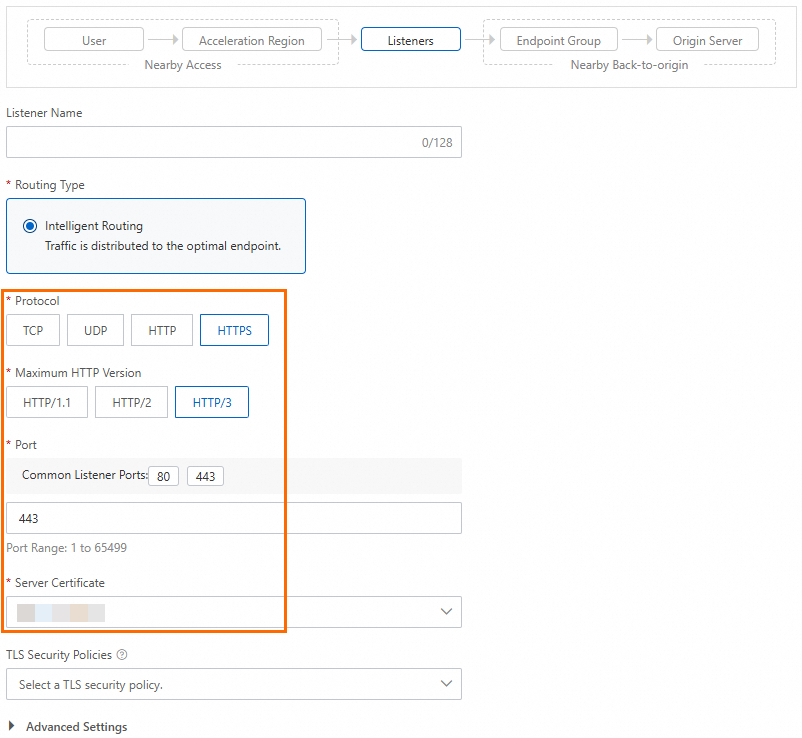
On the Configure Listener page, configure the following parameters. You can use the default values for other parameters or adjust as needed. Then, click Next.
Parameter
Description
Protocol
Select HTTPS.
Maximum HTTP Version
Select HTTP/3.
Note-
If your pay-as-you-go GA instance does not provide the option to configure the Maximum HTTP Version, your instance may be running on a version that does not support this feature. To use this feature, contact your account manager to request an instance upgrade.
-
If a client does not support HTTP/3, GA accepts requests over HTTP/2 or HTTP/1.1 as a fallback.
Port
Select the default HTTPS port 443.
Server Certificate
Select the SSL certificate that is associated with your domain name.
-
-
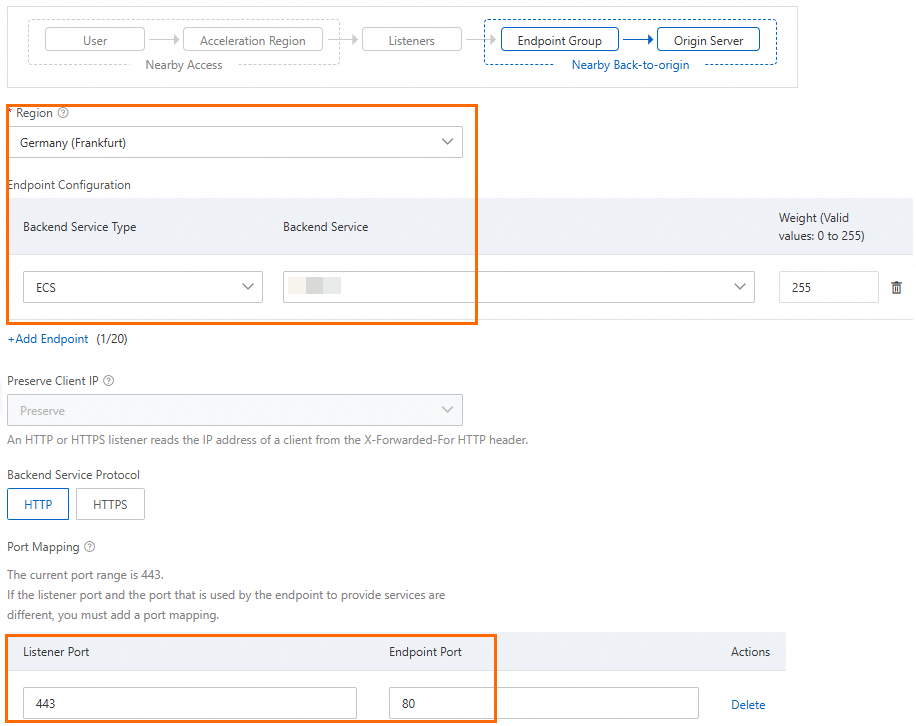
On the Configure an Endpoint Group page, configure the following parameters. You can use the default values for other parameters or adjust as needed. Then, click Next.
Parameter
Description
Region
Select Germany (Frankfurt).
Endpoint Configuration
-
Select Backend Service Type for Backend Service Type.
-
Select your application server for Backend Service.
Port Mapping
If the listener port is different from the endpoint port, you need to configure port mapping.
In this topic, the listener port is set to 443 and the endpoint port is set to 80.
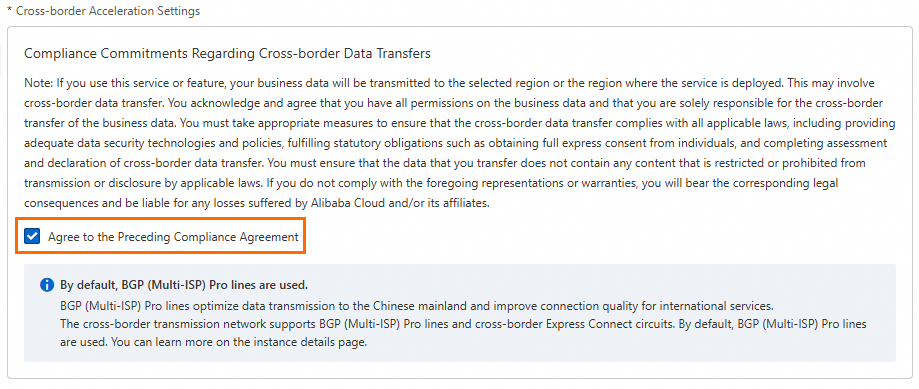
Cross-border Acceleration Settings
In this scenario, if your business involves cross-border acceleration between the Chinese mainland and other countries or regions, read and select Compliance Commitments Regarding Cross-border Data Transfers.
-
-
On the Configuration Review page, review the configurations and click Submit. Wait for the instance to be created.
Step 2: Configure DNS resolution
Map your domain name to the CNAME of the GA instance to route traffic through GA.
-
Log on to the GA console.
-
Find the GA instance for which you want to configure DNS resolution and copy its CNAME address.
-
Add a CNAME record.
-
On the Alibaba Cloud DNS page, find your domain name and click Actions in the Actions column.
NoteIf your domain name was not registered with Alibaba Cloud, add the domain name to the Alibaba Cloud DNS console before configuring DNS records.
-
On the Configure page, click Add Record.
-
In the Add Record panel, configure the following parameters to add the CNAME record. Then, click Confirm.
Parameter
Description
Type
Select CNAME from the drop-down list.
Host
The prefix of your domain name.
DNS Request Source
Select Default.
TTL
Time to Live — how long a DNS record is cached. Use the default value for this example.
Value
Enter the CNAME address that you copied from the GA instance.
-
Step 3: Verify HTTP/3 and acceleration performance
Test video acceleration performance from a client in the China (Beijing) acceleration area.
-
Test the GA acceleration performance with HTTP/3:
Open browser developer tools and navigate to
https://<your domain name>. Disable browser cache to prevent caching from affecting HTTP/3 negotiation (in Chrome, selectDisable cache).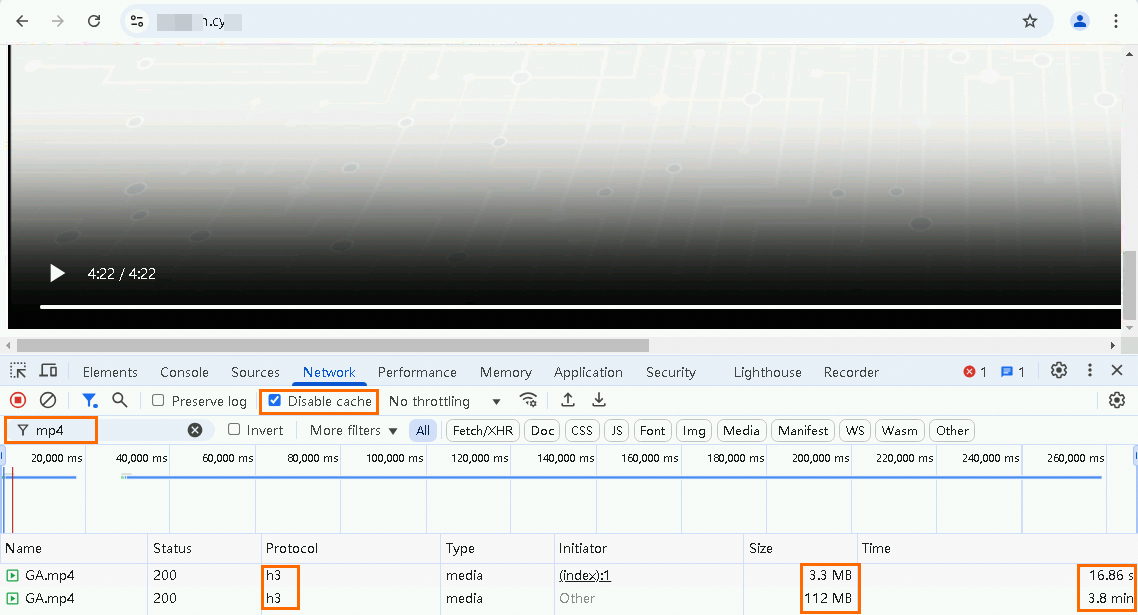
-
Test the GA acceleration performance without HTTP/3:
Modify the HTTPS listener configuration of the GA instance. Change the value of Maximum HTTP Version to HTTP/2.
Open browser developer tools and navigate to
https://<your domain name>.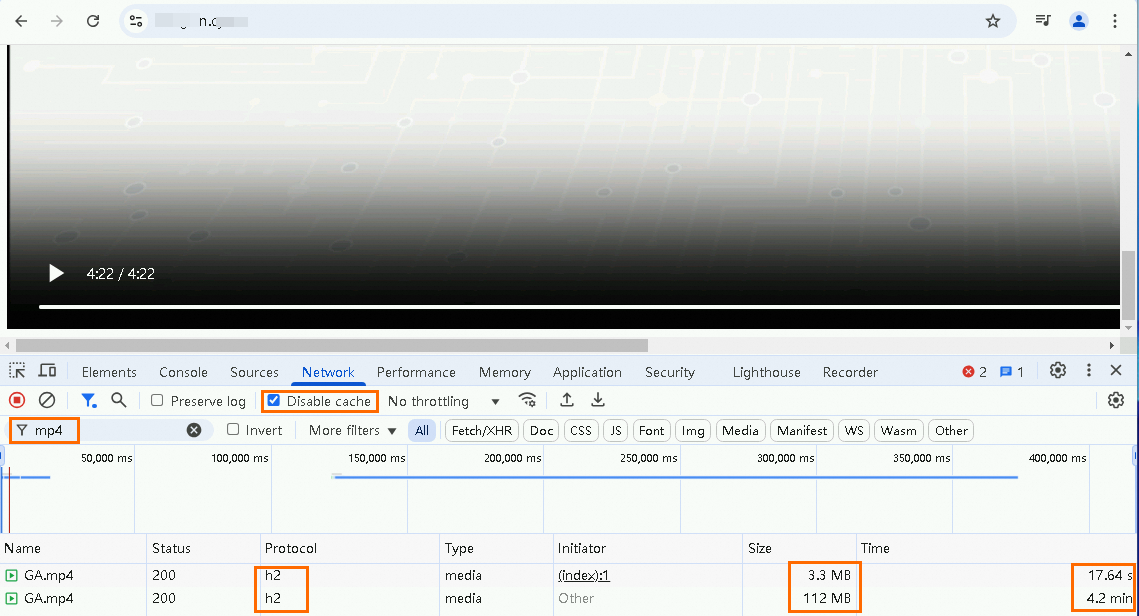
-
Test the performance without GA acceleration:
If the server lacks a public IP address, bind an Elastic IP Address (EIP) first.
Open browser developer tools and navigate to
http://<public IP address>:<port>.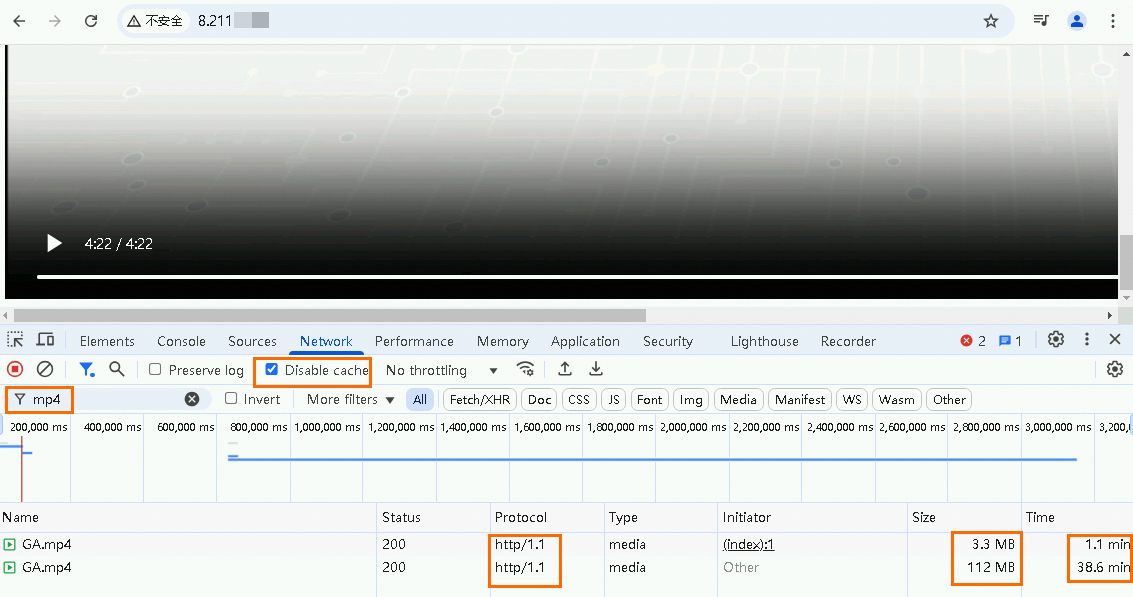
-
Compare the acceleration performance:
Test data shows GA with HTTP/3 improves video access speed.
Scenario
Initial load time (3.3 MB)
Full video load time (112 MB)
Initial load comparison
(Time saved / % improvement)
Video load comparison
(Time saved / % improvement)
Scenario 1: Use GA with HTTP/3
16.86 seconds
3.8 minutes
0.78s / 4.42% (vs. Scenario 2)
0.4 min / 9.52% (vs. Scenario 2)
Scenario 2: Use GA without HTTP/3
17.64 seconds
4.2 minutes
48.36s / 73.27% (vs. Scenario 3)
34.4 min / 89.12% (vs. Scenario 3)
Scenario 3: Do not use GA
1.1 minutes
38.6 minutes
N/A
N/A
NoteData shown is for reference only. Actual performance depends on your environment.
FAQ
Why is the HTTP/3 option unavailable?
If your pay-as-you-go GA instance does not provide the option to configure the Maximum HTTP Version, your instance may be running on a version that does not support this feature. To use this feature, contact your account manager to request an instance upgrade.
Why can't my client use HTTP/3?
GA falls back to HTTP/1.1 or HTTP/2 if HTTP/3 negotiation fails. How GA and clients negotiate HTTP/3.
Related documents
Cross-border scenarios use BGP (Multi-ISP) Pro lines by default. For higher network quality, use cross-border Express Connect circuits. Select and purchase GA resources.
API reference:
-
CreateListener: Creates a listener for a GA instance. You can use the
HttpVersionparameter to modify the HTTP/3 configuration. -
UpdateListener: Modifies the configuration of a specified listener for a GA instance. You can use the
HttpVersionparameter to modify the HTTP/3 configuration. -
DeleteListener: Deletes a listener from a GA instance.