This topic describes common methods for storing models when you deploy AI inference applications in Function Compute. It also compares the advantages, disadvantages, and applicable scenarios of these methods.
Background information
For information about storage types for functions, see Select a storage type for a function. The following two types are suitable for storing models for GPU-accelerated instances.
You can also place model files directly into a container image because GPU-accelerated functions use custom container images to deploy services.
Each method has unique scenarios and technical features. When you select a storage method, consider your specific requirements, execution environment, and team workflow to balance efficiency and cost.
Distribute models with container images
One of the most straightforward methods is to package trained models and related application code together in a container image. The model files are then distributed with the container image.
Advantages and disadvantages
Advantages:
Convenience: After you create an image, you can run it directly for inference without additional configuration.
Consistency: This ensures that the model version is consistent across all environments. This prevents issues caused by version inconsistencies between environments.
Disadvantages:
Image size: Images can become very large, especially for large models.
Time-consuming updates: Each model update requires you to rebuild and distribute the image, which can be a time-consuming process.
Description
To improve the cold start speed of function instances, the platform pre-processes container images. If an image is too large, it may exceed the platform's image size limit. It may also increase the time required for image acceleration and pre-processing.
For information about the platform's image size limits, see What is the size limit for GPU images?
For information about image pre-processing and function status, see Function status and invocation for custom images.
Scenarios
The model size is relatively small, such as a few hundred megabytes.
The model changes infrequently. In this case, you can package the model in the container image.
If your model files are large, are updated frequently, or cause the container image to exceed the platform's size limit, you should separate the model from the image.
Store models in File Storage NAS
Function Compute lets you mount a NAS file system to a specified directory in a function instance. The application can then load the model files by accessing the NAS mount target directory.
Advantages and disadvantages
Advantages:
NAS offers better application compatibility than
FUSEfile systems because it provides more complete and maturePOSIXfile interfaces.Capacity: NAS can provide petabyte-scale storage capacity.
Disadvantages:
VPC dependency: You must configure VPC access for functions to access NAS mount targets. This requires configuring permissions across multiple cloud products. Additionally, when a function instance cold starts, it takes a few seconds for the platform to establish VPC access for the instance.
Limited content management: A NAS file system must be mounted before use. This method requires you to establish a business workflow to distribute model files to the NAS instance.
No support for active-active or multi-availability zone (AZ) deployments. For more information, see NAS FAQ.
Description
In scenarios where many containers start and load models simultaneously, the NAS bandwidth bottleneck is easily reached. This increases the instance startup time and can even cause startup failures due to timeouts. For example, a scheduled Horizontal Pod Autoscaler (HPA) creates GPU snapshots in batches, or a traffic burst triggers the creation of many elastic GPU-accelerated instances.
You can view NAS performance monitoring (read throughput) in the console.
You can increase the read and write throughput of certain NAS file systems by increasing their capacity.
If you use NAS to store model files, we recommend using a Performance NAS file system. This is because this type of NAS provides a high initial read bandwidth of about 600 MB/s. For more information, see General-purpose NAS file systems.
Scenarios
Fast startup performance is required when you use elastic GPU-accelerated instances in Function Compute.
Store models in Object Storage Service (OSS)
Function Compute lets you mount an OSS bucket to a specified directory in a function instance. Applications can then load models directly from the OSS mount target.
Advantages
Bandwidth: OSS has a higher bandwidth limit than NAS. This makes bandwidth contention between function instances less likely. For more information, see Limits. You can also enable the OSS accelerator to obtain higher throughput.
Multiple management methods:
Provides access channels such as the console and APIs.
Provides various locally available object storage management tools. For more information, see Developer Tools.
You can use the OSS cross-region replication feature for model synchronization and management.
Simple configuration: Compared to a NAS file system, mounting an OSS bucket to a function instance does not require VPC connectivity. It is ready to use immediately after configuration.
Cost: If you only compare capacity and throughput, OSS is generally more cost-effective than NAS.
Description
OSS mounting uses the Filesystem in Userspace (FUSE) user mode file system mechanism. When an application accesses a file on an OSS mount target, the platform converts the access request into an OSS API call to access the data. Therefore, OSS mounting has the following characteristics:
It runs in user mode and consumes the resource quota of the function instance, such as CPU, memory, and temporary storage. Therefore, this method is best suited for GPU-accelerated instances with large specifications.
Data access uses the OSS API. Its throughput and latency are limited by the OSS API service. This makes it more suitable for accessing a small number of large files, as is common in model loading scenarios. It is not suitable for accessing many small files.
OSS mounting is better suited for sequential reads and writes than for random reads and writes. When you load large files, sequential reads can take full advantage of the file system's prefetch mechanism to achieve better network throughput and lower loading latency.
For example, with safetensors files, using a version optimized for sequential reads significantly reduces the time to load model files from an OSS mount target. For more information, see load_file: load tensors ordered by their offsets.
If you cannot adjust the application's I/O pattern, you can sequentially read the file once before loading it. This prefetches the content into the system's PageCache. The application then loads the file from the PageCache.
Scenarios
Many instances load models in parallel. This requires higher storage throughput to avoid bandwidth contention between instances.
Locally redundant storage or multi-region deployment is required.
Accessing a small number of large files with a sequential read I/O pattern, as is common in model loading scenarios.
Comparison summary
Comparison item | Distribute with image | Mount NAS | Mount OSS |
Model size |
| None | None |
Throughput | Faster |
|
|
Compatibility | Good | Good |
|
I/O pattern adaptability | Good | Good | Suitable for sequential read and write scenarios. Random reads must be converted to PageCache access for better throughput. |
Management method | Container image | Mount within a VPC and then use. |
|
Multi-AZ | Supported | Not supported | Supported |
Cost | No extra fees | NAS is generally slightly more expensive than OSS. Refer to the current billing rules for each product.
| |
Based on this comparison, the following are the recommended practices for storing models on Function Compute (FC) GPU-accelerated instances, considering different usage patterns, concurrent container startup volumes, and model management needs:
If you require high compatibility with file system APIs, or if your application uses random reads and cannot be modified to access the memory PageCache, use a Performance NAS file system.
In scenarios where many GPU containers start concurrently, use the OSS accelerator to avoid the single-point bandwidth bottleneck of NAS.
In multi-region deployment scenarios, use OSS and the OSS accelerator to reduce the complexity of model management and cross-region synchronization.
Test data
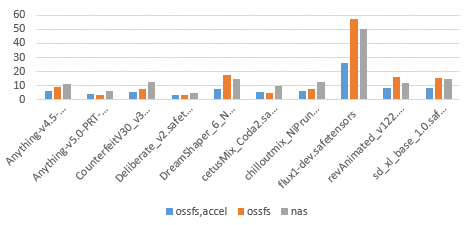
The following two tests analyze the performance differences between various storage media by comparing the time taken to load files in different scenarios. A shorter loading time indicates better storage performance.
Method 1: File loading time for different models
This test measures the time taken to load `safetensors` model weight files from different storage media to GPU memory. The results are used to compare the performance of different storage methods for various models.
Test environment
Instance type: Ada card type, 8-core, 64 GB memory
OSS accelerator capacity: 10 TB, with a maximum throughput of 3,000 MB/s
NAS specifications: Performance NAS file system, with a capacity corresponding to a maximum throughput of 600 MB/s
safetensors version
0.5.3The following table lists the models and their sizes used in this test.
Model
Size (GB)
Anything-v4.5-pruned-mergedVae.safetensors
3.97
Anything-v5.0-PRT-RE.safetensors
1.99
CounterfeitV30_v30.safetensors
3.95
Deliberate_v2.safetensors
1.99
DreamShaper_6_NoVae.safetensors
5.55
cetusMix_Coda2.safetensors
3.59
chilloutmix_NiPrunedFp32Fix.safetensors
3.97
flux1-dev.safetensors
22.2
revAnimated_v122.safetensors
5.13
sd_xl_base_1.0.safetensors
6.46
Results
In the following figure, the vertical axis represents the loading time, and the horizontal axis represents different models and the three storage methods: `ossfs,accel`, `ossfs`, and `nas`.
Bar color | Storage method | Technical feature |
Blue | ossfs,accel | OSS accelerator Endpoint |
Orange | ossfs | Standard OSS Endpoint |
Gray | nas | NAS file system mount target |
Test conclusion
Throughput: The core advantage of OSS over NAS is its throughput performance. Test data shows that the read throughput of a standard OSS Endpoint can often reach 600 MB/s or higher.
Impact of random reads: For some files, such as the relatively large flux1-dev.safetensors and the smaller revAnimated_v122.safetensors, the loading time for standard OSS is significantly longer than that of the OSS accelerator and NAS. This is because the platform optimizes random reads for the OSS accelerator, and NAS performs more predictably than standard OSS in random read scenarios.
Method 2: File loading time under different concurrency levels
This test uses the large 22.2 GB model flux1-dev.safetensors to test the latency distribution when loading the file to GPU memory under concurrency levels of 4, 8, and 16.
Test environment
Instance type: Ada.3, 8-core, 64 GB memory
OSS accelerator capacity: 80 TB, with a maximum throughput of 24,000 MB/s
NAS specifications: Performance NAS file system, with a capacity corresponding to a maximum throughput of 600 MB/s
safetensors version
0.5.3
Results
Figure 1 shows the maximum, average, and median loading times for different storage methods, including `ossfs,accel,N`, `ossfs,N`, and `nas,N`, under different concurrency levels. N indicates the minimum number of instances.
Storage method | Technical feature |
ossfs,accel,N | OSS accelerator Endpoint |
ossfs,N | Standard OSS Endpoint |
nas,N | NAS file system mount target |
Bar color | Value represented |
Blue | Average time |
Orange | Median time |
Gray | Maximum time |
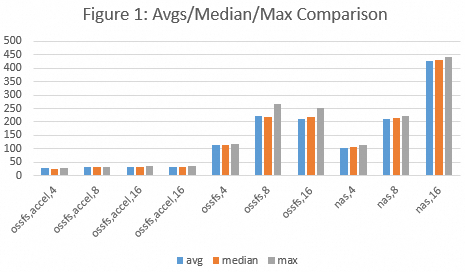
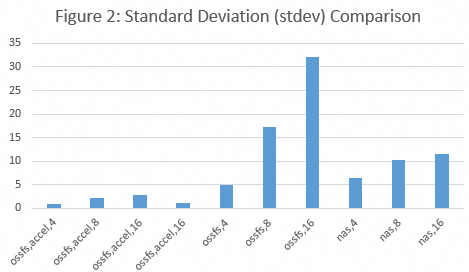
Figure 2 shows the standard deviation for different storage methods, including `ossfs,accel,N`, `ossfs,N`, and `nas,N`, under different concurrency levels. N indicates the minimum number of instances.
Test conclusion
Throughput: The core advantage of OSS over NAS is throughput performance, and the advantage of the OSS accelerator is even more significant. The throughput of standard OSS can often exceed 600 MB/s, and the throughput of the OSS accelerator can reach the expected value (see Figure 1).
Stability: In high-concurrency scenarios, standard OSS provides lower average loading latency than NAS, but its performance is less consistent, as indicated by a higher standard deviation. In this case, the throughput of NAS is more predictable than that of standard OSS (see Figure 2).
Note: The random I/O generated when loading different safetensors files varies. This has a more significant impact on the model loading times from a standard OSS mount target than from a NAS mount target.