Basic authentication lets you restrict access to your HTTP trigger with usernames and passwords. Function Compute checks the Authorization header for valid Base64-encoded credentials before invoking the function, so only clients with matching credentials can reach it.
Basic authentication transmits credentials in Base64 encoding, which is not encryption. Always use HTTPS in production. HTTP is for development and testing only. Function Compute is not responsible for credential leaks caused by using HTTP.
Prerequisites
Before you begin, ensure that you have:
A function with an HTTP trigger. See Create a function and Configure an HTTP trigger
Limits
| Constraint | Details |
|---|---|
| Max users per trigger | 20 |
| Username length | 12–128 characters; must follow FC resource naming conventions |
| Password length | 12–128 characters; must contain uppercase letters, lowercase letters, digits, and at least one of: ! @ # $ % ^ & * ( ) |
| Password uniqueness | Each user must have a unique password; avoid common or weak passwords |
| Credential management | Function Compute only stores and verifies credentials. Rotate passwords that are compromised, considered insecure, or have been in use for a long time |
Configure Basic authentication
Log in to the Function Compute console. In the left navigation pane, choose Function Management > Functions.
In the top navigation bar, select a region. On the Functions page, click the target function.
On the function details page, click the Triggers tab. In the Actions column of the HTTP trigger, click Modify.
In the Modify Trigger panel, configure the following settings and click OK:
Set Authentication Method to Basic Authentication.
Under Users, enter a Username and Password.
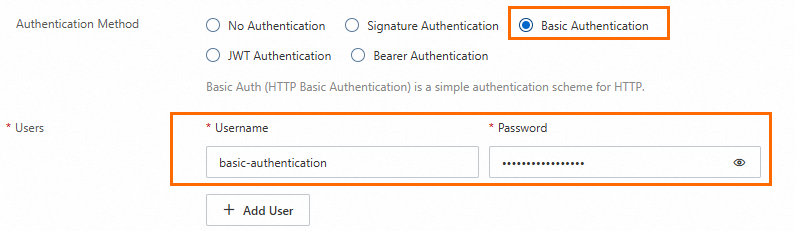
Verify the configuration
Use cURL to confirm that the trigger rejects unauthenticated requests and accepts valid credentials.
On the Triggers tab, copy the public endpoint of the HTTP trigger.
Base64-encode your credentials:
echo -n "username:password" | base64Send an authenticated request using the encoded value:
curl -X POST "https://example.com" \
  -H "Authorization: Basic YmFzaWMtYXV0aGVudGljYXRpb246MTUyMkBaaHV6aTV6****="
Replace
https://example.comwith the public endpoint from step 1. TheAuthorizationheader value must start withBasicfollowed by a single space, as required by RFC 7617.
FAQ
Why does the trigger return "authorization required" after I enable Basic authentication?
The request is missing a valid Authorization header. Check that the header is present and that the Base64-encoded credentials are correct.
Why does the trigger return "Authorization header must start with Basic"?
Per RFC 7617, the Authorization header value must start with Basic followed by a space. Check that your request includes the correct prefix before the encoded credentials.
Are there extra charges for enabling Basic authentication?
No. Gateway-related features in Function Compute are included in function invocation charges.