Function Compute freezes instances between requests rather than terminating them, which improves cold-start performance but breaks assumptions common in long-running applications. PreFreeze and PreStop hooks give your code a window to act before each freeze or stop event—letting you flush metrics, close database connections, and report status without adding latency to request handling.
How it works
Function Compute bills at one-millisecond granularity and only during request execution. When no requests are running, instances are frozen rather than terminated. This is efficient, but it creates three migration pain points for applications that rely on long-running background processes:
| Pain point | Description |
|---|---|
| Delayed or lost metrics | Asynchronous metric reporters—such as Managed Service for OpenTelemetry or third-party application performance management (APM) libraries—may not flush before a freeze. The next request triggers a flush, introducing delays, or data is discarded entirely. |
| Higher latency from synchronous flushing | Calling a flush method after every request adds latency and increases load on backend servers. |
| No graceful shutdown signal | Without a notification before an instance stops, applications cannot close connections, stop background processes, or report status cleanly. |
PreFreeze and PreStop hooks address these pain points by extending the HTTP server model. Function Compute sends HTTP GET requests to well-known paths at the appropriate lifecycle moment, giving your code a chance to act.

PreFreeze
Before freezing an instance, Function Compute sends an HTTP GET request to /pre-freeze. Use this hook to flush metrics or complete work that must finish before the instance is paused.

Key behaviors:
Time spent in PreFreeze is not counted toward InvokeFunction billing duration.
When multiple requests run concurrently on one instance, PreFreeze is called after all requests complete, before the instance is frozen.
Not supported in Python, PHP, or C# runtimes.
Java runtime: requires fc-java-core 1.4.0 or later. See HTTP handler.

PreStop
Before stopping an instance, Function Compute sends an HTTP GET request to /pre-stop. Use this hook to close database connections, stop background processes, and report or update status.

PreStop is supported in all runtimes.
Limitations
Neither PreFreeze nor PreStop receives the event parameter as input.
Neither hook returns a value. Any return logic appended to a hook has no effect.
When a function returns a response, Function Compute freezes the instance immediately. Asynchronous processes, threads, and coroutines are not guaranteed to complete, and asynchronously written logs may not be flushed.
Prerequisites
Before you begin, ensure that you have:
A function created in Function Compute. See Create a function
Configure lifecycle hooks
Billing for PreFreeze and PreStop calls follows the same rules as InvokeFunction calls. See Billing.
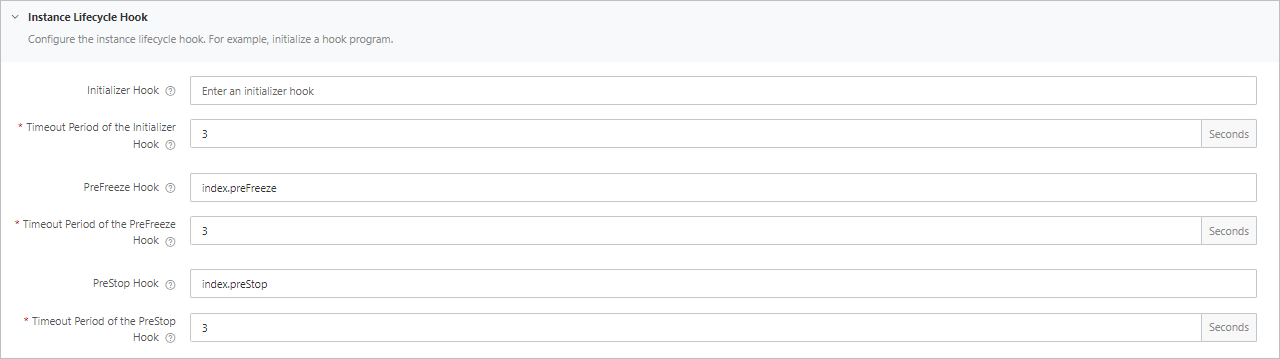
The hook format is [filename].[function name]. For example, index.preStopHandler refers to the preStopHandler function in index.py.
Choose a configuration method:
Configure hooks in the Function Compute console
Lifecycle hooks cannot be set when creating a function. Configure them when updating an existing function.
Log on to the Function Compute console. In the left-side navigation pane, click Services & Functions.
In the top navigation bar, select a region. On the Services page, click the target service.
On the Functions page, find the function and click Configure in the Actions column.
On the Modify Function Settings page, go to the Instance Lifecycle Hook section. Configure the hook handler and timeout for each hook, then click Save.
Click the Code tab. In the code editor, implement the hook function. If you set the PreStop hook to
index.preStopHandler, implement thepreStopHandlerfunction in your code. For runtime-specific implementation examples, see Runtime implementation guides.NoteThe online IDE supports PHP, Python, Node.js, and custom runtimes. It does not support compiled-language runtimes such as Java, Go, .NET, or custom container runtimes.
Click Deploy, then click Test Function.
Configure hooks by using Serverless Devs
Add an instanceLifecycleConfig block to your s.yaml:
codeUri: './code.zip'
......
instanceLifecycleConfig:
  preFreeze:
    handler: index.PreFreeze
    timeout: 60
  preStop:
    handler: index.PreStop
    timeout: 60
To disable a hook, set its handler to an empty string. If you do not explicitly set handler to an empty string, the function retains its previous hook configuration and is not updated by default. When handler is blank, the timeout value is ignored.
codeUri: './code.zip'
......
instanceLifecycleConfig:
  preFreeze:
    handler: ""
    timeout: 60
  preStop:
    handler: index.PreStop
    timeout: 60
For runtime-specific implementation examples, see Runtime implementation guides.
Configure hooks by using an SDK
Use the CreateFunction API to set hooks when creating a function.
Go to the CreateFunction page and click Debug to open the OpenAPI portal.
On the Parameters tab, fill in the required function information. Set the PreFreeze and PreStop handlers under
instanceLifecycleConfig.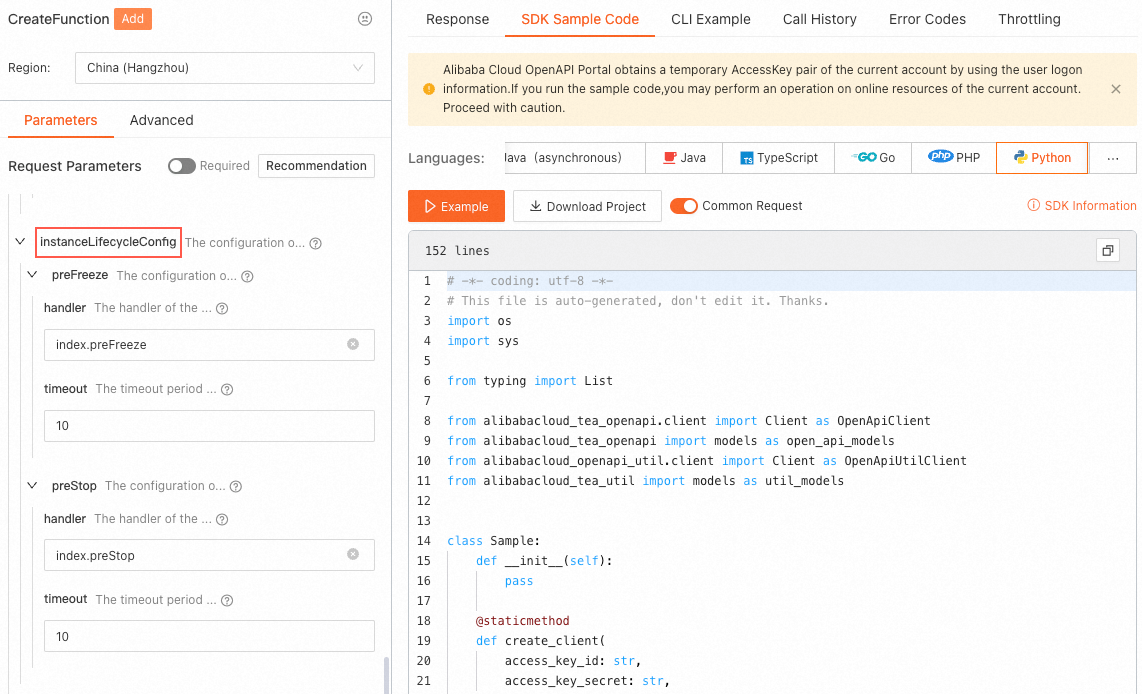
Click the SDK Sample Code tab to get sample code in your preferred language.
For runtime-specific implementation examples, see Runtime implementation guides.
Runtime implementation guides
| Runtime | Implementation guide |
|---|---|
| Node.js | Lifecycle hooks for function instances |
| Python | Lifecycle hooks for function instances |
| PHP | Lifecycle hooks for function instances |
| Java | Lifecycle hooks for function instances |
| C# | Lifecycle hooks for function instances |
| Go | Lifecycle hooks for function instances |
| Custom runtime | Lifecycle hooks for function instances |
| Custom container | Lifecycle hooks for function instances |
Query hook logs
After configuring and running a lifecycle hook, query its logs to verify execution.
Log on to the Function Compute console. In the left-side navigation pane, click Services & Functions.
In the top navigation bar, select a region. On the Services page, click the target service.
On the Functions page, click the function and go to the Logs tab.
On the Request List tab, find the relevant request. Copy the Instance ID, then click SLS Logs.
Use the instance ID to query the start and end logs of all lifecycle hooks. Combine the instance ID with a hook name to filter logs for a specific hook—for example: c-62833f38-20f1629801fa4bd***** and PreStop.
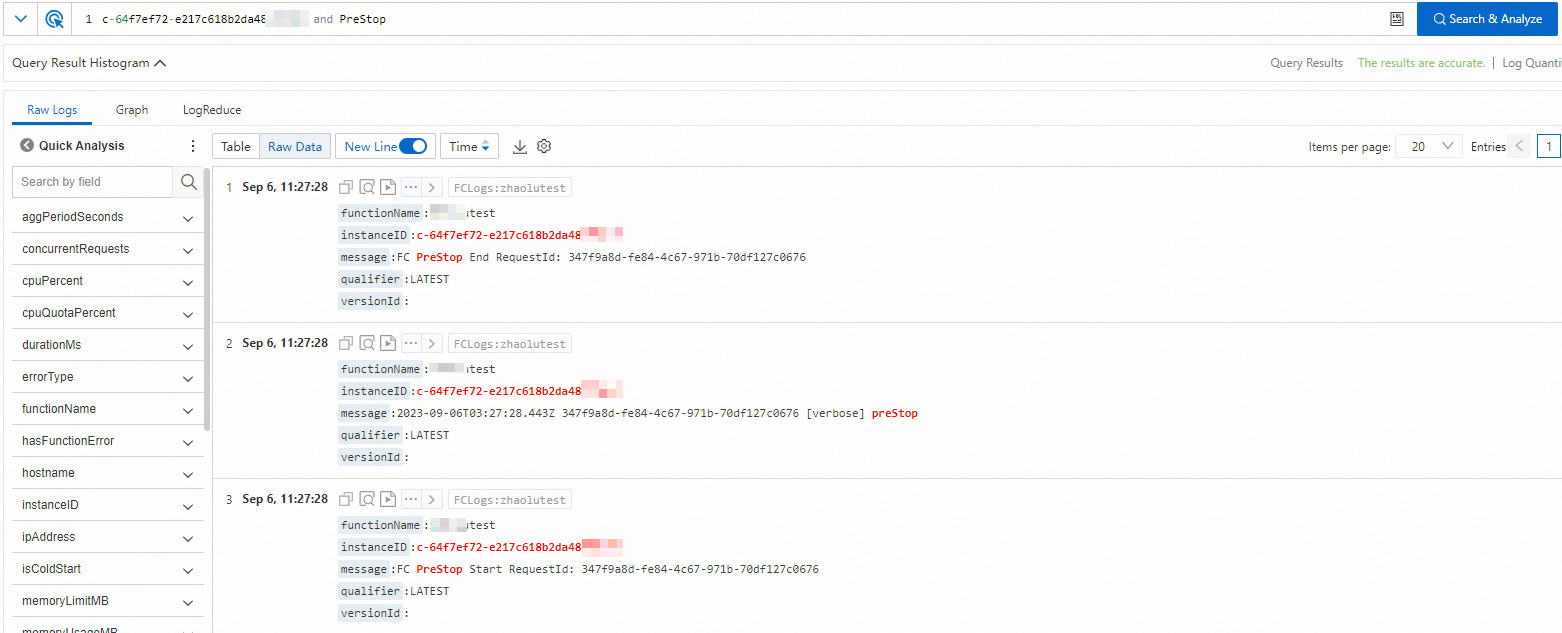
To trace a specific request, use the request ID from the Start or End log entries. If a user log does not include a request ID, click the  icon to view the surrounding log context.
Billing
| Billing item | Charged? |
|---|---|
| Hook execution time (PreFreeze) | No—time spent in the PreFreeze hook is not counted toward InvokeFunction billing duration |
| Hook calls (PreFreeze and PreStop) | Yes—billed at the same rate as InvokeFunction calls |
HTTP requests to hook paths (/pre-freeze, /pre-stop) | No—requests to hook paths are not counted separately |
Concurrent requests: If multiple requests run on the same instance simultaneously, PreFreeze is called once after all requests complete. Billing covers the full execution window from the start of the earliest concurrent request to the end of PreFreeze.
Example: A function configured with 1 GB memory. Assume PreFreeze starts at t1 and the last concurrent request (Request 2) completes at t6, with the total span being 1 second. Execution time = t6 - t1 = 1 s. Consumed resources = 1 s × 1 GB = 1 CU.

For a full breakdown of billing rules, see Billing overview.