Flink SQL supports complex joins on dynamic tables using various query semantics and join types. Avoid creating a cartesian product, as it is unsupported and causes queries to fail. The join order is not optimized by default. For better performance, list tables in the FROM clause from lowest to highest update frequency.
Joins overview
Join type | Description | Constraints |
A regular join is the most general-purpose join type. Any new records or changes to either side of the join are visible and affect the entire join result. | The syntax for a regular join is flexible and supports INSERT, UPDATE, and DELETE operations on input tables. However, a regular join keeps input data from both sides in its state, which can grow indefinitely. To prevent excessive state size, you can set a state time-to-live (TTL), but this might compromise the accuracy of your results. | |
An interval join returns the Cartesian product of records that meet both the join condition and time constraints. | Requires at least one equality join condition and a time-bounding condition that applies to both sides. The time range can be defined as a single condition (such as <, <=, >=, or >), using a | |
A temporal join joins a stream with a versioned table. It uses either event time or processing time to match data to the correct table version at a specific point in time. | Requires both tables to use the same time semantics (either processing time or event time). Pay attention to the lifecycle of the join result; the join condition is typically based on a specific timestamp. | |
A lookup join is typically used to enrich a table with data queried from an external system. The join requires one table to have a processing time attribute and the other to be backed by a dimension table. | Requires one table to have a processing time attribute, while the other must use a lookup source connector. An equality join condition between the two tables is also required. | |
A lateral join connects a table with the output of a table-valued function. Each row from the left table is joined with all rows produced by the corresponding call to the table-valued function. | Requires a constant |
Regular joins
The four common types of regular joins are:
INNER JOIN: Returns records that satisfy the join condition in both tables (the intersection).
LEFT JOIN: Returns all records from the left table, even if there are no matching records in the right table (preserves the left table).
RIGHT JOIN: Returns all records from the right table, even if there are no matching records in the left table (preserves the right table).
FULL OUTER JOIN: Returns the union of both tables, including both matching and non-matching records.
Regular join diagram
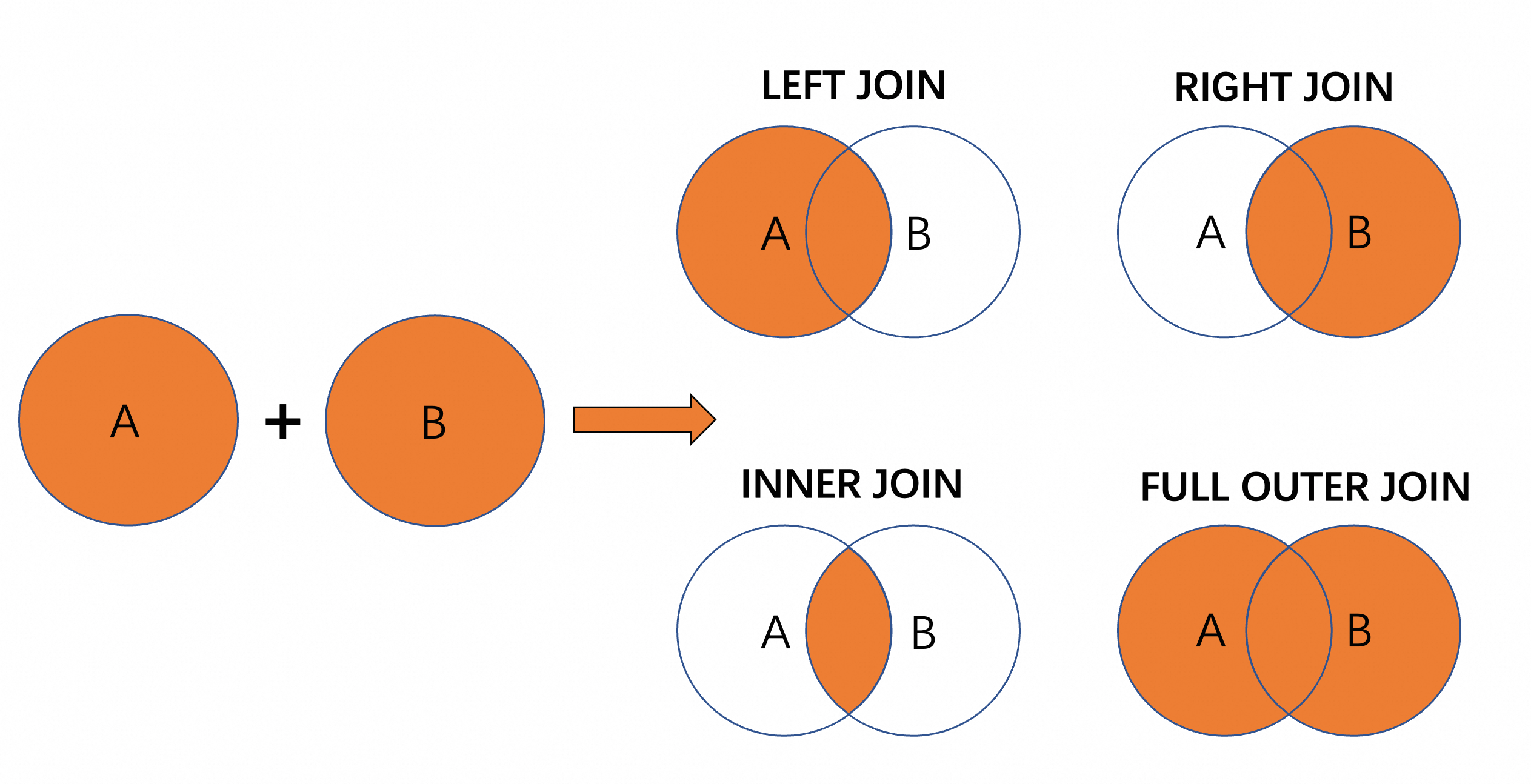
Regular join example
Log in to the Realtime Compute for Apache Flink console.
In the workspace list, find the target workspace and click Console in the Actions column.
In the left-side navigation pane, click .
Click the
 icon, and then click New Blank Stream Draft. Enter a name, select an engine version, and click Create.
This example shows how to use a join to correlate rows between tables, associating superhero codenames with their real names.
CREATE TEMPORARY TABLE NOC (
  agent_id STRING,
  codename STRING
)
WITH (
  'connector' = 'faker',   -- The Faker connector generates simulated data.
  'fields.agent_id.expression' = '#{regexify ''(1|2|3|4|5){1}''}',  -- Generates a random number from 1 to 5.
  'fields.codename.expression' = '#{superhero.name}',   -- A built-in Faker function that randomly generates a superhero name.
  'number-of-rows' = '10'   -- Specifies that 10 rows of data are generated.
);

CREATE TEMPORARY TABLE RealNames (
  agent_id STRING,
  name     STRING
)
WITH (
  'connector' = 'faker',
  'fields.agent_id.expression' = '#{regexify ''(1|2|3|4|5){1}''}',
  'fields.name.expression' = '#{Name.full_name}',  -- A built-in Faker function that randomly generates a name.
  'number-of-rows' = '10'
);

SELECT
    name,
    codename
FROM NOC
INNER JOIN RealNames ON NOC.agent_id = RealNames.agent_id;  -- If the agent_id (1-5) in both tables is equal, the name and codename are returned.
In the upper-right corner, click Debug, select a debug cluster, and then click OK. If you do not have a session cluster, see Create a session cluster.
After the debugging is complete, the result is a table with two columns, name and codename, showing the output data of the Regular Join.
For more information about how to use regular joins, see Regular join statements.
Interval joins
An interval join joins records from two streams that fall within a specific time interval. This type of join is typically used to correlate events from two streams that occur close to each other in time.
Interval join diagram

Interval join example
This example joins orders with shipments. It filters the results to include only orders that were shipped within three hours of being placed.
Create an ETL draft as described in Regular joins.
CREATE TEMPORARY TABLE orders (
  id INT,
  order_time AS TIMESTAMPADD(HOUR, CAST(FLOOR(RAND()*(1-5+1)+5)*(-1) AS INT), CURRENT_TIMESTAMP)    -- Randomly gets a time from 2, 3, or 4 hours ago based on the local time.
)
WITH (
  'connector' = 'datagen',     -- The datagen connector can periodically generate random data.
  'rows-per-second'='10',      -- The rate of random data generation, 10 rows/s.
  'fields.id.kind'='sequence', -- The sequence generator.
  'fields.id.start'='1',       -- The sequence starts at 1.
  'fields.id.end'='100'        -- The sequence ends at 100.
);

CREATE TEMPORARY TABLE shipments (
  order_id INT,
  shipment_time AS TIMESTAMPADD(HOUR, CAST(FLOOR(RAND()*(1-5+1))+1 AS INT), CURRENT_TIMESTAMP)   -- Randomly gets a time from 0, 1, or 2 hours ago based on the local time.
)
WITH (
  'connector' = 'datagen',
  'rows-per-second'='5',
  'fields.order_id.kind'='sequence',
  'fields.order_id.start'='1',
  'fields.order_id.end'='100'
);

SELECT
  o.id AS order_id,
  o.order_time,
  s.shipment_time,
  TIMESTAMPDIFF(HOUR,o.order_time,s.shipment_time) AS hour_diff    -- The time difference between order_time and shipment_time.
FROM orders o
JOIN shipments s ON o.id = s.order_id
WHERE
    o.order_time BETWEEN s.shipment_time - INTERVAL '3' HOUR AND s.shipment_time;  -- Filters for orders placed within three hours before the shipment time.
In the upper-right corner, click Debug and then click OK. The debug results are as follows.

For more information about interval joins, see Interval join statements.
Temporal joins
A temporal join is used with dynamic tables, whose contents change over time. It joins a stream of events to the version of the dynamic table that was valid at the time of each event.
Temporal join diagram

Temporal join example
This example demonstrates a business scenario where exchange rates change over different time periods, and orders must be calculated using the rate that was effective at the time of the transaction.
Create a new ETL draft as described in the Regular joins section to read the simulated data for debugging.
CREATE TEMPORARY TABLE currency_rates (
  `currency_code` STRING,
  `eur_rate` DECIMAL(6,4),
  `rate_time` TIMESTAMP(3),
  WATERMARK FOR `rate_time` AS rate_time - INTERVAL '15' SECOND,
  PRIMARY KEY (currency_code) NOT ENFORCED
) WITH (
  'connector' = 'upsert-kafka',
  'topic' = 'currency_rates',
  'properties.bootstrap.servers' = '${secret_values.kafkahost}',
  'properties.auto.offset.reset' = 'earliest',
  'properties.group.id' = 'currency_rates',
  'key.format' = 'raw',
  'value.format' = 'json'
);

CREATE TEMPORARY TABLE transactions (
  `id` STRING,
  `currency_code` STRING,
  `total` DECIMAL(10,2),
  `transaction_time` TIMESTAMP(3),
  WATERMARK FOR `transaction_time` AS transaction_time - INTERVAL '30' SECOND
) WITH (
  'connector' = 'kafka',
  'topic' = 'transactions',
  'properties.bootstrap.servers' = '${secret_values.kafkahost}',
  'properties.auto.offset.reset' = 'earliest',
  'properties.group.id' = 'transactions',
  'key.format' = 'raw',
  'key.fields' = 'id',
  'value.format' = 'json'
);

SELECT
  t.id,
  t.total * c.eur_rate AS total_eur,
  c.eur_rate,
  t.total,
  c.currency_code,
  c.rate_time,
  t.transaction_time
FROM transactions t
JOIN currency_rates FOR SYSTEM_TIME AS OF t.transaction_time AS c
ON t.currency_code = c.currency_code
;
In the upper-right corner, click Debug and then click OK.
The exchange rate changed twice, at 20:16:11 and 20:35:22. A transaction occurred at 20:35:14. At that time, the exchange rate had not yet been updated. Therefore, the calculation for this transaction must use the exchange rate that became effective at 20:16:11.
Lookup joins
A lookup join enriches a data stream with static or slowly changing data from an external system. For example, you can join a stream of real-time orders with reference data, such as product information stored in a relational database. This join requires one table to have a processing time attribute and the other to be connected via a lookup connector, such as the MySQL connector.
Lookup join diagram

You must include FOR SYSTEM_TIME AS OF PROCTIME() to join each stream record against the dimension table's snapshot at that time. If the dimension table's data changes later, the join results are not affected.
The ON condition must include an equality condition on a field that the dimension table can use for lookups.
Lookup join example
This example shows how to enrich order data with static data from an external connector to add product names.
Create an ETL draft as described in Regular joins.
CREATE TEMPORARY TABLE orders (
    order_id STRING,
    product_id INT,
    order_total INT
) WITH (
  'connector' = 'faker',   -- The Faker connector generates simulated data.
  'fields.order_id.expression' = '#{Internet.uuid}',   -- Generates a random UUID.
  'fields.product_id.expression' = '#{number.numberBetween ''1'',''5''}',   -- Generates a random number from 1 to 5.
  'fields.order_total.expression' = '#{number.numberBetween ''1000'',''5000''}',  -- Generates a random number from 1000 to 5000.
  'number-of-rows' = '10'  -- The number of data rows to generate.
);

-- Connect to static product data in MySQL.
CREATE TEMPORARY TABLE products (
 product_id INT,
 product_name STRING
)
WITH(
  'connector' = 'mysql',
  'hostname' = '${secret_values.mysqlhost}',
  'port' = '3306',
  'username' = '${secret_values.username}',
  'password' = '${secret_values.password}',
  'database-name' = 'db2024',
  'table-name' = 'products'
);

SELECT
    o.order_id,
    p.product_name,
    o.order_total,
  CASE
    WHEN o.order_total > 3000 THEN 1
    ELSE 0
  END AS is_importance          -- Adds the is_importance field. The value is 1 if the order total exceeds 3000, indicating an important order.
FROM orders o
JOIN products FOR SYSTEM_TIME AS OF PROCTIME() AS p -- The FOR SYSTEM_TIME AS OF PROCTIME() clause ensures that as the join operator processes rows from `orders`, each row from `orders` is joined with the `products` rows that match the join condition.
ON o.product_id = p.product_id;
The products table contains 5 sample records: 1-cola, 2-orange, 3-milk, 4-tea, 5-coffee.
In the upper-right corner, click Debug and then click OK. The debug results are as follows.

For more information about lookup joins, see JOIN statements for dimension tables.
Lateral joins
A lateral join uses a subquery in the FROM clause that is executed for each row of the outer query. This can improve query flexibility and performance by reducing table scans. However, this operation can lead to performance degradation if the inner query is complex or processes a large amount of data.

Lateral join example
This example aggregates sales records to find the top three products by total sales quantity.
Create an ETL draft as described in Regular joins.
CREATE TEMPORARY TABLE sale (
  sale_id STRING,
  product_id INT,
  sale_num INT
)
WITH (
  'connector' = 'faker',    -- The Faker connector generates simulated data.
  'fields.sale_id.expression' = '#{Internet.uuid}',   -- Generates a random UUID.
  'fields.product_id.expression' = '#{regexify ''(1|2|3|4|5){1}''}',   -- Generates a random number from 1 to 5.
  'fields.sale_num.expression' = '#{number.numberBetween ''1'',''10''}',  -- Generates a random integer from 1 to 10.
  'number-of-rows' = '50'   -- Generates 50 rows of data.
);

CREATE TEMPORARY TABLE products (
 product_id INT,
 product_name STRING,
 PRIMARY KEY(product_id) NOT ENFORCED
)
WITH(
  'connector' = 'mysql',
  'hostname' = '${secret_values.mysqlhost}',
  'port' = '3306',
  'username' = '${secret_values.username}',
  'password' = '${secret_values.password}',
  'database-name' = 'db2024',
  'table-name' = 'products'
);

SELECT
    p.product_name,
    s.total_sales
FROM  products p
LEFT JOIN LATERAL
    (SELECT SUM(sale_num) AS total_sales FROM sale WHERE sale.product_id = p.product_id) s ON TRUE
    ORDER BY total_sales DESC
    LIMIT 3;
In the upper-right corner, click Debug and then click OK. The debug results are as follows.

Related documents
If you are concerned only with the processing time of events and not their event time, you can use a processing-time temporal join. For more information, see Processing-time temporal join statements.
For more information about how to use regular joins, see Regular join statements.
For more information about how to use interval joins, see Interval join statements.
For more information about how to use lookup joins, see JOIN statements for dimension tables.