This topic describes how to use the built-in large language model service in Flink SQL jobs for streaming sentiment analysis and vectorization, without applying for your own API key.
Background information
The Flink AI service provides managed built-in large language models (LLMs). You do not need to apply for an API key. Directly reference the built-in models in Flink SQL jobs to enable streaming AI inference and vectorization. The following sections describe two core model use cases:
-
chat/completions model A chat/completions model is an LLM based on dialogue generation and text understanding. It is widely used in scenarios such as sentiment analysis, intent recognition, and question-answering systems.
-
Sentiment analysis: Performs real-time sentiment classification of your business's social media comments to identify user sentiment as positive, negative, or neutral.
-
Intelligent customer service: Provides natural language interactions for intelligent customer service systems, powered by dialogue generation capabilities.
-
Content moderation: Automatically detects sensitive content or policy violations in text for more efficient content security audits.
-
-
embedding model An embedding model converts text into high-dimensional vector representations. Common applications include semantic search, recommendation systems, and knowledge graph construction.
-
Semantic search: Enables relevance-based semantic search by vectorizing product descriptions or user queries.
-
Recommendation systems: Uses text vectorization to discover associations between user interests and product features, improving recommendation accuracy.
-
Knowledge graph: Converts unstructured text into a vector format to simplify subsequent knowledge extraction and relationship modeling.
-
Prerequisites
-
You have activated a Flink workspace. For more information, see Activate Realtime Compute for Apache Flink.
-
You have activated the Flink AI service. For more information, see Flink AI service (built-in models).
Limitations
-
Requires Ververica Runtime (VVR) 11.7 or later.
-
The throughput of the ML_PREDICT operator is limited by the rate limiting policy of the model service platform. When the traffic limit is reached, the Flink job may experience backpressure or restart due to timeouts.
Step 1: Register a built-in model
For more information, see Model settings.
Chat/completions model
The following sample SQL code shows how to register a Flink built-in text model:
CREATE MODEL ai_analyze_sentiment
INPUT (`input` STRING)
OUTPUT (`content` STRING)
WITH (
    'provider' = 'dashscope',
    'task' = 'chat/completions',
    'model' = 'qwen3.5-flash',
    'system-prompt' = 'Classify the text below into one of the following labels: [positive, negative, neutral, mixed]. Output only the label.'
);
Embedding model
The following sample SQL code shows how to register a Flink built-in embedding model:
CREATE MODEL embedding_model
INPUT (`input` STRING)
OUTPUT (`embeddings` ARRAY<FLOAT>)
WITH (
    'provider' = 'dashscope',
    'task' = 'embeddings',
    'model' = 'text-embedding-v4'
);
Step 2: Create a job
Create a draft for an SQL streaming job. For more information, see Flink SQL jobs.
Step 3: Write an SQL job for LLM analysis
Chat/completions model
Use the ML_PREDICT AI function to call the registered ai_analyze_sentiment model for sentiment analysis of movie reviews.
Copy the following sample SQL to the SQL editor.
-- Create a temporary sink table.
CREATE TEMPORARY TABLE print_sink(
  id BIGINT,
  movie_name VARCHAR,
  predict_label VARCHAR,
  actual_label VARCHAR
) WITH (
  'connector' = 'print',   -- Use the print connector.
  'logger' = 'true'        -- Display the results in the console.
);

-- Create a temporary data view to construct test data.
-- | id | movie_name | comment   | actual_label |
-- | 1  | Her Story     | My favorite part was when the kid guessed the sounds. It is one of the most romantic narratives I have seen in movies. Very gentle and loving. | POSITIVE |
-- | 2  | The Dumpling Queen   | Unremarkable.  | NEGATIVE |
CREATE TEMPORARY VIEW movie_comment(id, movie_name, user_comment, actual_label)
AS VALUES (1, 'Her Story', 'My favorite part was when the kid guessed the sounds. It is one of the most romantic narratives I have seen in movies. Very gentle and loving.', 'positive'), (2, 'The Dumpling Queen', 'Unremarkable.', 'negative');

INSERT INTO print_sink
SELECT id, movie_name, content as predict_label, actual_label
FROM ML_PREDICT(
  TABLE movie_comment,
  MODEL ai_analyze_sentiment,  -- The registered Flink built-in text model.
  DESCRIPTOR(user_comment));
Embedding model
Use the ML_PREDICT AI function to call the registered embedding_model, generate embeddings for movie reviews, and then write the results to Milvus (public preview).
Copy the following sample SQL to the SQL editor.
-- Create a temporary sink table named milvus_sink.
CREATE TEMPORARY TABLE milvus_sink
(
    id STRING,
    movie_name STRING,
    user_comment STRING,
    embeddings ARRAY<FLOAT>,
    PRIMARY KEY (id) NOT ENFORCED
)
WITH (
    'connector' = 'milvus',
    'endpoint' = '<YOUR-ENDPOINT>',
    'port' = '<YOUR-PORT>',
    'userName' = '<YOUR-USERNAME>',
    'password' = '<YOUR-PASSWORD>',
    'databaseName' = 'default',
    'collectionName' = 'movie-comment-embeddings'
);

-- Create a temporary data view to construct test data.
-- | id | movie_name | comment |
-- | 1 | Her Story |My favorite part was when the kid guessed the sounds. It is one of the most romantic narratives I have seen in movies. Very gentle and loving.|
-- | 2 | The Dumpling Queen | Unremarkable. |
CREATE TEMPORARY VIEW movie_comment(id, movie_name,  user_comment)
AS VALUES ('1', 'Her Story', 'My favorite part was when the kid guessed the sounds. It is one of the most romantic narratives I have seen in movies. Very gentle and loving.'), ('2', 'The Dumpling Queen', 'Unremarkable.');


INSERT INTO
    milvus_sink
SELECT
    id,
    movie_name,
    user_comment,
    embeddings
FROM
    ML_PREDICT (
        TABLE movie_comment,
        MODEL embedding_model,  -- The registered Flink built-in embedding model.
        DESCRIPTOR (user_comment)
    );
Step 4: Deploy and start the job
Deploy and start the job. For more information, see Flink SQL jobs.
Step 5: View the analysis results
Chat/completions model
-
Verify that the job status is FINISHED.
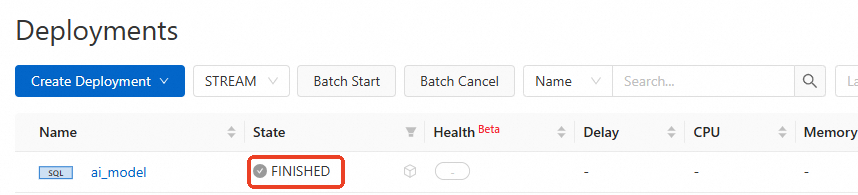
-
In the console, go to the Deployments page and click the name of the target job.
-
On the Logs tab, click the Task Managers subtab and select the current TaskManager.
-
Click Logs and search for logs related to PrintSinkOutputWriter.
The model's predicted label
predict_labelmatches the actual labelactual_label.On the Task Managers tab, select Running Logs on the left. The logs display the output of PrintSinkOutputWriter, such as
+I[1, Her Story, positive, positive]and+I[2, The Dumpling Queen, negative, negative]. This indicates that predict_label matches actual_label.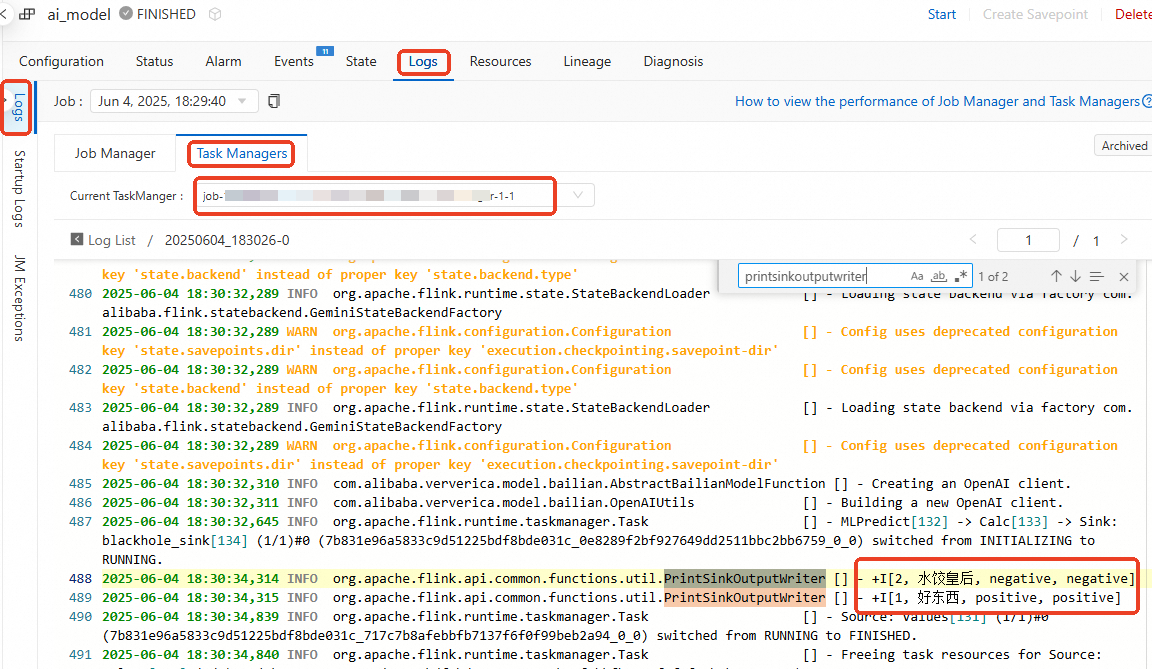
Related documents
-
Data definition language (DDL) statements for AI models: Configure a model
-
AI functions: ML_PREDICT
-
Vector search service: Milvus (public preview)