This topic describes how to use the content splitting template provided by the data cleansing feature to process message data.
Background information
The data cleansing feature provides common templates for message processing, including the content splitting, dynamic routing, content enrichment, and content mapping templates. You can use the code in a template to process messages. You can also modify the code in the template based on your business requirements.
The data cleansing feature provides basic operator capabilities based on Function Compute. The data cleansing feature is supported by the following services: ApsaraMQ for RocketMQ, ApsaraMQ for Kafka, ApsaraMQ for MQTT, ApsaraMQ for RabbitMQ, and Simple Message Queue (formerly MNS) (SMQ). After you create a data cleansing task, you can log on to the Function Compute console to write custom code and modify the configurations of the corresponding function.
Operator | Description |
Content splitting | Split message content based on regular expressions and send the split messages one by one to the destination. |
Dynamic routing | Match message content based on regular expressions. Messages whose content is matched are routed to the corresponding destination service. Messages whose content is not matched are routed to the default destination service. |
Content enrichment | Enrich message content based on enrichment sources. If the original content of the message contains an account ID, the account ID is used to query the database and obtain the client region. Then, the information about the database and client region is filled in the body of the source message and sent to the destination service. |
Content mapping | Map message content based on regular expressions. For example, the system masks sensitive fields in messages or reduces the message size to the minimum size. |
In this topic, ApsaraMQ for RocketMQ is used to describe how to use the content splitting template to perform data cleansing.
Example
The following message contains a list of students:
message:
[John, Male, 17, Class 4; Alice, Female, 17, Class 3; Tom, Male, 17, Class 4]
You need to split the message into the following messages and then send the split messages to the destination services. Sample code:
message:
    [John, Male, 17, Class 4]
message:
    [Alice, Female, 17, Class 3]
message:
    [Tom, Male, Class 17, Class 4]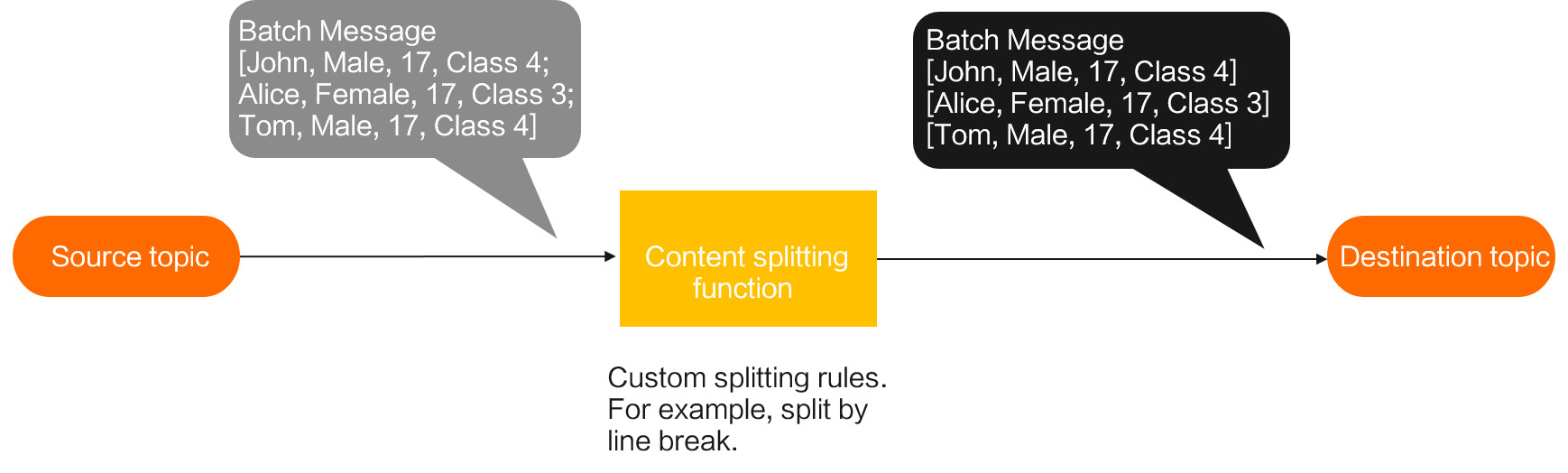
Procedure
Log on to the ApsaraMQ for RocketMQ console.
In the left-side navigation pane, choose . In the top navigation bar, select a region.
On the Message Outflow page, click Create Task.
In the Create Message Outflow Task panel, configure the parameters and click Confirm.
The following items describe the parameters that you must configure. Use the default values for other parameters.
Basic Information
Parameter
Description
Task Name
The task name.
Message Outflow Task Type
The service to which you want to route messages. In this example, ApsaraMQ for RocketMQ is selected. The following messaging services can be selected from the drop-down list: ApsaraMQ for RocketMQ, ApsaraMQ for RabbitMQ, SMQ, and ApsaraMQ for Kafka.
Resource Configuration
Parameter
Description
Source
Region
The region where the source ApsaraMQ for RocketMQ instance resides. In this example, China (Hangzhou) is selected.
Version
The version of the ApsaraMQ for RocketMQ instance from which you want to route messages. In this example, RocketMQ 5.x is selected.
Instance
The ApsaraMQ for RocketMQ instance from which you want to route messages.
Topic
The topic on the ApsaraMQ for RocketMQ instance from which you want to deliver messages.
Tag
The tags that are used to filter messages.
Group ID
The group ID. In this example, Quickly Create is selected and a group whose ID is in the GID_EVENTBRIDGE_xxx format is created.
Consumer Offset
The offset from which messages are consumed. In this example, Latest Offset is selected.
Target
Version
The version of the ApsaraMQ for RocketMQ instance to which you want to route messages. In this example, RocketMQ 5.x is selected.
Instance ID
The ID of the ApsaraMQ for RocketMQ instance to which you want to route messages.
Topic
The topic on the ApsaraMQ for RocketMQ instance to which you want to route messages.
Data Processing
Message Filtering: Specify whether to filter data in messages. In this example, None is selected.
Message Conversion: The rule that you want to use to convert messages. In this example, Custom Configuration is selected for the Message Conversion parameter, Data Cleansing is selected for the Message Body parameter, Create Function Template is selected, Content Splitting transform_split is selected for the Function Template parameter, and then the code in the Function Code editor is modified based on actual business requirements.
After you create the message outflow task, you can log on to the Function Compute console to view the service and function that are automatically created by the system.