EMR Serverless Spark connects to Hologres through the Hologres Spark Connector. You can add the required configurations to read from and write to Hologres in a Serverless Spark environment.
Limitations
The Spark connector requires Hologres version 1.3 or later. You can check your instance version on the Instance Details page in the Hologres console. If your instance is older than version 1.3, upgrade your instance or join the Hologres DingTalk group (ID: 32314975) to request an upgrade.
Access methods
You can access Hologres in two ways. Choose the method that best fits your needs:
|
Access method |
Description |
Scenarios |
References |
|
Method 1: Task/session-level configuration |
Configure the Hologres connection information (JDBC URL, username, password, and other parameters) separately in each task or session. |
|
This topic |
|
Method 2: Unified configuration through data catalogs (recommended) |
Add a Hologres data catalog through the Data Catalogs feature of EMR Serverless Spark. After the catalog is added, all jobs and sessions in the workspace can access the authorized data by default. Note
Only engine version esr-4.9.0 and later is supported. |
|
For workspaces that require long-term, frequent access to Hologres data, Method 2 (data catalogs) reduces repetitive configuration and improves development efficiency.
Procedure
Step 1: Get and upload the hologres-connector-spark JAR
EMR Serverless Spark esr-4.8.0 and later versions include the Hologres connector built-in. This step is only required if you are using a version before esr-4.8.0.
-
To read from and write to Hologres, Spark requires a connector JAR file. You can download it from the Maven Central Repository. This topic uses version 1.5.6: hologres-connector-spark-3.x-1.5.6-jar-with-dependencies.jar.
-
Upload the downloaded hologres-connector-spark JAR file to OSS. For instructions, see Simple upload.
Step 2: Add a network connection
-
Get the network information.
Go to the Hologres page and navigate to the instance details of your target Hologres instance to find its VPC and vSwitch information.
-
Add a network connection.
Serverless Spark requires a network connection to the Hologres cluster. For more information, see Network connectivity between EMR Serverless Spark and other VPCs.
Step 3: Create a Hologres database and table
-
Connect to the Hologres instance. For details, see Connect to an instance.
-
On the SQL Editor tab, enter the following SQL statements in a new temporary query and run them.
-- Create a database.
CREATE DATABASE testdb;
-- Create a table.
CREATE TABLE "public"."test" (
    "id" text  NULL,
    "name" text  NULL);
-- Insert data.
INSERT INTO public.test VALUES ('1001','jack'),('1002','tony'),('1003','mike');
-- Query data.
SELECT * FROM public.test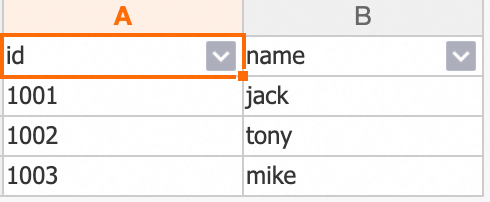
Step 4: Read from and write to Hologres
Example 1: SQL session
Read from and write to Hologres by using an SQL session.
-
Create an SQL session. For details, see Manage SQL Sessions.
When you create the session, select the network connection that you created in the previous step from the network connection list. In the Spark Configuration section, add the following parameters to load the hologres-connector-spark.
# Add the hologres-connector JAR file (only required for versions before esr-4.8.0).
spark.emr.serverless.user.defined.jars oss://<bucket>/hologres-connector-spark-3.x-<version>.jar

# Configure the Hologres catalog.
spark.sql.catalog.hologres_external_test_db com.alibaba.hologres.spark3.HoloTableCatalog
spark.sql.catalog.hologres_external_test_db.username ***
spark.sql.catalog.hologres_external_test_db.password ***
spark.sql.catalog.hologres_external_test_db.jdbcurl jdbc:postgresql://hgpostcn-cn-***-vpc-st.hologres.aliyuncs.com:80/testdb
The following table describes the parameters.
Parameter
Example
Description
spark.emr.serverless.user.defined.jarsoss://<bucket>/hologres-connector-spark-3.x-<version>.jarThe path to the user-defined JAR file.
spark.sql.catalog.hologres_external_test_dbcom.alibaba.hologres.spark3.HoloTableCatalogConfigures a Hologres data source as an external catalog in Spark 3.x. This is a fixed value.
spark.sql.catalog.hologres_external_test_db.usernameLTAI******The AccessKey ID of your Alibaba Cloud account. We recommend that you use secrets management to handle sensitive information. For details, see Manage sensitive information by using secrets management.
spark.sql.catalog.hologres_external_test_db.passwordmXYV******The AccessKey Secret of your Alibaba Cloud account. We recommend that you use secrets management to handle sensitive information. For details, see Manage sensitive information by using secrets management.
spark.sql.catalog.hologres_external_test_db.jdbcurljdbc:postgresql://hgpostcn-cn-***-vpc-st.hologres.aliyuncs.com:80/testdbThe JDBC connection URL of the Hologres instance.
You can customize the
hologres_external_test_dbpart in the parameter names. -
On the Data Development page, create a SparkSQL job and select the SQL session that you created from the upper-right corner.
For more information, see SparkSQL development.
-
Copy the following code into the new SparkSQL tab and click Run.
-- Switch to the testdb database.
USE hologres_external_test_db;
-- Write data.
INSERT INTO `public`.test VALUES ('1004','tom');
-- Query data.
SELECT * FROM `public`.test;
Example 2: Streaming job
This PySpark example reads data from Kafka and writes it to Hologres as a streaming job.
Ensure that the network connection between Kafka and Hologres is active. We recommend that you deploy Kafka and Hologres in the same VPC and vSwitch.
-
In this code example, replace the Kafka information and Hologres table with your actual values.
from pyspark.sql import SparkSession from pyspark.sql.functions import col # Configure your Kafka information. servers = "alikafka-serverless-cn-xxxxx-vpc.alikafka.aliyuncs.com:9092" # Replace with your Kafka bootstrap servers. topic = "topic-name" # Replace with your Kafka topic. # Create a SparkSession. spark = SparkSession.builder \ .appName("test read kafka") \ .getOrCreate() # Read the Kafka stream. df = spark \ .readStream \ .format("kafka") \ .option("kafka.bootstrap.servers", servers) \ .option("subscribe", topic) \ .load() # Define a function to write to Hologres (called for each micro-batch). def write_to_hologres(batch_df, batch_id): print(f"Writing batch {batch_id} to Hologres...") batch_df.write \ .format("hologres") \ .mode("append") \ .insertInto("hologres_external_test_db.public.test") # Replace with your Hologres table. # Convert the key and value to strings and write the stream. query = df.selectExpr("CAST(key AS STRING)", "CAST(value AS STRING)") \ .writeStream \ .foreachBatch(write_to_hologres) \ .outputMode("append") \ .trigger(processingTime='30 seconds') \ .start() # Wait for the streaming query to terminate (this blocks cell execution in a notebook). query.awaitTermination() -
Upload the file.
-
On the Artifacts page, click Upload File.
-
In the Upload File dialog box, click the upload area to select the Python file from the previous step, or drag the file into the upload area.
-
-
Create and run the streaming job.
-
On the Development page, click the
 (Create) icon.
 -
In the dialog box that appears, enter a Name, select PySpark from the Application (Streaming) list, and then click OK.
-
In the new development tab, configure the following parameters and leave the others at their default settings. Then, click Publish.
Parameter
Description
Main Python Resources
Select the Python file that you uploaded in the previous step.
Engine Version
Select a compatible Spark version. This example uses
esr-4.6.0.Network Connection
Select the network connection that you created in Step 2.
Spark Configuration
# Add the hologres-connector JAR file (only required for versions before esr-4.8.0).
spark.emr.serverless.user.defined.jars              oss://<bucket>/test_script/hologres-connector-spark-3.x-1.5.6-jar-with-dependencies.jar
# Configure the Hologres catalog.
spark.sql.catalog.hologres_external_test_db com.alibaba.hologres.spark3.HoloTableCatalog
spark.sql.catalog.hologres_external_test_db.username ***
spark.sql.catalog.hologres_external_test_db.password ***
spark.sql.catalog.hologres_external_test_db.jdbcurl jdbc:postgresql://hgpostcn-cn-***-vpc-st.hologres.aliyuncs.com:80/testdb
For a detailed description of the parameters, see Example 1: SQL session.
-
After you publish the job, click Go to O&M. On the page that opens, click Start.
-
-
Verify the result.
-
Send messages to Kafka.
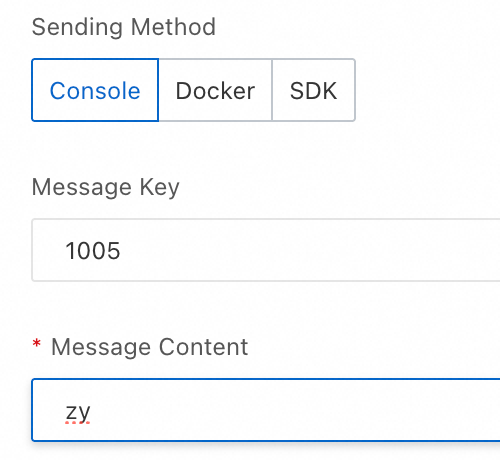
-
Query the data by using Spark SQL.
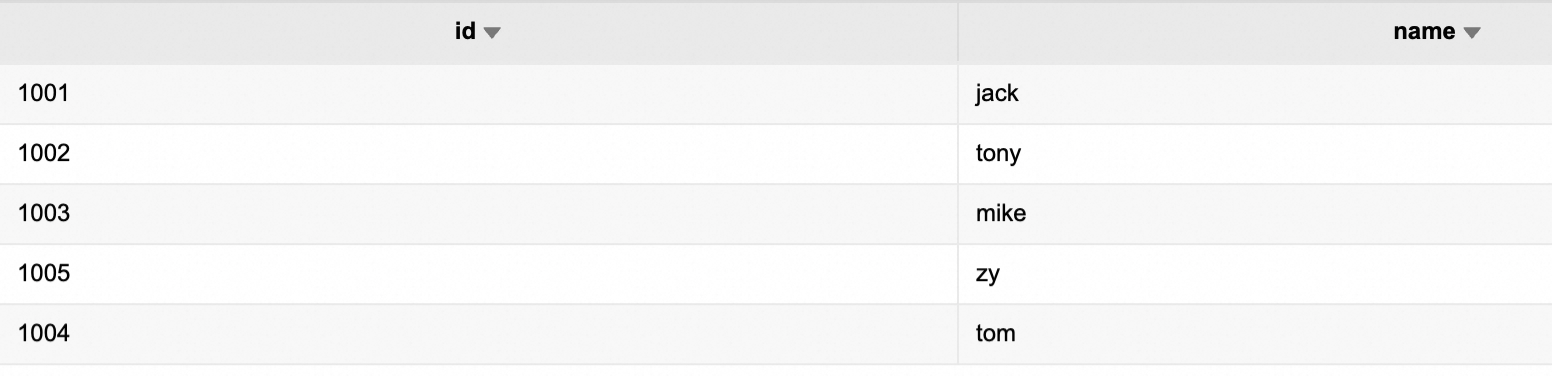
-
Example 3: Notebook session
-
Create a Notebook session. For details, see Manage Notebook Sessions.
When you create the session, select the network connection that you created in the previous step from the network connection list. In the Spark Configuration section, add the following parameter to load the hologres-connector-spark.
# Add the hologres-connector JAR file (only required for versions before esr-4.8.0). spark.emr.serverless.user.defined.jars oss://<bucket>/hologres-connector-spark-3.x-<version>.jar -
On the Data Development page, create a Notebook job and select the Notebook session that you created from the upper-right corner.
-
Copy the following code into the new Notebook tab and click
 .
.import pandas as pd from pyspark.sql import SparkSession from pyspark.sql.types import StructType, StructField, StringType, IntegerType, LongType # 1. Prepare a Pandas DataFrame. pdf = pd.DataFrame({ "id": ["1006"], "name": ["sl"] }) # 2. Convert to a PySpark DataFrame. # (Optional: Explicitly define the schema to ensure correct data types) schema = StructType([ StructField("id", StringType(), True), StructField("name", StringType(), True) ]) df = spark.createDataFrame(pdf, schema=schema) # Write to Hologres. df.write \ .format("hologres") \ .option("username", "LTAI******") \ .option("password", "mXYV******") \ .option("jdbcurl", "jdbc:postgresql://hgpostcn-cn-***-vpc-st.hologres.aliyuncs.com:80/testdb") \ .option("table", "test") \ .mode("append") \ .save() # Read data. readDf = spark.read\ .format("hologres") \ .option("username", "LTAI******") \ .option("password", "mXYV******") \ .option("jdbcurl", "jdbc:postgresql://hgpostcn-cn-***-vpc-st.hologres.aliyuncs.com:80/testdb") \ .option("table", "test") \ .load() readDf.select("id", "name").show(10)The following table describes the parameters.
Parameter
Example
Description
usernameLTAI******The AccessKey ID of your Alibaba Cloud account. We recommend that you use secrets management to handle sensitive information. For details, see Manage sensitive information by using secrets management.
passwordmXYV******The AccessKey Secret of your Alibaba Cloud account. We recommend that you use secrets management to handle sensitive information. For details, see Manage sensitive information by using secrets management.
jdbcurljdbc:postgresql://hgpostcn-cn-***-vpc-st.hologres.aliyuncs.com:80/testdbThe JDBC connection URL of the Hologres instance.
-
Verify the result.
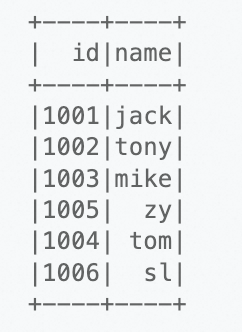
Common Hologres catalog commands
A Hologres catalog connects a Hologres database to Spark SQL as an external catalog. Each catalog is bound to a single Hologres database, and cross-database access is not supported. The logical structure inside a catalog is consistent with Hologres:
|
Spark concept |
Hologres concept |
Description |
|
catalog |
database |
For example, |
|
namespace |
schema |
For example, |
|
table |
table |
You must explicitly specify |
Using a Hologres catalog
A Hologres catalog in Spark maps to exactly one Hologres database and cannot be changed after it is created.
USE hologres_external_test_db;Listing all namespaces
A namespace in Spark corresponds to a schema in Hologres. The default schema is public. Use the USE command to change the default schema for a session.
-- View all namespaces in the Hologres catalog, which correspond to all schemas in Hologres.
SHOW NAMESPACES;
Listing tables in a namespace
-
List all tables.
SHOW TABLES; -
List tables in a specific namespace.
USE test_schema;
SHOW TABLES;

-- Or use:
SHOW TABLES IN test_schema;
Related documents
For more information about using Spark to read from and write to Hologres, see Read data from and write data to Hologres by using Spark.