This topic uses various scenarios to demonstrate how to use Jindo DistCp.
Prerequisites
- You have created a cluster of the required version. For more information, see Create a cluster.
- You have installed JDK 1.8.
- You have downloaded jindo-distcp-<version>.jar based on your Hadoop version.
- For Hadoop 2.7 and later, download jindo-distcp-3.0.0.jar.
- For Hadoop 3.x versions, download jindo-distcp-3.0.0.jar.
Scenario overview
- Scenario 1: What parameters should I use to import data from HDFS to OSS? If the data volume is large and contains millions of files, what parameters should I use for optimization?
- Scenario 2: How do I verify data integrity after importing data with Jindo DistCp?
- Scenario 3: If a DistCp job fails, what parameters can I use to resume the transfer?
- Scenario 4: What parameters should I use to incrementally sync new files that are added to the source during or after the copy process?
- Scenario 5: What parameters should I use to specify the YARN queue and bandwidth for a Jindo DistCp job?
- Scenario 6: What parameters should I use to write data to OSS in the Infrequent Access or Archive storage class?
- Scenario 7: How can I optimize the transfer speed for small files, and what parameters should I use?
- Scenario 8: What parameters should I use if the data source is S3?
- Scenario 9: What parameters should I use to compress files (for example, in LZO or GZ format) when writing to OSS?
- Scenario 10: Which parameters do you use to copy only subdirectories that match a specific rule, or a subset of subdirectories within the same parent directory?
- Scenario 11: How do I merge files that match certain rules to reduce the total file count?
- Scenario 12: How do I delete the source files after a successful copy?
- Scenario 13: How can I avoid entering credentials, such as the OSS AccessKey, in the command line?
Scenario 1: Import data from HDFS to OSS and optimize for large data volumes
- You have read access to the data in HDFS.
- You must provide the OSS AccessKey (AccessKey ID and AccessKey secret) and Endpoint. The AccessKey must have write permissions for the destination bucket.
- The destination OSS bucket cannot be an Archive bucket.
- The environment must be able to submit MapReduce jobs.
- You have downloaded the Jindo DistCp JAR package.
hadoop jar jindo-distcp-<version>.jar --src /data/incoming/hourly_table --dest oss://yang-hhht/hourly_table --ossKey yourkey --ossSecret yoursecret --ossEndPoint oss-cn-hangzhou.aliyuncs.com --parallelism 10--enableBatch parameter for optimization. The following command shows an example of this optimization.hadoop jar jindo-distcp-<version>.jar --src /data/incoming/hourly_table --dest oss://yang-hhht/hourly_table --ossKey yourkey --ossSecret yoursecret --ossEndPoint oss-cn-hangzhou.aliyuncs.com --parallelism 500 --enableBatchScenario 2: Verify data integrity after a transfer
- Jindo DistCp countersAt the end of the MapReduce job, you can find the DistCp counters information.
Distcp Counters
        Bytes Destination Copied=11010048000
        Bytes Source Read=11010048000
        Files Copied=1001

Shuffle Errors
        BAD_ID=0
        CONNECTION=0
        IO_ERROR=0
        WRONG_LENGTH=0
        WRONG_MAP=0
        WRONG_REDUCE=0
The counters are described as follows:- Bytes Destination Copied: The number of bytes written to the destination.
- Bytes Source Read: The number of bytes read from the source.
- Files Copied: The number of files successfully copied.
- Jindo DistCp --diff
You can use the
--diffcommand to compare the source and destination. This command compares filenames and file sizes. It records any missing or unsuccessfully transferred files and saves this information to a manifest file. The manifest file is generated in the directory where you run the command.You can add the--diffparameter to the command from Scenario 1. The following command is an example.hadoop jar jindo-distcp-<version>.jar --src /data/incoming/hourly_table --dest oss://yang-hhht/hourly_table --ossKey yourkey --ossSecret yoursecret --ossEndPoint oss-cn-hangzhou.aliyuncs.com --diffIf all files are transferred successfully, the system returns the following message.INFO distcp.JindoDistCp: distcp has been done completely
Scenario 3: DistCp jobs for importing data from HDFS to OSS may fail at any time. What parameters can you use to enable resumable transfers?
- Run the command with the
--diffparameter to check whether all files were transferred.hadoop jar jindo-distcp-<version>.jar --src /data/incoming/hourly_table --dest oss://yang-hhht/hourly_table --ossKey yourkey --ossSecret yoursecret --ossEndPoint oss-cn-hangzhou.aliyuncs.com --diffIf all files were transferred successfully, the following message is displayed.INFO distcp.JindoDistCp: distcp has been done completely. - If the transfer is incomplete, a manifest file is generated. You can use the
--copyFromManifestand--previousManifestparameters to copy the remaining files. The following command is an example.hadoop jar jindo-distcp-<version>.jar --src /data/incoming/hourly_table --dest oss://yang-hhht/hourly_table --dest oss://yang-hhht/hourly_table --previousManifest=file:///opt/manifest-2020-04-17.gz --copyFromManifest --parallelism 20file:///opt/manifest-2020-04-17.gzis the local path from which you run the command.
Scenario 4: Which parameters should be used when new files are generated during an incremental Distcp copy from HDFS to OSS?
- If a manifest file from a previous copy does not exist, you can generate one to record the files that are copied.You can add the
--outputManifest=manifest-2020-04-17.gzand--requirePreviousManifest=falseparameters to the command from Scenario 1. The following command is an example.hadoop jar jindo-distcp-<version>.jar --src /data/incoming/hourly_table --dest oss://yang-hhht/hourly_table --ossKey yourkey --ossSecret yoursecret --ossEndPoint oss-cn-hangzhou.aliyuncs.com --outputManifest=manifest-2020-04-17.gz --requirePreviousManifest=false --parallelism 20The parameters are described as follows:--outputManifest: Specifies the name of the manifest file to generate. You can customize the filename, but it must end with .gz, such as manifest-2020-04-17.gz. The file is saved to the directory specified by the--destparameter.--requirePreviousManifest: Set this parameter to indicate that no previous manifest file exists.
- After a DistCp job finishes, new files might exist in the source folder. You can incrementally sync these new files.You can add the
--outputManifest=manifest-2020-04-17.gzand--previousManifest=oss://yang-hhht/hourly_table/manifest-2020-04-17.gzparameters to the command from Scenario 1. The following command is an example.hadoop jar jindo-distcp-<version>.jar --src /data/incoming/hourly_table --dest oss://yang-hhht/hourly_table --ossKey yourkey --ossSecret yoursecret --ossEndPoint oss-cn-hangzhou.aliyuncs.com --outputManifest=manifest-2020-04-17.gz --requirePreviousManifest=false --parallelism 20hadoop jar jindo-distcp-2.7.3.jar --src /data/incoming/hourly_table --dest oss://yang-hhht/hourly_table --ossKey yourkey --ossSecret yoursecret --ossEndPoint oss-cn-hangzhou.aliyuncs.com --outputManifest=manifest-2020-04-18.gz --previousManifest=oss://yang-hhht/hourly_table/manifest-2020-04-17.gz --parallelism 10 - You can repeat step 2 to continuously sync incremental files.
Scenario 5: Specify the YARN queue and bandwidth
--queue: Specifies the name of the YARN queue.--bandwidth: Specifies the bandwidth in MB.
hadoop jar jindo-distcp-<version>.jar --src /data/incoming/hourly_table --dest oss://yang-hhht/hourly_table --ossKey yourkey --ossSecret yoursecret --ossEndPoint oss-cn-hangzhou.aliyuncs.com --queue yarnqueue --bandwidth 6 --parallelism 10Scenario 6: Write to OSS using Infrequent Access or Archive storage
- To write data to OSS as Archive objects, you can add the
--archiveparameter to the command from Scenario 1. The following command is an example.hadoop jar jindo-distcp-<version>.jar --src /data/incoming/hourly_table --dest oss://yang-hhht/hourly_table --ossKey yourkey --ossSecret yoursecret --ossEndPoint oss-cn-hangzhou.aliyuncs.com --archive --parallelism 20 - To write data to OSS as Infrequent Access (IA) objects, you can add the
--iaparameter to the command from Scenario 1. The following command is an example.hadoop jar jindo-distcp-<version>.jar --src /data/incoming/hourly_table --dest oss://yang-hhht/hourly_table --ossKey yourkey --ossSecret yoursecret --ossEndPoint oss-cn-hangzhou.aliyuncs.com --ia --parallelism 20
Scenario 7: Optimize transfer speed for small files
- Many small files and a few large files.
If you are copying many small files and a few very large files, the default random allocation may not be efficient. A single copy process might be assigned a large file along with many small files, which can prevent optimal performance.
To optimize this, you can add the--enableDynamicPlanparameter to the command from Scenario 1. Do not use this parameter with--enableBalancePlan. The following command is an example.hadoop jar jindo-distcp-<version>.jar --src /data/incoming/hourly_table --dest oss://yang-hhht/hourly_table --ossKey yourkey --ossSecret yoursecret --ossEndPoint oss-cn-hangzhou.aliyuncs.com --enableDynamicPlan --parallelism 10The following shows a comparison of the optimization results.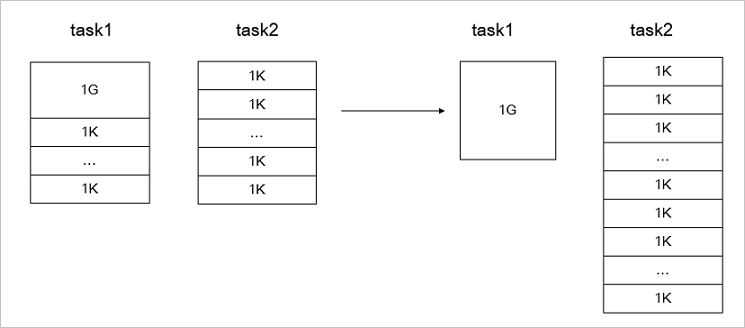
- Files are generally balanced and similar in size.If the files that you are copying are similar in size, you can use the
--enableBalancePlanparameter for optimization. The following command is an example.hadoop jar jindo-distcp-<version>.jar --src /data/incoming/hourly_table --dest oss://yang-hhht/hourly_table --ossKey yourkey --ossSecret yoursecret --ossEndPoint oss-cn-hangzhou.aliyuncs.com --enableBalancePlan --parallelism 10The following figure shows the optimization comparison.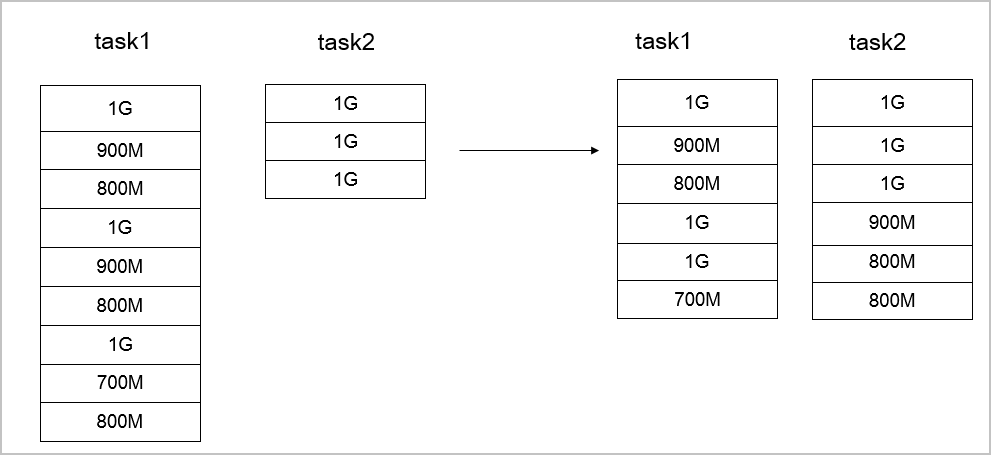
Scenario 8: What Parameters Are Required for an S3 Data Source?
--s3Key: The AccessKey ID for connecting to S3.--s3Secret: The AccessKey secret for connecting to S3.--s3EndPoint: The Endpoint for connecting to S3.
hadoop jar jindo-distcp-<version>.jar --src s3a://yourbucket/ --dest oss://yang-hhht/hourly_table --s3Key yourkey --s3Secret yoursecret --s3EndPoint s3-us-west-1.amazonaws.com --parallelism 10Scenario 9: Compress files when writing to OSS
To compress object files and reduce storage space, you can use the --outputCodec parameter. Supported formats include LZO and GZ.
--outputCodec parameter to the command from Scenario 1. The following command is an example.hadoop jar jindo-distcp-<version>.jar --src /data/incoming/hourly_table --dest oss://yang-hhht/hourly_table --ossKey yourkey --ossSecret yoursecret --ossEndPoint oss-cn-hangzhou.aliyuncs.com --outputCodec=gz --parallelism 10- `none`: Saves the file uncompressed. If the source file is compressed, Jindo DistCp decompresses it.
- `keep`: Copies the file without changing its compression format.
Scenario 10: Which parameters should be used to copy only certain subdirectories that meet specific rules or share a parent directory?
- To copy only the files that match a specific pattern, you can add the
--srcPatternparameter to the command from Scenario 1. The following command is an example.hadoop jar jindo-distcp-<version>.jar --src /data/incoming/hourly_table --dest oss://yang-hhht/hourly_table --ossKey yourkey --ossSecret yoursecret --ossEndPoint oss-cn-hangzhou.aliyuncs.com --srcPattern .*\.log --parallelism 10--srcPattern: A regular expression used for filtering. Only files that match the pattern are copied. - To copy specific subdirectories from the same parent folder, you can add the
--srcPrefixesFileparameter to the command from Scenario 1.hadoop jar jindo-distcp-<version>.jar --src /data/incoming/hourly_table --dest oss://yang-hhht/hourly_table --ossKey yourkey --ossSecret yoursecret --ossEndPoint oss-cn-hangzhou.aliyuncs.com --srcPrefixesFile file:///opt/folders.txt --parallelism 20--srcPrefixesFile: A file that lists the subdirectories to copy. These subdirectories must be in the same parent folder.The folders.txt file in the example contains the following content.hdfs://emr-header-1.cluster-50466:9000/data/incoming/hourly_table/2017-02-01 hdfs://emr-header-1.cluster-50466:9000/data/incoming/hourly_table/2017-02-02
Scenario 11: Which parameters should you use to merge files that match a specific rule to reduce the file count?
--targetSize: The maximum size of the merged file, in MB.--groupBy: The merge rule, a regular expression.
hadoop jar jindo-distcp-<version>.jar --src /data/incoming/hourly_table --dest oss://yang-hhht/hourly_table --ossKey yourkey --ossSecret yoursecret --ossEndPoint oss-cn-hangzhou.aliyuncs.com --targetSize=10 --groupBy='.*/([a-z]+).*.txt' --parallelism 20Scenario 12: Delete source files after a successful copy
--deleteOnSuccess parameter to the command from Scenario 1. The following command is an example.hadoop jar jindo-distcp-<version>.jar --src /data/incoming/hourly_table --dest oss://yang-hhht/hourly_table --ossKey yourkey --ossSecret yoursecret --ossEndPoint oss-cn-hangzhou.aliyuncs.com --deleteOnSuccess --parallelism 10Scenario 13: Avoid writing credentials in the command line
- To save your OSS credentials, you can add the following properties to the core-site.xml file.
<configuration> <property> <name>fs.jfs.cache.oss-accessKeyId</name> <value>xxx</value> </property> <property> <name>fs.jfs.cache.oss-accessKeySecret</name> <value>xxx</value> </property> <property> <name>fs.jfs.cache.oss-endpoint</name> <value>oss-cn-xxx.aliyuncs.com</value> </property> </configuration> - To save your S3 credentials, you can add the following properties to the core-site.xml file.
<configuration>
    <property>
        <name>fs.s3a.access.key</name>
        <value>xxx</value>
    </property>
    <property>
        <name>fs.s3a.secret.key</name>
        <value>xxx</value>
    </property>
    <property>
        <name>fs.s3.endpoint</name>
        <value>s3-us-west-1.amazonaws.com</value>
    </property>
</configuration>