You can grant different access policies to a Resource Access Management (RAM) user to control their access permissions. This method provides secure and controllable access and reduces the risk of your Alibaba Cloud account's AccessKey pair being exposed. This topic describes how to grant permissions and provides sample policies for Cloud Assistant.
Background information
Access policies are divided into custom policies that you create and system policies that Alibaba Cloud provides. For Cloud Assistant, you can create custom policies to control access based on dimensions, such as regions, Elastic Compute Service (ECS) instances, Cloud Assistant commands, and managed instance activation codes. You can then grant these policies to RAM users for flexible access control.
Procedure
Use an Alibaba Cloud account to create a RAM user.
For more information, see Create a RAM user.
Use the Alibaba Cloud account to create a custom policy. For more information, see Create custom policies.
The following table describes sample custom policies for common Cloud Assistant features.
Cloud Assistant feature
Sample custom policy
Cloud Assistant
Cloud Assistant Agent
Cloud Assistant commands
Send files
O&M task execution record delivery
Query and Modify the O&M Task Execution Record Delivery Feature Configuration
Query the configuration of the delivery feature for O&M task execution records
Region-specific permissions for O&M task execution record delivery
Query and modify the session operation records delivery feature configuration
Configuring regional restrictions for the session operation record delivery feature
Managed instances
Session management
Use your Alibaba Cloud account to grant permissions to the created RAM user.
For more information, see Manage permissions for a RAM user.
Specify a custom policy that you created.
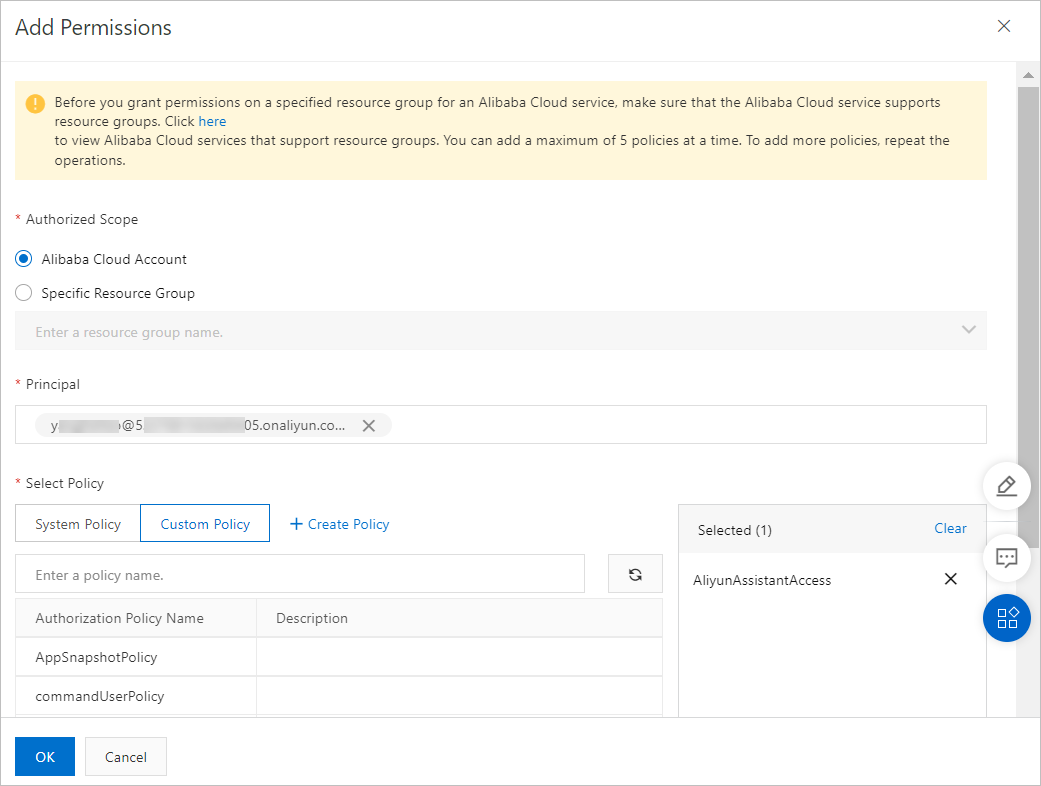
Specify a system policy provided by Alibaba Cloud.
AliyunECSAssistantFullAccess: Grants a RAM user permissions to manage the Cloud Assistant service for ECS.
AliyunECSAssistantReadonlyAccess: Grants a RAM user read-only permissions for the Cloud Assistant service for ECS.
You can view the basic information about a system policy, such as the policy content, in the RAM console. For more information, see View the information about a policy.
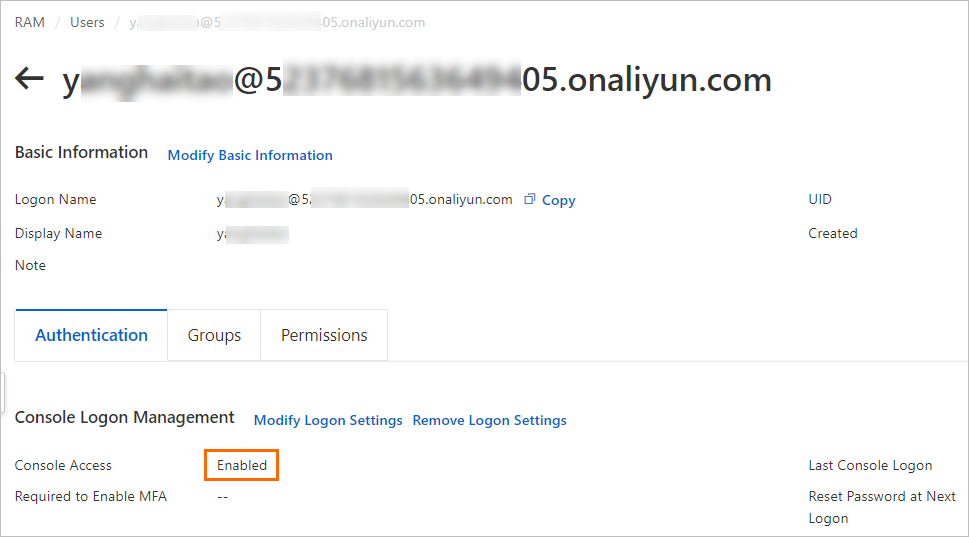
View the RAM user information to confirm that console access is granted.
If Console Access is not enabled, the RAM user can use Cloud Assistant only by calling API operations. For more information, see View the permissions of a RAM user.
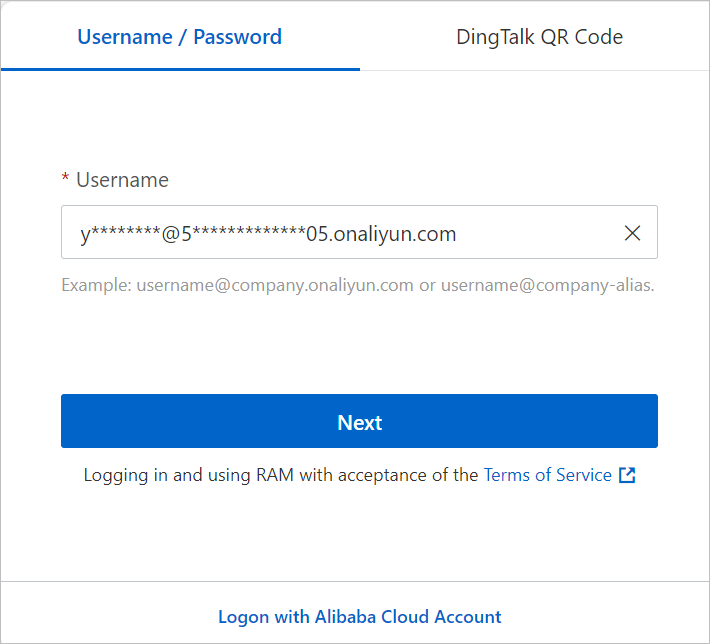
Log on to the Alibaba Cloud Management Console as the RAM user.
For more information, see Log on to the Alibaba Cloud Management Console as a RAM user.
Log on to the Cloud Assistant page of the ECS console as the RAM user to start using Cloud Assistant.
Sample custom policies for Cloud Assistant
Administrative permissions (read and write) for Cloud Assistant
This policy grants a RAM user all query and operation permissions for Cloud Assistant APIs.
{
    "Version": "1",
    "Statement": [
        {
            "Effect": "Allow",
            "Action": [
                "ecs:DescribeInstances",
                "ecs:DescribeTag*",
                "ecs:*Command",
                "ecs:DescribeCommand*",
                "ecs:DescribeInvocation*",
                "ecs:StopInvocation",
                "ecs:*CloudAssistant*",
                "ecs:SendFile",
                "ecs:DescribeSendFileResults",
                "ecs:*ManagedInstance",
                "ecs:DescribeManagedInstances",
                "ecs:*Activation",
                "ecs:DescribeActivations",
                "ecs:ListPluginStatus",
                "ecs:ModifyInvocationAttribute",
                "ecs:StartTerminalSession",
                "ecs:DescribeTerminalSessions",
                "ecs:RunCommand"
            ],
            "Resource": [
                "acs:ecs:*:*:instance/*",
                "acs:ecs:*:*:command/*",
                "acs:ecs:*:*:activation/*",
                "acs:ecs:*:*:invocation/*"
            ]
        },
        {
            "Effect": "Allow",
            "Action": [
                "ram:CreateServiceLinkedRole"
            ],
            "Resource": "*",
            "Condition": {
                "StringEquals": {
                    "ram:ServiceName": [
                        "archiving.ecs.aliyuncs.com"
                    ]
                }
            }
        },
        {
            "Effect": "Allow",
            "Action": [
                "ecs:ModifyCloudAssistantSettings",
                "ecs:DescribeCloudAssistantSettings"
            ],
            "Resource": [
                "acs:ecs:*:*:servicesettings/*"

            ]
        }
    ]
}
Read-only permissions for Cloud Assistant
This policy grants a RAM user all query permissions for Cloud Assistant APIs.
{
    "Version": "1",
    "Statement": [
        {
            "Effect": "Allow",
            "Action": [
                "ecs:DescribeInstances",
                "ecs:DescribeTag*",
                "ecs:DescribeCommand*",
                "ecs:DescribeInvocation*",
                "ecs:DescribeCloudAssistant*",
                "ecs:DescribeSendFileResults",
                "ecs:DescribeManagedInstances",
                "ecs:DescribeActivations",
                "ecs:ListPluginStatus",
                "ecs:DescribeTerminalSessions"
            ],
            "Resource": [
                "acs:ecs:*:*:instance/*",
                "acs:ecs:*:*:command/*",
                "acs:ecs:*:*:activation/*"
            ]
        },
        {
            "Effect": "Allow",
            "Action": [
                "ecs:DescribeCloudAssistantSettings"
            ],
            "Resource": [
                "acs:ecs:*:*:servicesettings/*"
            ]
        }
    ]
}
Configure Regional Restrictions for Cloud Assistant
You can specify a region in the policy element to limit the permissions of a RAM user to that region. For example, this policy allows a RAM user to use Cloud Assistant only in the China (Hangzhou) region.
{
    "Version": "1",
    "Statement": [
        {
            "Effect": "Allow",
            "Action": [
                "ecs:DescribeInstances",
                "ecs:DescribeTag*",
                "ecs:*Command",
                "ecs:DescribeCommand*",
                "ecs:DescribeInvocation*",
                "ecs:StopInvocation",
                "ecs:*CloudAssistant*",
                "ecs:SendFile",
                "ecs:DescribeSendFileResults",
                "ecs:*ManagedInstance",
                "ecs:DescribeManagedInstances",
                "ecs:*Activation",
                "ecs:DescribeActivations",
                "ecs:ListPluginStatus",
                "ecs:ModifyInvocationAttribute",
                "ecs:StartTerminalSession",
                "ecs:DescribeTerminalSessions",
                "ecs:RunCommand"
            ],
            "Resource": [
                "acs:ecs:cn-hangzhou:*:instance/*",
                "acs:ecs:cn-hangzhou:*:command/*",
                "acs:ecs:cn-hangzhou:*:activation/*",
                "acs:ecs:cn-hangzhou:*:invocation/*"
            ]
        },
        {
            "Effect": "Allow",
            "Action": [
                "ram:CreateServiceLinkedRole"
            ],
            "Resource": "*",
            "Condition": {
                "StringEquals": {
                    "ram:ServiceName": [
                        "archiving.ecs.aliyuncs.com"
                    ]
                }
            }
        },
        {
            "Effect": "Allow",
            "Action": [
                "ecs:ModifyCloudAssistantSettings",
                "ecs:DescribeCloudAssistantSettings"
            ],
            "Resource": [
                "acs:ecs:cn-hangzhou:*:servicesettings/*"
            ]
        }
    ]
}
Cloud Assistant Agent
Query Cloud Assistant Agent installation status
Related API operation: DescribeCloudAssistantStatus
This policy grants a RAM user permissions to query the installation status of Cloud Assistant Agent on all ECS instances.
{
    "Version": "1",
    "Statement": [
        {
            "Effect": "Allow",
            "Action": [
                "ecs:DescribeInstances",
                "ecs:DescribeCloudAssistantStatus"
            ],
            "Resource": [
                "acs:ecs:*:*:instance/*"
            ]
        }
    ]
}
By setting instance IDs in the Resource list, this policy allows a RAM user to view the installation status of Cloud Assistant Agent only on specified ECS instances.
{
    "Version": "1",
    "Statement": [
        {
            "Effect": "Allow",
            "Action": [
                "ecs:DescribeInstances",
                "ecs:DescribeCloudAssistantStatus"
            ],
            "Resource": [
                "acs:ecs:*:*:instance/i-instancexxx000a",
                "acs:ecs:*:*:instance/i-instancexxx000b"
            ]
        }
    ]
}
Install Cloud Assistant Agent
Related API operation: InstallCloudAssistant
This policy grants a RAM user permissions to install Cloud Assistant Agent on any ECS instance.
{
    "Version": "1",
    "Statement": [
        {
            "Effect": "Allow",
            "Action": [
                "ecs:InstallCloudAssistant"
            ],
            "Resource": [
                "acs:ecs:*:*:instance/*"
            ]
        }
    ]
}
By setting instance IDs in the Resource list, this policy allows a RAM user to install Cloud Assistant Agent only on specified ECS instances.
{
    "Version": "1",
    "Statement": [
        {
            "Effect": "Allow",
            "Action": [
                "ecs:InstallCloudAssistant"
            ],
            "Resource": [
                "acs:ecs:*:*:instance/i-instancexxx00a",
                  "acs:ecs:*:*:instance/i-instancexxx00b"
            ]
        }
    ]
}
Sample custom policies for Cloud Assistant commands
View Cloud Assistant commands
Related API operation: DescribeCommands
This policy grants a RAM user permissions to view all Cloud Assistant commands.
{
    "Version": "1",
    "Statement": [
        {
            "Effect": "Allow",
            "Action": [
                "ecs:DescribeCommands"
            ],
            "Resource": [
                "acs:ecs:*:*:command/*"
            ]
        }
    ]
}
By setting command IDs in the Resource list, this policy allows a RAM user to view only specified commands.
{
    "Version": "1",
    "Statement": [
        {
            "Effect": "Allow",
            "Action": [
                "ecs:DescribeCommands"
            ],
            "Resource": [
                "acs:ecs:*:*:command/c-commandxxx000a",
                "acs:ecs:*:*:command/c-commandxxx000b"
            ]
        }
    ]
}
Delete Cloud Assistant commands
Related API operation: DeleteCommand
This policy grants a RAM user permissions to delete all Cloud Assistant commands.
{
    "Version": "1",
    "Statement": [
        {
            "Effect": "Allow",
            "Action": [
                "ecs:DeleteCommand"
            ],
            "Resource": [
                "acs:ecs:*:*:command/*"
            ]
        }
    ]
}
By setting command IDs in the Resource list, this policy allows a RAM user to delete only specified commands.
{
    "Version": "1",
    "Statement": [
        {
            "Effect": "Allow",
            "Action": [
                "ecs:DeleteCommand"
            ],
            "Resource": [
                "acs:ecs:*:*:command/c-commandxxx000a",
                "acs:ecs:*:*:command/c-commandxxx000b"
            ]
        }
    ]
}
Create a Cloud Assistant command
Related API operation: CreateCommand
A RAM user must have at least the following permissions to create Cloud Assistant commands.
{
    "Version": "1",
    "Statement": [
        {
            "Effect": "Allow",
            "Action": [
                "ecs:CreateCommand"
            ],
            "Resource": [
                "acs:ecs:*:*:command/*"
            ]
        }
    ]
}
Modify Cloud Assistant Command
Related API operation: ModifyCommand
This policy grants a RAM user permissions to modify any Cloud Assistant command.
{
    "Version": "1",
    "Statement": [
        {
            "Effect": "Allow",
            "Action": [
                "ecs:ModifyCommand"
            ],
            "Resource": [
                "acs:ecs:*:*:command/*"
            ]
        }
    ]
}
After you grant the following permissions, a RAM user can modify only the specified commands for the instance ID set in the Resource list.
{
    "Version": "1",
    "Statement": [
        {
            "Effect": "Allow",
            "Action": [
                "ecs:ModifyCommand"
            ],
            "Resource": [
                "acs:ecs:*:*:command/c-commandxxx000a",
                "acs:ecs:*:*:command/c-commandxxx000b"
            ]
        }
    ]
}
Execute command
Related API operation: InvokeCommand
This policy grants a RAM user permissions to run commands on any instance.
{
    "Version": "1",
    "Statement": [
        {
            "Effect": "Allow",
            "Action": [
                "ecs:InvokeCommand"
            ],
            "Resource": [
                "acs:ecs:*:*:command/*",
                "acs:ecs:*:*:instance/*"
            ]
        }
    ]
}
By setting instance IDs in the Resource list, this policy allows a RAM user to run Cloud Assistant commands only on specified ECS instances.
{
    "Version": "1",
    "Statement": [
        {
            "Effect": "Allow",
            "Action": [
                "ecs:InvokeCommand"
            ],
            "Resource": [
                "acs:ecs:*:*:command/*",
                "acs:ecs:*:*:instance/i-instancexxx00a",
                "acs:ecs:*:*:instance/i-instancexxx00b"
            ]
        }
    ]
}
By setting command IDs in the Resource list, this policy allows a RAM user to run only specified commands on ECS instances.
{
    "Version": "1",
    "Statement": [
        {
            "Effect": "Allow",
            "Action": [
                "ecs:InvokeCommand"
            ],
            "Resource": [
                "acs:ecs:*:*:command/c-commandxxx00a",
                "acs:ecs:*:*:command/c-commandxxx00b",
                "acs:ecs:*:*:instance/*"
            ]
        }
    ]
}
By setting command IDs and instance IDs in the Resource list, this policy allows a RAM user to run only specified commands on specified ECS instances.
{
    "Version": "1",
    "Statement": [
        {
            "Effect": "Allow",
            "Action": [
                "ecs:InvokeCommand"
            ],
            "Resource": [
                "acs:ecs:*:*:instance/i-instancexxx00a",
                "acs:ecs:*:*:instance/i-instancexxx00b",
                "acs:ecs:*:*:command/c-commandxxx00a",
                "acs:ecs:*:*:command/c-commandxxx00b"
            ]
        }
    ]
}
Limit executable plugins: This policy allows a RAM user to run only the public command named ACS-ECS-ExecutePlugin-for-linux.sh, which corresponds to the plugin named test-plugin.
{
  "Version": "1",
  "Statement": [
    {
      "Effect": "Allow",
      "Action": "ecs:InvokeCommand",
      "Resource": [
        "acs:ecs:*:*:command/ACS-ECS-ExecutePlugin-for-linux.sh",
        "acs:ecs:*:*:instance/*"
      ],
      "Condition": {
        "StringEqualsIgnoreCase": {
          "ecs:PluginName": [
            "test-plugin"
          ]
        }
      }
    }
  ]
}
Add a tag condition to the Condition element to control the ECS instances on which commands can be run. For example, this policy allows commands to be run only on ECS instances that have the
test:tonytag.NoteWhen you use acs:ResourceTag, the resource must have a tag attached. For example, you can attach tags to ECS instances, but not to commands.
{
  "Version": "1",
  "Statement": [
    {
      "Effect": "Allow",
      "Action": "ecs:InvokeCommand",
      "Resource": [
        "acs:ecs:*:*:instance/*"
      ],
      "Condition": {
        "StringEquals": {
          "acs:ResourceTag/Owner": "zxy"
        }
      }
    },
    {
      "Effect": "Allow",
      "Action": "ecs:InvokeCommand",
      "Resource": [
        "acs:ecs:*:*:command/*"
      ]
    }
  ]
}
Execute a command immediately
Related API operation: RunCommand
If you set the KeepCommand parameter to true when you invoke the RunCommand operation, you must add the "acs::ecs:*:*:command/*" line to the Resource element.
This policy grants a RAM user permissions to immediately run commands on any instance.
{
    "Version": "1",
    "Statement": [
        {
            "Effect": "Allow",
            "Action": [
                "ecs:RunCommand"
            ],
            "Resource": [
                "acs:ecs:*:*:instance/*"
            ]
        }
    ]
}
By setting instance IDs in the Resource list, this policy allows a RAM user to immediately run Cloud Assistant commands only on specified ECS instances.
{
    "Version": "1",
    "Statement": [
        {
            "Effect": "Allow",
            "Action": [
                "ecs:RunCommand"
            ],
            "Resource": [
                "acs:ecs:*:*:instance/i-instancexxx00a",
                "acs:ecs:*:*:instance/i-instancexxx00b"
            ]
        }
    ]
}
Add a tag condition to the Condition element to control the ECS instances on which commands can be immediately run. For example, this policy allows commands to be immediately run only on ECS instances that have the
test:tonytag.{ "Version": "1", "Statement": [ { "Effect": "Allow", "Action": [ "ecs:RunCommand" ], "Resource": "acs:ecs:*:*:instance/*", "Condition": { "StringEquals": { "acs:ResourceTag/test": "tony" } } } ] }
Query Command Execution Results
Related API operation: DescribeInvocations
This policy grants a RAM user permissions to query command execution results on any instance.
{
    "Version": "1",
    "Statement": [
        {
            "Effect": "Allow",
            "Action": [
                "ecs:DescribeInvocations"
            ],
            "Resource": [
                "acs:ecs:*:*:instance/*",
                "acs:ecs:*:*:command/*"
            ]
        }
    ]
}
By setting instance IDs in the Resource list, this policy allows a RAM user to query command execution results only on specified ECS instances.
{
    "Version": "1",
    "Statement": [
        {
            "Effect": "Allow",
            "Action": [
                "ecs:DescribeInvocations"
            ],
            "Resource": [
                "acs:ecs:*:*:instance/i-instancexxx00a",
                "acs:ecs:*:*:instance/i-instancexxx00b",
                "acs:ecs:*:*:command/*"
            ]
        }
    ]
}
By setting command IDs in the Resource list, this policy allows a RAM user to query the execution results of only specified commands on ECS instances.
{
    "Version": "1",
    "Statement": [
        {
            "Effect": "Allow",
            "Action": [
                "ecs:DescribeInvocations"
            ],
            "Resource": [
                "acs:ecs:*:*:instance/*",
                "acs:ecs:*:*:command/c-commandxxx00a",
                "acs:ecs:*:*:command/c-commandxxx00b"
            ]
        }
    ]
}
By setting command IDs and instance IDs in the Resource list, this policy allows a RAM user to query the execution results of only specified commands on specified ECS instances.
{
    "Version": "1",
    "Statement": [
        {
            "Effect": "Allow",
            "Action": [
                "ecs:DescribeInvocations"
            ],
            "Resource": [
                "acs:ecs:*:*:instance/i-instancexxx00a",
                "acs:ecs:*:*:instance/i-instancexxx00b",
                "acs:ecs:*:*:command/c-commandxxx00a",
                "acs:ecs:*:*:command/c-commandxxx00b"
            ]
        }
    ]
}
Modify the execution information of a scheduled task
Related API operation: ModifyInvocationAttribute
This policy grants a RAM user permissions to modify the execution information of any scheduled task and add any instance to the scheduled task.
When you create a task by calling InvokeCommand or RunCommand, if you modify
CommandContentand setKeepCommandtotrue, a new command is created for long-term retention (LTR). In this case, you must addacs:ecs:*:*:command/*to the Resource list before you call ModifyInvocationAttribute.{ "Version": "1", "Statement": [ { "Action": "ecs:ModifyInvocationAttribute", "Resource": [ "acs:ecs:*:*:instance/*", "acs:ecs:*:*:invocation/*" ], "Effect": "Allow" } ] }By setting a task ID in the Resource list, this policy allows a RAM user to modify the execution information of only the specified task and add any instance to that task.
{
  "Version": "1",
  "Statement": [
    {
      "Action": "ecs:ModifyInvocationAttribute",
      "Resource": [
        "acs:ecs:*:*:instance/*",
        "acs:ecs:*:*:invocation/task-xxx"
      ],
      "Effect": "Allow"
    }
  ]
}
By setting an instance ID in the Resource list, this policy allows a RAM user to modify the execution information of any scheduled task but add only the specified instance to the scheduled task.
{
  "Version": "1",
  "Statement": [
    {
      "Action": "ecs:ModifyInvocationAttribute",
      "Resource": [
        "acs:ecs:*:*:instance/i-instance-xxx",
        "acs:ecs:*:*:invocation/*"
      ],
      "Effect": "Allow"
    }
  ]
}
By setting an instance ID and a task ID in the Resource list, this policy allows a RAM user to modify the execution information of only the specified task and add only the specified instance to that task.
{
  "Version": "1",
  "Statement": [
    {
      "Action": "ecs:ModifyInvocationAttribute",
      "Resource": [
        "acs:ecs:*:*:instance/i-instance-xxx",
        "acs:ecs:*:*:invocation/task-xxx"
      ],
      "Effect": "Allow"
    }
  ]
}
Stop Task Execution
Related API operation: StopInvocation
This policy grants a RAM user permissions to stop running Cloud Assistant command processes on any instance.
{
    "Version": "1",
    "Statement": [
        {
            "Effect": "Allow",
            "Action": [
                "ecs:StopInvocation"
            ],
            "Resource": [
                "acs:ecs:*:*:instance/*"
            ]
        }
    ]
}
By setting instance IDs in the Resource list, this policy allows a RAM user to stop running Cloud Assistant command processes only on specified ECS instances.
{
    "Version": "1",
    "Statement": [
        {
            "Effect": "Allow",
            "Action": [
                "ecs:StopInvocation"
            ],
            "Resource": [
                "acs:ecs:*:*:instance/i-instancexxx00a",
                "acs:ecs:*:*:instance/i-instancexxx00b"
            ]
        }
    ]
}
Using in commands OOS standard parameters
This policy grants a RAM user permissions to use Cloud Assistant to run commands that contain OOS common parameters.
{
    "Statement": [
        {
            "Effect": "Allow",
            "Action": [
                "ecs:DescribeInstances",
                "ecs:CreateCommand",
                "ecs:DescribeCommands",
                "ecs:InvokeCommand",
                "ecs:RunCommand",
                "ecs:DescribeInvocations",
                "ecs:DescribeInvocationResults",
                "ecs:DescribeCloudAssistantStatus",
                "oos:GetParameters",
                "oos:GetParameter"
            ],
            "Resource": "*"
        }
    ],
    "Version": "1"
}
Permissions to use OOS encrypted parameters in commands
This policy grants a RAM user permissions to use Cloud Assistant to run commands that contain OOS encrypted parameters.
{
    "Statement": [
        {
            "Effect": "Allow",
            "Action": [
                "ecs:DescribeInstances",
                "ecs:CreateCommand",
                "ecs:DescribeCommands",
                "ecs:InvokeCommand",
                "ecs:RunCommand",
                "ecs:DescribeInvocations",
                "ecs:DescribeInvocationResults",
                "ecs:DescribeCloudAssistantStatus",
                "oos:GetParameters",
                "oos:GetSecretParameters",
                "oos:GetParameter",
                "oos:GetSecretParameter",
                "kms:GetSecretValue"
            ],
            "Resource": "*"
        }
    ],
    "Version": "1"
}
Sample custom policies for sending files
Upload local file
Related API operation: SendFile
This policy grants a RAM user permissions to upload local files to any ECS instance.
{
    "Version": "1",
    "Statement": [
        {
            "Effect": "Allow",
            "Action": [
                "ecs:SendFile"
            ],
            "Resource": [
                "acs:ecs:*:*:instance/*"
            ]
        }
    ]
}
By setting instance IDs in the Resource list, this policy allows a RAM user to upload local files only to specified ECS instances.
{
    "Version": "1",
    "Statement": [
        {
            "Effect": "Allow",
            "Action": [
                "ecs:SendFile"
            ],
            "Resource": [
                "acs:ecs:*:*:instance/i-instancexxx00a",
                "acs:ecs:*:*:instance/i-instancexxx00b"
            ]
        }
    ]
}
Add a tag condition to the Condition element to control the ECS instances to which files can be uploaded. For example, this policy allows files to be uploaded only to ECS instances that have the
test:tonytag.{ "Version": "1", "Statement": [ { "Effect": "Allow", "Action": [ "ecs:SendFile" ], "Resource": "acs:ecs:*:*:instance/*", "Condition": { "StringEquals": { "acs:ResourceTag/test": "tony" } } } ] }
Query File Upload Result
Related API operation: DescribeSendFileResults
This policy grants a RAM user permissions to query the file upload results for any instance.
{
    "Version": "1",
    "Statement": [
        {
            "Effect": "Allow",
            "Action": [
                "ecs:DescribeSendFileResults"
            ],
            "Resource": [
                "acs:ecs:*:*:instance/*"
            ]
        }
    ]
}
By setting instance IDs in the Resource list, this policy allows a RAM user to query the file upload results only for specified ECS instances.
{
    "Version": "1",
    "Statement": [
        {
            "Effect": "Allow",
            "Action": [
                "ecs:DescribeSendFileResults"
            ],
            "Resource": [
                "acs:ecs:*:*:instance/i-instancexxx00a",
                  "acs:ecs:*:*:instance/i-instancexxx00b"
            ]
        }
    ]
}
Sample custom policies for O&M task execution record delivery
Permissions to query and modify the configuration of O&M task execution record delivery
This policy grants a RAM user permissions to query and modify the configuration of the O&M task execution record delivery feature.
{
    "Version": "1",
    "Statement": [
        {
            "Effect": "Allow",
            "Action": [
                "ecs:ModifyCloudAssistantSettings",
                "ecs:DescribeCloudAssistantSettings"
            ],
            "Resource": [
                "acs:ecs:*:*:servicesettings/cloudassistantdeliverysettings"
            ]
        }
    ]
}
Query the configuration of the O&M task execution record delivery feature
This policy grants a RAM user permissions to query the configuration of the O&M task execution record delivery feature.
{
    "Version": "1",
    "Statement": [
        {
            "Effect": "Allow",
            "Action": [
                "ecs:DescribeCloudAssistantSettings"
            ],
            "Resource": [
                "acs:ecs:*:*:servicesettings/cloudassistantdeliverysettings"
            ]
        }
    ]
}
Region-specific permissions for O&M task execution record delivery
You can specify a region in the policy element to limit the region-level access permissions of a RAM user.
This policy allows a RAM user to query and modify the configuration of the O&M task execution record delivery feature only in the China (Hangzhou) region.
{
    "Version": "1",
    "Statement": [
        {
            "Effect": "Allow",
            "Action": [
                "ecs:ModifyCloudAssistantSettings",
                "ecs:DescribeCloudAssistantSettings"
            ],
            "Resource": [
                "acs:ecs:cn-hangzhou:*:servicesettings/cloudassistantdeliverysettings"
            ]
        }
    ]
}
This policy allows a RAM user to query the configuration of the O&M task execution record delivery feature only in the China (Hangzhou) region.
{
    "Version": "1",
    "Statement": [
        {
            "Effect": "Allow",
            "Action": [
                "ecs:DescribeCloudAssistantSettings"
            ],
            "Resource": [
                "acs:ecs:cn-hangzhou:*:servicesettings/cloudassistantdeliverysettings"
            ]
        }
    ]
}
Permissions to query and modify the configuration of session record delivery
This policy grants a RAM user permissions to query and modify the configuration of the session record delivery feature.
{
    "Version": "1",
    "Statement": [
        {
            "Effect": "Allow",
            "Action": [
                "ecs:ModifyCloudAssistantSettings",
                "ecs:DescribeCloudAssistantSettings"
            ],
            "Resource": [
                "acs:ecs:*:*:servicesettings/sessionmanagerdeliverysettings"
            ]
        }
    ]
}
Permissions to query the configuration of session record delivery
This policy grants a RAM user permissions to query the configuration of the session record delivery feature.
{
    "Version": "1",
    "Statement": [
        {
            "Effect": "Allow",
            "Action": [
                "ecs:DescribeCloudAssistantSettings"
            ],
            "Resource": [
                "acs:ecs:*:*:servicesettings/sessionmanagerdeliverysettings"
            ]
        }
    ]
}
Region-specific permissions for session record delivery
You can specify a region in the policy element to limit the region-level access permissions of a RAM user.
This policy allows a RAM user to query and modify the configuration of the session record delivery feature only in the China (Hangzhou) region.
{
    "Version": "1",
    "Statement": [
        {
            "Effect": "Allow",
            "Action": [
                "ecs:ModifyCloudAssistantSettings",
                "ecs:DescribeCloudAssistantSettings"
            ],
            "Resource": [
                "acs:ecs:cn-hangzhou:*:servicesettings/sessionmanagerdeliverysettings"
            ]
        }
    ]
}
This policy allows a RAM user to query the configuration of the session record delivery feature only in the China (Hangzhou) region.
{
    "Version": "1",
    "Statement": [
        {
            "Effect": "Allow",
            "Action": [
                "ecs:DescribeCloudAssistantSettings"
            ],
            "Resource": [
                "acs:ecs:cn-hangzhou:*:servicesettings/sessionmanagerdeliverysettings"
            ]
        }
    ]
}
Querying an OSS bucket
When you use the O&M task execution record or session record delivery feature to deliver records to OSS, you must grant the following permissions to allow a RAM user to query OSS buckets.
{
    "Version": "1",
    "Statement": [
        {
            "Effect": "Allow",
            "Action": [
                "oss:ListBuckets"
            ],
            "Resource": "*"
        }
    ]
}
After O&M task execution records or session records are delivered to OSS, you also need to understand the access control rules of OSS to query and analyze the records. For more information, see Overview of RAM policies for OSS and Common examples of RAM policies for OSS.
Query SLS Projects and Logstores
When you use the O&M task execution record or session record delivery feature to deliver records to SLS, you must grant the following permissions to allow a RAM user to query SLS projects and their corresponding Logstores.
{
    "Version": "1",
    "Statement": [
        {
            "Effect": "Allow",
            "Action": [
                "log:ListProject",
                "log:ListLogStores"
            ],
            "Resource": "*"
        }
    ]
}
After O&M task execution records or session records are delivered to SLS, you also need to understand the access control rules of SLS to query and analyze the records. For more information, see Overview of SLS authentication rules.
Sample custom policies for managed instances
Unregister a Managed Instance
Related API operation: DeregisterManagedInstance
This policy grants a RAM user permissions to unregister any managed instance.
{
    "Version": "1",
    "Statement": [
        {
            "Effect": "Allow",
            "Action": [
                "ecs:DeregisterManagedInstance"
            ],
            "Resource": [
                "acs:ecs:*:*:instance/*"
            ]
        }
    ]
}
By setting instance IDs in the Resource list, this policy allows a RAM user to unregister only specified managed instances.
{
    "Version": "1",
    "Statement": [
        {
            "Effect": "Allow",
            "Action": [
                "ecs:DeregisterManagedInstance"
            ],
            "Resource": [
                "acs:ecs:*:*:instance/i-instancexxx00a",
                  "acs:ecs:*:*:instance/i-instancexxx00b"
            ]
        }
    ]
}
Query Managed Instances
Related API operation: DescribeManagedInstances
This policy grants a RAM user permissions to query information about any managed instance.
{
    "Version": "1",
    "Statement": [
        {
            "Effect": "Allow",
            "Action": [
                "ecs:DescribeManagedInstances"
            ],
            "Resource": [
                "acs:ecs:*:*:instance/*"
            ]
        }
    ]
}
By setting instance IDs in the Resource list, this policy allows a RAM user to query information only about specified managed instances.
{
    "Version": "1",
    "Statement": [
        {
            "Effect": "Allow",
            "Action": [
                "ecs:DescribeManagedInstances"
            ],
            "Resource": [
                "acs:ecs:*:*:instance/i-instancexxx00a",
                  "acs:ecs:*:*:instance/i-instancexxx00b"
            ]
        }
    ]
}
Create a Managed Instance Activation Code
Related API operation: CreateActivation
A RAM user must have at least the following permissions to create activation codes for Alibaba Cloud managed instances. These codes are used to register servers that are not hosted on Alibaba Cloud as managed instances.
{
    "Version": "1",
    "Statement": [
        {
            "Effect": "Allow",
            "Action": [
                "ecs:CreateActivation"
            ],
            "Resource": [
                "acs:ecs:*:*:activation/*"
            ]
        }
    ]
}
Permissions to disable activation codes for managed instances
Related API operation: DisableActivation
This policy grants a RAM user permissions to disable any activation code for an Alibaba Cloud managed instance.
{
    "Version": "1",
    "Statement": [
        {
            "Effect": "Allow",
            "Action": [
                "ecs:DisableActivation"
            ],
            "Resource": [
                "acs:ecs:*:*:activation/*"
            ]
        }
    ]
}
Once the instance ID is set in the Resource list and the following permissions are granted, the RAM user can only disable activation codes for the specified Alibaba Cloud managed instances.
{
    "Version": "1",
    "Statement": [
        {
            "Effect": "Allow",
            "Action": [
                "ecs:DisableActivation"
            ],
            "Resource": [
                "acs:ecs:*:*:activation/*****-*****A",
                  "acs:ecs:*:*:activation/*****-*****B"
            ]
        }
    ]
}
Query a managed instance activation code
Related API operation: DescribeActivations
This policy grants a RAM user permissions to query created activation codes for managed instances and their usage.
{
    "Version": "1",
    "Statement": [
        {
            "Effect": "Allow",
            "Action": [
                "ecs:DescribeActivations"
            ],
            "Resource": [
                "acs:ecs:*:*:activation/*"
            ]
        }
    ]
}
By setting instance IDs in the Resource list and granting the following permissions, a RAM user can query only the activation codes and usage status of specified managed instances.
{
    "Version": "1",
    "Statement": [
        {
            "Effect": "Allow",
            "Action": [
                "ecs:DescribeActivations"
            ],
            "Resource": [
                "acs:ecs:*:*:activation/*****-*****A",
                  "acs:ecs:*:*:activation/*****-*****B"
            ]
        }
    ]
}
Delete managed instance activation code
Related API operation: DeleteActivation
This policy grants a RAM user permissions to delete any unused activation code for a managed instance.
{
    "Version": "1",
    "Statement": [
        {
            "Effect": "Allow",
            "Action": [
                "ecs:DeleteActivation"
            ],
            "Resource": [
                "acs:ecs:*:*:activation/*"
            ]
        }
    ]
}
After you grant the following permissions, you can delete only specific unused managed instance activation codes by setting the instance ID in the Resource list.
{
    "Version": "1",
    "Statement": [
        {
            "Effect": "Allow",
            "Action": [
                "ecs:DeleteActivation"
            ],
            "Resource": [
                "acs:ecs:*:*:activation/*****-*****A",
                  "acs:ecs:*:*:activation/*****-*****B"
            ]
        }
    ]
}
Sample custom policies for Cloud Assistant Agent upgrades
Related API operations: ModifyCloudAssistantSettings and DescribeCloudAssistantSettings.
Permissions to query and modify the Cloud Assistant Agent upgrade configuration
This policy grants a RAM user permissions to query and modify the Cloud Assistant Agent upgrade configuration.
{
    "Version": "1",
    "Statement": [
        {
            "Effect": "Allow",
            "Action": [
                "ecs:ModifyCloudAssistantSettings",
                "ecs:DescribeCloudAssistantSettings"
            ],
            "Resource": [
                "acs:ecs:*:*:servicesettings/AgentUpgradeConfig"
            ]
        }
    ]
}
Querying the Cloud Assistant Agent upgrade configuration
This policy grants a RAM user permissions to query the Cloud Assistant Agent upgrade configuration.
{
    "Version": "1",
    "Statement": [
        {
            "Effect": "Allow",
            "Action": [
                "ecs:DescribeCloudAssistantSettings"
            ],
            "Resource": [
                "acs:ecs:*:*:servicesettings/AgentUpgradeConfig"
            ]
        }
    ]
}
Sample custom policies for Session Manager
Related API operations: StartTerminalSession and DescribeTerminalSessions.
Permissions to create and query Session Manager sessions
This policy grants a RAM user permissions to create and query Session Manager sessions.
{
    "Version": "1",
    "Statement": [
        {
            "Effect": "Allow",
            "Action": [
                "ecs:StartTerminalSession",
                "ecs:DescribeTerminalSessions"
            ],
            "Resource": [
                "acs:ecs:*:*:instance/*"
            ]
        }
    ]
}
By setting instance IDs in the Resource list, this policy allows a RAM user to create Session Manager sessions and query Session Manager records only for specified instances.
{
    "Version": "1",
    "Statement": [
        {
            "Effect": "Allow",
            "Action": [
                "ecs:StartTerminalSession",
                "ecs:DescribeTerminalSessions"
            ],
            "Resource": [
                "acs:ecs:*:*:instance/i-instancexxx00a",
                "acs:ecs:*:*:instance/i-instancexxx00b"
            ]
        }
    ]
}