The ESA CLI (esa-cli) lets you manage the full lifecycle of Functions and Pages from your terminal — create projects, debug locally, deploy to all points of presence (POPs), and configure custom domains and routes.
With the ESA CLI, you can:
Local development: Create projects, start a local debugging service that simulates production, and test edge functions before deploying.
Deployment: Commit versions and deploy to all POPs.
Domain and route management: Configure custom domains and routes for your Functions and Pages.
Multi-file project support: The CLI automatically packages and builds project dependencies, including npm modules, so you can deploy local Node.js projects to the cloud.
For the full command reference and source code, see the ESA CLI GitHub repository.
Prerequisites
Before you begin, ensure that you have:
Install the CLI
Install the ESA CLI globally through npm, then verify the installation:
npm install esa-cli -g       # Install the CLI globally
esa-cli -v                   # Verify the installed version
esa-cli --help               # View available commands
Log on to your account
Get your AccessKey ID and AccessKey secret from the Alibaba Cloud Resource Access Management (RAM) console, then run:
esa-cli loginTo log off:
esa-cli logoutNote: If you only need to debug code locally, you can skip this step. Authentication is not required for local debugging.
Initialize a project
Run esa-cli init to create a project. The CLI prompts you to enter a project name and select a template.
esa-cli initDebug locally
After writing your code, start the local debugging service:
esa-cli devThe CLI automatically packages the entry file and starts a local server that simulates the production environment.
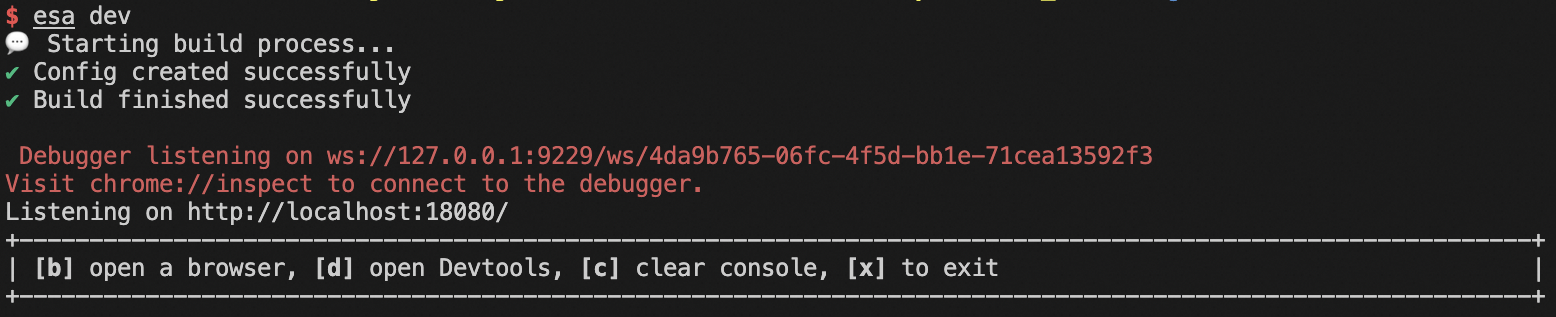
Keyboard shortcuts during debugging:
|
Key |
Action |
|
|
Open the debug page in your browser |
|
|
Clear the panel |
|
|
Exit debugging |
To use a specific port:
esa-cli dev --port <port>Debug with Chrome DevTools
EdgeRoutine code runs on the server side. The browser preview console does not display output from the entry file's console statements. To view console output, use Chrome DevTools:
Open
chrome://inspect#devicesin Chrome.Under Remote Target, find the running debug session.
Click inspect to open DevTools and view console output.
Use Edge Storage API and Cache API locally
Local debugging supports the Edge Storage API and Cache API in your code.
Note: For the security of your online data, the edge storage service does not retrieve or set online data during local debugging.
To simulate edge storage data locally, create a kv.json file in the project root directory, at the same level as the esa.jsonc configuration file:
{
  "namespace": {
    "k1": "v1",
    "k2": "v2"
  }
}
Access the simulated data in your code:
const edgeKv = new EdgeKV({ namespace: 'namespace' });

async function run() {
  const data = await edgeKv.get('k1', { type: 'text' });
  console.log(data); // 'v1'
}
Commit a version
After local debugging is complete, commit your code as a version:
esa-cli commitDeploy to production
Deploy a version to all online POPs:
esa-cli deployThe CLI prompts you to select a version and a target environment.
To check deployment status or delete a version:
esa-cli deployments list                 # View deployment status
esa-cli deployments delete <versionId>   # Delete a version
Configure custom domains
Attach a domain name to your Functions and Pages. The domain must be a subdomain of your ESA site and must have an ICP filing. When attached, Functions and Pages acts as the origin server for that domain, and the domain resolves directly to your edge function.
esa-cli domain list
esa-cli domain add <domainName>
esa-cli domain delete <domainName>
Configure routes
Attach a route to your ESA site. When a request matches the route, it triggers Functions and Pages execution, and Functions and Pages can communicate with the site's origin server.
esa-cli route list
esa-cli route add [route] [site]
esa-cli route delete <route>
Manage functions
View and delete functions using the CLI:
esa-cli project list                     # List all functions
esa-cli project delete <PROJECT_NAME>    # Delete a function
Command reference
|
Command |
Description |
|
|
Initialize a project from an ESA template |
|
|
Start the local debugging service |
|
|
Commit project code to the cloud and save it as a version |
|
|
Deploy a version to all online POPs |
|
|
View current version deployments or delete a version |
|
|
View all Functions and Pages, or delete a function |
|
|
View information about all sites under your account |
|
|
Manage domain names attached to Functions and Pages |
|
|
Manage routes attached to Functions and Pages |
|
|
Log on using an AccessKey ID and AccessKey secret |
|
|
Log off |
|
|
Manage the ESA CLI configuration file |
|
|
Select the CLI display language |