Define rules based on query strings, HTTP headers, or cookies to generate custom cache keys that unify the cache identity for similar requests, improving hit rates and reducing response time and bandwidth consumption.
How it works
-
Custom cache keys modify only the cache identity, not the back-to-origin URL. The back-to-origin request remains consistent with the client request.
-
A cache key uniquely identifies a file cached on an ESA point of presence (POP). By default, the cache key is the full URL of the client request, including parameters.
Usage notes
If your custom cache key includes HTTP request headers, cookies, or user features, you cannot use Purge cache by URL to purge cache for a specific URL. Use Purge cache by custom key instead.
Use cases
When request URLs contain complex parameters, the ESA POP treats requests for the same file as different files due to varying URL parameters, caching them separately and increasing back-to-origin requests.
Use the custom cache key feature to ignore query strings. This unifies cache keys for the same class of requests and reduces back-to-origin traffic.

When client request URLs are identical, ESA treats them as requests for the same file. However, the client field in the HTTP request header may indicate different client systems requesting different content.
Use the custom cache key feature to generate different cache keys based on client type, ensuring each request maps to a distinct cached file.

Procedure
When rules are applied, requests are matched according to Rule Precedence.
-
In the ESA console, select Websites, and in the Website column, click the target site.
-
In the left navigation pane, choose .
-
Click Create Rule and enter a Rule Name.
-
Under If requests match..., set the match conditions for incoming requests. To learn more about creating a rule expression, see Composition of a rule expression.
-
In the Cache Eligibility section, set Cache Eligibility to Eligible for Cache.
-
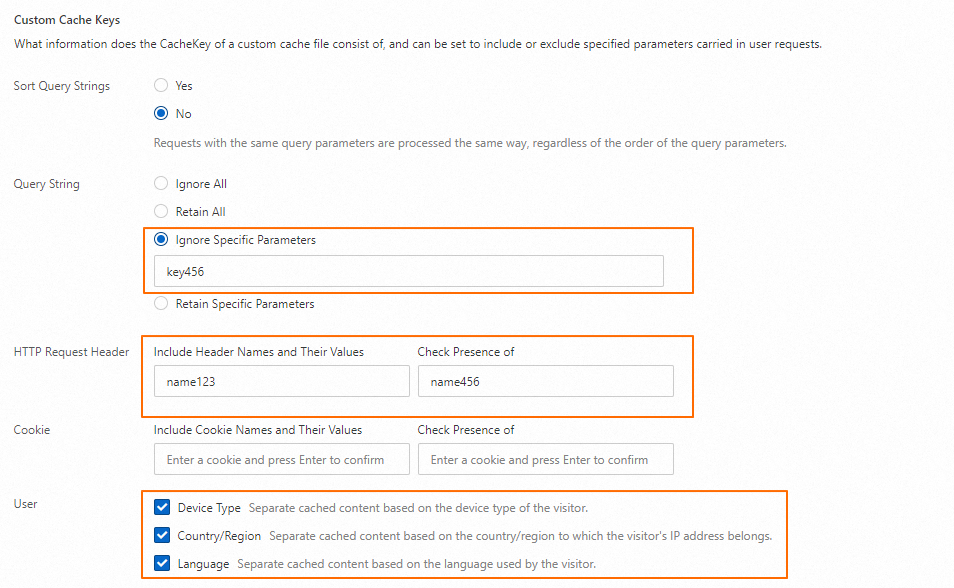
In the Custom Cache Keys section, click Configure, and set the following parameters.

Parameter
Description
Sort Query Strings
Specifies whether to enable the Sort Query String feature.
Query String
Specifies whether to remove the
?and subsequent query string from the request URL.HTTP Request Header
-
Include these header names and values (enter header name; lowercase only): Adds specified HTTP request header names and values to the cache key.
-
Check existence (enter header name; lowercase only): Adds HTTP request header names to the cache key if the headers exist in the request.
Cookie
-
Include these cookie names and values (enter cookie name; lowercase only): Adds specified cookie parameter names and values to the cache key.
-
Check existence (enter header name; lowercase only): Adds cookie parameter names to the cache key if the cookies exist in the request.
-
Supported input character types:
-
Symbols:
! # $ % & ' * + - . ^ _ ` | ~ -
Digits:
0-9 -
Letters:
a-z(lowercase English letters)
-
User
-
Device Type: Generates a cache key based on client type derived from the
User-Agentheader. Valid values:desktop,tablet,mobile -
Country/Region: Generates a cache key based on the client's country or region, derived from the client IP address.
-
Language: Generates a cache key based on the client language derived from the
Accept-Languagerequest header.
Cache Deception Defense
Defends against web cache deception attacks while allowing static content to be cached.
-
-
Click OK.
Configuration examples
|
Example scenario |
|
|
Feature configuration |
|
|
Generated Cachekey |
Cache key fragments for each parameter:
The final cache key concatenates these fragments: |
Related documentation
Rule-related features vary in effective priority, reentrancy, and effective granularity. For details, see Characteristics of rule-based features.