Cache API enables you to cache data on edge nodes for faster responses on subsequent requests. You can configure the cache duration and size to control caching policies.
How it works
The built-in Cache API of Edge Routines (ER) caches data processed by ER or fetched from the origin server to ESA for reuse by other requests on the same node. This reduces repeated computation and network requests. The following figure shows the relationship between ER and ESA cache: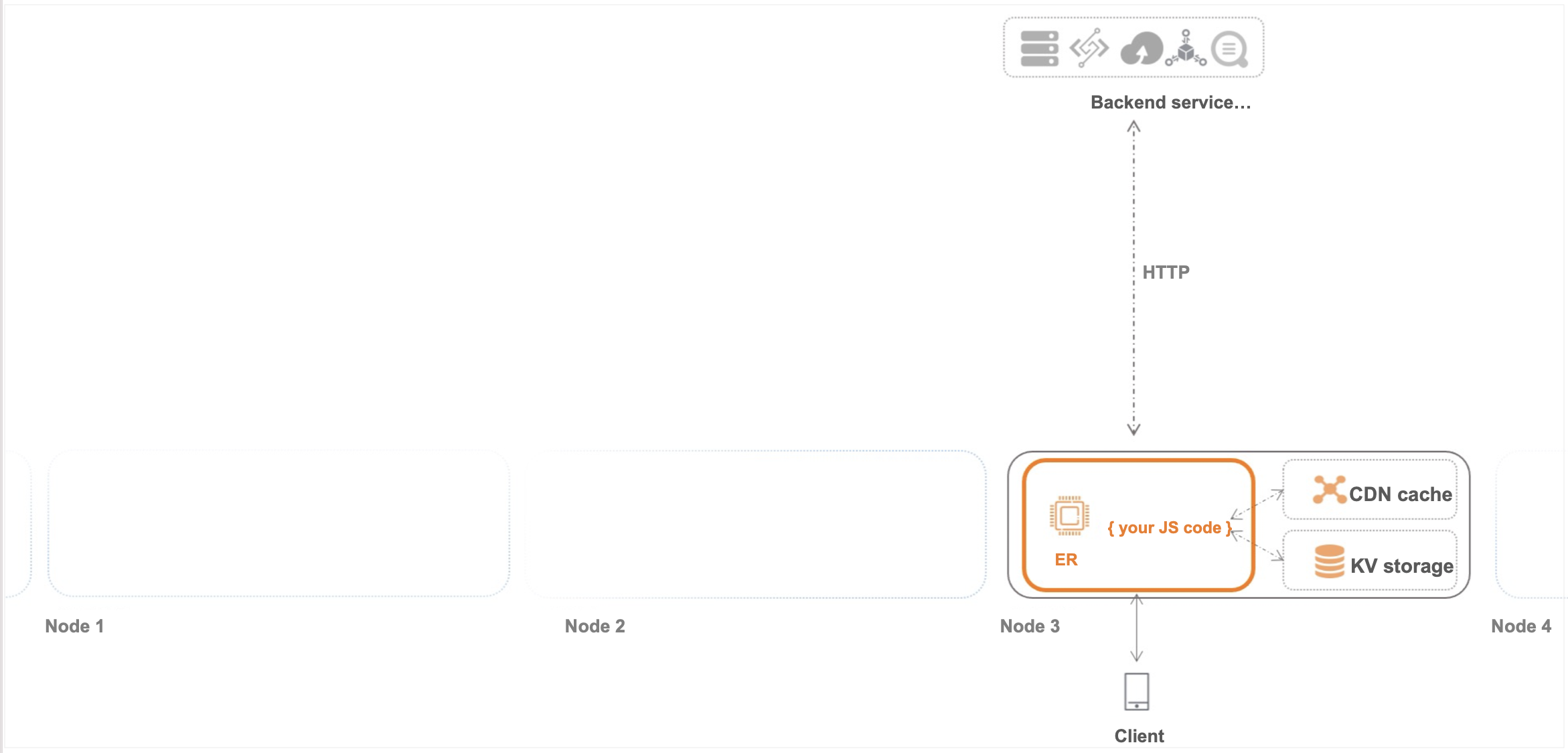
API standard
Cache API conforms to the standard Cache interface as much as possible. However, because Edge Routines reuse the existing cache engine of ESA, the semantics are not fully consistent.
API definition
cache.put(request/string, response)
-
Caches a Response object in the Cache.
-
If put succeeds, resolves to undefined.
-
If the Cache engine fails, rejects with an error exception.
-
If the Cache engine quota is exceeded, rejects with an error exception.
-
-
The cache key is set to the URL of the request object or a URL string. (Use HTTP URLs. Currently, due to the ESA Cache engine, HTTPS URLs are not supported.)
-
This is an asynchronous function. You can use await to ensure the put operation is complete。
-
You can set the cache-control header on the Response object to configure the cache TTL (the cache-control header follows cache standards).
cache.get(request/string)
-
Retrieves a Response object with the specified request/string as the key (if the object does not exist, resolves to undefined).
-
This is an asynchronous function. You can use await to ensure the get operation is complete.
-
get may not return the object that was just put, because the cache uses the LRU algorithm and does not guarantee that the cached object can always be retrieved.
cache.delete(request/string)
-
Deletes a Response object with the specified key.
-
If the deletion succeeds, resolves to true.
-
If the deletion fails, resolves to false.
-
-
This is an asynchronous function. Use await to ensure the delete operation is complete.
Usage limits
-
All Cache API operations are subrequests that share the ER subrequest limit. By default, a single ER request supports a maximum of 32 fetch subrequests (this number may change when ER is commercialized). Cache API operations share this limit with fetch, so the total number of cache.put + cache.get + cache.delete + fetch operations within a single request context cannot exceed 32.
-
cache.put, cache.get, and cache.delete have concurrency control. For the same URL, if one request is performing a get while another is performing a delete, the operation may return a pending status because multiple concurrent requests are modifying the same key. Wait and retry in this case.
NoteWhen cache.put, cache.get, or cache.delete rejects to true, it indicates that the operation is subject to concurrency control.
Cache refresh
Cache API does not currently support active cache refresh. Specify an appropriate cache duration by using the TTL parameter when calling Cache.put().