Cache expiration rules control how long resources are cached on DCDN points of presence (POPs), which lets you balance content freshness, access performance, and origin fetch costs. This topic describes how cache rules work, how to configure and verify them, and how to troubleshoot caching issues, and it provides best practices for production environments.
Usage notes
You can modify the cache time after you add a domain name. The cache duration affects back-to-origin traffic and costs. The cache expiration time affects the frequency of origin fetches. Set the resource cache duration based on your business needs.
If the cache expiration time is too short, DCDN will frequently fetch data from the origin, which increases origin server traffic. If the cache expiration time is too long, data updates will be delayed.
A resource cached on a DCDN POP that is infrequently accessed (meaning the resource on the same DCDN POP is not requested often by clients) may be overwritten by other more popular resources on the DCDN POP before its cache expires.
-
When a DCDN POP receives a static file from an origin server, it caches the resource based on the DCDN default cache rules and priority. For information about cache rules for dynamic files, see Overview of acceleration rules for dynamic and static content.
Do not update content on your origin server using the same file name. Instead, use version numbers for synchronization.
To accurately distinguish between content before and after an update, synchronize your origin content using version numbers. This means using different file names when you update content. For example, you can use names such as img-v1.0.jpg and img-v2.1.jpg.
Procedure
-
Log on to the DCDN console.
-
In the left-side navigation pane, click Domain Names.
-
On the Domain Names page, find the target domain name and click Configure.
-
In the left-side navigation tree of the domain name, click Caching.
-
On the Cache Duration tab, click Add.
-
In the Cache Duration dialog box, configure a cache rule.

Parameter
Description
Type
Specify the scope of resources by Directory or Filename Extension.
-
Directory: Set the same cache rule for all resources in a specified path.
-
Filename Extension: Set the same cache rule for resources of a specified file type.
Content
The directory or filename extension to which the rule applies.
-
If you set Type to Directory, note the following:
-
You can add only one directory at a time. A forward slash (/) matches all directories.
-
Enter the full path of the directory. The path must start with a forward slash (/). Example: /directory/aaa.
-
-
If you set Type to Filename Extension, note the following:
-
You can enter one or more filename extensions. Separate multiple extensions with a comma (,), for example,
jpg,txt. The input is case-sensitive.The file name extensions are not limited to the common static file types listed below. You can enter any custom file name extension (for example,
bytesorunity3d). The system can recognize and cache resources that match these custom extensions.Supported types of static files:
-
Images: GIF, PNG, BMP, JPEG, and JPG.
-
Webpages: HTML, HTM, and SHTML.
-
Audio and video files: MP3, WMA, FLV, MP4, WMV, OGG, and AVI.
-
Documents: DOC, DOCX, XLS, XLSX, PPT, PPTX, TXT, and PDF.
-
Others: ZIP, EXE, TAT, ICO, CSS, JS, SWF, APK, M3U8, TS, EJS, SVG, WOFF, and OTF.
-
-
You cannot use an asterisk (*) to match all file types.
-
Expire In
The cache TTL for resources. The maximum duration is 3 years. We recommend the following settings:
-
For static files that are not frequently updated, such as images and application packages, set the TTL to one month or longer.
-
For frequently updated static files, such as JS and CSS files, set a custom TTL based on your business needs.
-
For dynamic files, such as PHP, JSP, and ASP files, set the TTL to 0s to prevent them from being cached.
Honor origin cache policy
If enabled, cache policy headers from the origin server, such as Cache-Control and Pragma, take precedence.
Ignore origin no-cache header
When this feature is enabled, DCDN POPs will ignore the following cache policy headers from the origin server's response. These headers indicate that the content must not be cached.
-
Cache-Control: no-store
-
Cache-Control: no-cache
-
Cache-Control: max-age=0
-
Pragma: no-cache
Client follows DCDN cache policy
When this feature is enabled, the DCDN POPs will respond to the client with the effective cache policy.
Force revalidation
This parameter takes effect only when the cache TTL is set to 0. The effects are as follows:
-
Disabled (default): When the cache TTL for /DCDN is set to 0, the /DCDN POPs do not cache files, and an origin fetch is performed for every request.
-
Enabled: When the cache TTL for DCDN is set to 0, files can be cached on DCDN POPs, and every request requires an origin fetch to validate the cached content.
Weight
The priority of the cache rule. Valid values are integers from 1 to 99. A larger value indicates a higher priority. The rule with the highest priority is applied first.
Note-
If you configure multiple cache rules, set a different weight for each rule to control their execution priority.
-
If multiple rules have the same weight, the rule that was created earlier has a higher priority, regardless of the rule type.
-
If multiple cache policies are configured, DCDN stops matching other cache policies after one policy takes effect.
Rule condition
A rule condition identifies various parameter information in a user request. This determines whether a configuration takes effect for that request.
ImportantWhen you reference rule conditions, they are matched based on the priority of the associated rule conditions, not the configuration order of the feature itself.
Do not use: Does not use a rule condition.
To add or edit rule conditions, manage them in the Rules Engine.
-
-
Click OK to save the configuration.
After you successfully configure a cache rule, you can find it in the list on the Cache Duration tab. You can click Modify or Delete to manage the rule.
Default Alibaba Cloud DCDN cache rules and priorities
For origin responses with the HTTP status codes 200, 203, 206, 300, 301, 308, or 410, the cache expiration time is determined by the following rules.
When a DCDN POP receives a file resource from an origin server, it applies cache rules in the following order of priority. A smaller number indicates a higher priority.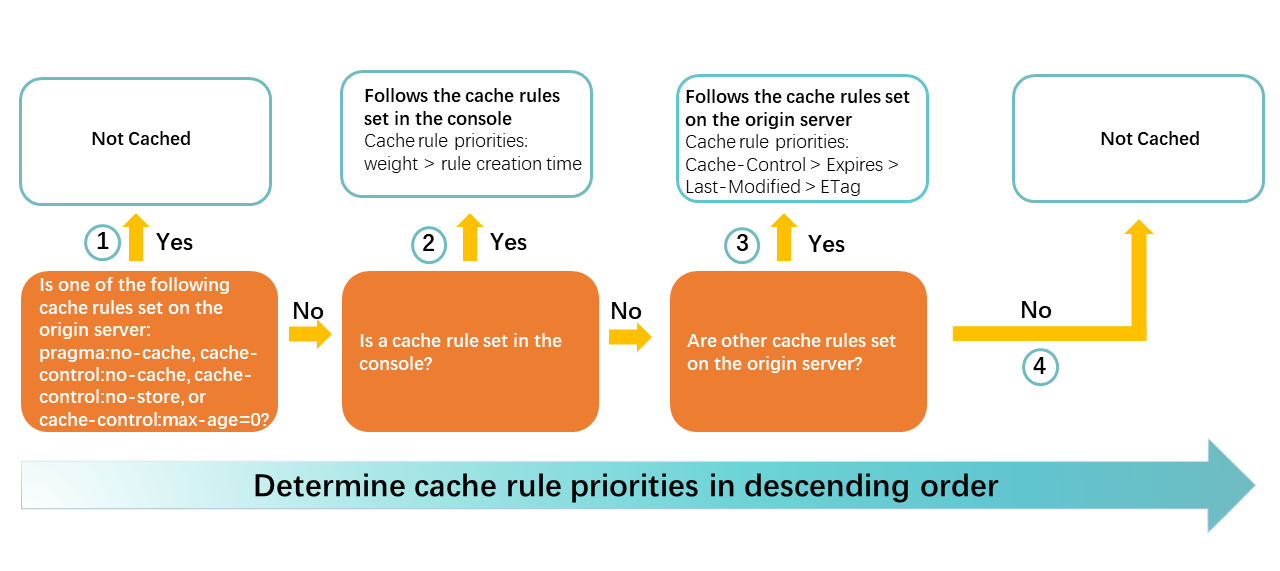
If the origin server responds with
pragma:no-cache,cache-control:no-cache(orno-store, ormax-age=0), DCDN does not cache the resource.The cache expiration time or status code expiration time that is set in the DCDN console.
NoteIf a DCDN request matches multiple rules, only one rule is applied. The priority is determined first by weight and then by creation time.
If you have multiple cache rules, you can set a different weight for each rule to control its execution priority. A larger weight indicates a higher priority.
For rules with the same weight, the rule that was created earlier has a higher priority, regardless of the rule type.
Other cache rules that are configured on the origin server. The priority from high to low is:
cache-control>expires>last-modified>ETag.If the
cache-controlheader in the response from the origin server specifies amax-ageors-maxagevalue greater than 0, thecache-controlheader is used to set the time-to-live. For example: cache-control:max-age=3600. If bothmax-ageands-maxageare present,s-maxagetakes precedence.If the origin response does not contain a
cache-controlheader but contains anExpiresheader, the cache expiration time is determined by theExpiresheader. For example: expires:Tue, 25 Nov 2031 17:25:43 GMT.If the origin response does not contain
cache-controlorExpiresbut containslast-modified, the cache time is calculated using the formula: (Current Time -last-modified) × 0.1. If the result is between 10 seconds and 3600 seconds, that result is used. If the result is less than 10 seconds, the cache time is 10 seconds. If the result is greater than 3600 seconds, the cache time is 3600 seconds.If the origin response does not contain
cache-control,Expires, orlast-modifiedbut containsETag, the resource is cached for 10 seconds.
If the data returned from the origin server does not contain any of the cache-related response headers (
cache-control,expires,last-modified, orETag), the resource is not cached by default.
Description of cache response information
Date:Indicates the time when the origin server sent the resource in a response to the DCDN POP.
When the DCDN POP revalidates the resource with the origin server by including the
If-Modified-SinceorIf-None-Matchheader in the origin request, the Date information is updated if the origin server returns a 304 status code.The format is Greenwich Mean Time (GMT), for example:
Sat, 19 Apr 2025 08:58:31 GMT.
X-Cache:Indicates whether the requested resource hit the cache on the DCDN POP. The following table describes the possible values.
Status
Description
HITThe requested resource hit the cache on the DCDN POP.
MISSThe requested resource did not hit the cache on the DCDN POP. The resource was provided by the origin server.
X-Swift-Cachetime:Indicates the remaining cache time of the resource on the DCDN POP, in seconds.
X-Swift-Cachetime=Ali-Swift-Global-Savetime+ Cache expiration time set for CDN -X-Swift-SaveTime.X-Swift-Cachetimeis not always equal to the cache expiration time set for DCDN. The following three situations may occur:X-Swift-Cachetime= Cache expiration time set for DCDN, for example, 3600 seconds.X-Swift-Cachetimeis slightly less than the cache expiration time set for DCDN. For example, the cache expiration time for DCDN is set to 300 seconds, butX-Swift-Cachetimeis 295 seconds. This may be because of the following reasons:High latency occurs when a Layer 1 POP fetches data from a Layer 2 POP.
The clocks on the Layer 1 and Layer 2 POPs are not synchronized.
The value of
X-Swift-Cachetimeis negative. This may be because the cache expiration time for DCDN was changed. When the client sends a request, the cache on the Layer 1 POP has expired, but the cache on the Layer 2 POP has not. For example, the cache expiration time for DCDN was originally 3600 seconds and was later changed to 300 seconds. If a client sends a request 600 seconds after the first request, the response header isX-Swift-Cachetime:-300. To resolve this issue, you can refresh the cache.
X-Swift-SaveTime:Indicates the time when the resource was first cached on the DCDN POP that the client directly accessed. This is typically a Layer 1 POP.
The format is Greenwich Mean Time (GMT), for example:
Sat, 19 Apr 2025 08:58:31 GMT.
Ali-Swift-Global-Savetime:Indicates the time when the resource was first cached on a DCDN POP. This could be a Layer 2 POP or a POP at another cache layer, depending on the site's cache architecture.
The format is a UNIX timestamp, for example:
1745053111, which represents2025-04-19 16:58:31.
Verify resource cache status
After configuring a cache TTL, use these methods to verify if a resource is served from the DCDN cache.
-
Method 1: Use the curl command
In the terminal, run the following command to request the target URL by using
curl -I, and check theX-Cachefield in the response header to determine whether the cache is hit.curl -I http://<accelerated_domain_name>/<resource_path>In the response headers, check the
X-Cachefield:-
X-Cache: HITindicates that the resource was served from the DCDN cache. -
X-Cache: MISSindicates that the resource was not found in the DCDN cache and was served directly from the origin server.
-
-
Method 2: Use browser developer tools
Use your browser's developer tools (F12). On the Network tab, access the resource URL. Select the request and inspect the
X-Cacheheader in the response.
HTTP cache control mechanisms
The HTTP protocol defines three types of cache control mechanisms:
Configuration examples
Example 1: To cache .txt files for 7 days, add a cache rule in the DCDN console for the .txt filename extension and set the cache TTL to 7 days.

Example 2: The following caching policies are configured for the accelerated domain name demo.aliyun.com. When a DCDN POP fetches the resource http://demo.aliyun.com/image/example.png from the origin, two rules are matched. Because both rules have the same weight, the system prioritizes the rule that was created earlier. The rule for the /image directory was created earlier. Therefore, the directory-based rule takes effect.