In a microservices architecture, if a consumer is unaware of unhealthy provider instances, service calls can fail. This failure can degrade the consumer's performance and even compromise its availability. The outlier ejection feature improves service stability and quality by automatically detecting and ejecting unhealthy instances, ensuring that the system routes requests only to healthy instances. This topic describes how to create an outlier ejection policy.
Background
In the following example, a system contains four applications: A, B, C, and D. Application A acts as a consumer and calls applications B, C, and D, which act as providers. When some instances of B, C, or D become unhealthy, Application A may be unaware of the issue and make calls that fail. If a large number of provider instances become unhealthy, this can severely impact the performance and availability of Application A.
To protect the performance and availability of Application A, you can configure an outlier ejection policy for it. Once configured, the system monitors the health of the instances of applications B, C, and D and dynamically ejects or readmits them to ensure successful service calls.
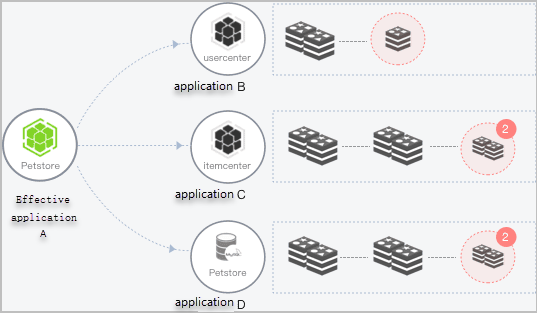
The outlier ejection process is as follows:
When an instance of application B, C, or D is abnormal, the system detects it and determines whether to remove the corresponding instance from the application based on the configured instance removal rate threshold.
After an instance is ejected, the system no longer routes the consumer's requests to it.
The system starts to check whether the abnormal instance has recovered based on the configured recovery detection unit time.
The detection interval increases linearly with the number of detections based on the recovery detection unit time, which is 0.5 minutes by default. After the max number of instance checked before restoration is reached, the system continues to check whether the abnormal instance has recovered at the maximum detection interval.
When an instance is detected as recovered, it is added back to the application's instance list to process call requests. At the same time, the detection interval is reset to the recovery detection unit time, for example, 0.5 minutes.
If the number of unhealthy instances in a provider application exceeds the specified instance removal rate threshold, the system only ejects instances up to that limit.
To ensure service availability, the last available instance of a provider application is never ejected, even if its error rate exceeds the configured error rate threshold.
Create an outlier ejection policy
Log on to the EDAS console.
In the left-side navigation pane, choose .
In the left-side navigation pane, click Outlier Ejection. On the Outlier Ejection page, click Create Outlier Ejection Policy.
In the Create Outlier Ejection Policy panel, configure the parameters and click OK.
Parameter
Description
Microservice space
Select a region and microservice space from the list on the right.
Policy name
The name of the outlier ejection policy. It can be up to 64 characters long and can contain uppercase letters, lowercase letters, digits, underscores (_), and hyphens (-).
Framework for called services
Select Spring Cloud, Dubbo, or service mesh based on your requirements.
Select application
Select an application and click the > icon to move it to the Selected Applications list.
This policy applies to the selected application. The system will eject the unhealthy instances of any service that this application calls. During the ejection period, the system will not route requests from this application to the ejected instances.
Error rate threshold
If the error rate of an instance in a called application exceeds this threshold, the system ejects the instance. For example, if an instance receives 10 calls within the statistical time window and 6 calls fail, its error rate is 60%. Because 60% is greater than the 50% threshold, the system ejects the instance from the application's service pool.
Advanced settings
Click the
 icon to expand the Advanced Settings section.
Exception type
Select Network Exception or Network Exception + Business Exception (Dubbo Exception) based on your business requirements.
NoteA network exception typically refers to a Dubbo
RpcException, which can be caused by network timeouts or a full server thread pool due to slow responses from full garbage collection (GC).A business exception typically refers to a Dubbo
BizException, such as aRuntimeExceptionthrown by the server.
Lower QPS limit
Error rate analysis begins only when the queries per second (QPS) of an application reaches this limit within the statistical time window. The statistical time window is 15 seconds for applications that use Dubbo 2.7, and 10 seconds for applications that use other Dubbo versions or Spring Cloud.
Instance removal rate threshold
The maximum percentage of unhealthy instances that the system can eject. Once this threshold is reached, the system ejects no more instances. The system rounds the number of instances to eject down. For example, if an application has 6 instances and the threshold is set to 60%, the number of instances to eject is 6 × 60% = 3.6, which is rounded down to 3. If the calculated number is less than 1, the system ejects no instances.
Recovery detection unit time
This value defines the base time unit for the check interval, which increases linearly with each failed check. The default value is 30,000 ms (0.5 minutes).
Max number of instance checked before restoration
Unhealthy instances are continuously checked. The check interval increases linearly with each check, based on the recovery detection unit time. If an instance does not recover after the max number of instance checked before restoration is reached, subsequent checks are performed at the maximum possible interval. For example, if recovery detection unit time is set to 30,000 ms and max number of instance checked before restoration is set to 20, the check interval becomes 10 minutes (20 × 30,000 ms) after the 20th failed check. If the instance recovers, the check interval resets to its initial value, which is one recovery detection unit time.
NoteWe recommend that you do not set the max number of instance checked before restoration value too high. A high value results in a longer maximum detection interval. If an instance recovers early during the detection interval, the system still waits until the interval ends before performing the next check. This wastes instance resources and prevents the instance from processing service requests in a timely manner.
Verify the result
After an outlier ejection policy is configured and created, outlier ejection is enabled. You can go to the Advanced Monitoring page for the application to view its monitoring information and determine whether the policy has taken effect. For example, check the Topology to see if requests are still routed to abnormal instances and if the application's Error Rate/Min is higher than the configured error rate threshold. For more information, see the section.
More operations
After you create an outlier ejection policy, you can view its details, edit its configuration, or delete it.
View outlier ejection policy details
In the list of outlier ejection policies, click the name of a policy to view its basic information and configuration details.
Edit an outlier ejection policy
In the list of outlier ejection policies, find the policy you want to modify and click Edit in the Actions column. After you modify the parameters, click OK.
Delete an outlier ejection policy
In the list of outlier ejection policies, find the policy you want to delete and click Delete in the Actions column. In the confirmation dialog box that appears, click Confirm.