Elastic High Performance Computing (E-HPC) is a computing service provided by Alibaba Cloud that delivers excellent performance and stable, reliable, and elastically scalable high performance computing. E-HPC aggregates computing capabilities and uses parallel computing to solve larger-scale scientific, engineering, and commercial problems. It is widely used in scientific research, petroleum exploration, financial markets, weather forecasting, biopharmaceuticals, gene sequencing, image processing, and other industries.
Product architecture
The following figure shows the product architecture of E-HPC.
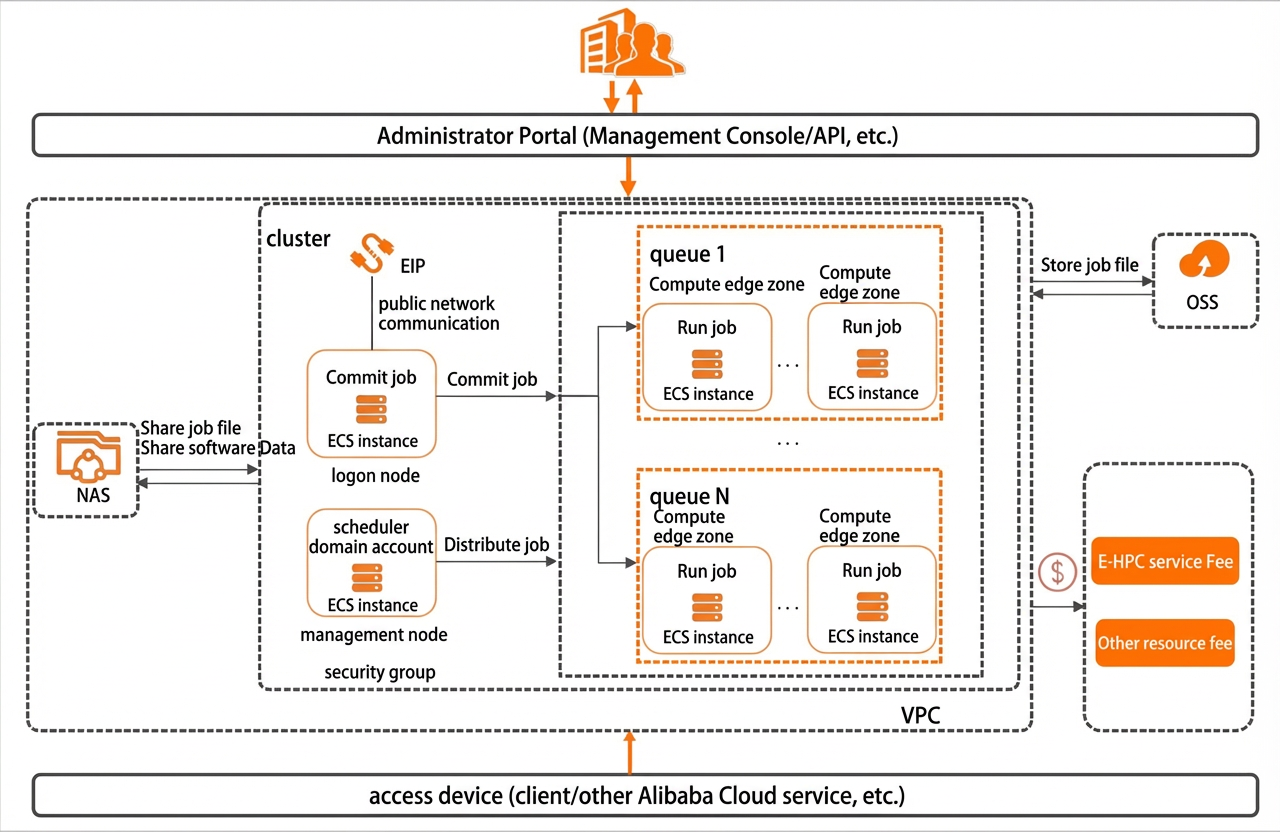
The following table describes the relationship between E-HPC and other products.
|
Product |
Description |
References |
|
Elastic Compute Service (ECS) |
ECS instances are the building blocks of a cluster. They serve as logon nodes, management nodes, and compute nodes based on their function.
A security group is a virtual firewall that provides cluster node status detection and packet filtering. It is used to divide security domains in the cloud. |
|
|
Virtual Private Cloud (VPC) |
Your own private network on the cloud. Different VPCs are logically isolated from each other. You can create and manage clusters in a VPC. |
|
|
Elastic IP Address (EIP) |
By default, the logon node of a cluster is associated with an EIP and is allocated a certain amount of public bandwidth to access the Internet. |
|
|
Apsara File Storage NAS |
File storage provides shared file paths for all nodes in the cluster. |
|
|
Object Storage Service (OSS) |
Object storage can store your job data and executable files. You can import job data and executable files from OSS into an E-HPC cluster. |
Features
E-HPC provides the following main features.
|
Feature |
Description |
References |
|
Create computing resources |
Before you use E-HPC, you must create an E-HPC cluster. Then you can submit and run jobs and view job results on the cluster. |
|
|
Configure computing resources |
E-HPC supports various configuration management options for computing resources, including cluster user management, node management, scheduler queue management, and cluster auto scaling. |
|
|
Submit jobs |
You can submit jobs from the console. For small jobs, you can edit and submit the job script directly in the console. For large jobs, you can upload the script to OSS and then submit it. You can also access the cluster and submit jobs by using SSH commands. |
|
|
Performance analysis |
You can use the E-HPC optimizer to monitor cluster performance data while jobs are running, including real-time data and historical data. You can also select specific processes to profile performance. |
|
|
Visualization |
You can use the remote visualization feature of E-HPC to process jobs on the console in a visual manner. |