CEN health checks monitor the connectivity of Express Connect circuits associated with Virtual Border Routers (VBRs). When redundant routes exist between CEN and your data center, health checks detect Express Connect circuit failures and automatically switch traffic to an available route to ensure uninterrupted traffic flow.
Background
How it works
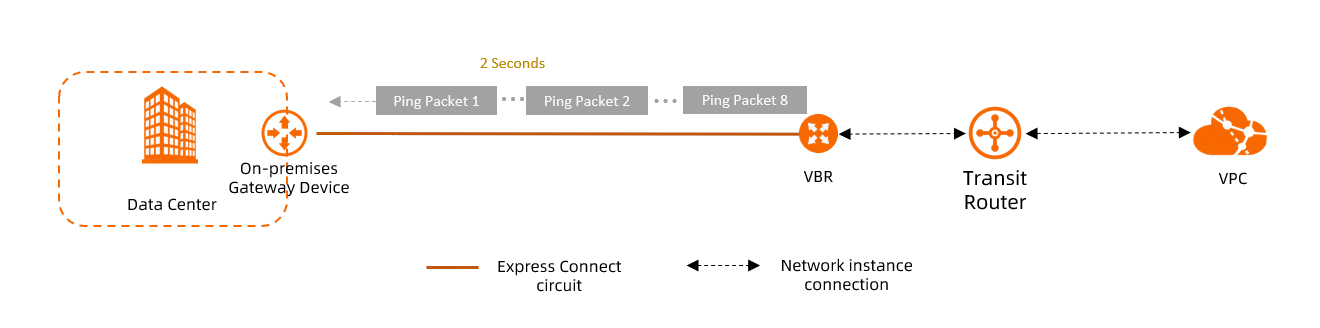
After you configure a health check for a VBR instance, Alibaba Cloud sends an ICMP ping packet from each source IP address to the destination IP address in your data center every 2 seconds by default. If the ping packet returns along the same Express Connect circuit path, the link is healthy. If no response is received for eight consecutive ping packets, or if the response returns through a different path, the Express Connect circuit has failed.
Health checks do not send notifications when a link failure is detected. We recommend that you configure an alert rule for the Express Connect circuit. When the alert rule is triggered, the system notifies you so that you can address the issue promptly.
-
The destination IP address for the health check must be able to respond to ICMP ping probes. Your data center must not rate-limit or block these ping probes.
-
If you have Control Plane Policing (CoPP) on Cisco devices or similar anti-attack policies on other network devices in your data center, health check packets might be dropped, causing link flapping. We recommend that you disable CoPP rate limiting on your data center devices.
Redundancy with Express Connect circuits
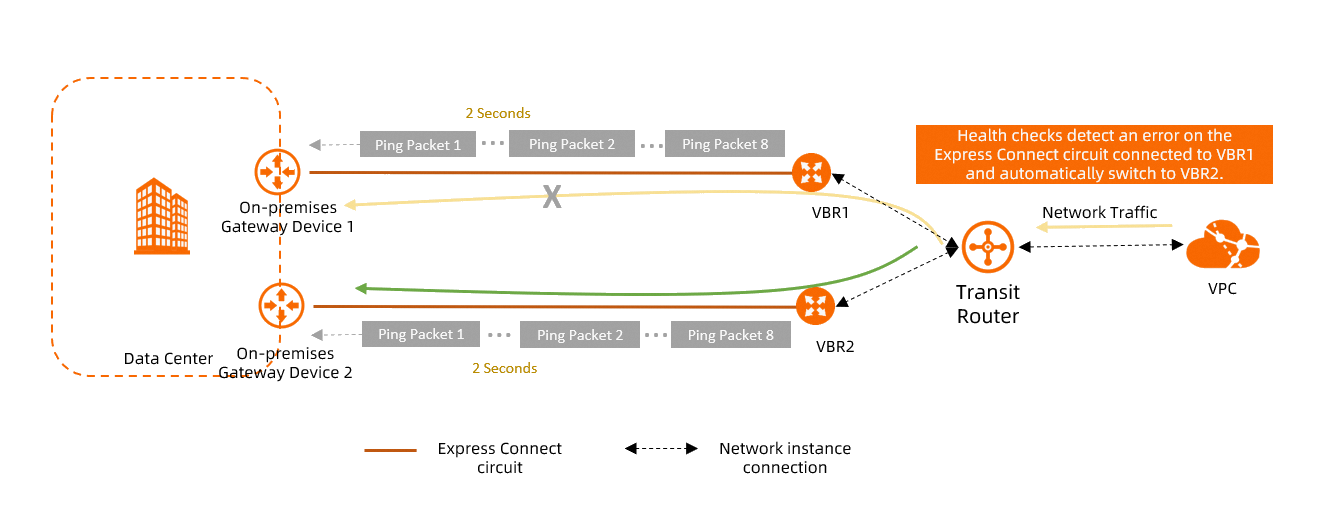
If your data center connects to Alibaba Cloud over multiple Express Connect circuits, you can use the Switch Route feature to enable or disable automatic route switchover. When this feature is enabled and a health check detects a failure on an Express Connect circuit, traffic is automatically switched to another healthy Express Connect circuit.
If the VBR instance uses static routing for hybrid cloud connectivity, you must configure a health check and enable the Switch Route feature to implement automatic route failover. Health checks support route switchover only between multiple Express Connect circuits, not between other connection types such as an Express Connect circuit and an IPsec-VPN connection.
Health check and fast failover group (BFD) selection guide
VBR health checks and fast failover groups are two independent features designed for different scenarios:
-
VBR health checks: An active probe initiated from Alibaba Cloud that sends ICMP ping packets to test Express Connect circuit connectivity. Default configuration: probe interval of 2 seconds, 8 consecutive probe packets. When used with the Switch Route feature, traffic is automatically switched to a healthy circuit if 8 consecutive probes fail to receive a response. The source IP address can be automatically assigned from the 100.96.0.0/16 CIDR block (recommended) or manually specified. The destination IP address is the customer-side IP address of the VBR instance.
-
Fast failover group: Available as a dedicated Fast Failover Group tab on the VBR details page in the Express Connect console. You can configure a backup next-hop VBR to achieve fast BGP neighbor convergence.
Selection guide: We recommend using VBR health checks with the Switch Route feature for automatic route failover. If you use BGP dynamic routing and require faster convergence, you can additionally configure a fast failover group.
Relationship: VBR health checks detect link failures and trigger route switchovers. Fast failover groups handle fast BGP neighbor convergence. The two features complement each other and cannot substitute for one another.
Prerequisites
Ensure the VBR instance associated with the Express Connect circuit is attached to a CEN instance. For more information, see Create a VBR connection.
Step 1: Add a health check in the CEN console
Log on to the CEN console.
In the left-side navigation pane, click VBR Health Check.
-
On the VBR Health Check page, select the region where the VBR instance is deployed and then click Add Health Check.
-
In the Add Health Check dialog box, configure the parameters and click OK.
Parameter
Description
CEN Instance
Select the CEN instance to which the VBR instance is attached.
Virtual Border Router (VBR)
Select the VBR instance that you want to monitor.
Source IP
You can configure the source IP address in one of the following ways:
-
Automatic IP Address (Recommended): The system automatically assigns an IP address from the 100.96.0.0/16 CIDR block.
-
Custom IP Address: You can specify an unused IP address from the 10.0.0.0/8, 192.168.0.0/16, or 172.16.0.0/12 CIDR block. The IP address must not conflict with any IP address used for communication in the CEN instance or with the Alibaba Cloud Side IPv4 Address or Data Center Side IPv4 Address of the VBR instance.
Note-
If you select Automatic IP Address:
-
In each of the following regions, you can automatically assign source IP addresses to a maximum of 16 VBR instances.
Click to view regionsUS (Silicon Valley), China (Hong Kong), US (Virginia), China (Beijing), China (Shanghai), China (Shenzhen), Singapore, China (Hangzhou), China (Heyuan), China (Chengdu), China (Zhangjiakou), Germany (Frankfurt), Malaysia (Kuala Lumpur), UK (London), China (Qingdao), Indonesia (Jakarta), China (Hohhot), China (Guangzhou), China (Ulanqab), China (Nanjing-Local), Japan (Tokyo)
-
In each of the Philippines (Manila), South Korea (Seoul), China (Fuzhou-Local), Thailand (Bangkok), Mexico, , and Saudi Arabia (Riyadh) regions, you can automatically assign source IP addresses to a maximum of 8 VBR instances.
-
-
Regardless of the configuration method you choose, after the health check is configured, CEN advertises a route to the VBR instance. The destination of the route is the source IP address with a 32-bit subnet mask.
If Border Gateway Protocol (BGP) is used between the VBR instance and the data center, this route is advertised to the data center through BGP.
Destination IP
The destination IP address must be an IP address in your data center that can respond to ICMP pings.
Probe Interval (Seconds)
The interval, in seconds, between health check probes.
Valid values: 2 to 3. Default value: 2.
Failure Threshold
The number of consecutive failed probes before the link is declared unhealthy. A probe fails if no response is received.
Valid values: 3 to 8. Default value: 8.
Switch Route
Enables or disables automatic route switchover for the health check.
This feature is enabled by default. If a link failure is detected and redundant routes exist in the CEN instance, CEN automatically switches traffic to a healthy link.
If you disable this feature, health checks perform only link probing. If a link failure is detected, a route switchover is not triggered.
WarningIf you disable this feature, make sure that you have an alternative way to ensure link redundancy. Otherwise, a link failure may cause network interruptions.
Description
Enter a description for the health check.
-
Step 2: Configure health checks in your data center
You must also configure health checks in your data center to ensure they function correctly.
-
Add a return route for health check probe packets in your data center.
Important-
If your VBR instance uses Border Gateway Protocol (BGP), CEN automatically advertises a route with a 32-bit subnet mask for the health check source IP address to your data center. Therefore, you do not need to configure a return route for health check probe packets in your data center.
-
If your VBR instance uses static routing, you must manually add a route in your data center. The destination of the route must be the health check source IP address, the subnet mask must be 32 bits in length, and the next hop must point to the Alibaba Cloud-side IP address of the VBR connection. Otherwise, probe packets cannot return along the original path, and Alibaba Cloud will incorrectly determine that the Express Connect circuit is unavailable.
The following sample command is for reference only. For the specific command, consult your device vendor.
# Configure a return route for health check probe packets. ip route <health_check_source_ip> 255.255.255.255 <vbr_alibaba_cloud_ip> -
-
Add health check configurations in your data center.
Use Bidirectional Forwarding Detection (BFD) or Network Quality Analyzer (NQA) to monitor Express Connect circuit connectivity from your data center. For specific commands, consult your device vendor.
Important-
When you configure NQA probing, do not use the Alibaba Cloud Side IPv4 Address of the VBR as the probe destination. This can cause incorrect failovers or prevent necessary failovers. You must use the health check source IP address from Step 1 as the destination for probing the cloud network from your data center. This IP address supports only ICMP probes.
-
If you do not have a redundant link for your Express Connect circuit, we recommend that you configure a summary route to the cloud that is not affected by NQA probing results. This ensures that traffic can still be forwarded if NQA probing fails but the Express Connect circuit is not interrupted.
-
-
Associate health checks with routing in your data center.
If your data center connects to Alibaba Cloud over multiple Express Connect circuits, associate health checks with routing in your data center so that it can detect Express Connect circuit connectivity changes and automatically switch routes. For specific commands, consult your device vendor.
Step 3: Add an alert rule in the CloudMonitor console
After you configure a health check, we recommend adding an alert rule for the Express Connect circuit. When the alert rule is triggered, the system sends a notification so you can address the issue promptly.
-
Log on to the CloudMonitor console.
-
In the left-side navigation pane, choose .
-
On the Alert Rules page, click Create Alert Rule.
-
In the Create Alert Rule panel, set Product to CEN-VBR, configure the alert rule, and then click Confirm.
Only the parameters most relevant to this task are described below. For more information about other parameters, see Create an alert rule.
Click Add Rule and select a metric type for the threshold-based alert rule. This topic uses Simple Metric as an example. In the Configure Rule Description panel that appears, configure the following parameters and click OK.
Parameter
Description
Alert Rule
The name of the threshold-based alert rule.
Metric Type
The metric type for the threshold-based alert rule. This topic uses Simple Metric as an example. For information about how to configure parameters for other metric types, see Create an alert template.
-
Simple Metric
-
Combined Metrics
-
Expression
-
Dynamic Threshold
Metric
Select the metric that you want to monitor.
-
VBRHealthyCheckLatency: The latency of communication between Alibaba Cloud and your data center.
-
VBRHealthyCheckLossRate: The packet loss rate of communication between Alibaba Cloud and your data center.
-
VBRInternetOutRate: The bandwidth that is used to transmit data from Alibaba Cloud to your data center.
-
VBRInternetInRate: The bandwidth that is used to transmit data from your data center to Alibaba Cloud.
Threshold and Alert Level
Configure the alert conditions, threshold, and severity level.
-
Additional operations
|
Actions |
Description |
Procedure |
|
Modify a health check |
After you create a health check, you can modify its source IP address, destination IP address, probe interval, and failure threshold. Note
You cannot modify the configuration of Switch Route. If you need to modify the configuration of Switch Route, you must delete the current health check configuration and then add it again. |
|
|
Delete a health check |
You can delete a health check if you no longer need to monitor the connectivity of an Express Connect circuit. |
|
FAQ
What is the granularity of redundancy when multiple VBRs are connected to a Transit Router?
Redundancy between Express Connect circuits operates at the route entry level.
For example, a Transit Router is connected to VBR1 and VBR2, and the route table of the Transit Router contains the following three routes:
-
If the health check for VBR1 fails, traffic destined for 192.168.1.0/24 via VBR1 is switched to the Express Connect circuit under VBR2.
-
If the health check for VBR2 fails, traffic destined for 192.168.1.0/24 via VBR2 is switched to the Express Connect circuit under VBR1. The path for traffic destined for 192.168.2.0/24 via VBR2 is not switched.
|
Destination CIDR block |
Next hop |
Associated network instance |
|
192.168.1.0/24 |
VBR1 Connection |
VBR1 |
|
192.168.1.0/24 |
VBR2 Connection |
VBR2 |
|
192.168.2.0/24 |
VBR2 Connection |
VBR2 |
What happens if the health checks for all VBRs fail in a redundant setup?
-
For traffic from Alibaba Cloud to your data center, Alibaba Cloud forwards traffic through the Express Connect circuit of the last VBR instance that failed its health check.
-
If the last VBR instance fails the health check but the physical connection is still active, the available bandwidth for traffic from Alibaba Cloud to your data center is reduced because traffic is transmitted over only a single Express Connect circuit.
-
If the last VBR instance fails the health check and the Express Connect circuit is also down, traffic from Alibaba Cloud to your data center is interrupted.
The last VBR instance to fail a health check is the last one whose status changed to unhealthy. For example, a Transit Router is connected to VBR1, VBR2, and VBR3, and its route table contains the following three routes. If the system detects that the health checks for VBR1 and VBR2 fail, and then the health check for VBR3 fails, VBR3 is the last VBR instance to fail the health check. All traffic from Alibaba Cloud to the data center is transmitted through the Express Connect circuit under VBR3.
Destination CIDR block
Next hop
Associated network instance
192.168.1.0/24
VBR1 Connection
VBR1
192.168.1.0/24
VBR2 Connection
VBR2
192.168.1.0/24
VBR3 Connection
VBR3
-
-
The impact on traffic from your data center to Alibaba Cloud depends on your network configuration.
Does a route switchover occur if all VBR health checks have already failed?
A route switchover occurs only when the connectivity status of an Express Connect circuit changes, such as when a circuit transitions from healthy to unhealthy or vice versa.
Does deleting a health check configuration cause link flapping or traffic interruption?
-
If you delete a health check configuration in the CEN console, link flapping does not occur. The system assumes the corresponding Express Connect circuit is healthy and forwards traffic based on the existing route.
However, if the Express Connect circuit is actually faulty, traffic is interrupted.
-
If you delete a health check configuration in your data center, the impact depends on your network configuration.
How can I troubleshoot a VBR health check that is not working?
A health check may fail for the following reasons:
-
Incorrect source or destination IP configuration
Log on to the CEN console and verify the following settings on the health check page:
-
The source IP address does not conflict with any private IP addresses within the VPC, VBR connection IP addresses, or IP addresses already in use in your data center.
-
The destination IP address is an address in your data center that can respond to ping probes.
-
-
Missing return route in the data center
If the VBR instance uses static routing, you must manually add a route in your data center. The destination must be the health check source IP address, the subnet mask must be 32 bits, and the next hop must be the Alibaba Cloud-side connection IP of the VBR. Without this return route, probe packets cannot return along the original path, and the health check will incorrectly report the link as unavailable. For more information, see Step 2.
-
Express Connect circuit connectivity issue
Check whether the port status and optical power of the Express Connect circuit are normal. Ping the customer-side connection IP address from the Alibaba Cloud-side connection IP address of the VBR to verify basic circuit connectivity. For detailed troubleshooting methods, see Troubleshoot Express Connect circuit failures.
What is the difference between health checks and failover groups? Do I need to configure both?
CEN health checks and Express Connect failover groups are two independent features:
-
CEN health check — Uses ICMP probing to implement route switching within seconds. Configure it in the CEN console by setting the packet sending interval and failure threshold, and enabling the Switch Route feature. The source IP address is automatically assigned from the 100.96.0.0/16 CIDR block.
-
Express Connect failover group — Uses Bidirectional Forwarding Detection (BFD) to implement sub-second switching. Configure it on the VBR details page in the Express Connect console by setting the transmit interval, receive interval, and detection time multiplier.
The two features are independent of each other and can be configured separately. In a BGP dual-active VBR scenario, configure the failover group on the Express Connect side first, and then configure health checks on the CEN side. Using both together provides multi-layer failover protection.
References
-
API reference:
-
EnableCenVbrHealthCheck: Creates or modifies a health check for a VBR instance.
-
DescribeCenVbrHealthCheck: Queries health check configurations for VBR instances in a specified region.
-
DisableCenVbrHealthCheck: Deletes a health check configuration from a VBR instance.
-