If you encounter network connectivity issues after you configure an IPsec-VPN connection, refer to this document for troubleshooting.
1. Quick checklist (5-minute check)
Before you analyze logs, complete the following checklist to rule out common configuration errors. Many issues can be resolved at this stage.
Network connectivity: Can your on-premises gateway device
pingthe public IP address of the Alibaba Cloud VPN gateway?Action: On your on-premises gateway device, run the
pingcommand. If it fails, check your internet connection and any intermediate firewalls.
Firewalls and security policies: Are the required ports open?
Action: Make sure that the firewall and access control policies on your on-premises gateway device (and Alibaba Cloud security groups, if applicable) allow both inbound and outbound traffic on UDP port 500 and UDP port 4500 (for NAT traversal).
Whether the parameter configurations are consistent: Are the encryption parameters consistent between the cloud side (Alibaba Cloud VPN Gateway) and the on-premises side (on-premises gateway device)?
Action: Carefully verify the IKE configuration parameters on both sides (version, encryption algorithm, authentication algorithm, DH group, pre-shared key) to ensure they are consistent.
Customer gateway IP address: Is the IP address correct, especially if the on-premises gateway device is behind a NAT device?
Action: In the Alibaba Cloud Management Console, check the IP address of the customer gateway associated with the IPsec-VPN connection.
If the on-premises gateway device has a public IP address, this value must be that public IP address.
If the on-premises gateway device is behind a NAT device, this value must be the public IP address of the NAT device. An incorrect IP address is a common cause of the "no response from peer" error.
Route configuration: Do the routes point to the VPN?
Action:
Alibaba Cloud side: Check the VPC route table to make sure that traffic destined for the data center's CIDR block is routed to the VPN gateway.
Data center side: Check your on-premises router to make sure that traffic destined for the VPC's CIDR block is routed to the IPsec tunnel.
Non-RFC private CIDR blocks on the IDC side: Does the on-premises IDC use non-RFC private CIDR blocks (such as 30.0.0.0/xx, which are not the standard private CIDR blocks 10.0.0.0/8, 172.16.0.0/12, or 192.168.0.0/16)?
Action: If such non-RFC private CIDR blocks exist on the IDC side, you must enable the privately used public CIDR block feature for the VPC. For more information, see Using public CIDR blocks for private communication.
Configuration for interconnection between multiple CIDR blocks: For scenarios with multiple CIDR blocks in the traffic of interest, see Configuration recommendations and FAQ for interconnection between multiple CIDR blocks.
Private CIDR block conflict: Does the private CIDR block used by the on-premises data center overlap with the CIDR blocks of the VPC and its vSwitches?
Action: Check the private CIDR blocks of the on-premises data center against the CIDR blocks of the VPC and its vSwitches one by one to ensure that the CIDR blocks on both sides do not overlap. In addition to the CIDR block where the servers reside, you also need to check the CIDR blocks used by container platforms, such as the default bridge CIDR block of Docker
172.17.0.0/16, and the Pod CIDR block and Service CIDR block of Kubernetes. These CIDR blocks are automatically allocated by the platforms and are usually not included in the network planning checklist, so they are most likely to be overlooked. Traffic whose destination address falls within the overlapping range is preferentially matched to the local interface by local routing and does not enter the IPsec tunnel. As a result, the IPsec-VPN connection negotiation succeeds, but the on-premises client cannot communicate with ECS instances in the VPC, orpingfails. If an overlap exists, adjust the CIDR block planning on the on-premises data center side or the container platform so that it does not overlap with the VPC CIDR block.
CEN routes in cross-VPC scenarios (CEN and VPN working together): Is the ECS instance you want to access located in a VPC other than the VPC associated with the IPsec connection?
Action: If the IPsec connection is associated with VPC A, but the target ECS instance is located in VPC B, which communicates with VPC A over a Cloud Enterprise Network (CEN), configuring only the routes on the VPN side is not sufficient for end-to-end connectivity. You also need to check the route advertisement in CEN: confirm that the routes required for communication between the on-premises data center CIDR block and the VPC B CIDR block already exist in the CEN route table and have been advertised, so that the return traffic from VPC B can return to VPC A over CEN and enter the IPsec tunnel. When the relevant routes are missing or not advertised, the IPsec-VPN connection negotiation succeeds, the on-premises data center communicates normally with ECS instances in VPC A, but cannot communicate with ECS instances in VPC B, or
pingfails.
2. View error information
If the quick checklist does not resolve the issue, you can view the specific error codes or log information to identify the problem.
2.1 View error codes
Error codes provide direct clues for troubleshooting.
To obtain the latest error status, you can trigger a new negotiation. A simple method is to modify the IPsec connection, toggle the value of Effective Immediately, save it, and then change it back to the original value.
VPN gateways created before March 21, 2019 must be upgraded before you can view error codes.
Console
View the error code in the Connection Status column of the target tunnel.
For single-tunnel mode: View the error code in the Connection Status column of the target IPsec-VPN connection.
API
Call the DiagnoseVpnConnections operation to retrieve the error code.
2.2 View logs
For a more detailed analysis, especially when no error code is displayed, you can view up to 180 days of IPsec-VPN logs. You can filter the logs by a specific time range (minimum 10 minutes).
Console
Click View Logs in the Actions column of the target tunnel.
For single-tunnel mode: Click View Logs in the Actions column of the target IPsec connection.
API
Call the DescribeVpnConnectionLogs operation to retrieve the logs.
3. Find a solution for your scenario
Find your specific issue in the following categories and refer to the corresponding solution.
a. Phase 1 negotiation failed or timed out
This is the most common issue. It means the Alibaba Cloud VPN gateway sent a negotiation request but did not receive a response from the on-premises gateway device.
Possible cause | Troubleshooting method |
1. Network connectivity issues | Check: Run the Solution: If packets are lost, a network issue exists between your data center and Alibaba Cloud. Check your internet connection, Internet Service Provider (ISP), and any intermediate firewalls. VPN Gateway does not support cross-border IPsec-VPN connections. To create a cross-border connection, use Cloud Enterprise Network (CEN). |
2. Incorrect customer gateway IP address | Check: In the Alibaba Cloud Management Console, confirm the IP address of the customer gateway. Solution: This IP address must be the public IP address that the on-premises gateway device uses to connect to the internet. If the on-premises gateway device is behind a NAT device, this IP address must be the public IP address of the NAT device. Note: To change the IP address of a customer gateway, you must create a new customer gateway and re-associate it with the IPsec-VPN connection. This operation causes a service interruption. |
3. Peer firewall is blocking packets | Check: Check the access control policies of the on-premises gateway device and its upstream firewall. Solution: Make sure that traffic to and from the public IP address of the Alibaba Cloud VPN gateway is allowed on UDP port 500 (for IKE) and UDP port 4500 (for NAT traversal). |
4. IKE (Phase 1) policy mismatch | Check: Compare the IKE configurations on both ends. Solution: Make sure the following parameters are identical: - IKE Version ( - Negotiation Mode ( - Encryption Algorithm (such as - Authentication Algorithm (such as - DH Group (such as - SA Lifetime (seconds). We recommend that you keep this value consistent to avoid instability. |
5. On-premises gateway device issues | Check: Check the status and logs of the on-premises gateway device for errors or unexpected restarts. Solution: Make sure the device is working correctly and the IPsec service is running. For configuration examples, see Configure on-premises devices. Some devices require data traffic to trigger IPsec protocol negotiation. Contact the device vendor to learn how to trigger it. |
6. Miscellaneous | For more information, see Appendix: Error codes and log keywords. |
b. Phase 2 negotiation failed or timed out
Quick reference:
Previously "Phase 2 negotiation successful," now always "Phase 2 negotiation failed"?
Does the negotiation status intermittently change to failed?
Always fails to negotiate?
Possible cause | Troubleshooting method |
1. IPsec (Phase 2) policy mismatch | Check: Compare the IPsec configurations on both ends. Solution: Make sure the following parameters are identical: - Encryption Algorithm (such as - Authentication Algorithm (such as - DH Group (Perfect Forward Secrecy - PFS): If one end enables PFS, the other end must also enable it and use the same DH group. If one end is set to |
2. The traffic selector is configured correctly but negotiation still fails | Check: Check the traffic selector configuration of the peer device, and confirm that its local CIDR block corresponds to the remote CIDR block of the IPsec connection on the Alibaba Cloud side, and its remote CIDR block corresponds to the local CIDR block of the IPsec connection on the Alibaba Cloud side. Solution: After confirming that the traffic selectors on both ends are each other's remote CIDR blocks, check whether the route configurations on both sides are correct, and test connectivity. |
3. Other | For more information, see Appendix: Error codes and log keywords. |
Previously "Phase 2 negotiation successful," now always "Phase 2 negotiation failed"?
Cause category | Cause | Solution |
Gateway is abnormal | The Alibaba Cloud VPN gateway instance has an overdue payment. | Add funds to your account or add a new payment method. For more information, see Payment methods. |
The on-premises gateway device is abnormal. | Troubleshoot the on-premises gateway device. For more information, contact the device vendor. | |
The access control policy of the on-premises gateway device has changed. | Check the access control policy of the on-premises gateway device to make sure that traffic is allowed between the data center and the VPC. | |
IPsec-VPN configuration changed | The IPsec-VPN configuration was deleted from the on-premises gateway device. | Re-add the IPsec-VPN configuration to the on-premises gateway device. Make sure that the configuration of the on-premises gateway device is consistent with the configuration of the IPsec-VPN connection. For some examples, see Configure on-premises devices. |
The IPsec-VPN configuration on the on-premises gateway device was modified and is now inconsistent with the parameter settings of the IPsec-VPN connection. | Modify the configuration of the on-premises gateway device to make it consistent with the configuration of the IPsec connection. | |
In the IPsec-VPN configuration of the on-premises gateway device, a parameter is specified with multiple values. For example, when configuring the on-premises gateway device, the encryption algorithm in the IKE configuration phase is specified as aes and aes192. | When configuring an IPsec connection on the Alibaba Cloud side, each parameter supports only one value. Check the IPsec-VPN configuration of the on-premises gateway device to ensure that each parameter is also specified with only one value, and that it is the same as the value of the IPsec connection. | |
The configuration of the IPsec connection is modified and is inconsistent with the on-premises gateway device. | Check the configuration of the IPsec connection to make it consistent with the configuration of the on-premises gateway device. For more information, see IPsec connection. | |
An IPv4 gateway and a network ACL are newly configured for the VPC instance associated with the IPsec connection. | Check the configurations of the IPv4 gateway and network ACL applied to the VPC instance to allow traffic between the on-premises data center and the VPC instance. For more information, see IPv4 gateway and Network ACLs. | |
The IP address of the on-premises gateway device changes | The IP address used by the on-premises gateway device to establish the IPsec-VPN connection has changed, causing the IP address of the customer gateway instance on the Alibaba Cloud side to be inconsistent with the IP address used by the on-premises gateway device. | Ensure that the IP address used by the on-premises gateway device to establish the IPsec-VPN connection is the same as the IP address configured for the customer gateway instance on the Alibaba Cloud side. |
The on-premises gateway device has multiple IP addresses, and the IP address of the customer gateway instance on the Alibaba Cloud side is inconsistent with the IP address used by the on-premises gateway device to establish the IPsec-VPN connection. | Ensure that the IP address used by the on-premises gateway device to establish the IPsec-VPN connection is the same as the IP address configured for the customer gateway instance on the Alibaba Cloud side. | |
The on-premises gateway device uses a dynamic IP address, and the IP address of the customer gateway instance on the Alibaba Cloud side is inconsistent with the IP address used by the on-premises gateway device to establish the IPsec-VPN connection. | The on-premises gateway device must use a static IP address to establish the IPsec-VPN connection, and ensure that the static IP address used by the on-premises gateway device is the same as the IP address configured for the customer gateway instance on the Alibaba Cloud side. |
Does the negotiation status intermittently change to failed?
Cause category | Cause | Solution |
IPsec-VPN configuration change | The configuration of the DH group parameter (called PFS on some on-premises gateway devices) in the IPsec configuration phase is inconsistent between the IPsec connection and its on-premises gateway device. | Check the configuration of the DH group parameter (PFS) in the IPsec configuration phase of the IPsec connection or the on-premises gateway device, so that the values of the DH group parameter (PFS) on both ends are configured the same. For the configuration method, see IPsec connection. |
In the IPsec-VPN configuration of the on-premises gateway device, a parameter is specified with multiple values. For example, when configuring the on-premises gateway device, the encryption algorithm in the IKE configuration phase is specified as aes and aes192. | When configuring an IPsec connection on the Alibaba Cloud side:
| |
The on-premises gateway device is configured with a traffic-based SA lifetime. | The IPsec connection on the Alibaba Cloud side does not support configuring a traffic-based SA lifetime; it only supports configuring a time-based SA lifetime. We recommend that the on-premises gateway device not configure a traffic-based SA lifetime, or set the traffic-based SA lifetime to 0 bytes. | |
Poor network quality | Due to poor network quality between the IPsec connection and the on-premises gateway device, DPD protocol packets, health check probe packets, or IPsec protocol packets are lost and then time out, causing the IPsec-VPN connection to be interrupted. | Check the network connectivity at the point in time when the IPsec-VPN connection was interrupted. |
Peer-side limitation of the IPsec connection | The peer vendor of the IPsec connection has a limitation that IPsec protocol negotiation can be triggered only when there is data traffic. | Confirm whether the peer VPN gateway of the IPsec connection has this usage limitation. If this limitation exists, consult the peer vendor about how to trigger IPsec protocol negotiation. |
When establishing an IPsec-VPN connection in dual-tunnel mode, the IPsec connection on the Alibaba Cloud side uses the traffic selector mode, and the traffic selectors of the two tunnels are the same by default. The on-premises gateway device of the IPsec connection may have a relevant limitation (for example, a Cisco ASA firewall device). When the traffic selectors of the two tunnels are the same, only one tunnel can negotiate successfully, and the two tunnels negotiate successfully in turn. | Confirm with the relevant vendor whether the on-premises gateway device of the IPsec connection has this limitation. If this limitation exists, see Configure on-premises devices to modify the IPsec-VPN configuration of the on-premises gateway device of the IPsec connection. |
c. Phase 2 negotiation succeeded, but an exception exists
Quick reference table:
Is the negotiation status of the BGP routing protocol "Abnormal"?
Cannot ECS instances in the VPC access servers in the on-premises data center?
Cannot servers in the on-premises data center access ECS instances in the VPC?
In a multiple-CIDR-block scenario, some CIDR blocks communicate normally while others do not?
Can ping succeed but service access fails, or access to some port numbers fails?
Packet loss occurs during private network access, and connectivity is intermittent?
Private network access is normal but forwarding latency is high?
Is the negotiation status of the BGP routing protocol "Abnormal"?
Cause category | Cause | Solution |
Incorrect BGP configuration | The on-premises gateway device is not configured with the correct BGP IP address. | Check the BGP configurations of the IPsec connection and its on-premises gateway device to ensure that the BGP IP address of the IPsec connection and the BGP IP address of the on-premises gateway device are in the same CIDR block and do not conflict with each other. The CIDR block to which the BGP IP addresses belong must be a CIDR block within 169.254.0.0/16 with a subnet mask length of 30. |
IPsec-VPN connection-related issues | Due to abnormal connectivity of the IPsec-VPN connection, the IPsec connection side cannot receive the BGP protocol packets from the on-premises gateway device. | Check the connectivity of the IPsec-VPN connection and confirm whether the IPsec connection side has received the BGP protocol packets from the on-premises gateway device. You can view the traffic monitoring data under the IPsec connection. If the current system has not monitored any inbound traffic records, it indicates that the IPsec connection side has not received the BGP protocol packets from the on-premises gateway device. |
The negotiation status of the IPsec connection is interrupted. | Based on the logs of the IPsec connection, check whether the IPsec connection is always in the "Phase 2 negotiation succeeded" status. If the negotiation status of the IPsec connection is unstable, troubleshoot the IPsec connection issue based on Error codes and log keywords. |
Cannot ECS instances in the VPC access servers in the on-premises data center?
Cause: The VPC route configuration, security group rules, or the on-premises data center route configuration and access control policies do not allow ECS instances in the VPC to access servers in the on-premises data center.
Solution: See the following information to troubleshoot the relevant configuration.
VPC
Check the route configuration in the VPC route table. Ensure that the relevant routes are configured in the VPC route table so that ECS instances can access the servers in the on-premises data center.
Check the security group rules applied to the VPC. Ensure that the security group rules allow mutual access between ECS instances and servers.
On-premises data center
Check the route configuration of the on-premises data center. Ensure that the relevant routes are configured in the on-premises data center so that the servers can respond to ECS instances.
Check the access control policies of the on-premises data center. Ensure that the on-premises data center allows mutual access between ECS instances and servers.
If public IP addresses are used as private IP addresses within the on-premises data center, you need to set the CIDR block of the public IP addresses as the customer CIDR block of the VPC to ensure that the VPC can access the public CIDR block.
Cannot servers in the on-premises data center access ECS instances in the VPC?
Cause: The VPC route configuration, security group rules, or the on-premises data center route configuration and access control policies do not allow servers in the on-premises data center to access ECS instances in the VPC.
Solution: See the following information to troubleshoot the relevant configuration.
VPC
Check the route configuration in the VPC route table. Ensure that the relevant routes are configured in the VPC route table so that ECS instances can respond to access from the servers.
Check the security group rules applied to the VPC. Ensure that the security group rules allow mutual access between ECS instances and servers.
On-premises data center
Check the route configuration of the on-premises data center. Ensure that the relevant routes are configured in the on-premises data center so that the servers can access ECS instances over the IPsec-VPN connection.
Check the access control policies of the on-premises data center. Ensure that the on-premises data center allows mutual access between ECS instances and servers.
In a multiple-CIDR-block scenario, some CIDR blocks communicate normally while others do not?
Cause: In a scenario where an IPsec-VPN connection is used to connect an on-premises data center and a VPC, if the VPN gateway interconnects with devices from traditional vendors such as Cisco, H3C, and Huawei, and the IPsec connection uses the routing mode of traffic selector with multiple CIDR blocks configured, only one CIDR block can communicate, while the other CIDR blocks cannot.
The current phenomenon is caused by the incompatibility of the IPsec protocol between the two ends when the Alibaba Cloud VPN gateway interconnects with devices from traditional vendors such as Cisco, H3C, and Huawei. When multiple CIDR blocks are configured for the IPsec connection, the Alibaba Cloud VPN gateway uses one SA (Security Association) to negotiate with the peer gateway device, while the peer gateway device uses multiple SAs to negotiate with the VPN gateway in the case of multiple CIDR blocks.
Solution: See Multi-CIDR block communication: configuration recommendations and FAQ.
Can ping succeed but service access fails, or access to some port numbers fails?
Cause: The security group rules applied to the VPC or the access control policies applied to the on-premises data center do not allow the corresponding IP addresses, protocol types, and port numbers.
Solution: See the following information to troubleshoot the relevant configuration.
Check the security group rules applied to the VPC. Ensure that the security group rules allow the IP addresses, protocol types, and port numbers that need to communicate between the on-premises data center and the VPC.
Check the access control policies applied to the on-premises data center. Ensure that the access control policies allow the IP addresses, protocol types, and port numbers that need to communicate between the on-premises data center and the VPC.
If the on-premises data center side has configurations such as service policies and domain name resolution, we recommend that you check them together. Ensure that the IP addresses, protocol types, and port numbers that need to communicate between the on-premises data center and the VPC are allowed.
Why can the on-premises traceroute not reach the cloud, but ping succeeds?
Cause
traceroute and ping use different types of ICMP packets, and intermediate network devices may apply different processing policies to them:
ping uses ICMP Echo Request/Echo Reply to directly test end-to-end reachability of the target.
traceroute relies on ICMP Time Exceeded messages (the timeout notification returned by intermediate devices when the packet TTL decreases to 0) to trace the path hop by hop.
If the on-premises egress firewall or router is configured with a security policy that prohibits ICMP Time Exceeded messages (or the UDP port used by traceroute), path tracing will be interrupted at that node, but the ICMP Echo packets of ping are not blocked, so ping can succeed. This is a policy difference of intermediate devices and does not indicate that the VPN tunnel or the target host has a problem.
Troubleshooting suggestions
Check the security policy of the on-premises egress device to confirm whether it restricts ICMP Time Exceeded messages or UDP ports (traceroute starts from UDP port 33434 by default; some tools support switching to ICMP mode).
Verify network connectivity in segments:
On the on-premises device, ping the public IP address of the Alibaba Cloud VPN gateway (to verify connectivity from the internet egress to the VPN gateway).
On the on-premises device, ping the private IP address within the Alibaba Cloud VPC (to verify connectivity of the internal channel of the VPN tunnel).
If you need to confirm the availability of the path tracing tool, you can run traceroute in reverse on a cloud ECS instance to trace to the on-premises IP, and compare the bidirectional results.
Packet loss occurs during private network access, and connectivity is intermittent?
Cause category | Cause | Solution |
VPN gateway specification issue | During traffic communication, a traffic burst exceeds the bandwidth specification of the VPN gateway instance. You can view the traffic monitoring information of the VPN gateway instance in the VPN Gateway management console to confirm whether a traffic burst occurred. | You can upgrade the VPN gateway instance or perform a temporary upgrade. For more information, see Resize (Standard VPNGW only). |
IPsec-VPN connection-related issues | The negotiation status of the IPsec connection is interrupted. | Based on the log information of the IPsec connection, check whether the IPsec connection is always in the "Phase 2 negotiation succeeded" status. If the negotiation status of the IPsec connection is unstable and the tunnel frequently re-negotiates, causing intermittent network interruptions, troubleshoot the IPsec connection issue based on Error codes and log keywords. |
MTU-related issues | The user MTU of the on-premises data center is configured to exceed 1300 bytes (excluding 1300 bytes). | For VPN gateways created before April 1, 2021, if the user MTU of the on-premises data center is configured to be greater than 1300 bytes (excluding 1300 bytes), the IPsec-VPN connection may not work. We recommend that you upgrade the VPN gateway to the latest version to avoid this issue. |
During traffic transmission, the traffic packet is too large and exceeds the MTU value in the transmission path, causing the packet to be fragmented for transmission. | The VPN gateway only supports transmitting already-fragmented packets, and does not support fragmenting packets or reassembling packet fragments. We recommend that you set the user MTU to 1399 bytes. For more information, see Configure MTUs. |
Private network access is normal but forwarding latency is high?
Cause category | Cause | Solution |
VPN gateway specification issue | During traffic communication, a traffic burst exceeds the bandwidth specification of the VPN gateway instance. You can view the traffic monitoring information of the VPN gateway instance in the VPN Gateway management console to confirm whether a traffic burst occurred. | You can upgrade the VPN gateway instance or perform a temporary upgrade. For more information, see Resize (Standard VPNGW only). |
Poor network quality | Due to poor network quality between the IPsec connection and the on-premises gateway device, high network latency and packet loss occur during traffic communication. | Use the |
The traffic selectors configured on the cloud and on-premises are different, but the IPsec-VPN connection can still negotiate successfully?
Cause:
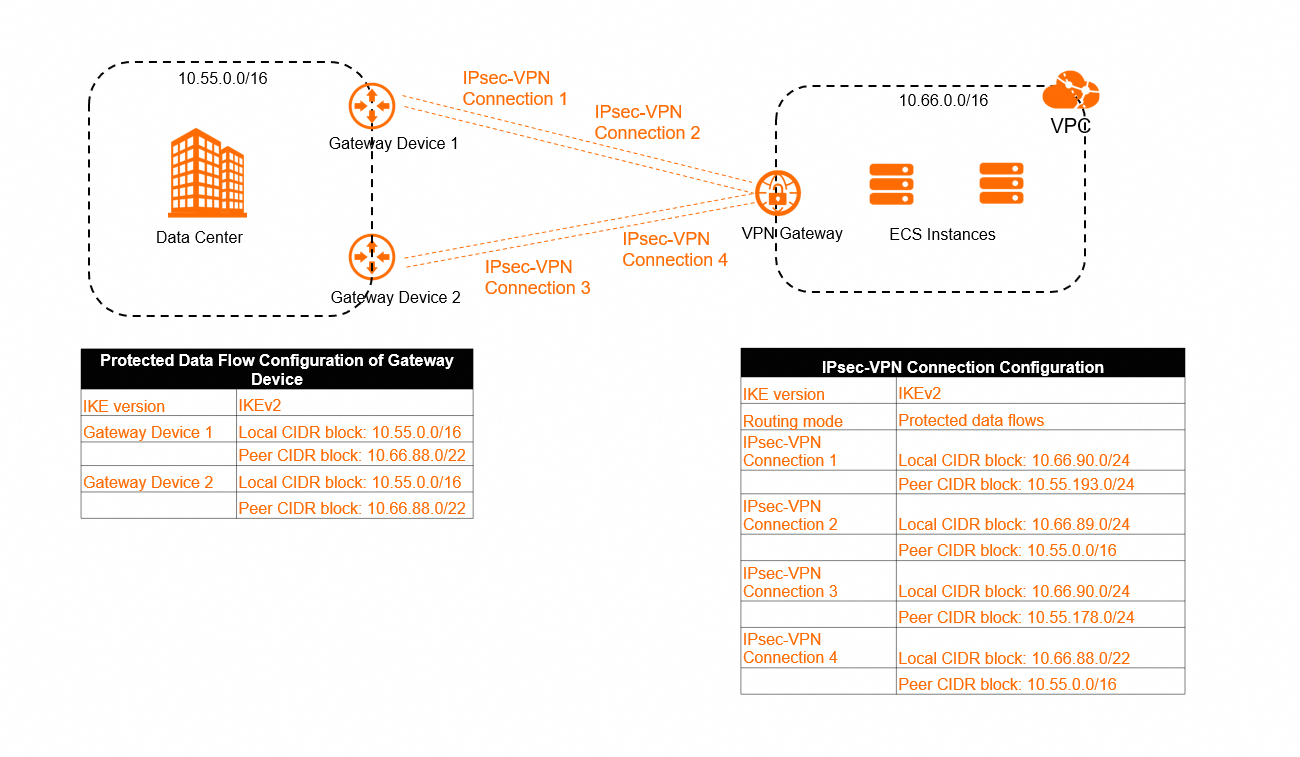
As shown in the following figure, if the traffic selector CIDR block configured on the on-premises gateway device and the traffic selector CIDR block configured on the IPsec connection have an inclusion relationship, and both ends use the IKEv2 version, then during IPsec negotiation, the Alibaba Cloud VPN gateway considers that the traffic selectors of both ends match. If the on-premises gateway device also supports the inclusion relationship (that is, it considers that traffic selectors with an inclusion relationship match each other), then the phenomenon occurs where the traffic selectors configured on the cloud and on-premises are different, but the IPsec-VPN connection can still negotiate successfully.
For example, on-premises gateway device 1 supports the inclusion relationship. When on-premises gateway device 1 negotiates with IPsec connection 1 and IPsec connection 2, the local CIDR block 10.55.0.0/16 on on-premises gateway device 1 includes the remote CIDR block 10.55.193.0/24 of IPsec connection 1 and the remote CIDR block 10.55.0.0/16 of IPsec connection 2; the remote CIDR block 10.66.88.0/22 of on-premises gateway device 1 includes the local CIDR block 10.66.90.0/24 of IPsec connection 1 and the local CIDR block 10.66.89.0/24 of IPsec connection 2. Therefore, both on-premises gateway device 1 and the Alibaba Cloud VPN gateway consider that the traffic selectors match each other, and on-premises gateway device 1 can negotiate successfully with both IPsec connection 1 and IPsec connection 2.
If the on-premises gateway device does not support the inclusion relationship (that is, it considers that traffic selectors with an inclusion relationship do not match each other), then the IPsec-VPN connection cannot negotiate successfully. Confirm with the vendor of the on-premises gateway device whether the on-premises gateway device supports the inclusion relationship.
If both the on-premises gateway device and the IPsec connection use the IKEv1 version, the traffic selectors of both ends must be exactly the same (no inclusion relationship is allowed) for the IPsec-VPN connection to negotiate successfully.
Possible impact:
As shown in the preceding figure, if there are multiple IPsec connections under one VPN gateway instance, and the traffic selector CIDR blocks of the multiple IPsec connections have an inclusion relationship, traffic may not be forwarded along the expected path.
For an IPsec connection configured with the traffic selector mode, after the IPsec connection is created, the system adds relevant routes to the policy-based route table of the VPN gateway instance by default, and each route has the same policy priority. In the scenario shown in the preceding figure, the system adds the following routes to the policy-based route table of the VPN gateway instance by default:
Route entry name | Source CIDR block | Destination CIDR block | Next hop | Weight | Policy priority |
Route entry 1 | 10.66.90.0/24 | 10.55.193.0/24 | IPsec connection 1 | 100 | 10 |
Route entry 2 | 10.66.89.0/24 | 10.55.0.0/16 | IPsec connection 2 | 100 | 10 |
Route entry 3 | 10.66.90.0/24 | 10.55.178.0/24 | IPsec connection 3 | 100 | 10 |
Route entry 4 | 10.66.88.0/24 | 10.55.0.0/16 | IPsec connection 4 | 100 | 10 |
According to Policy-based route matching rules, in a scenario where the policy priorities are the same, the system matches routes one by one in the order of the policy-based routes. Once a policy-based route is matched, the traffic is immediately forwarded according to the current policy-based route. The order of policy-based routes is determined by the time when the policy-based routes are delivered to the system. Usually, the policy-based route configured first is preferentially delivered to the system, but this cannot be fully guaranteed in the current situation. Therefore, a policy-based route configured later may be preferentially delivered to the system, causing the priority of the policy-based route configured later to be higher than that of the policy-based route configured first.
In the scenario shown in the preceding figure, it is possible that the on-premises data center sends request packets to the VPC over IPsec-VPN connection 1, while the VPC sends reply packets to the on-premises data center over IPsec-VPN connection 4, because route entry 4 may be preferentially delivered to the system, causing the priority of route entry 4 to be higher than that of route entry 1.
Solution:
Avoid adding traffic selector CIDR blocks with an inclusion relationship for the on-premises gateway device and the IPsec connection. We recommend that you add exactly matching traffic selector CIDR blocks for both ends. This method can improve the stability of the IPsec-VPN connection.
When creating an IPsec connection, add precise traffic selector CIDR blocks as much as possible to ensure that the traffic selector CIDR blocks of multiple IPsec connections under the VPN gateway instance do not overlap.
Configure a different policy priority and weight value for each policy-based route to ensure that traffic can match only one policy-based route.
If your VPN gateway instance does not support configuring policy priority, you can upgrade the VPN gateway instance. After the upgrade, the VPN gateway instance supports configuring policy priority for policy-based routes by default.
What should I do if access to the peer service times out when VPC NAT Gateway SNAT is combined with IPsec-VPN?
Cause: After the VPC NAT Gateway performs SNAT, the source IP of the traffic changes to the public IP used by the NAT Gateway. If the route configuration of the VPN gateway does not match the traffic path corresponding to the translated source IP, the return packets cannot be returned over the IPsec tunnel, which manifests as a timeout when accessing the peer service.
Solution:
In the destination-based route table of the VPN gateway, add a destination-based route pointing to the peer target CIDR block or IP, and select the corresponding IPsec connection as the next hop.
If you use the policy-based route mode, check whether the source IP configuration of the policy-based route is consistent with the actual source IP after SNAT translation (that is, the public IP used by the VPC NAT Gateway), so that the policy-based route can accurately match the traffic after SNAT translation.
What should I do if AD Connector or DNS resolution fails after the IPsec tunnel is connected?
Cause: When the IPsec tunnel ping test is normal and the domain name resolution configuration is correct, the fault may not be at the tunnel layer. If the underlying UDP port 53 is blocked by an on-premises firewall or security policy, DNS communication will be blocked, which may in turn cause AD Connector connection failure or RPC timeout (Error 1818).
Solution:
Check and allow UDP port 53 of the on-premises IDC DNS server (based on the DNS server IP in the actual environment) to ensure that cloud resources can communicate with the on-premises DNS through this port.
When synchronizing a Windows AD domain controller in a cross-cloud CEN+VPN environment, troubleshoot the packet loss rate and latency of bidirectional long pings, and capture packets on both the cloud and on-premises ends simultaneously for analysis if necessary.
What causes the IPsec tunnel failover to take a long time?
Cause: The overall time consumed by tunnel failover depends not only on the switchover speed of the Alibaba Cloud VPN gateway instance, but also on the fault detection and switchover mechanism of the on-premises VPN device. Even if the backup tunnel on the Alibaba Cloud side has taken effect, the on-premises device may not have completed the switchover due to configurations such as the heartbeat timeout time and probe interval, which manifests as an end-to-end recovery time significantly longer than expected (for example, recovery takes about 10 minutes).
Troubleshooting suggestions:
Check the status and logs of the Alibaba Cloud VPN gateway instance and the on-premises VPN device separately.
Confirm the actual effective time point of the backup tunnel and the time point when the traffic path completes the switchover.
Compare the two time points to evaluate whether the additional time consumption is caused by the probe and switchover policy of the on-premises device.
Health check failure (only for single-tunnel mode)?
Cause category | Cause | Solution |
Health check target IP address issue | The health check target IP address cannot be accessed. | On the host associated with the target IP address, use the target IP address to access the health check source IP address through the |
The host associated with the health check target IP address is working abnormally and cannot respond in time to the probe packets (ICMP packets) sent by the IPsec connection. | Check whether the host associated with the target IP address is normal. For more information, consult the vendor of the gateway device. | |
The route configuration and security policy associated with the health check target IP address have changed. For example, the security policy does not allow packets of the health check source IP address, target IP address, or ICMP protocol type. | On the on-premises gateway device side, check the route configuration and security policy associated with the target IP address to ensure that:
| |
The health check target IP address does not respond to the health check probe packets from the original path (the path through which the target IP address receives the probe packets). | Use the | |
IPsec-VPN connection-related issues | The negotiation status of the IPsec connection is interrupted. | Based on the logs of the IPsec connection, check whether the IPsec connection is always in the "Phase 2 negotiation succeeded" status. If the negotiation status of the IPsec connection is unstable, troubleshoot the IPsec connection issue based on Error codes and log keywords. Note: After the IPsec connection health check fails, the system resets the IPsec tunnel. In application scenarios other than active/standby IPsec-VPN connections, we do not recommend that you configure health check for the IPsec connection. |
Appendix: Error codes and log keywords
Use Ctrl+F (Windows) or Cmd+F (Mac) to find the corresponding error code or match the log keyword in the following table, and find the corresponding troubleshooting method.
Error code (console only) | Error code (API only) | Error message | Log keyword | Troubleshooting method |
The peer does not match. | PeerMismatch | The received protocol packet does not match the customer gateway information |
|
|
The algorithm does not match. | AlgorithmMismatch | The encryption algorithm, authentication algorithm, or DH group parameter does not match |
|
|
The encryption algorithm does not match. | EncryptionAlgorithmMismatch | The IPsec encryption algorithm does not match |
|
|
Check whether the authentication algorithm matches. | AuthenticationAlgorithmMismatch | The IKE authentication algorithm does not match |
|
|
The DH groups do not match. | DhGroupMismatch | The IKE phase 1 DH group parameter does not match |
|
|
The pre-shared key does not match. | PskMismatch | The pre-shared key parameter does not match |
|
|
PeerID does not match. | PeerIdMismatch | LocalID or RemoteID does not match or is incompatible |
|
|
DPD payload sequence is incompatible. | DpdHashNotifyCompatibility | DPD payload order compatibility |
| When the DPD function is enabled for the IPsec connection, the DPD payload order of the IPsec connection is |
DPD timed out. | DpdTimeout | DPD packet timeout |
|
|
The IKE version does not match. | IkeVersionMismatch | The IKE version number parameter does not match, or the negotiation mode does not match |
|
|
The negotiation mode does not match. | NegotiationModeMismatch | The negotiation mode does not match |
|
|
NAT-T does not match. | NatTMismatch | NAT traversal does not match |
| Check whether the NAT traversal function status of the IPsec connection and its on-premises gateway device is the same. If it is different, modify it to ensure that the configurations on both ends are the same. If the on-premises gateway device is behind a NAT Gateway, we recommend that both the IPsec connection and its on-premises gateway device enable the NAT traversal function. |
SA Lifetime does not match. | LifetimeMismatch | The Lifetime parameter does not match |
| Check the SA lifetime (seconds) is the same. If it is different, modify it to ensure that the configurations on both ends are the same. The SA lifetime (seconds) configured for the IPsec connection and its on-premises gateway device is not required to be the same, but because different gateway devices belong to different vendors, to ensure the stability of the IPsec-VPN connection, we recommend that both ends be configured with the same SA lifetime (seconds). configured in the IKE configuration phase and IPsec configuration phase of the IPsec connection and its on-premises gateway device. |
The security protocol does not match. | SecurityProtocolMismatch | The security protocol parameter does not match |
| Check whether the security protocol used by the on-premises gateway device is ESP (Encapsulating Security Payload). If not, change it to ESP. For the security protocol used by the IPsec-VPN connection, the Alibaba Cloud VPN gateway supports only ESP, and does not support AH (Authentication Header). |
The encapsulation mode does not match. | EncapsulationModeMismatch | The encapsulation mode does not match |
| Check whether the encapsulation mode used by the on-premises gateway device is tunnel mode. If not, change it to tunnel mode. For the encapsulation mode used by the IPsec-VPN connection, the Alibaba Cloud VPN gateway supports only tunnel mode, and does not support transport mode. |
The algorithm is incompatible. | AlgorithmCompatibility | Algorithm compatibility | None | The authentication algorithm configured in the IKE configuration phase and IPsec configuration phase of the IPsec connection and its on-premises gateway device are incompatible. We recommend that both ends use another authentication algorithm, such as md5. |
Protected Data Flow does not match. | TrafficSelectorMismatch | The traffic selector CIDR block parameter does not match |
|
|
PFS does not match. | PfsMismatch | The IPsec phase 2 DH group parameter does not match |
| Check whether the configuration status of the PFS function in the IPsec configuration phase of the IPsec connection and its on-premises gateway device is the same. If it is different, modify it to ensure that the configurations on both ends are the same.
|
The commit bit does not match. | CommitMismatch | The commit bit does not match | None | Check whether the commit bit of the on-premises gateway device is enabled. If it is, disable the commit bit. The commit bit is used to ensure that IPsec protocol negotiation is completed before protected data is sent. The Alibaba Cloud VPN gateway does not support configuring the commit bit. |
The proposal does not match. | ProposalMismatch | The proposal does not match |
|
|
Negotiations failed. | NegotiationFailed | Protocol negotiation failed |
| Reset the IPsec-VPN connection to trigger IPsec protocol re-negotiation, and the system will check again. |
Phase 1 negotiations timed out. | Phase1NegotiationTimeout | Failed to receive phase 1 protocol packets, and negotiation failed due to timeout |
|
|
Check whether Phase 2 negotiations timed out. | Phase2NegotiationTimeout | Failed to receive phase 2 packets, and negotiation failed due to timeout | None |
|
Response packets cannot be received from the peer. | NoResponse | The peer gateway does not respond |
|
|
The delete packet is received from the peer. | ReceiveDeleteNotify | Received a delete packet from the peer |
| The IPsec connection side received the |
The reason for the negotiation exception is not found. | NoExceptionFound | The cause of the negotiation exception was not diagnosed | None | The current result may be caused by the IPsec-VPN connection not having started negotiation. Reset the IPsec-VPN connection on the Alibaba Cloud side or the peer network device side. On the Alibaba Cloud side, you can modify the value of Effective Immediately under the IPsec connection, save it, and then change Effective Immediately back to the original configuration value to trigger the start of IPsec protocol negotiation. Then refresh the current page to view the check result. |