Use cases
If your applications are deployed in multiple regions, you can use Global Traffic Manager (GTM) to route user queries to the nearest service. GTM allows you to configure intelligent resolution based on user regions and automatically fail over to a healthy application service in another region during a service outage.
Prerequisites
You have a domain name, such as
cloud-example.com, that is managed by Alibaba Cloud DNS. The service domain name that you want to connect to GTM iswww.cloud-example.com.NoteIf your domain name is not managed by Alibaba Cloud DNS, you can still use GTM. Add a CNAME record with your current DNS provider, pointing your service domain name to the GTM access domain name.
You have purchased a GTM instance, such as
gtm-cn-35t3pd5**06. If you do not have an instance, see Purchase a subscription instance.The goal is to configure the following intelligent resolution:
Query source region
Application service address
Failover address
South China
1.1.XX.XX
3.3.XX.XX
North China
2.2.XX.XX
3.3.XX.XX
Global
3.3.XX.XX
1.1.XX.XX, 2.2.XX.XX
Solution architecture

Procedure
Go to the Alibaba Cloud DNS - Global Traffic Manager console.
On the Access Zone tab, click Create Access Zone.
In the Select Scenario dialog box, select Custom Scenario.
On the Create Access Zone page, click the access domain name icon and select Basic Configuration.
On the Basic Configuration page, configure the parameters and click Submit. For more information, see Access Domain Name.
On the Access Zone page, click the address pool icon and select Basic Configuration. On the Basic Configuration page, configure the parameters and click Submit. For more information, see Basic configuration. Create three address pools named South China, North China, and Global.
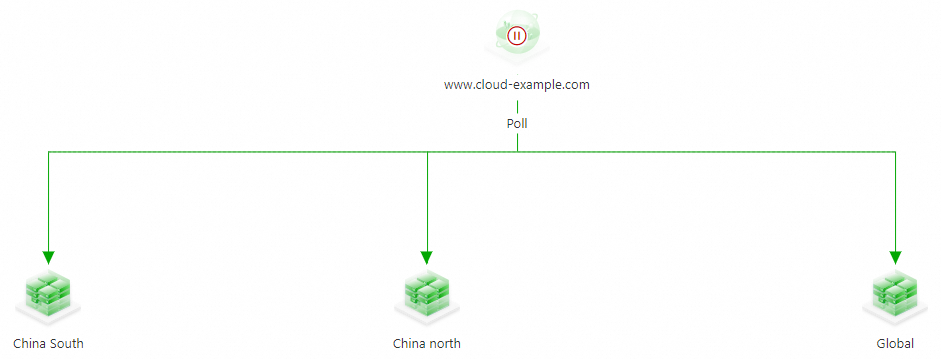
On the Access Zone page, click the address pool icon and select Add Address. Add the planned addresses to each of the three address pools. On the Add Address page, configure the parameters and associate a health check template. For this example, use the TCP Protocol on Port 80.
NoteTo create a health check template, click Add Health Check Template. For more information, see Health Check Template.
Click the load balancing policy name under the access zone icon and select Configure Load Balancing Policy. To implement geolocation-based routing, set the load balancing policy of address pools to Nearest Source. For more information, see Configure a load balancing policy for address pools. In the Query Source section, map the Source for the three address pools to South China, North China, and Global, respectively.
ImportantGeolocation lines are available under Region - China Mainland and can be configured down to the province level.
To ensure that requests from unmatched source regions are resolved, you must configure a Global Default line.
If an address pool for a specific geolocation line becomes unavailable, GTM responds with an address from the Global Default line.
If all address pools become unavailable, GTM responds with all addresses from the default address pool using round-robin. If the default line has multiple address pools, GTM selects the non-empty address pool with the lowest priority number. If no default line exists, GTM selects the non-empty address pool with the lowest priority number from all available lines.

Click the load balancing policy name under the address pool icon and select Configure Load Balancing Policy. To implement primary/standby disaster recovery, select the Sequential (Preemptive Mode) mode. For more information, see Configure a load balancing policy for addresses.
ImportantThe lower the priority number of an address, the higher its resolution priority. GTM resolves an address with a higher priority number only when the address with a lower priority number is unavailable.
The address pool priority number has two functions. First, for queries from the same source, GTM resolves the address pool with the lower priority number first. Second, if all address pools become unavailable, GTM returns all IP addresses from the non-empty address pool with the lowest priority number.
 Important
This example demonstrates the configuration. If you see red or orange alerts in your configuration, investigate the health check status of your addresses.
Configure monitoring alerts for the instance. For more information, see Configure alerts.
On the Access Zone page, click the access domain name icon and select Enable.

On the Confirm Access Zone Enabling page, verify that the access zone is correct and click OK.
ImportantIf a record with the same name and type already exists in Public Zone of Alibaba Cloud DNS, queries for that record type will first follow the GTM policy for intelligent DNS resolution to enable advanced features like traffic load balancing and failover.
If you disable or delete the GTM instance, Alibaba Cloud DNS resolves the domain name.