Enable tracking to collect open and click event data for emails you send through Direct Mail.
How tracking works
Open tracking and click tracking use different mechanisms:
Open tracking: Direct Mail embeds a transparent image in the email. When a recipient opens the email, the image loads and an open event is recorded.
-
Click tracking: Direct Mail replaces eligible links with redirect URLs that route through the Direct Mail tracking service. When a recipient clicks a tracked link, the service records the event and redirects the recipient to your original URL.
Open and click event data is collected in real time and displayed in the console.
Prerequisites
Before you begin, make sure that you have:
A sender domain with Verified status
An email tag created on the Set Email Tag page, referenced when sending
Email requirements
Your email must meet the following requirements before you enable tracking:
Use an existing email tag.
Use HTML email format. The email body must include a
<body>element, for example:<body>Your email content</body>.For click tracking, links must be HTML
<a>tags in the HTML body, for example:<html><body><a href="hyperlink_to_track">test</a></body></html>. Links must be publicly accessible and start withhttp://orhttps://.
Enable tracking
Send emails from the console
When creating an email sending task, select the Enable checkbox for email tracking.
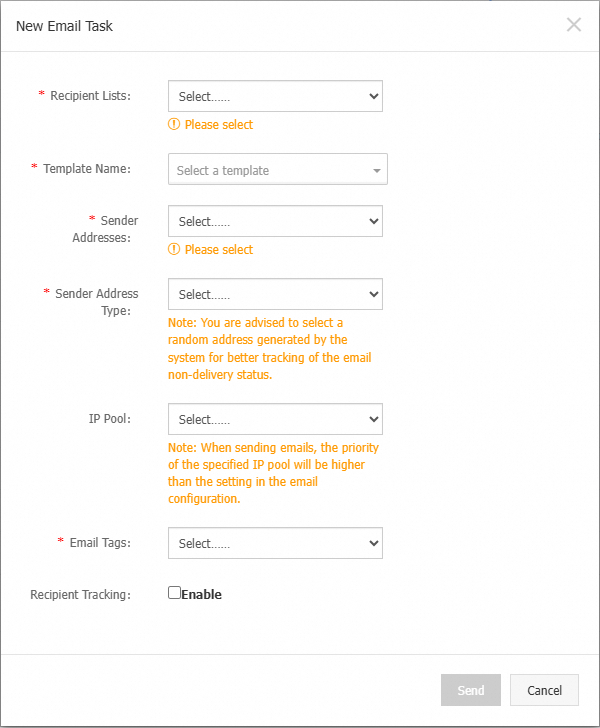
Make sure the email content meets the requirements listed above.
Send emails by API or SDK
Set the
Tagparameter to an existing email tag and theClickTraceparameter to"1".Set the email body using the
setHtmlBodymethod. Make sure the content meets the requirements listed above.
To verify tracking is active, check the raw email content for an img tag (open tracking) or a tracking link (click tracking) at the end of the body.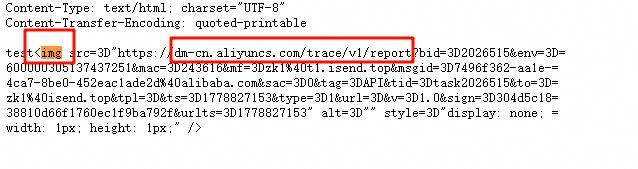
Send emails by SMTP
Set the X-AliDM-Trace header as described in Track email open data by tag when sending by SMTP. Use the following values:
|
Header field |
Value |
|
|
An existing email tag |
|
|
|
|
|
|
To exclude a specific link from click tracking, add the data-alidm-traceoff attribute to its <a> tag in the HTML content. For example:
<a href = "http://www.aliyun.com" data-alidm-traceoff>Alibaba Cloud</a>SMTP requirements
The MIME type of the email body must be
text/html;charset=UTF-8. Set theContent-Transfer-Encodingheader toquoted-printable. Make sure the content meets the requirements listed above.
Python example:
from email.mime.multipart import MIMEMultipart
from email.mime.text import MIMEText
msg = MIMEMultipart('alternative')
texthtml = MIMEText('''<html><body><a href="https://www.aliyun.com">Email Tracking</a></body></html>''', _subtype='html',
                    _charset='UTF-8')
if 'Content-Transfer-Encoding' in msg:
    # If the header is already set, replace the first value (this header usually has only one value).
    msg.replace_header('Content-Transfer-Encoding', 'quoted-printable')
else:
    # If the header is not set, add it.
    msg['Content-Transfer-Encoding'] = 'quoted-printable'
msg.attach(texthtml)
SMTP call example for Python 3.6 and later
Java example:
import javax.mail.internet.MimeBodyPart;
// Assume that msg is the MimeMessage object you are working with. This example uses MimeBodyPart for demonstration.

// Create the message body part.
MimeBodyPart textPart = new MimeBodyPart();
textPart.setContent("<html><body><a href=\"https://www.aliyun.com\">Email Tracking</a></body></html>", "text/html; charset=UTF-8");
// Check if 'Content-Transfer-Encoding' is set.
String[] cte = textPart.getHeader("Content-Transfer-Encoding");
if (cte == null || cte.length == 0) {
    // If not set, add the header.
    textPart.addHeader("Content-Transfer-Encoding", "quoted-printable");
} else {
    // If it is set, replace the first value (this header usually has only one value).
    textPart.setHeader("Content-Transfer-Encoding", "quoted-printable");
}