Key concepts involved in developing with DataWorks modules, including Data Integration, Data Modeling, DataStudio, DataAnalysis, and DataService Studio.
General concepts
Workspace
A workspace is the fundamental unit for managing tasks and members and for assigning roles and permissions in DataWorks. A workspace administrator can add members to the workspace and grant them roles such as Administrator, Developer, O&M, Deploy, Security Administrator, or Visitor to enable collaboration across multiple roles.
We recommend that you organize workspaces by department or business unit.
Resource group
A DataWorks resource group provides the computing resources required by all functional modules in DataWorks. Its status affects feature stability, while its quota impacts the performance of tasks and services.
DataWorks resource groups differ from the resource groups in your Alibaba Cloud account. An Alibaba Cloud resource group helps you manage and authorize resources within your account. In contrast, a DataWorks resource group is used specifically to run tasks.
-
In DataWorks, unless specified as a legacy resource group, a resource group refers to a serverless resource group, and its usage type is General-purpose.
-
A serverless resource group can be used for Data Integration, data scheduling, and DataService Studio.
Basic mode and standard mode
DataWorks provides two workspace modes to meet different security requirements: basic mode and standard mode. In standard mode, a DataWorks workspace corresponds to two data sources, which allows you to isolate data between development and production environments.
Computing resource
A computing resource is a resource instance that a compute engine uses to run data processing and analysis tasks, such as a MaxCompute project (quota group) or a Hologres instance.
You can add multiple types of computing resources to a workspace. After you bind a computing resource, you can develop and schedule tasks that use it within that workspace.
Data Integration
-
Data source
A DataWorks data source connects to a data storage service. Before you configure a synchronization task, add the source and destination data sources. You can then select them to specify which databases to read from and write to. Multiple data source instances can be added to a single workspace.
-
Data synchronization
The data synchronization feature in Data Integration synchronizes structured (for example, RDS and DRDS), semi-structured, and unstructured (for example, OSS and TXT) data, as long as the data can be abstracted into a logical two-dimensional table. Fully unstructured data, such as MP3 files stored in OSS, is not supported. Synchronization methods include offline, real-time, and full or incremental synchronization for single tables or entire databases. Serverless synchronization tasks are also supported, eliminating the need for a resource group.
Data Modeling
-
Data modeling
As businesses grow, enterprise data increases exponentially, often resulting in large, complex datasets with inconsistent standards. The DataWorks Data Modeling service provides a structured approach to managing these datasets and helps enterprises extract more value from their data.
-
Reverse modeling
Reverse modeling generates logical models from existing physical tables, helping you quickly create models without manual effort.
-
Modeling space
A modeling space lets you share data modeling tools across multiple DataWorks workspaces. This is useful when you need to reuse a single data warehouse plan in a complex data system, enabling unified data warehouse planning, dimensional modeling, and metric definition across your entire data architecture.
-
Dimension table
Based on your business's data domain plan, you can extract potential dimensions for data analysis and store these dimensions and their attributes in a dimension table. For example, in e-commerce business analysis, available dimensions and their attributes might include the order dimension (with attributes like order ID, creation time, buyer ID, and seller ID), the user dimension (gender, birth date), and the product dimension (product ID, name, launch date). You can create dimension tables for orders, users, and products, where the dimension attributes are recorded as fields in the table.
-
Fact table
In line with business process planning, you can analyze the actual data generated during each business process and store these data fields in a fact table. For example, for the order placement process, you can create an order placement fact table to record data fields such as order ID, creation time, product ID, quantity, and amount. You can then deploy these fact tables to a data warehouse and use ETL to aggregate and store real data according to the fact table's definition, making it accessible for business analysis.
-
Aggregate table
An aggregate table organizes statistical data for multiple derived metrics within a data domain that share the same time period and dimensions. It represents a highly abstracted summary of business operations and serves as a foundation for subsequent business queries, OLAP analysis, and data distribution.
-
Application table
An application table is designed for specific business scenarios and organizes statistical data for multiple atomic metrics, derived metrics, or statistical granularities that share the same time period and dimensions. It provides a basis for subsequent business queries, OLAP analysis, and data distribution.
-
Data mart
A data mart is a way of organizing data that is based on business categories and tailored for specific application scenarios or products. It is typically located in the application layer of the data warehouse and relies on integrated data from the common layer.
-
Data warehouse planning
When using DataWorks for data modeling, data warehouse architects or modeling team members can use the data warehouse planning page to design data layers, business categories, data domains, business processes, data marts, and subject areas. After the design is complete, model designers can use these planned elements to manage the layers and domains of the models they build.
-
Data Import Layer: This layer is used to ingest raw data from sources such as databases, logs, and messages. Source data is loaded into the ODS layer after a series of ETL operations. This layer can only store ODS tables.
-
Common Layer: This layer is used to process and integrate common data from the source layer, establish unified metrics and dimensions, and build reusable detailed fact data and summary data for analysis and statistics. This layer can contain fact tables, dimension tables, and summary tables.
-
Application Layer: Obtains processed and integrated data from the public layer to perform personalized data statistics for specific application scenarios or designated products based on actual application requirements. This layer can contain application tables and dimension tables.
-
-
Data layer
The data layer feature in DataWorks creates five default layers for you: the Operational Data Store (ODS) layer, the Dimension (DIM) layer, the Data Warehouse Detail (DWD) layer, the Data Warehouse Summary (DWS) layer, and the Application Data Service (ADS) layer. The function of each layer is described as follows:
-
ODS (Operational Data Store)
The ODS layer receives and processes raw data that needs to be stored in the data warehouse system. Its table structure is consistent with the table structure in the source data system and serves as the data preparation area for the data warehouse.
-
DWD (Data Warehouse Detail)
The DWD layer builds data models based on business activity events. It is used to construct the most granular fact tables. Depending on your data usage patterns, you can denormalize by appropriately adding redundant key dimension attribute fields to the fact tables, creating wide tables. This reduces joins between fact tables and dimension tables, improving usability.
-
DWS (Data Warehouse Summary)
The DWS layer builds data models by analyzing subject objects. It constructs public-granularity summary fact tables based on the metric requirements of upstream applications and products.
-
ADS (Application Data Service)
The ADS layer is used to store personalized statistical metric data for data products and to generate various reports.
-
DIM (Dimension)
The DIM layer uses dimensions to build data models. It can store dimension tables for logical models based on business needs, or it can store dimension definitions for conceptual models. By defining dimensions, determining primary keys, adding dimension attributes, and associating different dimensions, you can build consistent analytical dimension tables for the entire enterprise, which helps reduce inconsistencies in data calculation standards and algorithms.
-
-
Subject area
A subject area is used to partition a data mart from an analytical perspective and is usually a collection of closely related data subjects. You can group these data subjects into different subject areas based on business focus. For example, the e-commerce industry is typically divided into transaction, member, and product subject areas.
-
Data domain
A data domain is a collection of closely related data subjects. It is a logical grouping of business data based on dimensions such as business category, data source, or data purpose, which places similar data together to facilitate quick retrieval. The classification criteria vary depending on the intended use of the data. For example, the e-commerce industry is typically divided into transaction, member, and product data domains.
-
Business process
A business process is a business activity performed by an enterprise within a specified data domain and is the logical subject to be analyzed in data modeling. For example, the transaction domain can include business processes such as adding to cart, placing an order, and making a payment.
-
Composite metric
A derived metric provides statistics on the volume of a business activity over a certain period, but it does not support comparative analysis, such as calculating business growth rates or differences. For example, you cannot use it to calculate the week-over-week growth rate of a business activity. To address this, DataWorks provides the composite metric, which is calculated from derived metrics using operational rules. This helps you define business metrics with greater flexibility and granularity.
-
Data metric
DataWorks Data Modeling provides the data metric feature for establishing a unified metric system.
A metric system consists of an atomic metric, a modifier, a time period, and a derived metric.
-
Atomic metric: A measurement based on a specific business process, such as "payment amount" in the "order payment" business process.
-
Modifier: A constraint that limits the business scope of a metric, such as limiting the statistical scope of "payment amount" to "maternity and infant products."
-
Time period: The time range or point in time for a metric's statistics, such as specifying the period for "payment amount" as "last 7 days."
-
Derived metric: A combination of an atomic metric, modifiers, and a time period. For example, "payment amount for maternity and infant products in the last 7 days."
-
-
Lookup table
A lookup table defines the range of values for a field standard. In a lookup table, you can specify the content and range of data that a field standard can accept. For example, the content of the lookup table for the gender field standard should be male or female.
-
Field standard
A field standard is a data criterion used to uniformly manage data that has the same meaning but different field names. A field standard can define a field's value range, unit of measurement, and other properties. When a field standard changes, you can quickly locate or modify the corresponding tables, which greatly improves application efficiency and accuracy.
DataStudio
-
Node
The DataStudio module in DataWorks provides various types of nodes, including Data Integration nodes for data synchronization, compute engine nodes for data cleansing (such as ODPS SQL, Hologres SQL, and EMR Hive), and general-purpose nodes for complex logic processing on compute engine nodes (such as virtual nodes for managing multiple nodes and do-while nodes for looping code execution). You can combine these nodes to meet your different data processing needs.
-
Workflow
A workflow is a business-centric way to organize code development and improve task management efficiency.
Workflows help you organize code from a business perspective:
-
Supports code organization based on task type.
-
Supports multi-level subdirectories (up to four levels recommended).
-
Allows you to view and optimize the entire workflow from a business perspective.
-
Supports organizing deployment and O&M based on workflows.
-
Provides a workflow dashboard to help you develop more efficiently.
-
-
Auto triggered workflow
An auto triggered workflow provides a business-oriented, visual DAG development interface. You can integrate sub-task nodes through drag-and-drop, establish task dependencies, and build data processing pipelines to manage complex task projects efficiently.
-
Notebook
The DataWorks notebook provides an interactive development environment for data exploration, analysis, and AI model development by integrating code (such as SQL and Python), text, execution results, and visualization charts.
-
SQL component
Available only for MaxCompute, you can abstract common logic in SQL into an SQL script template to improve code reusability.
The process of handling SQL code typically involves importing one or more source tables and processing them through filtering, joining, and aggregation operations to produce a new target table required by the business. An SQL script template is a procedural template for SQL code with multiple input and output parameters.
-
Scheduling dependency
A scheduling dependency between tasks defines the order in which they run. If node B can run only after node A has run, A is an upstream dependency of B, and B depends on A. In a Directed Acyclic Graph (DAG), dependencies are represented by arrows between nodes.
-
Data timestamp
A data timestamp typically refers to the date directly associated with a business activity, reflecting the actual time the business data was generated. This concept is particularly important in offline computing scenarios. For example, in retail, if you need to calculate the sales revenue for October 10, 2024, you would typically start the calculation in the early morning of October 11, 2024. The resulting data actually represents the revenue for October 10, 2024, which is the data timestamp.
-
Output name
The output name is the name of a task's output point. It is a virtual entity used to connect upstream and downstream tasks when you set up dependencies within a single tenant (Alibaba Cloud account).
When you set up upstream and downstream dependencies for a task, you must use the output name, not the node name or node ID. Once set, the task's output name also serves as the input name for its downstream nodes.
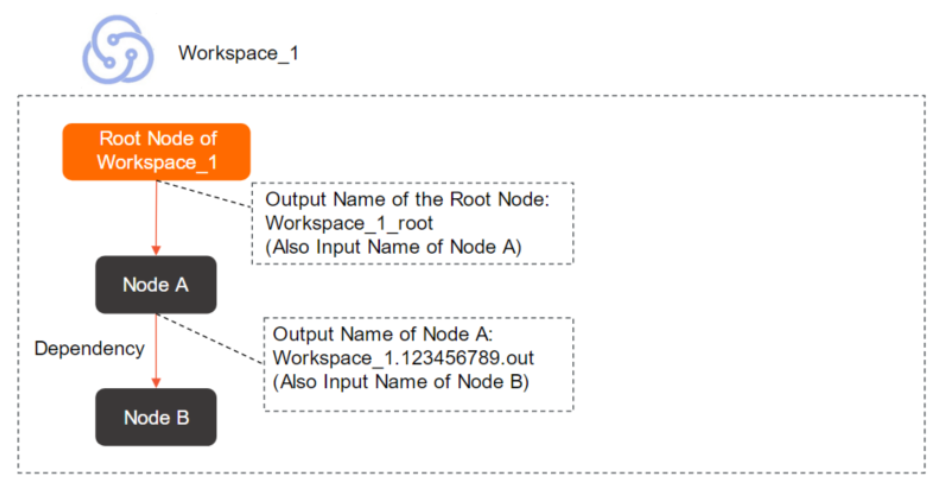 Note
NoteThe output name serves as a unique identifier for a task within a tenant. The default output name for each node is
WorkspaceName.SystemGenerated9DigitNumber.out. You can add a custom output name to a task, but you must ensure that the output name is unique within the tenant. -
Output table name
The output table name should be the table produced by the current task. Correctly filling in the output table name makes it easier for downstream tasks to confirm that the data comes from the expected upstream table when setting dependencies. Manually modifying an automatically parsed output table name is not recommended. The output table name serves only as an identifier; modifying it does not affect the actual table name produced by the SQL script, which is determined by the SQL logic.
NoteThe Output Name of a node must be globally unique, while the Output Table Name does not have this restriction.
-
Scheduling parameter
A scheduling parameter is a variable in your code that is dynamically assigned a value at runtime. When your code needs runtime environment information such as the date or time, you can assign values based on scheduling parameter definitions in the DataWorks scheduling system.
-
Data catalog
A data catalog is a structured list or map of all data assets within an organization, including databases, tables, and files. In DataWorks, the data catalog records metadata for these assets.
-
Computing resources, data sources, and data catalogs
These three are independent but related objects. Their relationships are as follows:
-
When you bind a computing resource, a data source and a data catalog can be created in association.
-
When you create a data source, a data catalog can be created in association.
-
When you create a data catalog, you cannot create a data source or a computing resource in association.
-
Operation Center
-
Scheduling time
The expected execution time for an auto triggered task, which can be set to the minute.
ImportantMany factors can affect a task's execution, which means a task will not necessarily run immediately when its scheduled time is reached. Before running a task, DataWorks verifies that upstream tasks have run successfully, the scheduled time has been reached, and scheduling resources are sufficient. A task only begins to run after all these conditions are met.
-
Data timestamp
A data timestamp typically refers to the date directly associated with a business activity, reflecting the actual time the business data was generated. This concept is particularly important in offline computing scenarios. For example, in retail, if you need to calculate the sales revenue for October 10, 2024, you would typically start the calculation in the early morning of October 11, 2024. The resulting data actually represents the revenue for October 10, 2024, which is the data timestamp.
-
Auto triggered task
An auto triggered task is a task that is automatically triggered for execution by the scheduling system based on a user-defined schedule. In the auto triggered task list in Operation Center, you can perform a series of O&M and management operations on a task, such as viewing its DAG, running tests, performing a data backfill, and changing the task owner.
-
Auto triggered instance
An auto triggered instance is a task instance that is automatically generated for execution based on the scheduling configuration of an auto triggered task. For example, if a task is set to run every hour, the platform generates 24 task instances in one day, with one instance automatically triggered to run each hour. Only instances have information such as a running status. In the auto triggered instance list in Operation Center, you can perform a series of O&M operations on an instance, such as terminating, setting to success, and re-running.
-
Data backfill
DataWorks automatically generates a data backfill instance based on the task and time range you specify. The data backfill feature is mainly used for re-running historical data and correcting data. With this feature, you can re-calculate data for any past or future time period to ensure data completeness and accuracy.
-
Baseline
Based on the configurations you set for a baseline, such as priority, committed completion time, and alert margin, the system automatically monitors all tasks on the baseline and issues warnings for any risks that may affect the timely output of tasks. The higher the number indicating the baseline priority, the higher the priority. DataWorks allocates more resources to tasks on high-priority baselines to ensure their output time. The alert margin is mainly reserved for handling exceptions. DataWorks calculates the alert time by subtracting the alert margin from the committed completion time. If a task cannot produce output within the alert time, the platform promptly issues an alert to inform the relevant business parties of the risk.
Data Governance Center
-
Health score
A health score is a comprehensive metric ranging from 0 to 100 that measures data asset health based on governance items. It reflects governance effectiveness at the tenant, workspace, or individual level across five dimensions: storage, computing, R&D, quality, and security.
-
Governance item
A governance item is an issue identified in a data asset that requires optimization or resolution, covering areas such as development standards, data quality, security and compliance, and resource utilization. Governance items are classified as mandatory (enabled by default and unmodifiable) and optional (enabled based on your needs). For example, excessively long task runtimes, nodes with consecutive errors, and unaccessed leaf nodes are all governance items.
-
Check item
A check item is a proactive governance mechanism that performs pre-checks at key stages such as task submission and deployment to detect potential problems with code or data, such as full table scans or missing scheduling dependency configurations. If non-compliant content is detected, the system generates a check item event, automatically intercepts the action, and enforces development standards.
-
Data governance plan
A data governance plan provides templates for different governance scenarios. Guided by governance goals for a specific period, it helps you select relevant governance and check items and identify objects for optimization. This enables continuous tracking of governance effectiveness and drives the team to achieve goals through quantitative evaluation.
-
Knowledge base
The knowledge base contains definitions of built-in check and governance items in the Data Governance Center. It helps governance personnel quickly identify specific issues and provides reference information and practical guidance for solving problems.
Security Center
-
Data permission
Security Center provides fine-grained features for data permission requests, approvals, and audits, implementing least-privilege access control. You can also easily track the permission approval process at each stage. For more information, see Data access control.
-
Data content security
Security Center provides features such as data classification and grading, sensitive data identification, sensitive data access auditing, and data source traceability. During business process handling, it can quickly and timely identify data with potential security risks, ensuring the security and reliability of data content. For more information, see Data Security Guard overview.
Data Quality
-
Quality monitoring
Quality monitoring continuously tracks and detects the status and changes of data objects (such as specific partitions of a partitioned table) to ensure they meet preset quality requirements. In DataWorks, you can set up quality monitoring triggered by scheduling events to automatically perform quality checks and send alerts to the relevant personnel.
-
Quality rule
A quality rule is a specific condition or logical standard for evaluating whether data quality meets expected requirements. For example, "Customer age cannot be less than 0" are both quality rules. In DataWorks, you can flexibly configure different quality rules according to your business needs and apply them to the corresponding data range for validation. When data that does not meet the rule's expectations is found, the system automatically identifies it and issues a quality alert.
-
Rule template
A rule template is a sample quality rule with predefined validation logic. You can use it directly or modify the validation thresholds as needed to create quality rules that meet your requirements. DataWorks provides various types of rule templates to choose from and also supports creating new templates through custom SQL:
-
System template rules: You can create rules using the built-in rule templates provided by DataWorks.
-
Custom template rules: If the built-in rule templates cannot meet your needs for monitoring data quality in partition expressions, you can use custom rule templates. You can also save frequently used custom rules as rule templates for easy reuse.
-
Data Security Guard
-
Data classification and grading
Data classification and grading: This is used to classify your current data into sensitivity levels based on its value, content sensitivity, impact, and distribution scope. Different sensitivity levels have different control principles and data development requirements.
-
Sensitive data identification rule
Sensitive data identification rule: Based on the source and purpose of the data, you can define data categories and configure sensitive field types to identify sensitive data in the current workspace. DataWorks provides built-in data categories and identification rules, and you can also customize them as needed.
-
Data masking rule
Data masking rules are used to configure masking for identified sensitive data. Depending on business control requirements, the data masking controls for different sensitivity levels vary.
-
Risk identification rule
Risk identification rules use intelligent analysis technology to proactively discover and issue alerts for risky operations. This helps you conduct more comprehensive risk management and effectively identify and avoid risks.
Data Map
-
Metadata
Metadata is data that describes other data. It can specify a data's attributes (name, size, data type), structure (fields, types, lengths), or related information (location, owner, output task, access permissions).
-
Data lineage
Data lineage describes the relationships formed as data is processed and transformed, showing the entire data lifecycle from creation through processing to consumption. On the DataWorks platform, data lineage is visualized to help users quickly locate problems and assess the impact of changing a table or field.
-
Data album
A data album is a way of organizing and managing categories of data tables from a business perspective. You can add specified tables and other assets to a target album for quick and easy retrieval and location.
DataAnalysis
-
SQL query
SQL query (legacy) uses standard SQL statements to query and analyze data from various data sources. For more information, see SQL query (legacy).
-
Workbook
A workbook is a tool for online editing and management of data tables. It supports importing data from SQL query results or local files into a target workbook for further review, analysis, and visualization. It also supports exporting, downloading, and sharing data from the workbook, flexibly meeting daily data analysis needs. For more information, see Create and manage a workbook.
-
Data insight
Data insight supports data exploration and visualization. You can use it to understand data distribution, create data cards, and combine them into data reports. Data insight results can be shared as long-form reports and use AI technology to assist with data analysis, helping you interpret complex data and support business decisions.
DataService Studio
-
API
An API (Application Programming Interface) in DataService Studio allows developers to quickly create data APIs based on various data sources. These APIs can be called in business applications, software, systems, and reports to retrieve and consume data.
-
Function
A function acts as a filter for a data API. When used as a pre-filter, a function can process request parameters, for example, by changing or assigning their values. As a post-filter, it can process the returned results, such as changing the data structure or adding content.
-
Data push
DataWorks provides a data push service that allows you to create push tasks. Within a task, you can write SQL code for single or multiple table queries to define the data scope and organize the push message content using rich text or tables. By configuring a scheduling cycle and time, you can periodically push data to a target webhook.
Open Platform
-
OpenAPI
The DataWorks Open Platform provides OpenAPI capabilities, allowing you to call DataWorks API operations to integrate and interact between your applications and DataWorks.
-
OpenEvent
DataWorks OpenEvent delivers status change notifications as event messages that users can subscribe to and respond with custom actions. For example, you can subscribe to table change events through OpenEvent to achieve real-time monitoring of core tables, or subscribe to task change events for customized task monitoring.
-
Extensions
DataWorks Extensions are plug-ins that, in combination with OpenAPI and OpenEvent, allow you to apply custom logic to user actions in DataWorks and implement behavioral controls such as interception and blocking. For example, you can develop a task change control extension to implement a custom task deployment workflow.