DataWorks Copilot is the built-in AI assistant for DataWorks. Using AI inference and Natural Language Processing (NLP), it lets you generate and refactor SQL and Python code, automate complex data development and governance tasks, and get intelligent assistance directly in the modules you already use — all through natural language.
How it works
Copilot integrates three capabilities into DataWorks:
| Capability | What it does | Best for |
|---|---|---|
| Agent | Autonomously plans and executes multi-step tasks across DataWorks modules | Data integration pipelines, ETL workflows, governance remediation, O&M diagnostics |
| AI coding assistant | Generates, completes, refactors, debugs, and explains SQL and Python | Single coding tasks: write a query, fix a bug, add comments |
| Quick AI actions | Embedded one-click actions inside specific DataWorks modules | Visualize query results, create tables, generate publish descriptions, diagnose task failures |
Prerequisites
Before you begin, ensure that you have:
-
A DataWorks account at Basic Edition or higher
-
An Alibaba Cloud account owner, tenant administrator, or a user with equivalent permissions to activate Copilot for your organization
Some features are only available in the new Data Studio.
Activate Copilot
Copilot requires a one-time activation per Alibaba Cloud account. Once activated, all users under the account can start using it.
-
Click the Copilot icon in the upper-right corner of the DataWorks interface.
-
Read the DataWorks Copilot Service Agreement.
-
Click Confirm Participation.
Copilot is free of charge during public preview. After the public preview ends, it will become a paid service. Pricing details will be announced later.
Open Copilot
Access Copilot from three entry points:
-
Global entry point: Click the Copilot icon in the upper-right corner of the DataWorks interface to open the Copilot Chat window.
-
In the editor: In the intelligent code editor for code-based nodes, right-click or use a keyboard shortcut to open Copilot.
-
Embedded in modules: Look for quick action buttons marked with the Copilot icon in specific product modules.
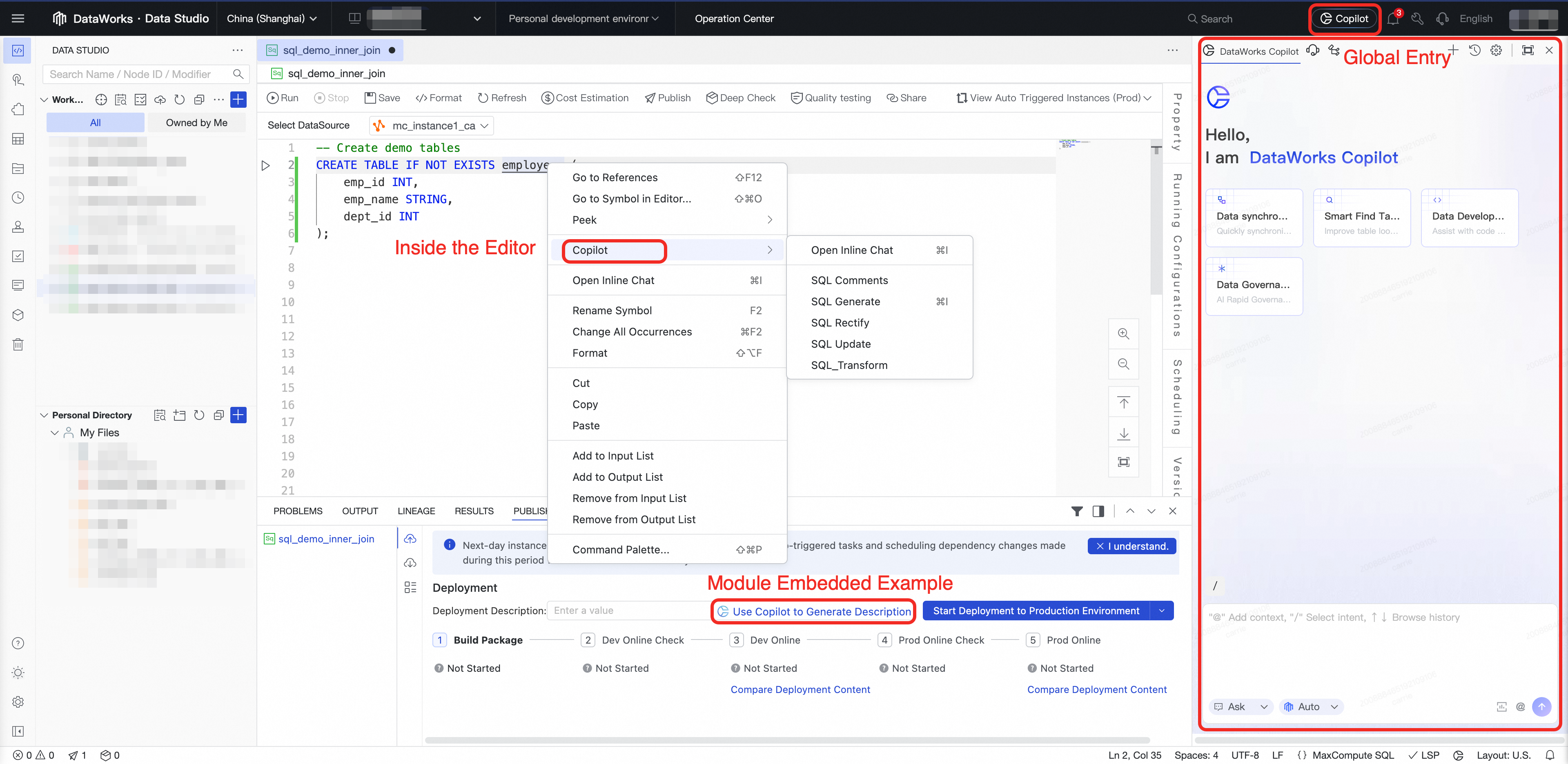
From the global entry point, Copilot shows predefined scenario cards for data synchronization, intelligent table discovery, Data Development, and data governance. Click a card to load a sample prompt for that scenario.
Agent: Automate complex tasks
The DataWorks Agent goes beyond Q&A. Powered by the reasoning and planning capabilities of a Large Language Model (LLM), it understands your goal, breaks it into steps, creates an execution plan, and calls the relevant tools in the DataWorks MCP Server (Model Context Protocol Server) to carry out the task automatically.
Tip: Use Agent mode for multi-step tasks — such as building an ETL workflow end to end, configuring quality rules across a set of tables, or diagnosing a failing task instance. For single-step tasks like generating a SQL snippet or explaining a function, Ask mode is faster.
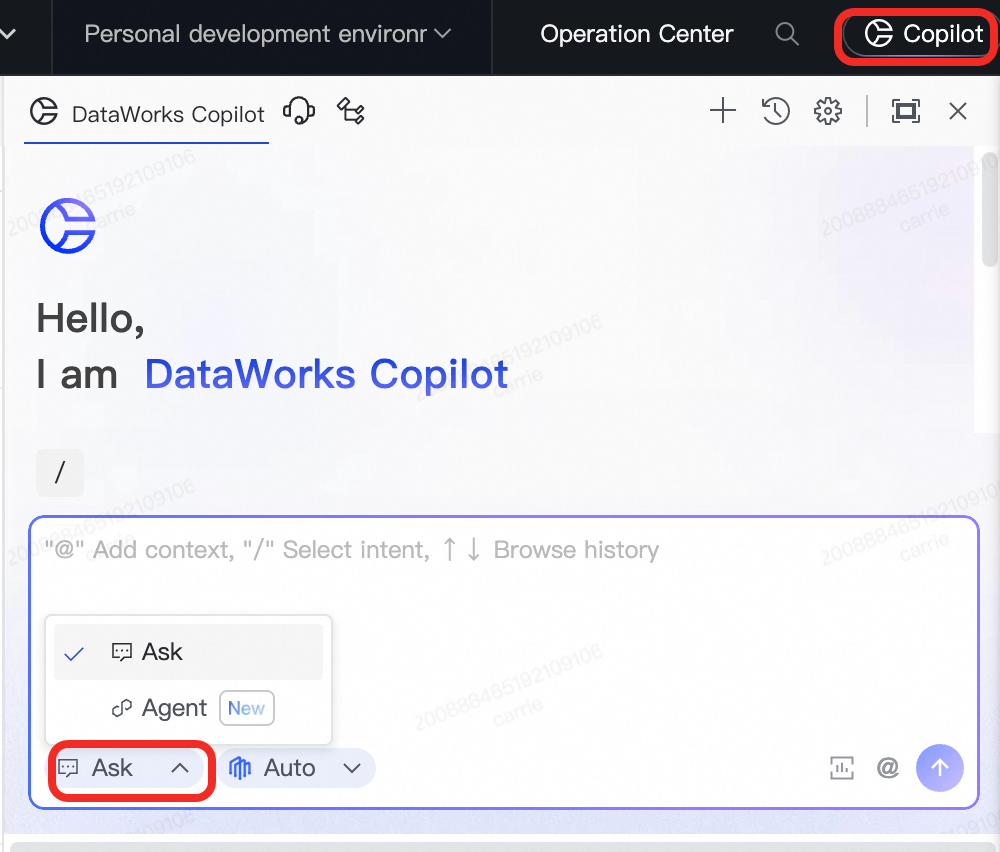
Switch to Agent mode
-
In the Copilot Chat window, switch from Ask mode to Agent mode.
-
Type
/and select the appropriate Agent type. -
Enter your request to start the task.
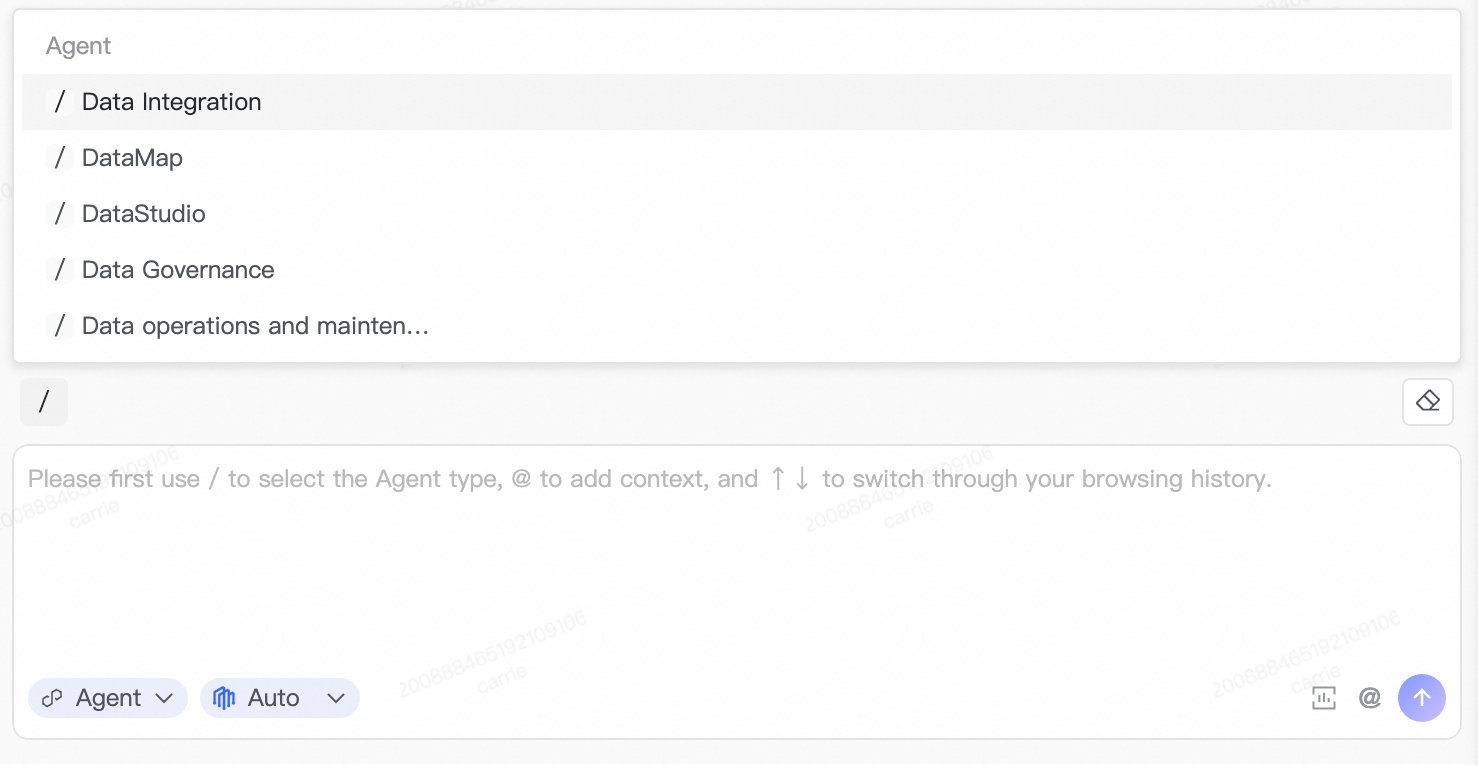
Agent types
Data Studio Agent
Provides a natural language-based ETL development experience, covering requirements analysis, code generation, workflow creation, and deployment.
Sample prompts to get started:
-
"Create an ETL workflow that reads from the
ods_orderstable, filters records from the last 7 days, and writes the results todws_orders_weekly." -
"Generate a scheduled workflow for daily incremental data loading into the sales summary table."
Data Integration Agent
Describe your data synchronization requirements in natural language. The Agent parses your intent and generates a full task configuration, including source and destination data source types, table schema mappings, field filtering conditions, partitioning strategies, and scheduling parameters.
Sample prompts to get started:
-
"Sync the
user_profiletable from MySQL to MaxCompute daily at 2 AM, filtering out test accounts." -
"Create a full-load synchronization task from the PostgreSQL order database to OSS in Parquet format."
Data Map Agent
Improves the efficiency of data discovery and understanding through AI-driven natural language search across massive datasets.
Sample prompts to get started:
-
"Find the summary tables related to user activity." — Search by business intent without needing exact keywords.
-
"In the
adm_biproject, find tables related to business operations." — Scope the search to a specific project. -
"What are the direct downstream dependencies of the
dws_bi_metric_ditable? Which owners will be affected if it changes?" — Get data lineage and ownership details.
Data Governance Agent
Issue natural language commands that are converted into governance actions and executed automatically — from configuring quality rules to remediating identified issues.
Sample prompts to get started:
*Configure quality rules:*
-
"Automatically generate quality rules for the core user dimension table
dim_user_info." -
"For tables starting with
ods_, automatically configure quality rules related to table row counts."
*Remediate quality issues:*
-
"Find frequently accessed tables that have no quality rules, then recommend and configure them."
-
"Help me resolve issues in the data quality dimension."
Data O&M Agent
Provides a comprehensive health assessment and issue diagnosis for task instances. The Agent analyzes dependency chains, resource levels, historical run trends, change impacts, log anomalies, and data quality, then generates a structured diagnostic report.
For more information, see AI-powered O&M.
AI coding assistant
The AI coding assistant handles SQL and Python coding tasks inside the intelligent code editor and Copilot Chat.

Switch between multiple models — the DataWorks default model, Qwen, and DeepSeek — to get the best results for your task.
Use it in the editor
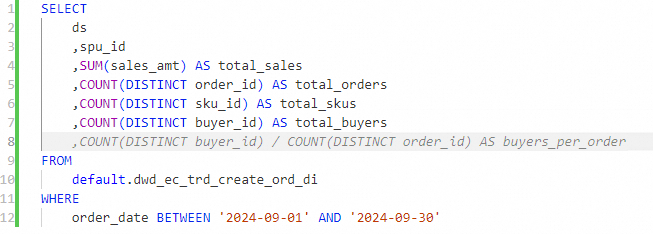
Code completion — While developing a code-based node, Copilot predicts and suggests subsequent code based on the context (code already written, referenced table schemas, and more). Suggestions appear automatically. Press Tab to accept.
Right-click actions — Select code in the intelligent code editor, right-click, and choose Copilot from the context menu to access quick commands.

Use it in Copilot Chat (Ask mode)
Ask mode is the default mode for Copilot Chat. Select code in the editor to use it as context, then ask Copilot to act on it.
Supported tasks:
| Task | How to trigger | Example |
|---|---|---|
| Generate ETL scripts | Type your requirement | "Based on dwd_ec_trd_create_ord_di, calculate sales amount, volume, SKU count, buyer count, and seller count per SPU from September 1–18, 2024." |
| Refactor code | Describe the change | "Transpose the SQL results from columns to rows using unpivot." |
| Debug code | Select the code, use quick command | Click Perform Diagnostics or select the failed code and right-click |
| Explain code | Reference the code | "Explain this SQL." |
| Generate comments | Reference the code | "Add a comment for each field." |
| Code Q&A | Ask a question | "How do I write a mapjoin in MaxCompute?" |
| Optimize performance | Select the code, use quick command | Select the code, open the chat, and ask for optimization |
| Generate test cases | Reference the code | "Generate SQL test cases and explain the testing steps." |
Quick AI actions
DataWorks modules embed one-click AI actions for common operations.
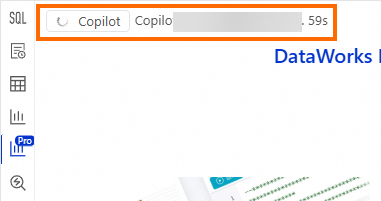
Visualize query results
After a node runs or a SQL query completes, switch to the visualization tab in the results area to generate charts and data insights.
Create tables intelligently
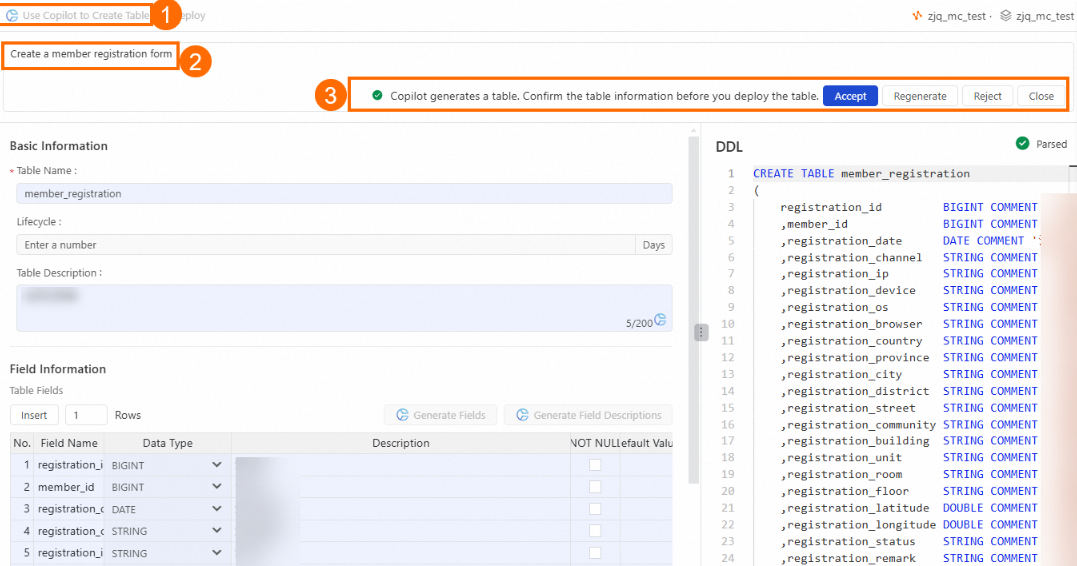
In the Data Studio catalog, enter keywords for a table name to get AI-recommended field names and descriptions with a single click.
Generate publish descriptions
During the publishing process in Data Studio, click once to generate a deployment description.

Diagnose task failures
When a task fails in the Operation Center, click Perform Diagnostics. Copilot — integrated with LLMs including Qwen and DeepSeek-R1 (671B) — extracts key information from the logs, provides an error analysis and solution, and recommends quick actions.
To access: On the Operation Center page, go to Auto Triggered Node O&M > Auto Triggered Instances. Click a failed instance, select the failed node, and click Perform Diagnostics in the lower-right corner.
Recommend data quality rules
On the Data Quality page, go to Configure Rules > Configure By Table. Select the target table and click Create Monitor to open Copilot and generate quality rules for that table.

Create DataService Studio APIs
In the DataService Studio module, create a new API and select the code editor mode. Copilot generates a SQL script based on your requirements and automatically parses it into request and response parameters.

Improve accuracy with context
Copilot's responses improve significantly when it has the right context. Two mechanisms control this: Rules for persistent knowledge, and context references for per-conversation inputs.
Custom knowledge (Rules)
Rules are guidelines, standards, and background knowledge you define once and apply to every Copilot interaction.
Configure Rules: In the upper-right corner of the Copilot Chat window, click the  icon.
icon.

| Rule type | Who configures it | Scope | Use it for |
|---|---|---|---|
| Enterprise-level Rules | Administrators | Organization-wide (configurable scope) | Company-wide business terminology, coding standards |
| Personal-level Rules | Individual users | Current user only | Personal preferences, frequently used code snippets |
Specify context per conversation
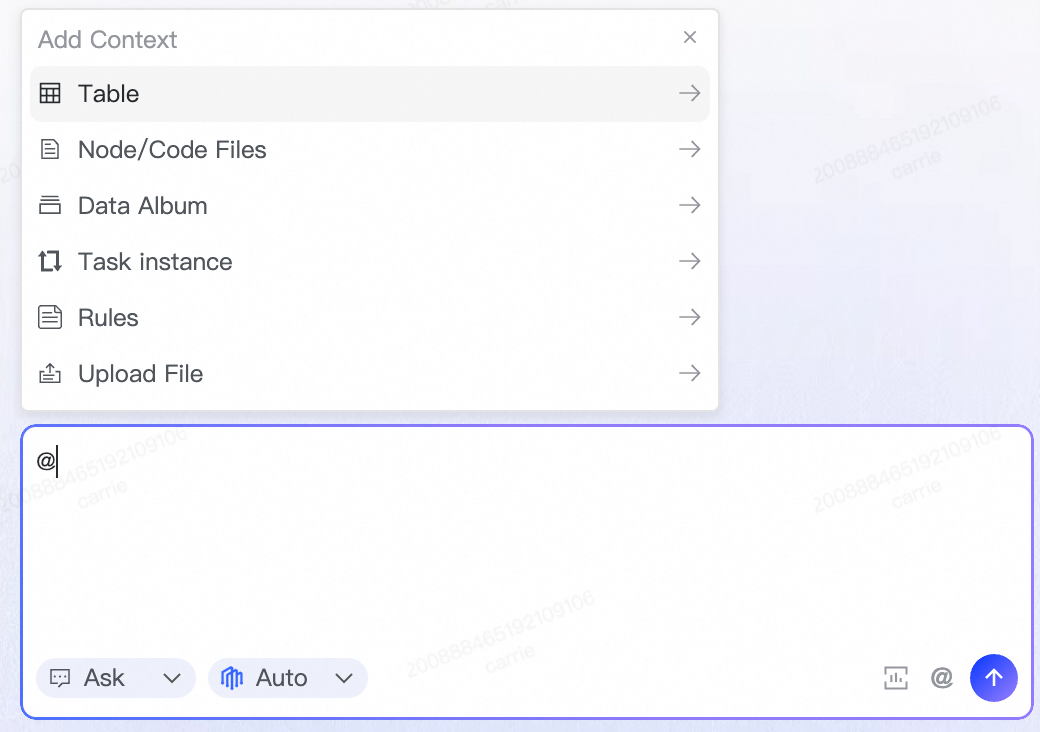
In each conversation, add context to focus Copilot on the relevant data and provide more accurate results.
In the Copilot Chat input box, type @ or click + to open the context selector.
| Context type | What Copilot can access |
|---|---|
| Table | Metadata from one or more tables |
| Node/Code file | The code within a specific node |
| Data collections | Data collections from Data Map |
| Rules | One or more Rules, applied only for this conversation |
| Local file | Documents you upload as background information |
Manage conversations
Conversation history
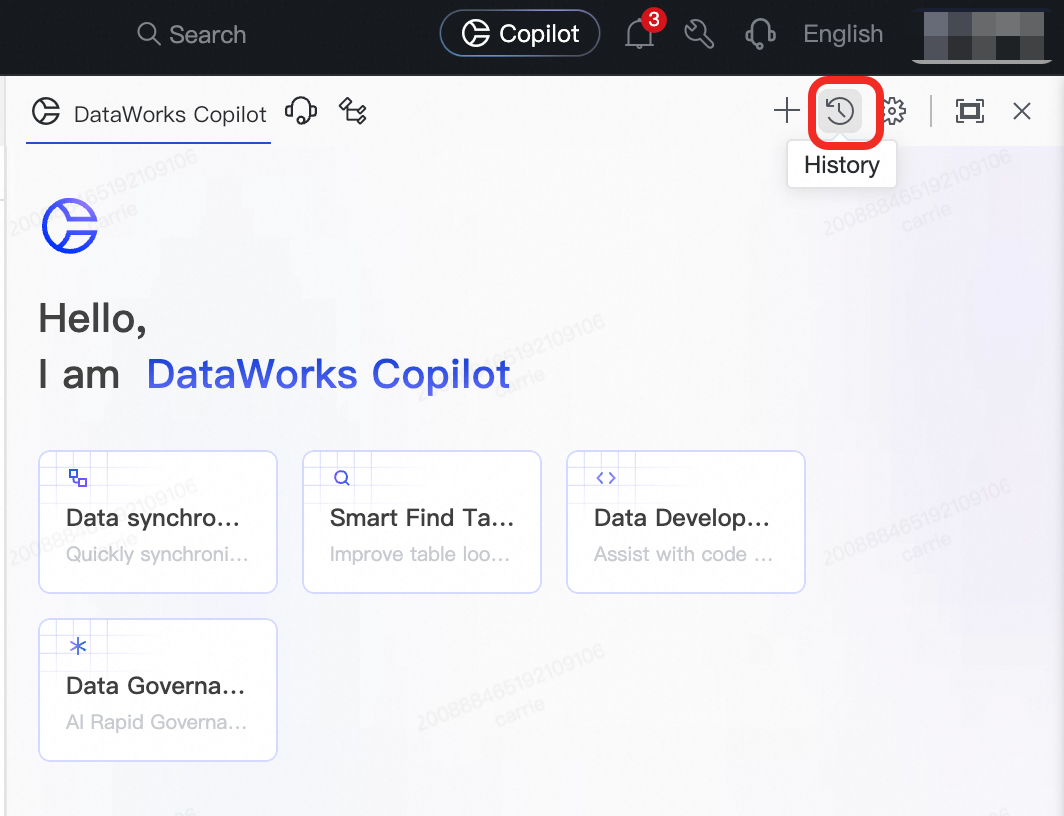
Copilot automatically saves your recent conversations. View up to 100 records from the last 7 days.
To access: In the Copilot Chat window, click History in the upper-right corner.
Start a new chat per task
Start a new chat for each independent task. This prevents context from different tasks from interfering with each other, keeping Copilot focused on the current task.
Availability
| Attribute | Details |
|---|---|
| Eligible users | DataWorks Basic Edition or higher |
| Current stage | Public preview |
| Billing | Free during public preview; paid after public preview ends |
| Available regions | China (Zhangjiakou), China (Beijing), China (Ulanqab), China (Hangzhou), China (Shanghai), China (Shenzhen), China (Chengdu), China (Hong Kong), Singapore, Malaysia (Kuala Lumpur), Indonesia (Jakarta), Japan (Tokyo) |
FAQ
Why are Copilot's responses inaccurate or not what I expected?
The most common cause is insufficient context. Add relevant tables, code files, or Rules using @ or + in the input box. The more precise the context, the more accurate the response. See Specify context per conversation.
What's the difference between Ask mode and Agent mode?
Ask mode handles single-step tasks: generate a snippet, explain a function, debug a block of code. Agent mode is for multi-step tasks that require planning, tool use, and autonomous execution across DataWorks — such as building a full ETL pipeline or remediating data quality issues across multiple tables. If your task has more than one step, switch to Agent mode.
How do I get Copilot to respond in English?
Add a clear instruction to your prompt, such as "Please respond in English" or "Explain in English". Switching the DataWorks interface language to English also improves the consistency and accuracy of English responses.