This topic describes common issues where a task runs successfully but produces no data.
Scenario 1: Node succeeds with an execution log
The node completes its logic successfully, but during automatic scheduling of the periodic instance, the node fails to retrieve upstream data or reports that the table partition does not exist. Manually rerunning the instance retrieves data normally.
-
No dependency is configured on the upstream task that produces the required data.
-
A dependency on the upstream node exists, but the table partition produced by the upstream node does not match what is expected. This indicates that the scheduling cycle is incorrect. Check the parameter substitution for the upstream and downstream instances in the periodic instance parameters and log details.
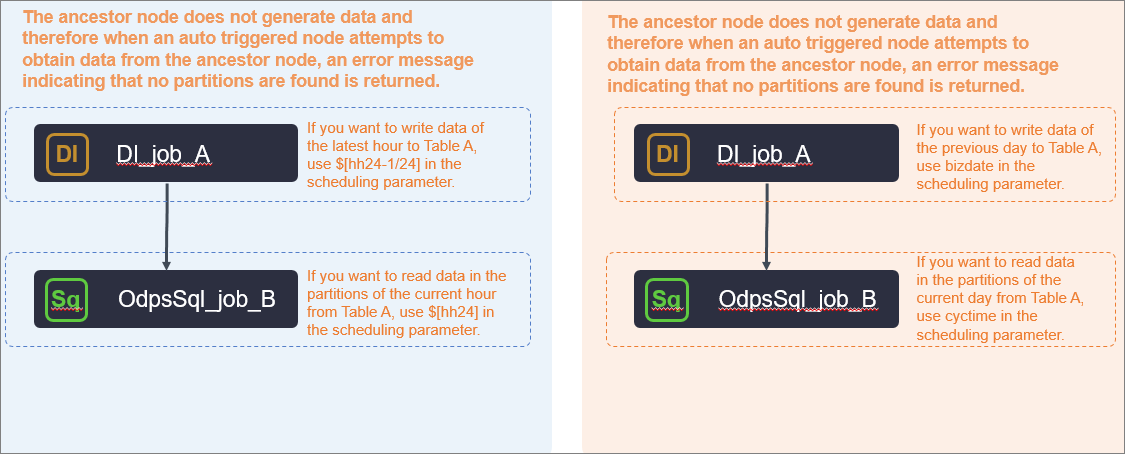
Reconfigure the node dependencies.
Check the parameters of the upstream and downstream nodes: On the Periodic Instances page in Operation Center, the DAG shows the upstream virtual node xc_demo_start connected to the downstream offline sync node xc_oss_data_sync. Select a node and view the Properties tab to check the data destination type (MaxCompute), runtime duration (40s), instance status (Success), and other details. The execution parameter bizdate=20210614 indicates that the business date of this instance is June 14, 2021.
Scenario 2: Node succeeds without an execution log
The node performed a dry run. Check the node status on the Properties page.
Scenario 3: Task log shows success but the instance status shows failure
The task execution log shows "Shell run successfully", but the instance status shows execution failure. This scenario is typically caused by a DQC (Data Quality Check) rule that fails validation.
DQC performs quality checks on the output data after the task completes. If a quality rule is configured with a blocking policy and the check fails, the system marks the instance as failed even though the task itself ran successfully.
Troubleshooting steps:
-
Go to .
-
Find the quality monitoring rule bound to the output table.
-
Check the execution history of the rule to confirm whether the check passed. If the check failed, fix the data issue or adjust the DQC rule, and then rerun the instance.