This topic describes how to set node scheduling dependencies across business flows and workspaces. This method ensures that a downstream business flow runs only after the upstream business flow succeeds.
Background information
In DataWorks, you can create a node dependency using the output of an upstream node as the input for a downstream node. This feature lets you create dependencies across business flows and workspaces. For more information about this feature, see Scheduling dependency configuration guide.
Configure scheduling dependencies across business flows
To create a dependency across business flows, you can make a node in the downstream business flow dependent on the output of a node in the upstream business flow. The following example shows how to set a cross-business flow dependency for a business flow with multiple branches.
A virtual node is a control node. It is a dry-run node that does not generate data. A virtual node is typically used as the root node of a business flow to control the overall scheduling time and execution. It can also be used to aggregate the outputs from multiple branches in a business flow.
If a business flow has multiple branches, create a virtual node, such as
business_flow_end_virtual_node. Make thebusiness_flow_end_virtual_nodedependent on the outputs of the multiple upstream branches. When thebusiness_flow_end_virtual_noderuns successfully, the entire business flow is complete.
If a business flow with multiple branches requires a cross-business flow dependency, you can use a virtual node to configure the upstream and downstream dependencies. The following figure shows an example.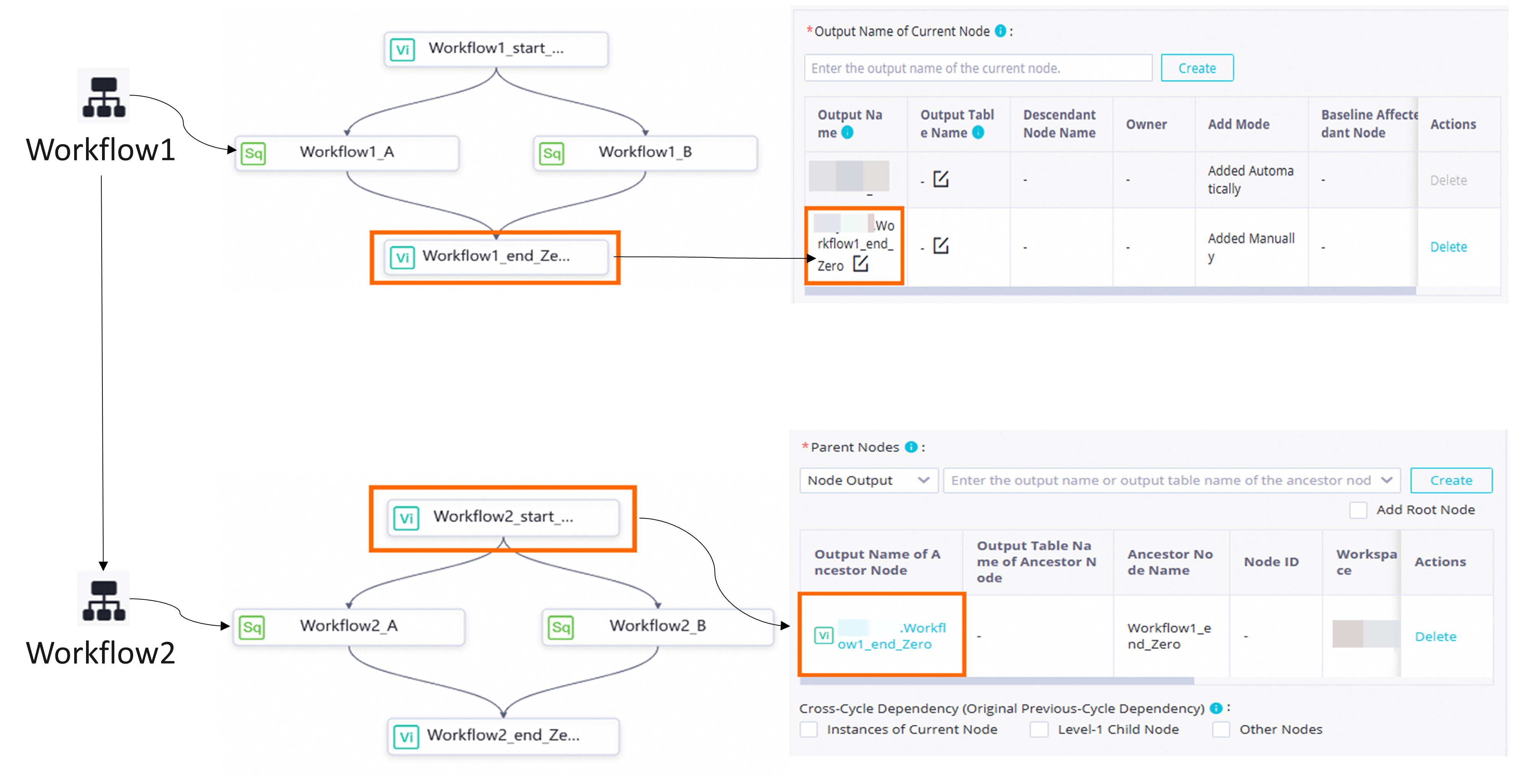
Create two business flows: Business Flow 1 and Business Flow 2. Business Flow 1 is the upstream flow for Business Flow 2.
In the upstream Business Flow 1, create the following virtual nodes.
business_flow_1_start_virtual_node: The start node for the multiple branches in the upstream Business Flow 1.business_flow_1_end_virtual_node: The aggregation node that aggregates the outputs from the multiple branches in the upstream Business Flow 1.
In the downstream Business Flow 2, create the following virtual nodes.
business_flow_2_start_virtual_node: The start node for the multiple branches in the downstream Business Flow 2.business_flow_2_end_virtual_node: The aggregation node that aggregates the outputs from the multiple branches in the downstream Business Flow 2.
Upstream and downstream business flow dependency: Configure the output of
business_flow_1_end_virtual_nodeas the input forbusiness_flow_2_start_virtual_nodeto create the cross-business flow scheduling dependency.
In DataWorks, you can create a dependency by configuring the output of an upstream node as the input for a downstream node. You can configure node dependencies in three ways: dragging with the mouse, manual configuration, and automatic parsing. This example manually creates a dependency by entering the output of the upstream node business_flow_1_end_virtual_node in the Upstream Dependencies configuration area of the downstream node business_flow_2_start_virtual_node.
To create a business flow, see Create a recurring business flow.
To create a virtual node, see Virtual node.
To configure a scheduling dependency, see Configure same-cycle scheduling dependencies.
Configure scheduling dependencies across workspaces
DataWorks supports cross-workspace dependencies for workspaces that are in the same region. You can create a cross-workspace dependency using the output of an upstream node as the input for a downstream node. For example, you can add the output of Node A in Workspace A as the input for Node B in Workspace B. The configuration method is the same as that for other scheduling dependencies. For detailed steps, see Configure same-cycle scheduling dependencies.
For some older workspaces, dependencies from a standard mode workspace to a basic mode workspace may not be supported. If you encounter this issue, submit a ticket to request a fix.