You can add Alibaba Cloud API Gateway as a data source in DataV to visualize your API data. Alibaba Cloud API Gateway is a managed API service that provides full lifecycle management, including API publishing, management, O&M, and sales.
Prerequisites
An Alibaba Cloud API Gateway data source has been prepared.
Limits
This feature is available only in DataV Enterprise Edition and later versions.
Add an Alibaba Cloud API Gateway data source
Access the DataV console.
On the Workbench page, click in the navigation pane on the left. On the Data Source page, click New Data Source.
-
In the Type list, select Alibaba Cloud API Gateway.
-
Configure the API Gateway parameters.
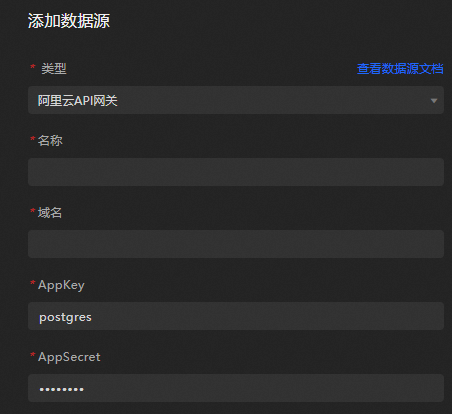
Parameter
Description
Name
Enter a display name for the data source.
Domain Name
The domain name of the API Gateway. You can find it in the API Gateway console.
AppKey
The AppKey for calling the API Gateway. To obtain the AppKey, see Access a backend service over HTTP using API Gateway.
AppSecret
The AppSecret for calling the API Gateway. To obtain the AppSecret, see Access a backend service over HTTP using API Gateway.
-
Complete the configuration and click OK.
The new data source appears in the data source list.
Use the Alibaba Cloud API Gateway data source
Access the DataV console.
-
On the Workbench page, hover over the data dashboard you want to edit and click Edit.
ImportantIf you haven't created a data dashboard on your Workbench page, please see Create a PC Dashboard Using a Template for guidance on creating one.
-
On the canvas editing page, select a widget from the canvas.
If your canvas lacks widgets, please add them first. For more information, see Widget Canvas Operations.
-
In the widget configuration panel on the right, select Data Source.
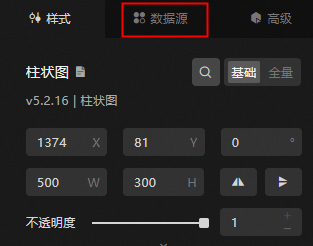
-
In the Set Data Source section, set Data Source Type to Alibaba Cloud API Gateway.
-
From the Select Existing Data Source list, select the Alibaba Cloud API Gateway data source that you configured.
-
Select a request method from the HTTP Method list. Supported methods include GET, POST, PATCH, PUT, DELETE, HEAD, and OPTIONS.
-
In the Request URL field, enter the API URL.
-
Based on the method you select from the HTTP Method list, enter the corresponding values in the Headers and Body sections.
NoteThe GET method supports only Headers and has no Body. Refer to the specific API documentation for details.
-
Click View Data Response.
What to do next
After you obtain the raw data, see Configure a widget data source to adapt the data for your widgets.
FAQ
For more information, see FAQ about data source configuration and usage.