The Dataphin metadata warehouse centrally manages business metadata and compute engine metadata. It resides in a Dataphin project within the metadata warehouse tenant (OPS tenant) and consists of periodic data integration nodes, SQL script nodes, and Shell nodes. You can use Transwarp TDH as the compute engine to initialize the metadata warehouse, which configures the engine type and prepares metadata for processing.
Prerequisites
-
To use Transwarp TDH as the metadata warehouse, you must enable access to the metadatabase or provide a Hive Metastore service for metadata retrieval.
-
If you use TDH Inceptor as the metadata warehouse, or if you use TDH Inceptor as the metadata retrieval method during initialization, the following conditions must be met:
-
A project named dataphin_meta is created in TDH Inceptor.
-
The user configured for TDH Inceptor during metadata warehouse initialization must have permissions to create and write to tables in the dataphin_meta project.
-
The compute engine account requires read permission for the materialized tables in the dataphin_meta project.

-
Background information
Dataphin supports metadata retrieval through a direct metadatabase connection or the Hive Metastore Service. The following table compares the two methods.
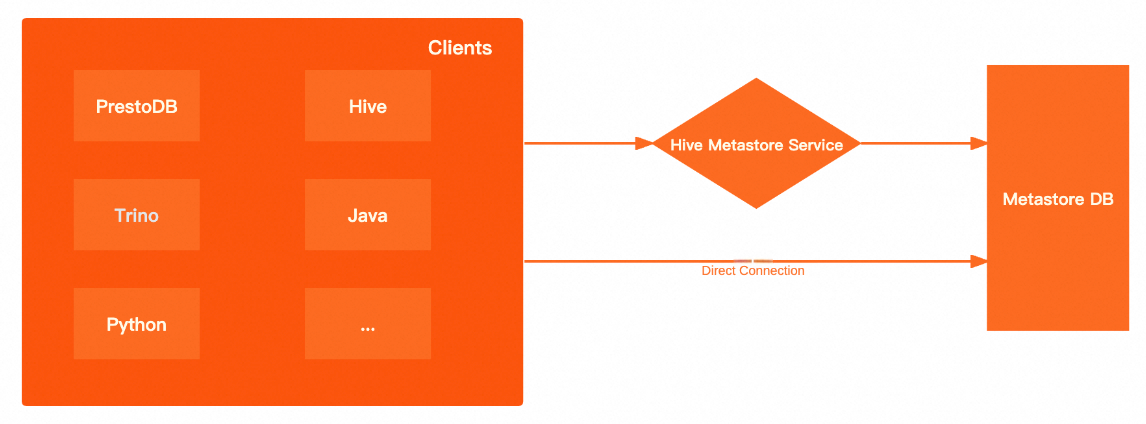
|
Metadata retrieval method |
Advantages and disadvantages |
|
Direct metadatabase connection |
High performance: Directly connects to the underlying metadatabase, bypassing the Hive Metastore Service (HMS) to improve metadata retrieval performance and reduce network latency. More open: A direct metadatabase connection lets you query metadata freely with SQL, unlike HMS, which limits you to the metastore client methods. |
|
Hive Metastore Service |
More secure: Supports Kerberos authentication for the metastore, requiring clients to authenticate before reading metadata. More flexible: Clients connect only to HMS, not the underlying database, so you can switch databases without changing client configurations. |
Limits
-
When you select MySQL metadatabase, Inceptor metadatabase, or HMS to retrieve metadata, some of the retrieved metadata may be missing or inaccurate.
-
When you retrieve metadata using MySQL metadatabase or HMS, the following information cannot be retrieved:
-
Data volume information for asset overview, data plates, and projects.
-
Table data volume, partition data volume, and number of partition records in the asset catalog.
-
Storage-related metrics for resource administration.
-
Data volume and number of records for dim_dataphin_table and dim_dataphin_partition in the metadata warehouse shared model.
-
-
When you retrieve metadata using the TDH Inceptor System library, the following information cannot be retrieved:
-
Number of partition records in the asset catalog.
-
Number of records for dim_dataphin_table and dim_dataphin_partition in the metadata warehouse shared model.
-
-
-
When you use TDH Inceptor as the compute engine for the metadata warehouse, Dataphin does not support user-defined functions (UDFs).
Adding a JAR package with a duplicate name may cause the Inceptor service to stop responding and fail to restart, and identical class files across differently named JARs may produce unpredictable results. To add UDFs, use the TDH Inceptor client directly and ensure that UDF names and class names are unique within the cluster.
Permissions
Only accounts with the metadata warehouse tenant super administrator or system administrator role can initialize the system.
Keep the account and password for the metadata warehouse tenant super administrator or system administrator secure. Exercise caution when you perform operations while logged on as the metadata warehouse tenant super administrator.
Procedure
-
In the top menu bar of the Dataphin homepage, select Management Center > System Settings.
-
In the navigation pane, select System O&M > Metadata Warehouse Settings.
-
On the Metadata Deployment wizard, click Start.
-
On the Select Initialization Engine Type page, select the Transwarp TDH 6.x or Transwarp TDH 9.3.x engine type.
ImportantIf you switch to an incompatible compute engine, the administration feature is unavailable. If the metadata warehouse is already initialized, the engine that was used for the last successful initialization is selected by default.
-
Click Next.
-
On the Parameter Checking page, configure the following parameters. The parameters are the same for Transwarp TDH 6.x and Transwarp TDH 9.3.x.
Area
Parameter
Description
Cluster Configuration
NameNode
Manages the file system namespace and client access permissions in Hadoop Distributed File System (HDFS).
-
Click Add.
-
In the Add NameNode dialog box, enter the hostname and port number for the NameNode, and then click OK.
The system automatically generates the corresponding format. Example:
host=start,webUiPort=50070,ipcPort=8020.
Configuration File
Upload cluster configuration files such as core-site.xml and hdfs-site.xml to configure cluster parameters.
History Log
The log path for the cluster. Example:
tmp/hadoop-yarn/staging/history/done.Authentication Type
The authentication method. Valid values: No Authentication and Kerberos. Kerberos is a symmetric-key-based identity authentication protocol commonly used between cluster components to improve security.
If you select Kerberos, you must also configure the Kerberos Configuration Method and HDFS parameters.
-
Kerberos Configuration Method
-
KDC Server: The unified service address of the Key Distribution Center (KDC) for Kerberos authentication. You can enter multiple addresses separated by commas (,).
-
Krb5 File Configuration: Upload the krb5 file for Kerberos authentication.
-
-
HDFS Keytab File: Upload the HDFS keytab file.
-
HDFS Principal: Enter the principal name for Kerberos authentication. Example:
XXXX/hadoopclient@xxx.xxx.
Inceptor Configuration
JDBC URL
The JDBC URL for connecting to Inceptor.
Authentication Type
The authentication method for Inceptor. Select from No Authentication, LDAP, or Kerberos based on your engine configuration.
-
No Authentication: No authentication is required. Configure the username and password to access Inceptor.
-
LDAP: Lightweight Directory Access Protocol (LDAP) authentication. Configure the username and password to access Inceptor.
-
Kerberos: The cluster authentication method must be Kerberos. For Kerberos tasks, you must upload a keytab file and configure the principal address.
-
Keytab File: Upload the keytab file for Kerberos authentication.
-
Principal: The principal name for Kerberos authentication.
-
Metadatabase Configuration
Metadata Retrieval Method
Select the method for retrieving metadata: direct metadatabase connection or Hive Metastore Service (HMS). For HMS with Kerberos authentication, upload the keytab file and enter the principal.
-
Keytab File: The keytab file for Hive metastore Kerberos authentication.
-
Principal: The principal for Hive metastore Kerberos authentication.
Database Type
Required for the direct metadatabase connection method. Supported databases: MySQL, PostgreSQL, and Inceptor.
MySQL: Supported versions are 5.1.43, 5.6/5.7, and 8.0.
Inceptor: Supports No Authentication, LDAP, and Kerberos authentication.
JDBC URL
The JDBC connection address for the target database. Examples:
MySQL database connection address format:
jdbc:mysql://host:port/dbname.Inceptor database connection address format:
jdbc:hive2://host:port/dbname.Username, Password
The username and password for the target database. If the Inceptor authentication method is No Authentication, only the username is required. For Kerberos authentication, upload the keytab file and enter the principal.
Metadata Production Project
Meta Project
The logical project for metadata production and processing. Set this to dataphin_meta. Keep the name unchanged during reinitialization to prevent failures.
-
-
Click Test Connection. After the connection test is successful, click Next.
-
On the initialization page, click Start.
NoteSystem initialization takes about 15 minutes.
-
After a success message appears, click Finish to complete the configuration.
What to do next
After initialization, you can set the compute engine for the Dataphin instance. When the metadata warehouse engine is set to Transwarp TDH, you can set the business tenant engine to any engine type except MaxCompute. For more information, see Compute settings.