The MaxCompute data lakehouse solution combines the flexibility of a data lake with the enterprise capabilities of a data warehouse. By integrating MaxCompute with Data Lake Formation (DLF), you can use Dataphin to manage data assets across the unified lakehouse platform.
Background information
The MaxCompute data lakehouse supports two construction methods:
-
Construct a data lakehouse using MaxCompute, DLF, and Object Storage Service (OSS): DLF manages the entire metadata (schema) of the data lake. MaxCompute uses DLF metadata management for OSS, supporting semi-structured formats such as Delta Lake, Hudi, AVRO, CSV, JSON, PARQUET, and ORC within OSS. For details on DLF and OSS, see Data Lake Formation (DLF) and What is OSS?.
-
Construct a data lakehouse using MaxCompute and Hadoop: This method covers local data center configuration, cloud-based virtual machine deployment, and Alibaba Cloud E-MapReduce. After the VPC network between MaxCompute and the Hadoop platform is established, MaxCompute can directly access Hive's global meta service and map metadata to an external MaxCompute project.
Prerequisites
Before you manage the MaxCompute, DLF, and OSS data lakehouse with Dataphin, make sure the following requirements are met:
-
Activate the DLF service.
-
Activate the OSS service.
-
Activate the MaxCompute service and create a MaxCompute project.
create externalproject -source dlf -name external_project  -- Required. The name of the external project to be created.
-ref maxcompute_project -- The name of the created MaxCompute project
-comment "DLF"
-region "cn-hangzhou" -- The RegionID of the region where DLF is located. For more information about RegionID, see Get RegionID and VPC ID.
-db metadat_store -- The name of the DLF metadatabase.
-endpoint "dlf-share.cn-hangzhou.aliyuncs.com" -- The Endpoint information of DLF
-ossEndpoint "oss-cn-hangzhou-internal.aliyuncs.com"; -- The Endpoint of the region where OSS is located
MaxCompute access authorization
-
For building a data lakehouse with MaxCompute and Hadoop:
Authorize MaxCompute to create an Elastic Network Interface (ENI) in the user's VPC for network connectivity. Log on to Alibaba Cloud with the VPC owner account and complete one-click authorization.
-
For building a data lakehouse with MaxCompute, DLF, and OSS:
The MaxCompute project account requires authorization to access DLF. You can use the following methods:
-
One-click authorization: Use this method when the account that created the MaxCompute project is the same as the one that deployed DLF.
-
Custom authorization: Use this method regardless of whether the MaxCompute project account and the DLF deployment account are the same. For more information, refer to Custom authorize DLF.
-
Manage MaxCompute data lakehouse through Dataphin
DLF handles metadata discovery and management for OSS. MaxCompute creates external projects based on DLF, registering the managed metadata into MaxCompute external projects. Dataphin provides data processing (offline development and standardized modeling), metadata management, access control, security auditing, data quality assessment, and computing resource administration for the MaxCompute and DLF data lakehouse.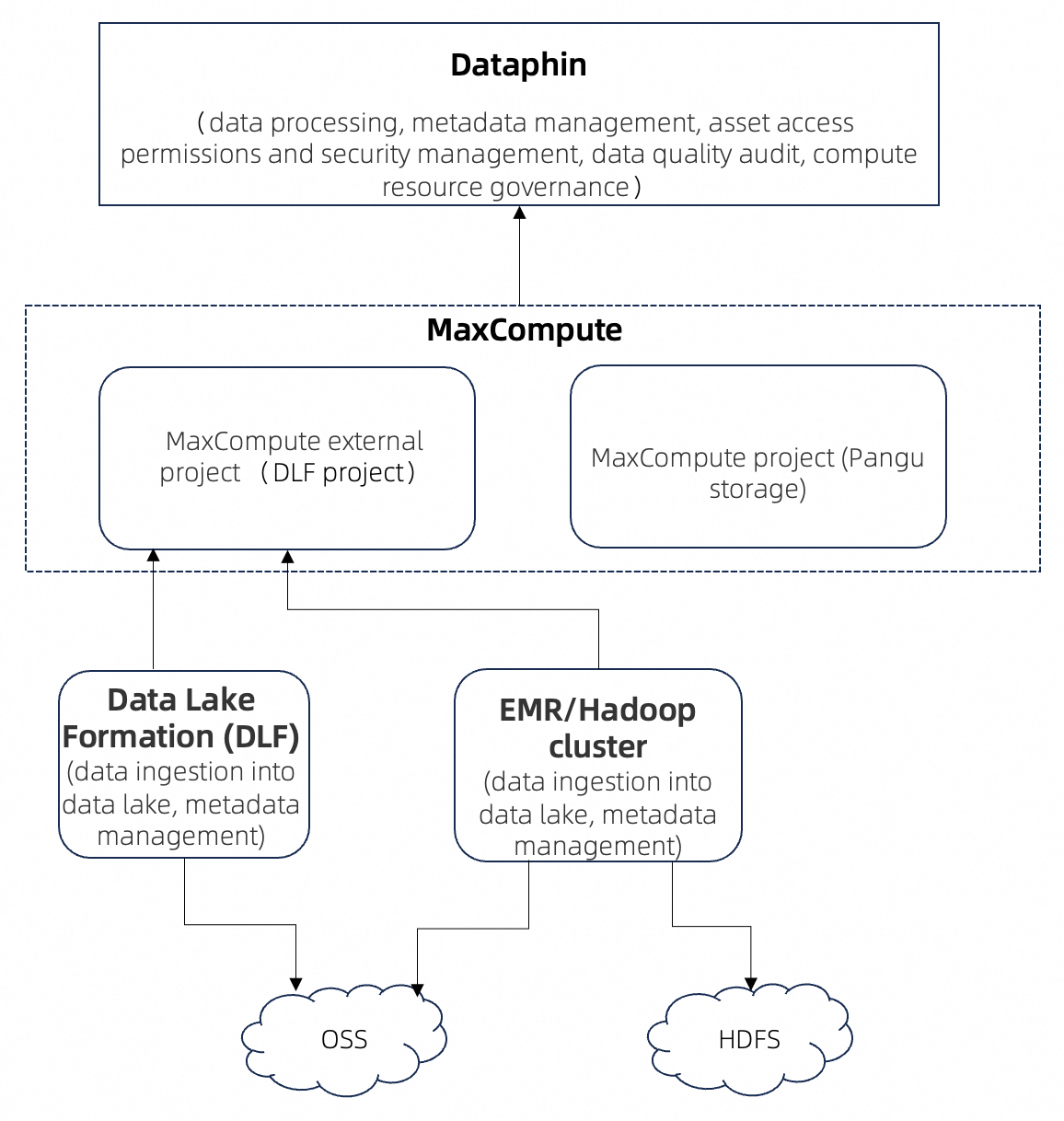
Create MaxCompute computing source and bind it to Dataphin project
Create a MaxCompute computing source and register the MaxCompute external project. Because the external project has no computing resources of its own, specify an additional MaxCompute project for task execution, quality rule enforcement, security rule scanning, and security policy implementation. For guidance on creating a MaxCompute computing source, see Create MaxCompute computing source.
After you create the computing source, create a Dataphin project and register the computing source as its MaxCompute computing source.
Standardized modeling and data processing based on the data of MaxCompute data lakehouse external projects
After the MaxCompute computing source is linked to the Dataphin project, you can use standardized modeling to generate logical tables from source tables in the external project. MaxCompute SQL tasks use the computing resources of the associated internal project to run data operations in the external project.
View metadata information and manage permissions of the data lakehouse
-
View metadata information.
-
Search and query data tables and fields in external projects.
-
Preview data.
-
Generate SELECT and DDL statements.
-
Request permissions for tables and fields in external projects.
Audit data quality and manage security of the data lakehouse
-
Configure data quality rules for physical tables in external projects.
-
Run MaxCompute SQL tasks for quality rule verification.
-
Scan security rules and implement security policies.