A change strategy applies predefined change rules to a specific scope with designated control methods. You can configure multiple rules in a single strategy, each with a different control method.
Background information
Key aspects of a change strategy:
-
Change strategy: Specifies the effective time, applicable platforms, control scope, and validation rules. Changes take effect immediately after you save the strategy.
-
Effective time: When you create or modify a strategy, it takes effect immediately and validates subsequent asset changes against the latest rules.
-
Management permissions: Only super administrators and system administrators can create change strategies. Strategy owners can also edit and delete their own strategies.
Prerequisites
Make sure you have created change rules before creating a change strategy. For more information, see the referenced document.
Creating change strategy
-
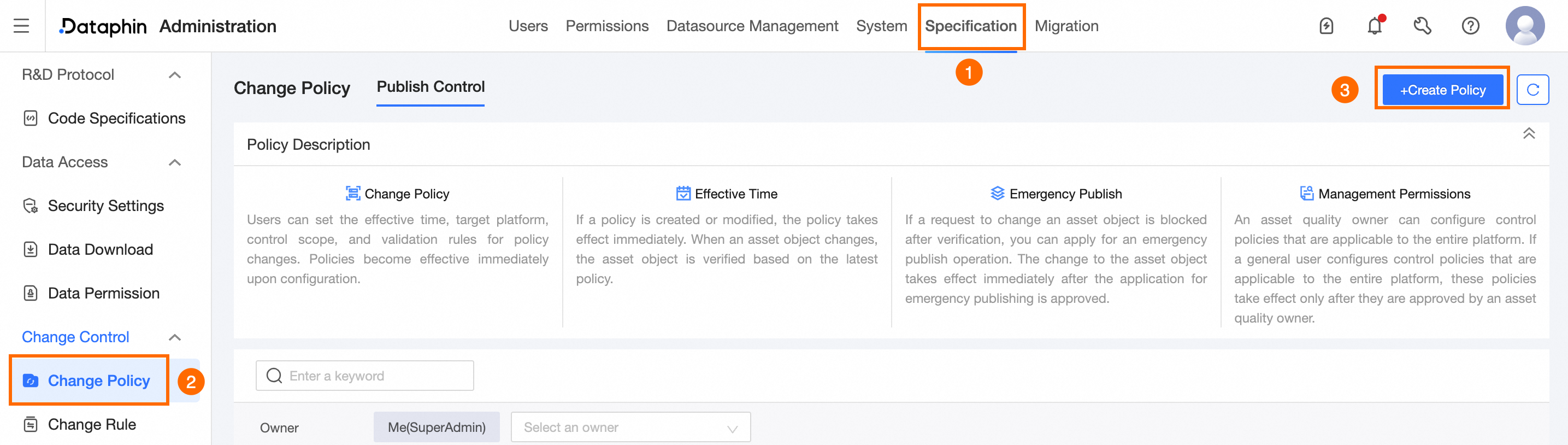
Navigate to the Dataphin home page, and from the top menu bar, select Management Center > Specification Settings.
-
In the left-side navigation pane, choose Change Control > Change Policy.
-
On the Change Policy page, click +create Change Strategy.
-
On the Create Change Strategy page, enter the required parameters.
-
Input basic information.
Parameter
Description
Strategy Name
Enter a name for the strategy. The name must meet the following requirements:
-
The maximum length is 30 characters.
-
All character types are supported.
Service Scenario
Defaults to Publish Control.
Owner
The owner of the strategy. Default: the current user. You can change this value.
Start And End Time
Set the time range during which the strategy is active.
Daily Effective Period
Set the daily time intervals when the strategy is active. You can add multiple periods.
-
-
Click Add Validation Rule to configure control behaviors for the strategy.
-
In the Add Validation Rule dialog box, select the rules you need and click Confirm.
ImportantEach rule can be associated with only one change strategy.
To create new change rules, refer to the referenced document.
-
After you configure the control behaviors, click Next.
-
Configure the validation scope.
You can define the validation scope in the following ways:
-
In Expression Configuration, select custom or system-provided rules. For guidance, click Rule Number Configuration Guide.
-
For Customized settings, click Documentation to view custom encoding rules.
-
-
Complete the configuration and click Submit.
After the change strategy is created, it is automatically enabled. You can manually disable it. If the switch is turned off, the strategy does not take effect even within the configured active period. -