Create the total order amount for the Longjing tea category in the last 1 day derived metric.
Procedure
-
Navigate to the Dataphin home page and single click Development on the top menu bar. You will be taken to the Development page by default.
-
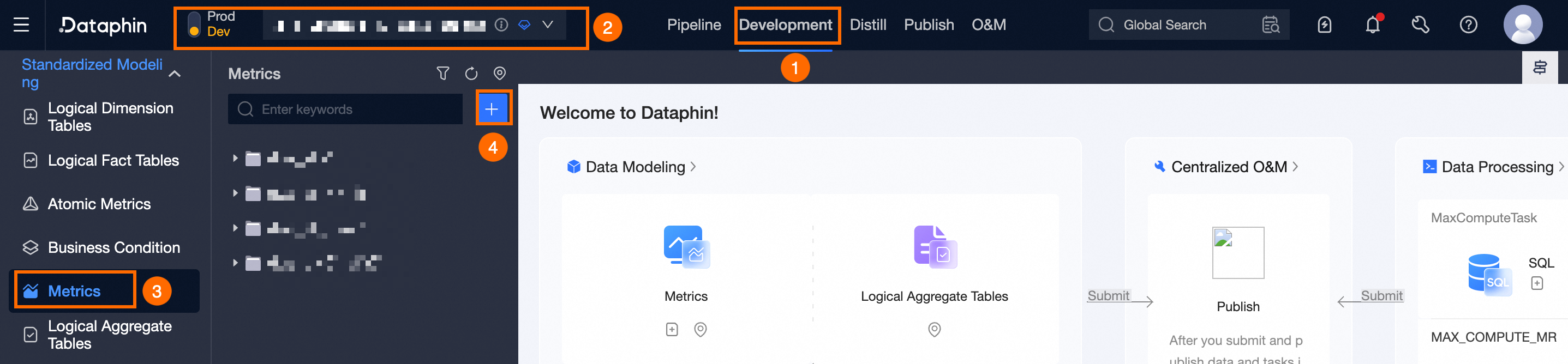
Refer to the instructions in the figure below to access the New Derived Metric configuration wizard.
-
On the New Derived Metric configuration wizard, perform the following steps:
-
At the Define Derived Metric page, specify the derived metric parameters as follows:
Parameter
Description
Statistical Period
Choose Last 1 day.
Atomic Metric
Select the total_order_amount (Total Order Amount).
Business Condition
Opt for longjing_tea (Longjing Tea).
Statistical Granularity
Select Entire Table.
-
At the Pre-generate Derived Metric page, you can preview the results by single clicking Data Preview and then confirm the derived metric.
-
Single click Next.
-
On the Complete Metric Information page, assign the business owner.
-
Single click Submit.
-
In the Submit Remarks dialog box, click Confirm to submit.
-