Develop the Total Order Amount atomic metric for this tutorial.
Procedure
-
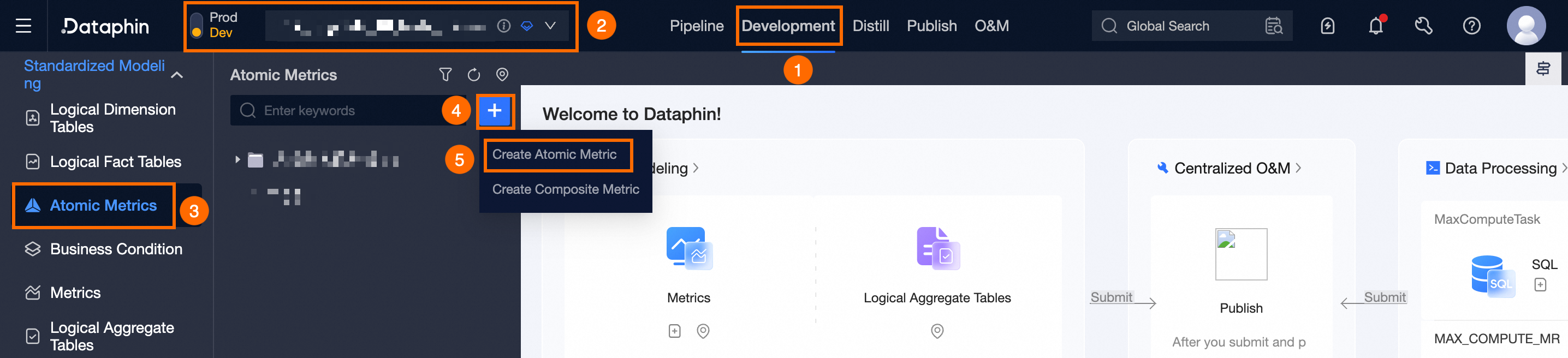
On the Dataphin home page, click Developer in the top menu bar.
-
Open the Create Atomic Metric dialog box as shown in the following figure.
-
In the Create Atomic Metric dialog box, configure the parameters.
-
In the Basic Information area, configure the parameters.
Parameter
Description
Business Entity
Select the Purchase Order business entity.
Data Domain
Defaults to transaction domain.
English Name
Enter total_order_amount.
Chinese Name
Enter Total Order Amount.
Measurement Unit
Select the CNY measurement unit.
Data Type
Select the decimal data type.
Description
Enter a brief description of the atomic metric, such as Total Order Amount.
-
Configure the parameters in the Computation Logic area.
Parameter
Description
Data Recency
Enable Day.
Main Source Table
Select the LD_dataphin_tutorial.fct_order_buy_di source table.
Computation Logic
Enter the computation logic.
sum(fct_order_buy_di.payment_amount)Is Additive
Select Yes.
-
After you complete the configuration, click Save and Submit to submit the atomic metric.
-