A sandboxed container runtime runs an application and its dependencies in a lightweight virtual machine. It provides an independent kernel or a fine-grained isolation layer for application pods. This helps prevent malicious attacks or vulnerabilities within a container from affecting the host or other containers. This topic describes the architecture, key benefits, and common scenarios of sandboxed containers.
Background information
Sandboxed containers are ideal for scenarios such as isolating untrusted applications, fault isolation, performance isolation, and isolating workloads among multiple users. They enhance security with minimal performance impact and provide the same user experience as Docker containers for features such as logging, monitoring, and elastic scaling.
Compared to the community solution (Kata Containers), sandboxed containers offer optimizations and improvements in storage, networking, and stability.

Architecture

Key benefits
Sandboxed Container V2 is a next-generation secure container runtime from Alibaba Cloud that is based on lightweight virtual machine technology. Compared to V1, it maintains strong isolation while reducing overhead by 90%, increasing startup speed by 3 times, and improving single-machine density by 10 times. Its key benefits are as follows:
Provides strong isolation between sandboxes based on lightweight virtual machines.
Offers application compatibility with traditional runC containers.
Delivers high overall application performance, reaching up to 90% of the performance of runC container applications.
Supports mounting and sharing NAS, cloud disks, and OSS Volumes in sandbox mode using virtiofs. NAS also supports direct attachment in sandbox mode.
Provides a user experience consistent with runC for monitoring, logging, and storage.
Supports RuntimeClass (runC and runV). For more information, see RuntimeClass.
Is easy to use and does not require extensive technical expertise.
Offers greater stability compared to the community's Kata Containers. For more information about Kata Containers, see Kata Containers.
Comparison between ACK sandboxed containers and community Kata Containers
Performance | Performance category | ACK Sandboxed Container V2 | Community Kata Containers |
Sandbox startup speed | About 150 ms | About 500 ms | |
Additional sandbox overhead | Low | High | |
Container RootFS | virtio-fs, Performance: ☆☆☆☆ |
| |
Container Persistent Volume | HostPath/EmptyDir | virtio-fs, Performance: ☆☆☆☆ | |
Cloud disk block storage | virtio-fs, Performance: ☆☆☆☆ Does not support features such as online scaling (Resize), container I/O monitoring, block/raw devices, or cloud disk queue settings. | ||
NAS file storage |
Does not support features such as Samba mounting and unmounting, recycle bin, Quota capacity control, capacity/I/O monitoring, or online scaling. | ||
OSS Object Storage | virtio-fs, Performance: ☆☆☆☆ | ||
Network plugin |
| Flannel | |
Monitoring and alerting |
| Lacks disk and network monitoring metrics for sandboxed container pods. | |
Stability | ☆☆☆☆☆ | ☆☆ | |
Scenarios for ACK sandboxed containers

Scenario 1: Isolate untrusted applications with strong separation using sandboxed containers (runV)
Security risks of runC containers

Containers that use namespace and cgroup technologies for isolation have a large attack surface.
All containers on a node share the host kernel. If a kernel vulnerability is exploited, malicious code can escape to the host. This allows the code to penetrate the backend private network, execute privileged code, disrupt system services and other applications, and steal important data.
Vulnerabilities in the application itself can also allow attackers to penetrate the private network.
You can reduce the security risks of runC containers by taking the following measures:
Seccomp: Filter system calls.
SELinux: Restrict permissions for container processes, files, and users.
Capability: Limit the capabilities of container processes.
Rootless mode: Prevent users from running the container runtime and containers as the root user.
Although these measures can enhance the security of runC containers, they cannot prevent container escapes that exploit host kernel vulnerabilities.
Isolate potential security risks with sandboxed containers (runV)

When you place applications with potential security risks into a lightweight virtual machine sandbox, the applications run on an independent guest OS kernel. Even if a security vulnerability occurs in the guest OS kernel, the impact is limited to a single sandbox and does not affect the host kernel or other containers. You can combine sandboxed containers (runV) with the Terway NetworkPolicy feature to flexibly configure network access policies for pods. This combination achieves true system, data, and network isolation.
Scenario 2: Address issues with runC containers, such as fault amplification, resource contention, and performance interference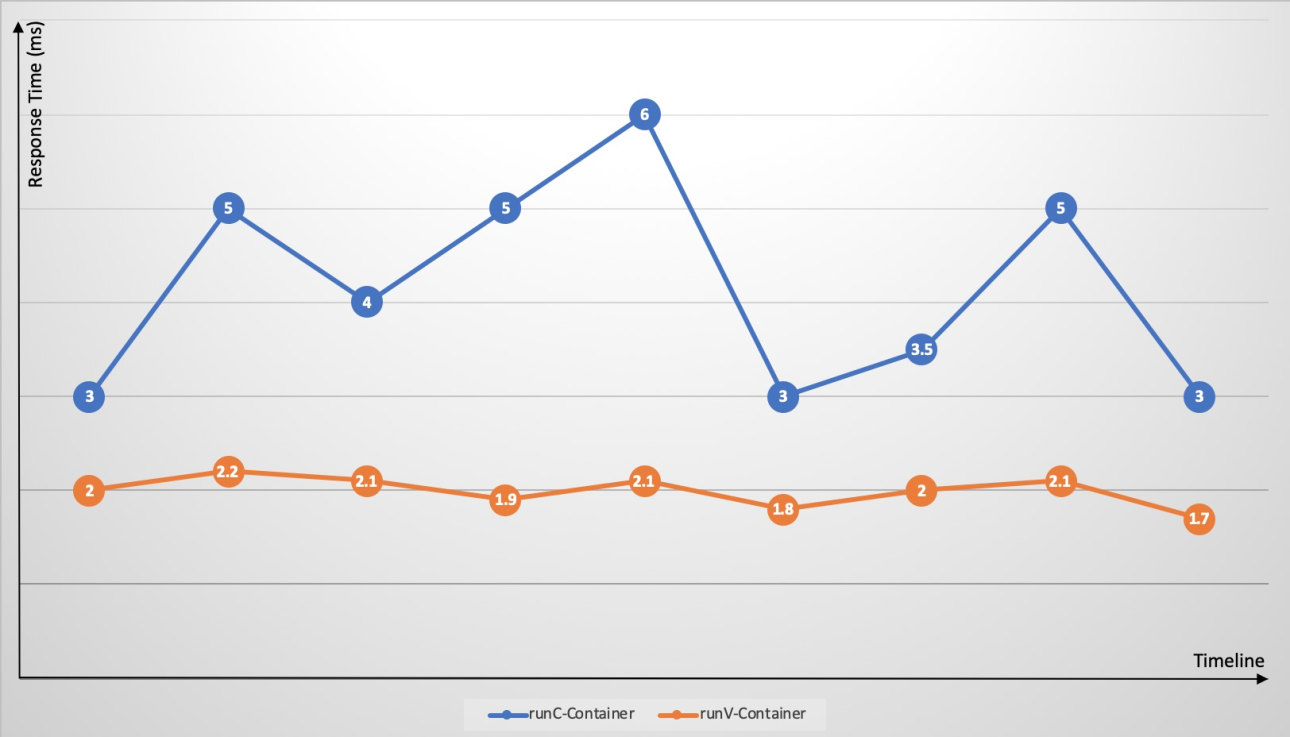
Kubernetes makes it easy to deploy different application containers on the same node. However, because cgroups do not effectively resolve resource contention, resource-intensive applications, such as CPU-intensive or I/O-intensive applications, on the same node compete for resources. This competition leads to significant fluctuations in application response times and increases overall response times. When an application on a node experiences an issue, such as a memory leak or frequent core dumps, the overall node load increases. A single container that triggers a host kernel bug can cause the system to go down. A fault in a single application can spread to the entire node and may even cause the entire cluster to become unresponsive. Sandboxed containers (runV) use an independent guest OS kernel and hypervisor to effectively address the issues of fault amplification, resource contention, and performance interference that are found in runC containers.
Scenario 3: Multi-tenant services
Typically, an enterprise has multiple lines-of-business (LOBs) or departments that deploy their own applications. These different LOBs or departments (multiple tenants) have strong isolation requirements. For example, finance-related businesses may not want their physical environment to run other, non-security-sensitive applications. Traditional runC containers cannot effectively prevent the potential security risks posed by untrusted applications. In this case, you would typically choose one of the following options:
Multiple single-tenant clusters: For example, you can separate finance business clusters from other non-security-sensitive business clusters.
A single multi-tenant cluster: You can separate applications from different LOBs into different namespaces. Each node can be exclusively used by a specific LOB. Multi-tenant isolation is achieved using resource quotas, network policies, and other features. Compared to using multiple single-tenant clusters, this approach uses fewer control planes and has lower management costs. However, it does not solve the problem of wasted node resources that result from low resource utilization by some tenants.

With sandboxed containers (runV), you can isolate untrusted applications within the cluster using virtual machine sandboxes without concerns about security risks from container escapes. This lets you run a mix of different application containers on all nodes. The benefits are as follows:
Reduces the complexity of resource scheduling.
Nodes are no longer exclusively used by a single business. This reduces resource fragmentation, improves node resource utilization, and saves overall cluster resource costs.
Sandboxed containers (runV) use lightweight virtual machines and deliver performance comparable to runC containers.

Limits
Cluster version: Only ACK managed clusters and ACK dedicated clusters of versions 1.16 to 1.34 are supported. To upgrade a cluster, see Manually upgrade the cluster.
Operating system: Sandboxed container node pools do not support custom images.
For clusters that run a version earlier than 1.30, only Alibaba Cloud Linux 3 and Alibaba Cloud Linux 2 (maintenance has stopped) are supported.
For clusters that run version 1.30 or later, only Alibaba Cloud Linux 3 is supported.
Instance types: Only ECS Bare Metal Instance types are supported.
Network plug-ins: Sandboxed container node pools support only the Flannel network plug-in and the Terway network plug-in in some modes. When you use the Terway network plug-in, the dedicated ENI mode is not supported and the DataPath v2 feature cannot be enabled.