By default, a RAM user has no permissions. If a RAM user without the required permissions logs on to the Compute Nest Console, an error dialog box appears. You must grant permissions to the RAM user.
Prerequisites
A RAM user has been created. For more information, see Create a RAM user.
Background information
You can create a RAM user by using an Alibaba Cloud account. You can also create a RAM user by using another RAM user or a RAM role that has administrator permissions. A RAM user is not an independent Alibaba Cloud account. Instead, it belongs to an Alibaba Cloud account.
A RAM user has an independent password for logging on to the Alibaba Cloud Management Console or accessing Alibaba Cloud API. Multiple RAM users can be created within an Alibaba Cloud account.
A RAM user must be granted permissions to log on to the Console and create a Service Instance. You can grant the appropriate Policy based on your business requirements.
If a RAM user only needs to log on to the Compute Nest Console, you only need to grant them permissions for Compute Nest. Compute Nest provides the following two System Policies:
AliyunComputeNestUserFullAccess: Grants full permissions for managing user resources in Compute Nest. This Permission allows the user to view and edit their resources.AliyunComputeNestUserReadOnlyAccess: Grants read-only permissions for accessing user resources in Compute Nest. This Permission allows the user to view but not edit their resources.
To create a Service Instance, you must grant permissions for both Compute Nest and other cloud resources. These permissions are categorized as required and optional.
Creating any Service Instance requires the following System Policies:
AliyunComputeNestUserFullAccess: Grants full permissions to manage user resources in Compute Nest.AliyunROSFullAccess: Grants full permissions on Resource Orchestration Service (ROS).
Optional permissions for other cloud resources may be required, depending on the specific Service Instance. Before deployment, the system automatically performs a Permission Check and lists any missing Policies for the RAM user, as shown in the following figure.
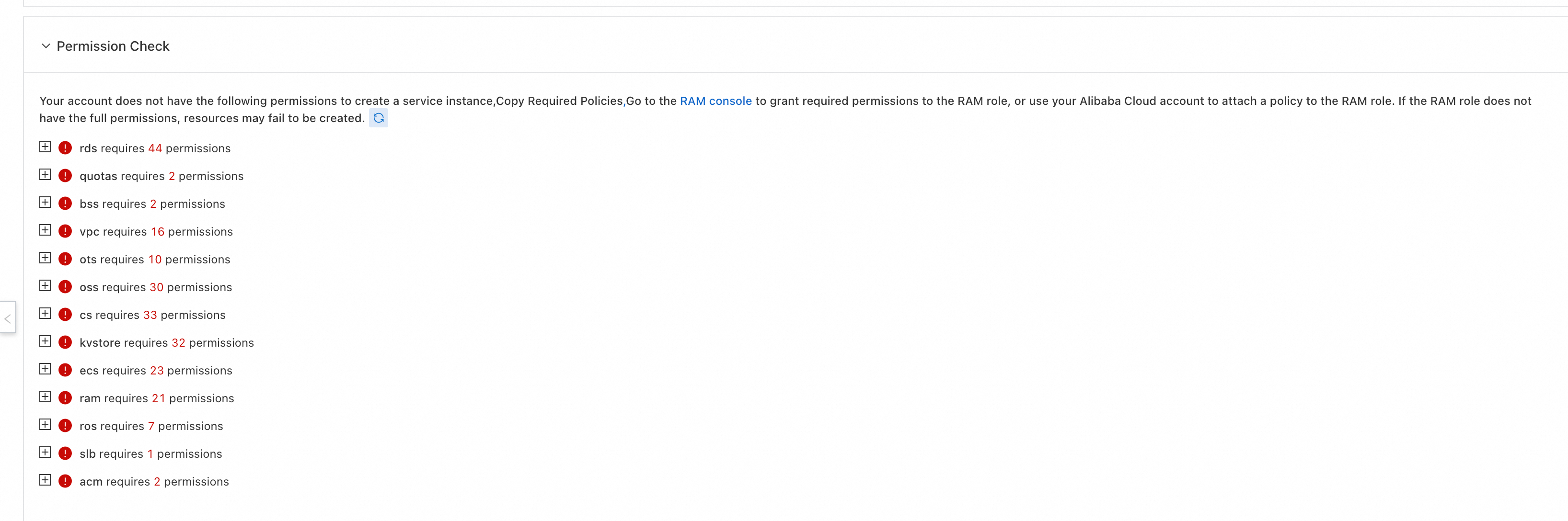
A "Required Policies" dialog box appears, showing the authorization status of each Permission in the "Permission Check" section. Based on the prompt, contact the Alibaba Cloud Account owner or a user with administrative privileges to create a Custom Policy in the RAM Console and grant it to the RAM user.
Procedure
Log on to the RAM Console as a RAM administrator.
In the left-side navigation pane, choose .
On the Users page, find the target RAM user and click Add Permissions in the Actions column.
On the Grant Permission page, specify the permissions for the RAM user.
Select a scope.
Account: The Permission is effective for all resources within the current Alibaba Cloud Account.
Resource Group: The Permission is effective only for resources within the specified Resource Group.
ImportantFor a Resource Group authorization to take effect, the cloud service and resource type must support Resource Groups. For more information, see Services that work with Resource Group. For an example of Resource Group authorization, see Control ECS access for RAM users by using resource groups.
Select a principal.
The principal is the RAM user who will be granted the permissions. The RAM user you are editing is selected by default.
Select a policy.
A Policy defines a set of permissions. To create a Service Instance, you must add the following Policies for the RAM user:
System Policy (Required)
Permissions to manage user resources in Compute Nest: In the System Policy section, select
AliyunComputeNestUserFullAccess.Permissions to manage Resource Orchestration Service: In the System Policy section, select
AliyunROSFullAccess.
Custom Policy (As-needed)
Before you deploy a Service Instance, the system automatically performs a Permission Check and lists the missing Policies on the page. You can consolidate these missing permissions into a single Custom Policy and then grant the permissions.
When you deploy a Service Instance in the Compute Nest Console, review the missing Policies listed in the Permission Check section.
Go to the RAM Console. In the left-side navigation pane, choose , and then click Create Policy.
Consolidate all the required Policies for the service deployment into a single Custom Policy and save it.
-
Click OK.
The results page shows a Completed status, which confirms that the policy was attached successfully.