Overview
Background
In a typical large enterprise, only 20% of network traffic flows between the internal network and the internet. The remaining 80% travels within the internal network itself. If an attacker bypasses the internet border defense, the resulting damage to internal systems can be severe. This makes east-west traffic control a critical security challenge.
In traditional data centers, network security relies on a large number of security devices arranged into a security domain. Traffic passes through different devices in the security domain based on business logic and protection levels. This approach is known as a service chain. In recent years, the service chain concept has extended to cloud environments, where it ensures that instances, containers, and microservices deployed on public clouds follow the same security policy for access control between each other. For example, data exchange between virtual private clouds (VPCs) in the same region or between VPCs and data centers requires rule-based filtering and protection from security services. These measures strengthen internal network security and help prevent potential risks.
Key terms
VPC: A VPC is a custom private network that you create on Alibaba Cloud. VPCs are logically isolated from each other. You can create and manage cloud service instances in your VPC, such as Elastic Compute Service (ECS), Server Load Balancer (SLB), and ApsaraDB RDS.
Cloud Enterprise Network (CEN): CEN establishes private network communication between VPCs in different regions and between VPCs and data centers. CEN supports custom communication, isolation, and routing policies within a region and helps you build an enterprise-class global network with flexible adjustment and high reliability.
Transit router: Transit routers provide network communication and route management features. You can use transit routers to connect network instances, create custom route tables, add routes, and configure routing policies.
Cloud Firewall: Cloud Firewall is a cloud security solution that delivers firewalls as a service. It provides centralized security isolation and traffic control for your cloud assets at the internet, VPC, and host boundaries. Cloud Firewall serves as the first line of defense for your workloads on Alibaba Cloud.
Design principles
Scalability: The architecture automatically scales out during east-west traffic spikes, such as data synchronization and migration, to handle traffic fluctuations without manual intervention. This prevents business disruption.
Sustainable architecture: As you deploy more workloads in the cloud, the architecture accommodates additional VPC connections, route entries, and security policies without requiring structural changes.
Managed services: Use cloud-native services to increase resource utilization. This simplifies operations and maintenance (O&M) and reduces resource waste caused by self-managed components.
Key design
Stability
-
To improve the stability of the overall architecture and implement zone-disaster recovery, you must select at least two zones when you create a transit router. Deploy backend servers in different vSwitches across different zones for zone-disaster recovery.
-
If you use Express Connect to connect your data center to Alibaba Cloud points of presence (PoPs), use different physical routers and deploy two Express Connect circuits from different internet service providers (ISPs) to ensure service stability.
-
Enable Border Gateway Protocol (BGP) and Bidirectional Forwarding Detection (BFD) on the Express Connect circuits to support failover and quick convergence if one circuit fails.
Security
-
Deploy a dedicated security VPC for Cloud Firewall. Keep the security VPC as an independent security component and do not deploy other business resources in it.
-
On the transit router, create a route table for trusted traffic and another route table for untrusted traffic. These route tables divide the network into two planes. Use Cloud Firewall to manage east-west traffic access control in a centralized manner.
Performance
-
Select zones for cloud resources and services based on the network latency, security, and disaster recovery requirements of your business. Deploy ECS instances, ApsaraDB RDS instances, transit routers, and Cloud Firewall in primary and secondary zones to prevent increased latency caused by cross-zone traffic. For Express Connect circuits, select access points close to the zones of your cloud resources.
Elasticity
-
VPCs, transit routers, and Cloud Firewall support automatic scaling within a certain range. If you need bandwidth greater than 100 Gbit/s per transit router, contact Alibaba Cloud for technical support.
-
Express Connect connections do not support elastic scaling. Estimate the bandwidth capacity required by your business in advance.
Observability
-
Network Intelligence Service (NIS) monitors the health status and performance of internet traffic and load balancing services, performs diagnostics and troubleshooting, and analyzes and measures network traffic. NIS integrates Artificial Intelligence for IT Operations (AIOps) methods such as machine learning and knowledge graphs to simplify network management and enable automated O&M. NIS helps network architects and O&M engineers design and use networks more efficiently.
-
Transit routers and VPCs support flow logs, which record business traffic as log entries for traffic analysis. Cloud Firewall automatically records all traffic in logs and provides the Log Audit page to display event logs, traffic logs, and operation logs. This allows you to trace attack sources and audit traffic conveniently.
Best practice
Combine transit routers with Cloud Firewall to implement monitoring, access control, and real-time attack mitigation for east-west traffic on the cloud. Configure routing between transit routers and VPC firewalls before you use the VPC firewall to protect the traffic between VPCs connected by the transit routers.

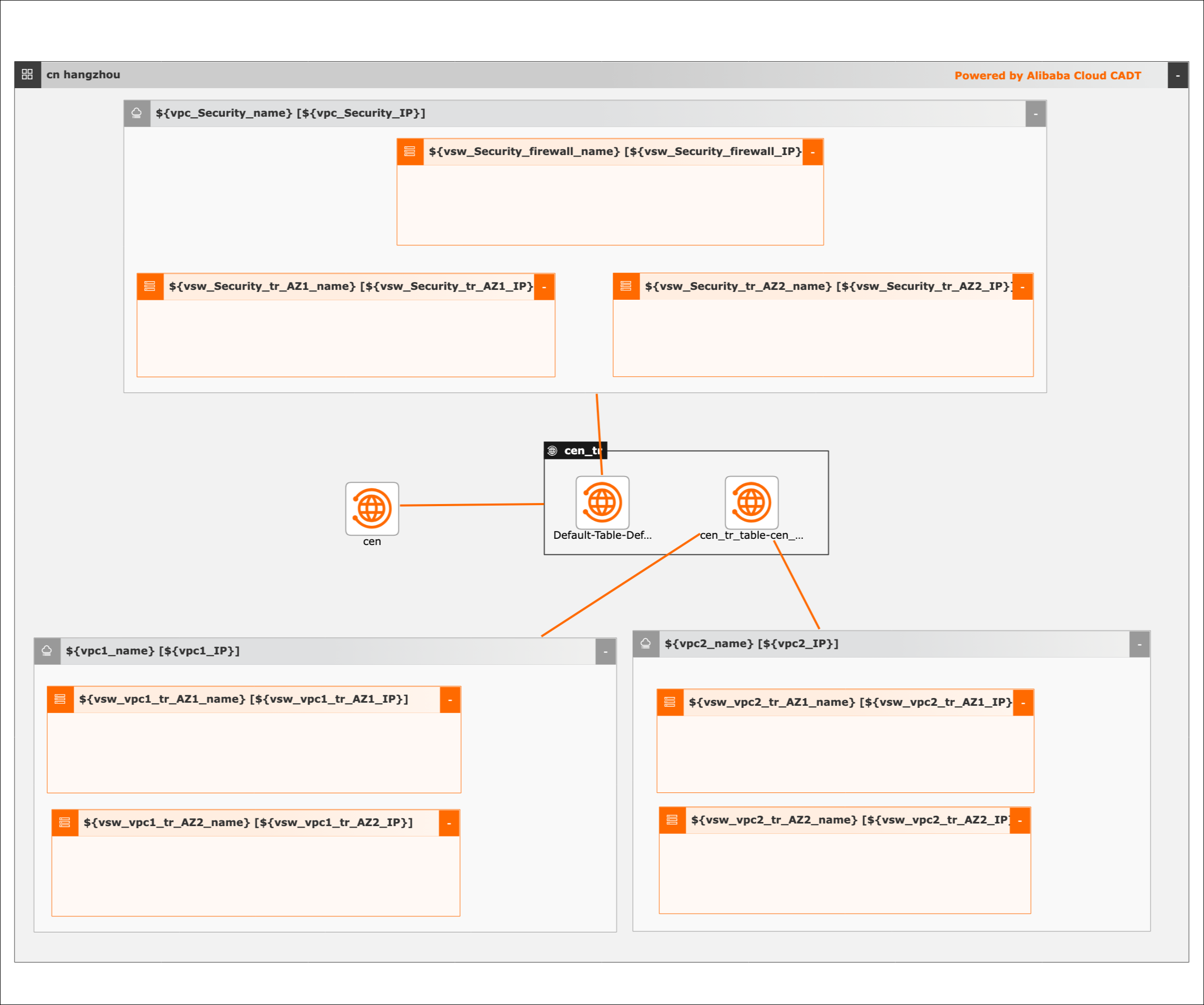
The architecture uses transit router route tables and a dedicated security VPC to separate trusted and untrusted traffic planes:
-
Transit router with multiple route tables: Use transit router route tables to isolate trusted network traffic (filtered by firewalls) from untrusted network traffic (not filtered by firewalls).
-
Untrusted traffic plane: Associate Business VPC1 and Business VPC2 with the transit router route table for untrusted traffic. Internal network traffic that reaches the transit router is forwarded to the security VPC based on the route table for untrusted traffic.
-
Security VPC with Cloud Firewall: Deploy a security VPC and Cloud Firewall in the VPC to filter internal network traffic. Associate the security VPC with the transit router route table for trusted traffic.
-
End-to-end traffic flow: Network traffic from Business VPC1 to Business VPC2, or to a data center through a VBR, follows this path:
-
Traffic from Business VPC1 reaches the transit router.
-
The transit router forwards the traffic to the security VPC based on the route table for untrusted traffic.
-
Cloud Firewall in the security VPC inspects and filters the traffic.
-
Cloud Firewall forwards the filtered traffic back to the transit router.
-
The transit router forwards the traffic to the destination (Business VPC2 or data center) based on the route table for trusted traffic.
-

Scenarios
Enterprise Multi-Level Protection Scheme (MLPS) requirements: Deploy transit routers and Cloud Firewall to meet laws and regulations, avoid deploying business-critical network regions on the boundaries, and isolate business-critical network regions from other network regions. Analyze east-west traffic, virtualize network-wide traffic, analyze and block outbound connections, and create or modify whitelists.
Protection for hybrid-cloud networks: Build a secure network architecture in the cloud and develop a protection system for hybrid-cloud networks. Detect and analyze inbound and outbound traffic transmitted over Express Connect circuits to reduce security risks for VPCs and data centers.
Protection for cloud workloads: Manage fine-grained microsegmentation policies for east-west traffic between cloud workloads based on protocols, ports, regions, and applications. These policies prevent security events from spreading across the internal network and reduce their impact.
Deployment
Terraform
|
Item |
References |
|
Website of Terraform modules |
|
|
GitHub URL |
|
|
Examples |
Coding process:
-
Create two business VPCs, one security VPC, and vSwitches.
-
Create a CEN instance and a transit router. Attach the VPCs to the CEN instance by connecting the VPCs to the transit router.
-
Create multiple transit router route tables to route traffic to the security VPC and re-inject traffic to the business VPCs.
Required resources:
-
Three VPCs
-
Seven vSwitches
-
One CEN instance
-
One transit router
Cloud Architect Design Tools (CADT)
Cloud Architect Design Tools (CADT)
|
Item |
Description |
|
|
Cloud Architect Design Tools (CADT) |
Template ID |
B7PNZR1WN3DANUY1 |
|
Template library address |
||
|
Sample code |
Visualized deployment architecture
Deployment procedure
Deployment procedure
Create the required cloud resources, including three VPCs and seven vSwitches.
-
Create an application based on a template. The default region is China (Hangzhou). Create the cloud resources instead of using existing cloud resources.
-
Save and verify the application, and calculate the fees. In this example, all cloud resources are billed on a pay-as-you-go basis.
-
Confirm the configurations, select a protocol, and start the deployment of all resources. Routes are automatically configured.
API calls
-
Call the corresponding API operations to deploy and use cloud resources.
-
Refer to the documentation to initialize the configurations by using a command-line interface (CLI).
-
Refer to the sample YAML file to deploy and output the architecture.
-
If you want to change the region, change the value of the area_id field. For example, change cn-hangzhou to cn-shanghai.