Overview
Background
Cross-VPC communication is increasingly common as enterprises adopt service-oriented architecture (SOA) and microservices — splitting monolithic systems into independently scalable modules across different VPCs. Alibaba Cloud Landing Zone or Well-Architected Frameworks further drive this trend by recommending fine-grained account and VPC planning. This topic covers the best design for shared enterprise services across multiple accounts and VPCs.
Terms
Virtual Private Cloud (VPC): A custom, logically isolated private network on Alibaba Cloud where you define IP address ranges, create vSwitches, and configure route tables.
Cloud Enterprise Network (CEN): CEN provides flexible interconnection, isolation, and traffic diversion policies to build reliable, large-scale enterprise global networks.
Transit Router (TR): A CEN component that acts as a central router, connecting VPCs, VPNs, VBRs, and Alibaba Cloud services. TRs support multiple route tables and advanced routing policies for centralized traffic management across complex, cross-account network architectures.
PrivateLink: PrivateLink provides private, one-way access to services in other VPCs without public endpoints such as NAT gateways or EIPs. Data stays off the Internet for higher security and better network quality.
Network Intelligence Service (NIS): NIS is a cloud network AIOps suite for full lifecycle management — from planning to operations and maintenance (O&M). It includes traffic analysis, network inspection, performance monitoring, diagnostics, path analysis, and network topology.
Design principles
Combining a transit router with PrivateLink creates an enterprise service sharing channel for secure, flexible access to shared services across accounts and VPCs. The design follows these core principles:
Stability: Service sharing requires access from all enterprise environments. Prioritize stability with multi-zone deployments and multiple shared channels.
Security and compliance: Multiple accounts and VPCs improve fault isolation but require private cross-account access to shared services. Apply the principle of least privilege, tailored to each shared service level.
High performance: Traffic demands on shared services are hard to predict as business units grow. Transit router combined with PrivateLink enables dynamic resource adjustment to handle traffic fluctuations.
Key design points
Stability
-
Transit routers and PrivateLink run on a high-performance Network Functions Virtualization (NFV) platform with native disaster recovery switchover within and across zones.
-
When connecting business VPCs to a shared service VPC, create TR vSwitches in multiple zones for high availability. Deploy TR and business vSwitches in corresponding zones for low-latency access from the nearest zone.
-
When using PrivateLink with a transit router as a proxy, create endpoints in multiple zones for high availability. Callers retrieve endpoint IP addresses through DNS resolution.
Security
-
All traffic through transit router and PrivateLink stays within the Alibaba Cloud private network, avoiding public network security risks.
-
Access through a transit router supports multilayered security: security groups, network ACLs, route configurations, multiple route tables, and multiple transit routers.
-
PrivateLink access supports security groups and authentication rules on the elastic network interfaces (ENIs) for fine-grained access control.
Performance
-
Cross-account interconnection: Transit router and PrivateLink support multi-account strategies where departments have separate accounts requiring cross-account access, isolation, and permission management.
-
Large scale: A transit router can connect thousands of VPCs to a shared service VPC.
-
High elasticity: Transit routers provide elastic networking at 100 Gbit/s. Dual-zone PrivateLink delivers up to 50 Gbps (forward proxy) and 25 Gbps (reverse proxy). Contact Alibaba Cloud technical support for higher bandwidth.
Observability
Enable flow logs on transit routers and PrivateLink to record NIC traffic. Use NIS to analyze traffic usage per business environment for full network visibility.
Best practices
Enterprise cloud services fall into two categories:
-
Internal services: Services such as Active Directory (AD) and Bastionhost are typically deployed in a public service VPC. A TR provides connectivity for business teams to access them.
-
Cloud SaaS services: Platform services such as Container Registry and Object Storage Service (OSS) require PrivateLink endpoints for private access.
Multiple departments accessing a public service VPC

Network plane design
Use multiple transit routers to build independent network planes for different departments (development and testing, finance, HR, administration). Each TR connects only that department's VPCs, ensuring complete isolation.
Public service VPC design
-
Deploy public services in a dedicated VPC and attach each department's TR as needed. Disable route synchronization between TRs to avoid conflicts. Do not use default routes (such as
10.0.0.0/8,172.16.0.0/12, and192.168.0.0/16) pointing to any TR. -
Fine-grained routing: Use static routes to different TR environments. Resolve conflicts by longest prefix match. For example, to route
172.16.1.0/24to TR1 and other172.16.0.0/16subnets to TR2, configure a /24 route pointing to the TR1 attachment and a /16 route pointing to the TR2 attachment.
Public SaaS services on the cloud

Alibaba Cloud SaaS service access
Alibaba Cloud SaaS services are deployed in three modes:
-
Services deployed within a VPC (such as RDS): Use standard VPC private endpoints. You can plan private endpoints and communicate within or across VPCs.
-
Services deployed outside a VPC (such as OSS): These services lack standard VPC private endpoints but provide addresses in the Alibaba Cloud public address range (
100.64.0.0/10) for direct VPC access. Custom private endpoint management is not supported. -
Services with only public network addresses (such as Alibaba Cloud Model Studio): These services do not have private endpoint options.
For services without standard private endpoints, use PrivateLink for address proxying and translation.
Public service VPC design
-
Partition vSwitches connecting to the TR for fine-grained data transmission security.
-
Partition PrivateLink endpoint vSwitches with a multi-zone, active-active design for high availability.
Business VPC access to SaaS services
-
Connect both the business VPC and the public service VPC to the TR.
-
The business VPC reaches SaaS services through the TR, then through PrivateLink endpoints (ENI private IPs or domain name) in the public service VPC.
-
Add a specific route in the business VPC route table pointing to the PrivateLink endpoint. Use the most granular route to avoid conflicts.
Scenarios
A multi-VPC, multi-account strategy combined with shared service architecture isolates resources while enabling shared access. Typical scenarios include:
Unified authentication (AD): Deploy a centralized AD service in a shared VPC and connect it to each department's transit router. Each department maintains its own account and VPC while sharing a single AD system for authentication and permission management. This ensures secure, efficient access regardless of region or department.
Security O&M (Bastionhost): Deploy Bastionhost in a dedicated VPC connected to each environment's transit router. This provides a centralized access point for auditing administrator activities, ensuring traceability for sensitive operations across all VPCs and accounts.
Shared storage (OSS via PrivateLink): Centrally manage OSS in a unified environment and share it across departments through PrivateLink. Combined with authentication, PrivateLink keeps data off the public network while maintaining network isolation and data confidentiality.
Visualized architecture CADT reference
Enterprise service sharing design
|
Scenario |
Item |
Description |
|
Enterprise service sharing design |
Template ID |
C25E5F0DE12CJBPN |
|
Template library URL |
||
|
Code sample URL |
Visualized deployment architecture diagram
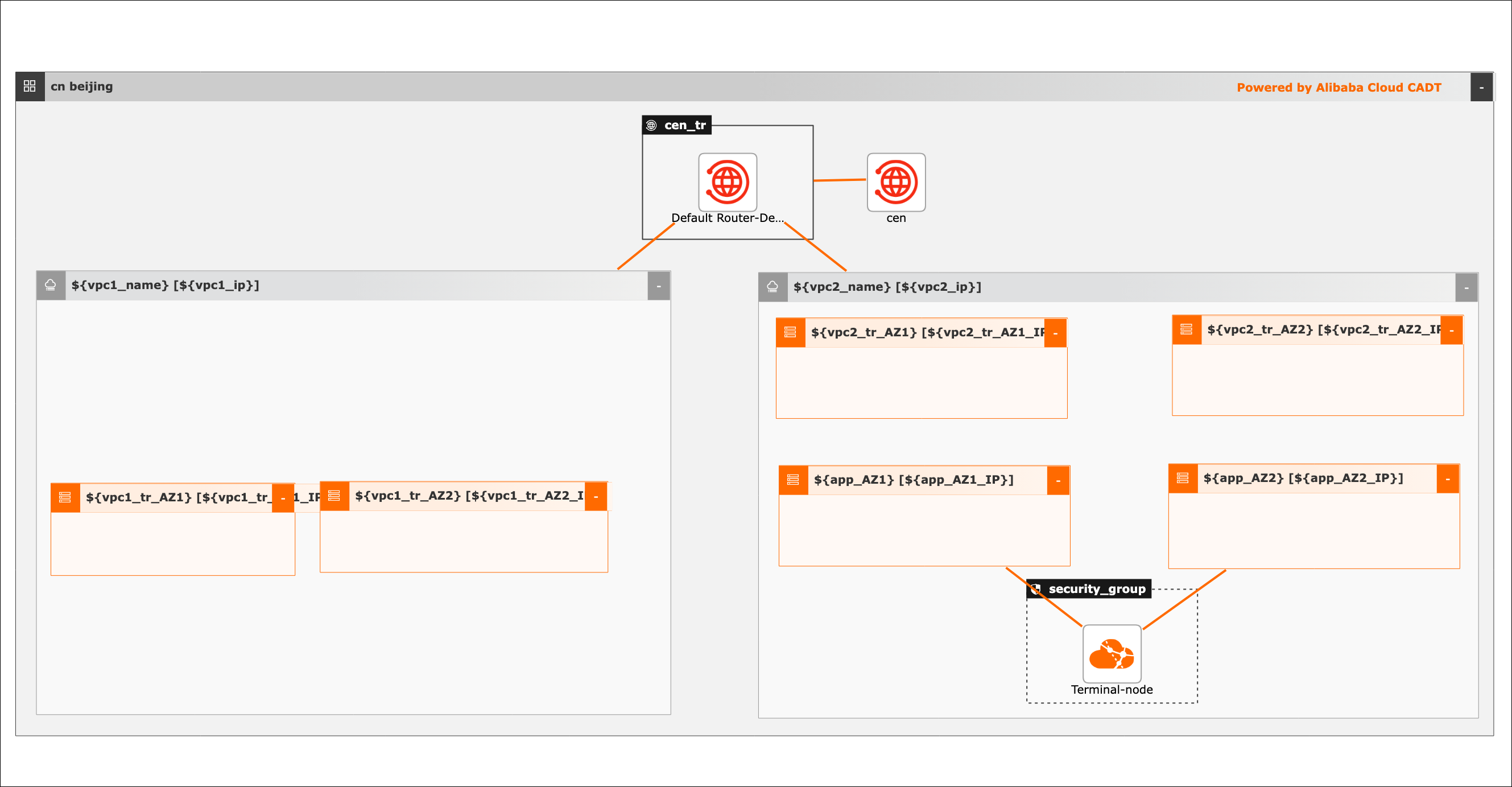
Procedure
Visualized method
Create the required Alibaba Cloud services in batches, including 2 VPCs, 6 vSwitches, and 1 PrivateLink.
-
Create an application from the template. The default region is Hangzhou, and all cloud products are newly created.
-
Save the application, validate it, and check the price. All products use pay-as-you-go billing.
-
After verification, confirm the protocol to start batch deployment. Routing is configured automatically.
Integrated API call method
-
Use a set of OpenAPI operations to complete the setup through integrated API calls.
-
Initialize the CLI as described in the reference document.
-
Deploy using the model YAML file and view the output.
-
To change the region, replace the `area_id` value. For example, replace "cn-hangzhou" with "cn-shanghai".