Track backup job execution across regions for compliance and evidence collection. Filter by data source, status, policy, or account, and export the results.
What is an audit report?
Generate downloadable reports for backup jobs, filtered by start time, data source type, data source ID, job status, backup policy ID, or backup account. This feature is free of charge.
Each report includes the job ID, status, start time, end time, backup file count, and policy ID per data source.
-
Reports expire after 90 days. Regenerate expired reports as needed.
-
Reports cover all backup jobs under your logon account and its managed accounts across all data sources.
-
Real-time backup jobs and charts support only these data sources: Elastic Compute Service (ECS) files, Object Storage Service (OSS) buckets, Alibaba Cloud NAS, on-premises files, local NAS, Cloud Parallel File Storage (CPFS), Tablestore, Container Service for Kubernetes (ACK) clusters, and ECS instances.
-
SQL Server, Oracle, MySQL, virtual machine (VM), and SAP HANA backup jobs are not displayed. To export these, select the data source in the Export Backup Job Report dialog box.
-
Distribution charts and pie charts show real-time backup job status.
-
Reports are region-specific. To access reports from another region, switch regions in the top navigation bar.
Download an audit report
-
In the top navigation bar of the Audit Report page, select the region where the reports are stored, such as China (Hangzhou).
-
On the Backup Jobs tab, specify the start time and optionally filter by data source type, data source ID, job status, backup policy ID, or backup account. Click Search. Without filters, all records are returned.
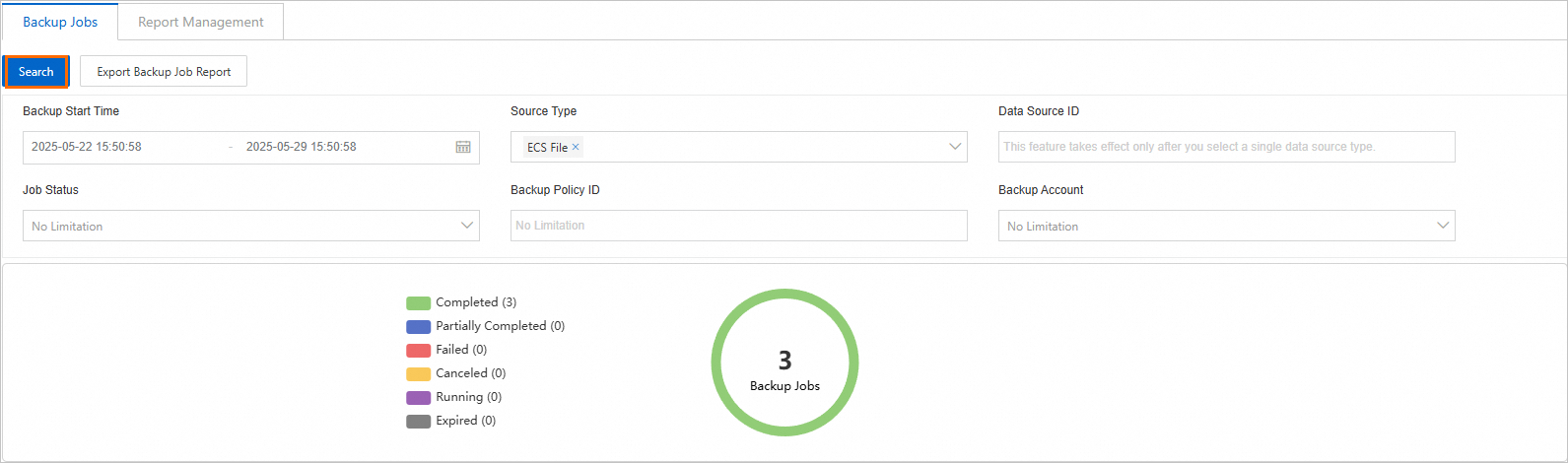
The following table describes the parameters.
Parameter
Description
Backup Start Time
Query backup jobs by a preset period (1 day, 1 week, 1 month, 3 months, 6 months, or 1 year) or a custom range up to 1 year.
Source Type
Select a data source type: ECS files, OSS buckets, Alibaba Cloud NAS, on-premises files, local NAS, CPFS, Tablestore, ACK clusters, or ECS instances.
Data Source ID
Valid only when a single data source type is selected.
NoteIf Source Type is not specified or multiple types are selected, Data Source ID does not take effect.
Job Status
Select a status: Completed, Partially Completed, Failed, Canceled, Running, and Expired.
Backup Policy ID
Select a backup policy ID from the Policy Center page.
Backup Account
Specify a backup account.
-
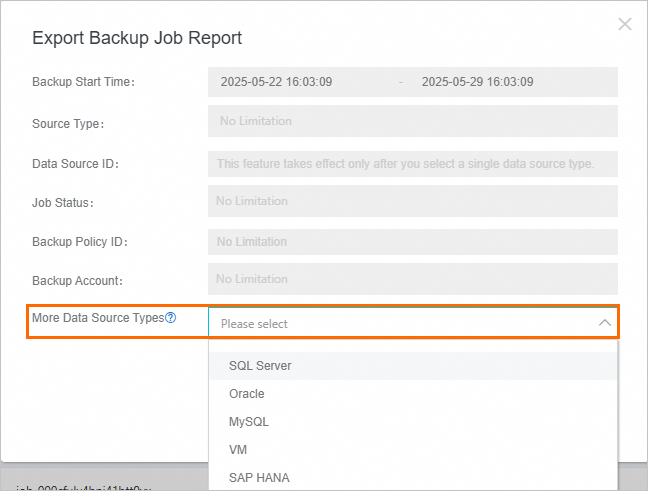
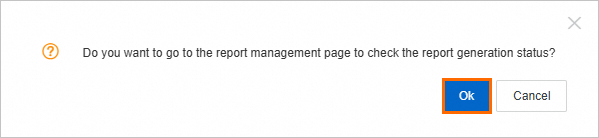
On the Backup Jobs tab, click Export Backup Job Report and confirm the export.
Important-
SQL Server, Oracle, MySQL, VM, and SAP HANA backup jobs are not displayed. To export these, select the data source types from the More Data Source Types drop-down list in the Export Backup Job Report dialog box.
-
Only one export can run at a time.
-
-
On the Report Management tab, click a report name or click Download in the Actions column.

Audit report fields
|
Sheet name |
Data source type of backup jobs |
Field |
Description |
|
Jobs |
ECS files, OSS buckets, Alibaba Cloud NAS, on-premises files, local NAS, CPFS, Tablestore, ACK clusters, and ECS instances |
User ID |
The Alibaba Cloud account ID. |
|
Cross User ID |
The cross-account ID. |
||
|
Data Source |
The data source. |
||
|
Vault Id |
The backup vault ID. |
||
|
Job ID |
The backup job ID. |
||
|
Job Status |
The backup job status. |
||
|
Start Time |
The backup job start time. Uses the same time zone as the report job. |
||
|
Finish Time |
The backup job end time. Uses the same time zone as the report job. |
||
|
Bytes Done |
The size of successfully backed-up data. If less than Bytes Total, check the Status column for details. Unit: bytes. Note
If the value is a hyphen ( |
||
|
Bytes Total |
The total size of source files scanned. Unit: bytes. Note |
||
|
Actual Written Bytes |
The amount of data to be written to the backup vault. Unit: bytes. Note |
||
|
File Count Done |
The number of files that have been backed up. Note |
||
|
File Count Total |
The total number of source files. Note |
||
|
Actual Written File Count |
The number of files written to the backup vault. Note |
||
|
Plan/Policy ID |
The backup plan ID or the backup policy ID. |
||
|
Data Source ID |
The data source name. |
||
|
Error Info |
The error message. |
||
|
MYSQL Jobs, ORACLE Jobs, and MSSQL Jobs |
MySQL, Oracle, and SQL Server databases |
User ID |
The Alibaba Cloud account ID. |
|
Cross User ID |
The cross-account ID. |
||
|
Job Status |
The backup job status. |
||
|
Start Time |
The backup job start time. Uses the same time zone as the report job. |
||
|
Finish Time |
The backup job end time. Uses the same time zone as the report job. |
||
|
Backup Bytes |
The amount of backup data. Unit: bytes. |
||
|
Plan Name |
The backup plan name. |
||
|
Data Source ID |
The data source name. |
||
|
Error Info |
The error message. |
||
|
HANA Jobs |
SAP HANA databases |
User ID |
The Alibaba Cloud account ID. |
|
Cross User ID |
The cross-account ID. |
||
|
Backup ID |
The backup ID. |
||
|
Cluster ID |
The cluster ID. |
||
|
DataBase Name |
The database name. |
||
|
Job Status |
The backup job status. |
||
|
Start Time |
The backup job start time. Uses the same time zone as the report job. |
||
|
Finish Time |
The backup job end time. Uses the same time zone as the report job. |
||
|
Backup Bytes |
The amount of backup data. Unit: bytes. |
||
|
Service Name |
The service name. |
||
|
Entry Type Name |
The backup type: full, incremental, or log backup. |
||
|
VM Jobs |
VMware VM |
User ID |
The Alibaba Cloud account ID. |
|
Cross User ID |
The cross-account ID. |
||
|
Vault ID |
The backup vault ID. |
||
|
Execution ID |
The job execution ID. |
||
|
Job Status |
The backup job status. |
||
|
Start Time |
The backup job start time. Uses the same time zone as the report job. |
||
|
Finish Time |
The backup job end time. Uses the same time zone as the report job. |
||
|
Plan/Policy ID |
The backup plan ID or the backup policy ID. |
||
|
Task Error Info |
The error message for the backup job. |
||
|
VM Name |
The VM name. |
||
|
vCenter ID |
The vCenter server ID. |
||
|
Client ID |
The client ID. |
||
|
Snapshot ID |
The snapshot ID. |
||
|
Snapshot Status |
The snapshot status. |
||
|
Bytes Done |
The size of successfully backed-up data. If less than Bytes Total, check the backup job error message. Unit: bytes. |
||
|
Bytes Total |
The total size of source files scanned. Unit: bytes. |
||
|
Actual Written Bytes |
The amount of data to be written to the backup vault. Unit: bytes. |
||
|
VM Error Message |
The error message for the VM. |
||
|
DistributionByStatus |
Backup job status distribution |
COMPLETE |
The number of completed backup jobs. |
|
CANCELED |
The number of canceled backup jobs. |
||
|
CANCELING |
The number of backup jobs being canceled. |
||
|
CREATED |
The number of created backup jobs. |
||
|
EXPIRED |
The number of expired backup jobs. |
||
|
FAILED |
The number of failed backup jobs. |
||
|
PARTIAL_COMPLETE |
The number of partially completed backup jobs. |
||
|
QUEUED |
The number of queued backup jobs. |
||
|
RUNNING |
The number of running backup jobs. |
||
|
SKIPPED |
The number of skipped backup jobs. |