Message integration is a full-stack platform that connects diverse data sources across on-premises and cloud environments with low-code visual orchestration.
Background information
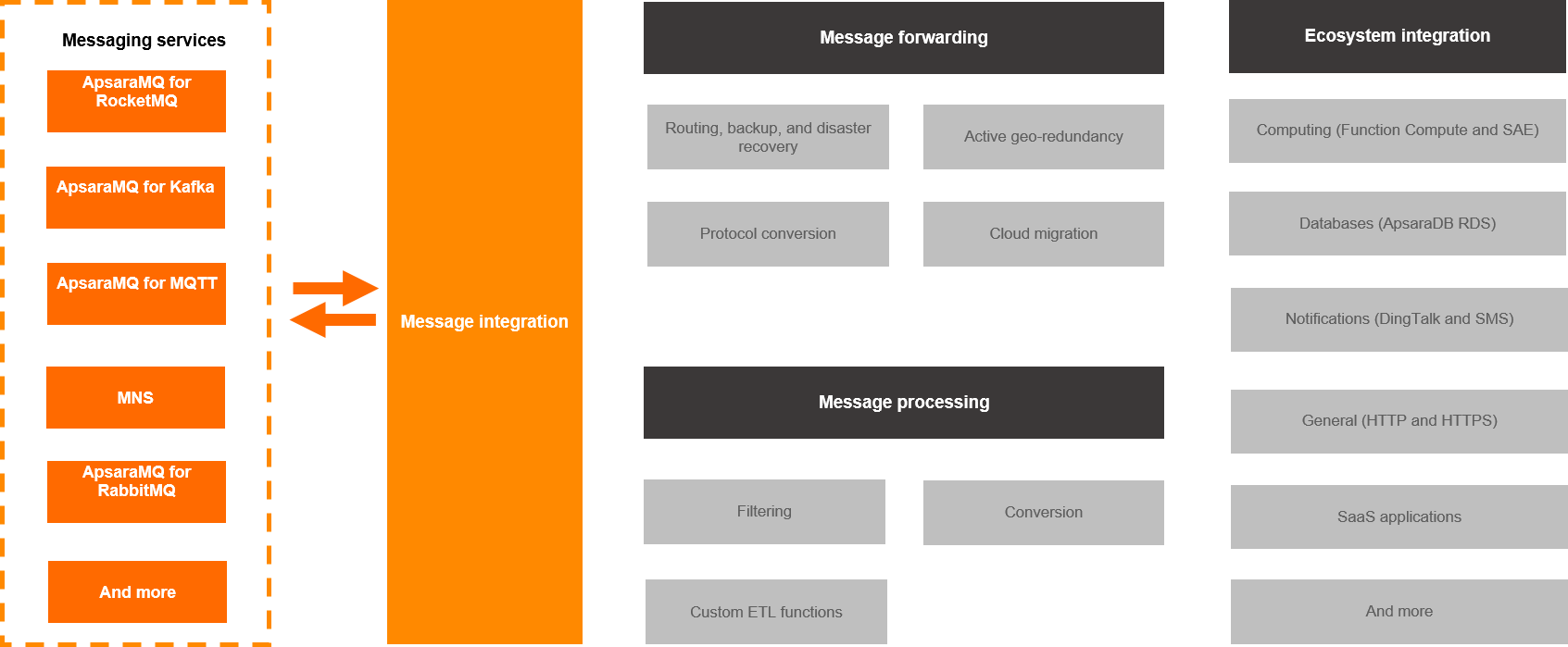
Digital transformation often requires a unified way to integrate information across diverse data formats, share data and backend services, and establish secure channels between on-premises and cloud environments. Message integration is a full-stack message and data integration platform that simplifies these workflows and supports integration across on-premises, cloud, and cross-region environments.
Message integration provides a low-code event streaming platform for messaging products, covering message integration, data connection, data processing, and service integration. A visual UI lets you create and orchestrate integration tasks with cross-region, cross-instance, and cross-application connectivity, reducing integration and development costs.
Features
-
Integration with rich data sources
Connects data across Alibaba Cloud, multi-cloud, and hybrid cloud scenarios. It supports log ingestion from multiple cloud products and data source integration for self-managed and multi-cloud environments, including logs, databases, and message middleware.
-
Data cleansing and streaming
Provides UI-based extract, transform, and load (ETL) configuration to clean, format, and transform data entering the message queue, and dump processed data to downstream systems.
-
Serverless custom processing
Leverages Function Compute (FC) to let you write custom business logic on a Serverless platform for data processing and distribution.
Limits
The following table lists the limits of message integration.
|
Limit |
Description |
|
Number of tasks |
The total number of tasks (including message inflow and outflow) in a single region cannot exceed 20. To increase the number of message integration tasks you can create, submit a ticket. |
|
Task name |
Must start with a letter or a digit. The rest of the name can contain letters, digits, and hyphens (-). The name can be up to 127 characters long. If the name exceeds the length limit, it is automatically truncated. |
|
Event pattern matching |
In stringExpression mode, each field can contain a maximum of five MAP structures (expressions). |
|
Event content transform |
|
|
Data loss in extreme cases |
For more information, see Retries and dead-letter queues. |
Concepts: Message inflow (Source)
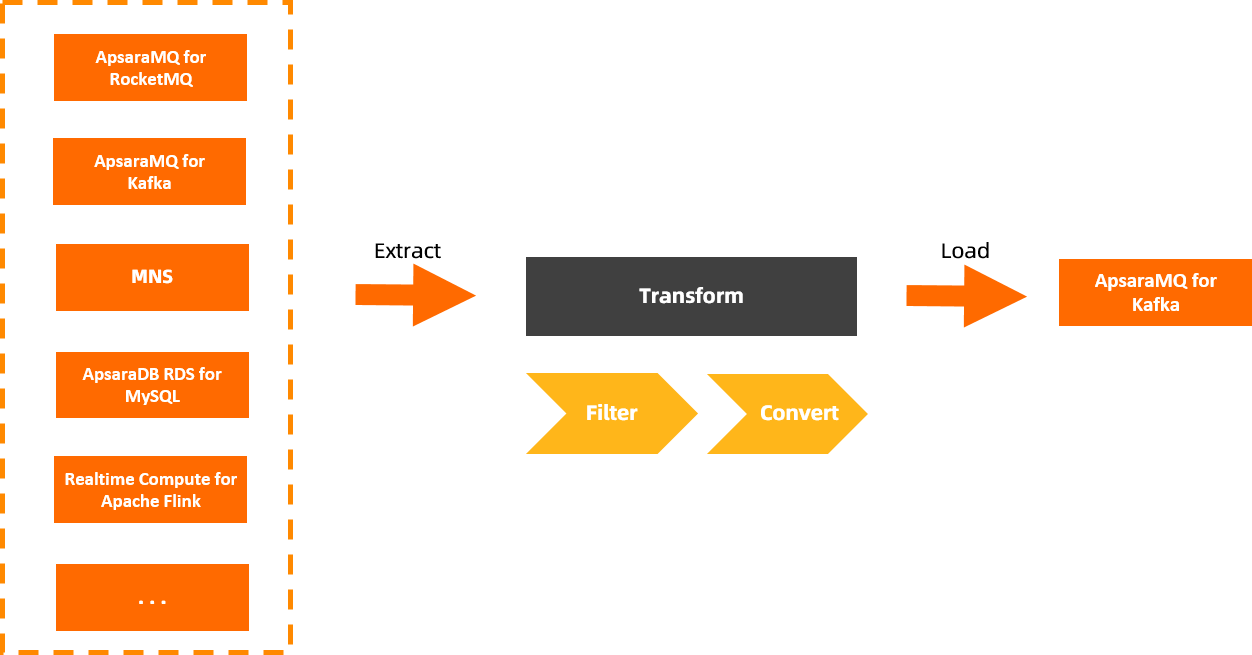
Message inflow (Source) is the data ingestion component that streams various data types — messages, logs, relational data, and non-relational data — into messaging products. It supports flexible, non-intrusive integration across data centers and clouds, with built-in source management, filtering, O&M, and monitoring.
Concepts: Message outflow (Sink)
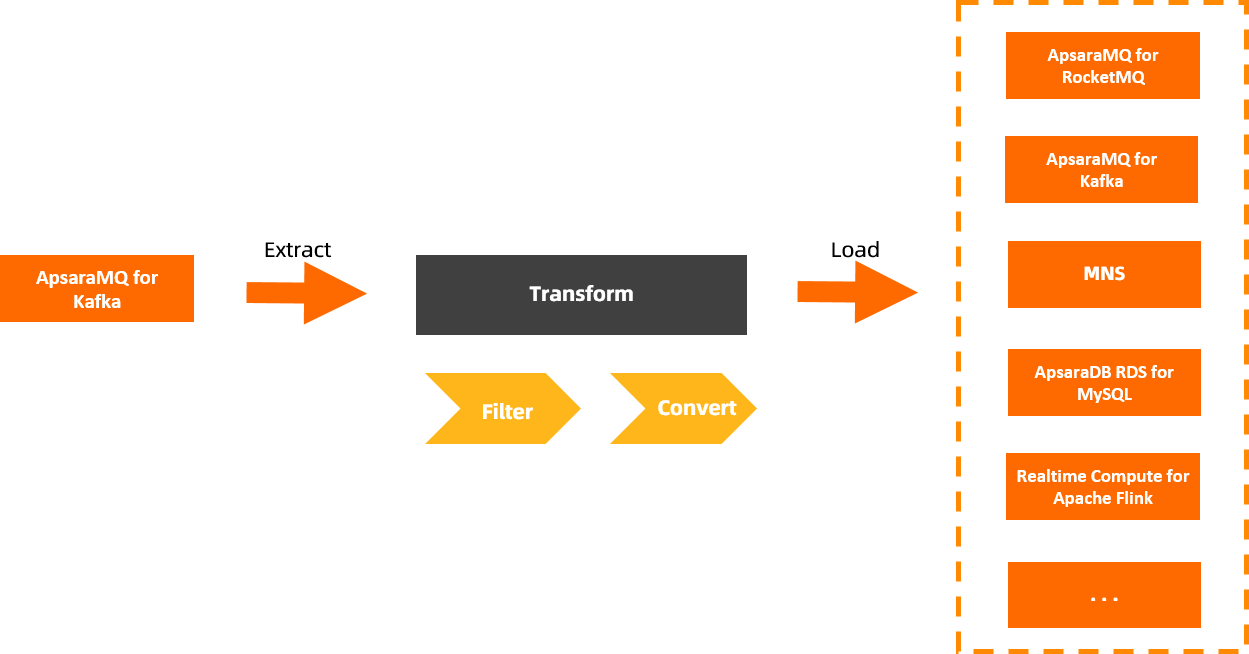
Message outflow (Sink) streams data from messaging products to various data targets. It reliably distributes messages and supports data cleansing and filtering during distribution.
Concepts: Data processing (Transform)
You can configure data processing when you set up a message inflow or outflow task. Data processing relies on the proprietary processing engine and custom Function Compute capabilities of EventBridge. It provides seven matching patterns (exact value, prefix, suffix, anything-but, numeric, array, and complex logic) and five rule converters (complete event, partial event, constant, template converter, and Function Compute template converter) for transforming, processing, and analyzing messages.
Concepts: Task
A task is the resource entity that implements message integration. It consists of a source, a target, and their configured filter and transform rules. The underlying resource is the event streaming feature of EventBridge.
Each task has two parts: resource configuration and data processing. Resource configuration defines the task's source and target. For more information about data processing, see Concepts: Data processing (Transform).
After a task is created, the resource type for message inflow or outflow cannot be modified.