How do I troubleshoot connection failures when a client first connects to the server?
What do I do if subscription relationships are inconsistent?
If a machine in a consumer group goes down, are messages lost during the restart?
What do I do if an online consumer does not consume messages but the group has message accumulation?
How do I view the retry details of ordered message consumption?
How do I troubleshoot connection failures when a client first connects to the server?
Verify that the following configurations are correct:
Check that the endpoint is specified correctly. You can obtain the endpoint on the Instance Details page in the ApsaraMQ for RocketMQ console.
Run the telnet <Domain name in the endpoint> <Port number> command to check the network connectivity.
If your application is deployed on-premises, or if you need cross-region access and cannot use Cloud Enterprise Network (CEN) to build a network, use a public endpoint to access the ApsaraMQ for RocketMQ instance. Using a public endpoint incurs outbound traffic fees. For more information, see Public network access fees for 4.x series instances or Public network access fees for 5.x series instances.
If your application is deployed on an Alibaba Cloud Elastic Compute Service (ECS) instance, use a VPC endpoint to access the ApsaraMQ for RocketMQ instance through a virtual private cloud (VPC). In this scenario, ensure that the ECS instance is in the same region as the ApsaraMQ for RocketMQ instance.
For 5.0 series instances with public network access enabled, confirm whether a whitelist is configured. By default, public network access allows connections from all IP addresses. If a whitelist is configured, only IP addresses in the whitelist can access ApsaraMQ for RocketMQ.
Check that the topic name is correct. Ensure that the name does not contain extra spaces or special characters and that the topic has been created in the console.
Check that the username and password are correct.
For 5.0 series instances, enter the username and password for the instance. You can obtain them from the instance details page in the console.
For 4.0 series instances, enter the AccessKey ID and AccessKey secret of an Alibaba Cloud account or a Resource Access Management (RAM) user. Ensure that the user is granted the required permissions. To obtain an AccessKey pair, see Create an access key pair.
What do I do if subscription relationships are inconsistent?
Log on to the console, go to the Groups page, and view the subscription relationships and consumer information for the specified group. Modify the subscription code for consumers with inconsistent subscription relationships to ensure they are consistent.
For detailed troubleshooting steps, see How do I troubleshoot inconsistent subscription relationships in ApsaraMQ for RocketMQ?
How do I handle message accumulation?
Message accumulation can occur for the following reasons:
The consumer's message processing logic is abnormal, which prevents messages from being consumed.
The message producer application experiences a traffic burst. The message production rate far exceeds the consumption rate, causing messages to accumulate.
The downstream services that the consumer depends on are experiencing increased response times, which blocks consumption threads.
The number of consumption threads is insufficient. The low consumption concurrency causes the consumption rate to fall behind the production rate.
Check the client logs or stack information to determine the cause of the exception. For more information, see How to handle message accumulation.
What do I do if a consumer cannot consume messages?
Log on to the ApsaraMQ for RocketMQ console and go to the Groups page. Check that the consumer is online and the client connection is normal. If the client is not connected, check the client logs to identify and fix the error.
Check that the subscription relationships are consistent. If they are not consistent, locate the consumer client based on the subscription relationship details and modify the client's message subscription code.
If a machine in a consumer group goes down, are messages lost during the restart?
No, they are not. ApsaraMQ for RocketMQ uses persistent subscriptions. Messages are not lost if a consumer group goes offline or a consumption exception occurs. When the consumer client comes back online, it resumes consumption from the offset where it left off.
Can the message tag be empty when subscribing to messages?
No. If you set an empty tag when subscribing to messages, the consumer will not receive any messages. To subscribe to all messages in a topic, set the tag to *. The following sample code shows an example:
String topic = "Your Topic";
// Use a tag to filter messages. This subscribes to all messages.
FilterExpression filterExpression = new FilterExpression("*", FilterExpressionType.TAG);
pushConsumer.subscribe(topic, filterExpression);
For more information, see Tag-based filtering.
How do I set the initial consumer offset when creating a new consumer group to subscribe to an existing topic?
You cannot set the initial consumer offset when you create a consumer group. By default, when a consumer starts for the first time, it begins consuming from the earliest message in the topic, regardless of whether it is subscribing to a new or an existing topic.
After the consumer starts for the first time, you can reset the consumer offset in the ApsaraMQ for RocketMQ console. For more information, see Reset a consumer offset.
What do I do if an online consumer does not consume messages but the group has message accumulation?
Check the subscription method that the consumer group uses for the topic. If the consumer subscribes to the topic using message filtering, messages that do not match the filter conditions are counted as accumulated. This is expected behavior. For more information, see Message filtering.
If you use SQL or tag-based filtering and the group has message accumulation even though no messages are being consumed, the number of accumulated messages is calculated as follows.
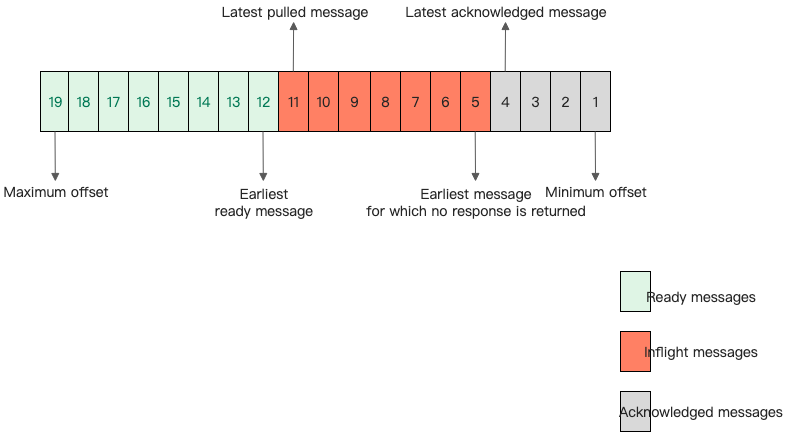
SQL filtering: Number of accumulated messages = Number of ready messages + Number of inflight messages - Number of messages that do not meet the filtering conditions
Tag-based filtering: Number of accumulated messages = (Number of ready messages + Number of inflight messages) × Percentage of messages that match the tags
Percentage of messages that match the tags = Number of messages that match the tags in the sample/Total number of sampled messages
What do I do if the dashboard shows a large message accumulation, but the messages are already consumed on the consumer side?
This issue can occur if you use a Remoting protocol software development kit (SDK) and set the consumption mode to broadcasting consumption on the consumer. The server-side determines message accumulation based on consumer offset information. However, in broadcasting consumption mode, consumer offsets are maintained on the client. As a result, the dashboard may incorrectly show message accumulation.
Additionally, if the consumer uses tag-based or SQL filtering, messages that do not match the filter conditions are considered accumulated.
How do I view the retry details of ordered message consumption?
Ordered message consumption retries are performed locally on the consumer client. Therefore, you cannot query the specific retry information from the message trace on the server side.
You can query detailed retry information from the client logs. The following log keywords can be used:
RocketMQ Remoting SDK:
consumeMessage exception: {} Group: {} Msgs: {} MQ: {}consumeMessage Orderly return not OK, Group: {} Msgs: {} MQ: {}
RocketMQ gRPC SDK:
Prepare to redeliver the fifo message because of the consumption failure, maxAttempt={}, attempt={}, mq={}, messageId={}, nextAttemptDelay={}, clientId={}