What are the advantages of ApsaraMQ for RocketMQ 5.x instances over 4.x instances?
Which client versions are compatible with ApsaraMQ for RocketMQ 5.x instances?
Which programming languages does the ApsaraMQ for RocketMQ client support?
How do I enable public network access for ApsaraMQ for RocketMQ?
What is the difference between ordered messages and normal messages?
Where can I find the username and password to connect to the server?
Is there a limit on the number of tags for an ApsaraMQ for RocketMQ subscription?
How are messages consumed when multiple consumer groups subscribe to the same topic?
What is the maximum message body size in ApsaraMQ for RocketMQ?
If message consumption fails, will the message be consumed again?
Do ApsaraMQ for RocketMQ 5.x instances support broadcasting consumption?
What is the maximum delay for a scheduled message in ApsaraMQ for RocketMQ?
Are there limits on the number of topics and groups for an instance?
Can I enable or disable the disk encryption feature for a purchased instance?
How do I use Spring Boot to connect to ApsaraMQ for RocketMQ?
What is the difference between an IP address whitelist and a security group for a RocketMQ 5.0 Serverless instance?
How do I query the storage space of a RocketMQ instance?
How do I determine the target TPS specification when downgrading a RocketMQ 5.x instance?
What are the advantages of ApsaraMQ for RocketMQ 5.x instances over 4.x instances?
Compared to previous versions, 5.x instances feature a more advanced architecture, a lower barrier to entry for development and O&M, more flexible costs, and more comprehensive sales models. For more information, see Differences and compatibility between 4.x and 5.x versions.
Which client versions are compatible with ApsaraMQ for RocketMQ 5.x instances?
ApsaraMQ for RocketMQ 5.x instances are compatible with open source Apache RocketMQ 5.x, 4.x, and 3.x clients, and ApsaraMQ for RocketMQ ONS 1.x clients. For more information, see Server version compatibility.
Which programming languages does the ApsaraMQ for RocketMQ client support?
ApsaraMQ for RocketMQ 5.x series: Supports Java, C/C++, C#, and Go SDKs over the TCP protocol. For more information, see Overview of 5.x series SDK Reference.
ApsaraMQ for RocketMQ 4.x series: Supports Java, C/C#, and .NET SDKs over the TCP protocol, and Java, Go, Python, Node.js, PHP, C#, and C++ SDKs over the HTTP protocol. For more information, see Overview of 4.x series SDK Reference.
How do I enable public network access for ApsaraMQ for RocketMQ?
5.x series instances: You can enable public network access when you purchase an instance. If you did not enable public network access when you created the instance, you can upgrade the instance to enable it. For more information about billing for public network access for 5.x series instances, see Public network access fees.
4.x series instances: Public network endpoints are supported by default. No manual setup is required. For more information about billing for public network access for 4.x series instances, see Public network traffic pricing.
You can obtain the public network endpoint from the Instance Details page in the ApsaraMQ for RocketMQ console.
What is the difference between ordered messages and normal messages?
Normal messages do not guarantee that messages are consumed in the same order they are produced.
For ordered messages, all messages are partitioned based on a ShardingKey. Messages within the same partition are consumed on a first-in, first-out (FIFO) basis. Order is guaranteed for messages within the same partition, but not for messages across different partitions. For more information, see Ordered messages.
Where can I find the username and password to connect to the server?
5.x series instances: To access a 5.x series instance, you must provide the instance's username and password. For example:
/**
* If you use a public endpoint, you must also set the instance username and password in the configuration.
* You can get the username and password from the Intelligent Identity Recognition tab of Access Control in the console.
* If you access the instance from an Alibaba Cloud ECS instance over the internal network, you do not need to configure this.
* The server automatically obtains the information based on the internal VPC.
* For Serverless instances, you must set the username and password for public network access.
* If internal network access without identity verification is enabled, you do not need to set them for internal network access.
*/
builder.setCredentialProvider(new StaticSessionCredentialsProvider("Instance UserName", "Instance Password"));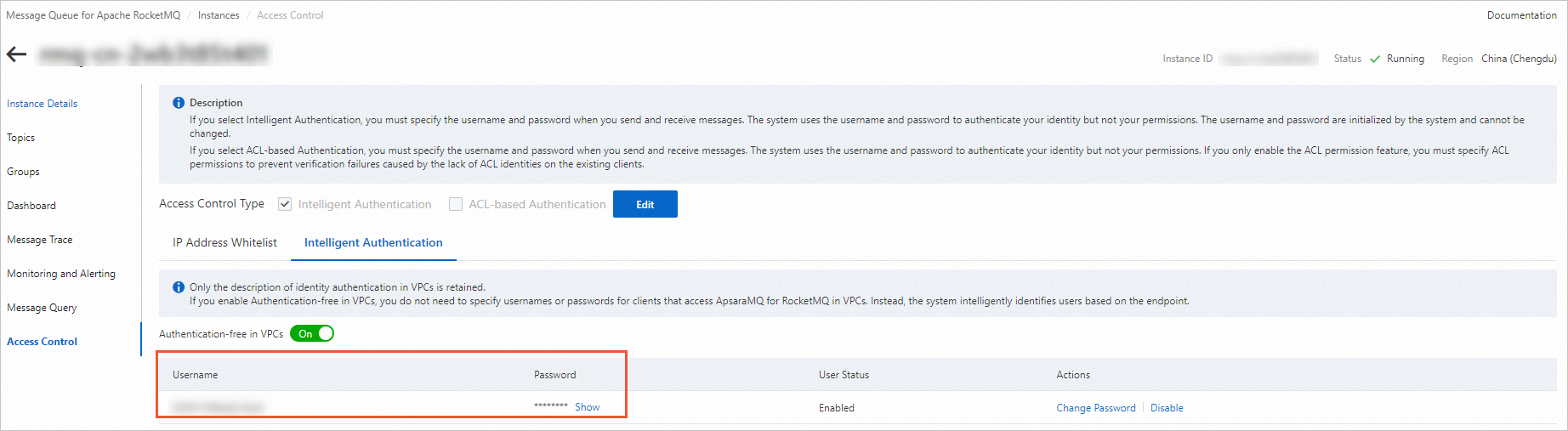
4.x series instances: To access a 4.x series instance, you must provide the AccessKey ID and AccessKey secret of your Alibaba Cloud account or RAM user. For example:
// The AccessKey ID for Alibaba Cloud identity verification. Create it in the Alibaba Cloud RAM console.
properties.put(PropertyKeyConst.AccessKey,"Y2lK16J6Eh******");
// The AccessKey secret for Alibaba Cloud identity verification. Create it in the Alibaba Cloud RAM console.
properties.put(PropertyKeyConst.SecretKey,"SPX46tC00z******");
To create an AccessKey, see Create an AccessKey.
Where can I find the endpoint to connect to the server?
5.x instances: Use TCP endpoints. Access through HTTP SDKs is not supported.
4.x instances: Use both TCP and HTTP endpoints. Select the endpoint that matches the protocol of your SDK. Endpoints for different protocols cannot be used interchangeably.
Obtain through the console
Log on to the ApsaraMQ for RocketMQ console. In the left-side navigation pane, click Instances.
In the top navigation bar, select a region, such as China (Hangzhou). On the Instances page, click the name of the instance that you want to manage.
On the Instance Details page, view the instance's endpoints on the Basic Information tab.
Get the endpoint by calling an API operation
5.x instances: Call the GetInstance operation.
4.x instances: Call the OnsInstanceBaseInfo operation.
Is there a limit on the number of tags for an ApsaraMQ for RocketMQ subscription?
Tags are set by the producer when sending a message. Each message can have one tag.
When a consumer subscribes to messages, there is no limit on the number of tags in the filter rule. However, the filter expression cannot be too long. We recommend that you keep it under 1 KB.
For more information, see Best practices for topics and tags.
What is the difference between clustering consumption and broadcasting consumption in ApsaraMQ for RocketMQ?
Clustering consumption: In this mode, ApsaraMQ for RocketMQ ensures that a message is processed by only one consumer within the consumer group.
Broadcasting consumption: In this mode, ApsaraMQ for RocketMQ pushes each message to all consumers in the consumer group. This guarantees that every consumer processes the message at least once.
For more information, see Clustering consumption and broadcasting consumption.
How are messages consumed when multiple groups subscribe to the same topic?
A consumer group can subscribe to multiple topics, and a topic can be subscribed to by multiple consumer groups. When multiple consumer groups subscribe to the same topic, each message is delivered to every consumer group once. Consumer groups are isolated from each other, so a message can be consumed by each consumer group simultaneously.
What is the maximum message body size in ApsaraMQ for RocketMQ?
5.x series instances:
Maximum: 4 MB.
4.x series instances:
Normal or ordered message: 4 MB
Transactional, scheduled, or delayed message: 64 KB
NoteThe total attribute size of a message cannot exceed 16 KB.
How long are messages stored in ApsaraMQ for RocketMQ?
5.x series instances:
Minimum: 24 hours.
Maximum: 720 hours.
4.x series instances:
Standard Edition: The storage duration is 3 days. Older messages are automatically deleted.
Enterprise Platinum Edition: The default storage duration is 3 days. If the purchased storage space is insufficient, ApsaraMQ for RocketMQ deletes the oldest messages. In this case, the actual storage duration may be less than 3 days.
What is the message load balancing policy?
5.x series instances: See 5.x series producer load balancing policy and 5.x series consumer load balancing policy.
4.x series instances: See 4.x series message load balancing policy.
If message consumption fails, will the message be consumed again?
If message consumption fails, ApsaraMQ for RocketMQ redelivers the message to the consumer for another attempt. For more information about the retry mechanism, see the following topics:
Do ApsaraMQ for RocketMQ 5.x instances support broadcasting consumption?
ApsaraMQ for RocketMQ allows multiple consumer groups to subscribe to the same message and each consumer group to initialize multiple consumers. Consumer groups and consumers can be configured to consume messages in the following scenarios: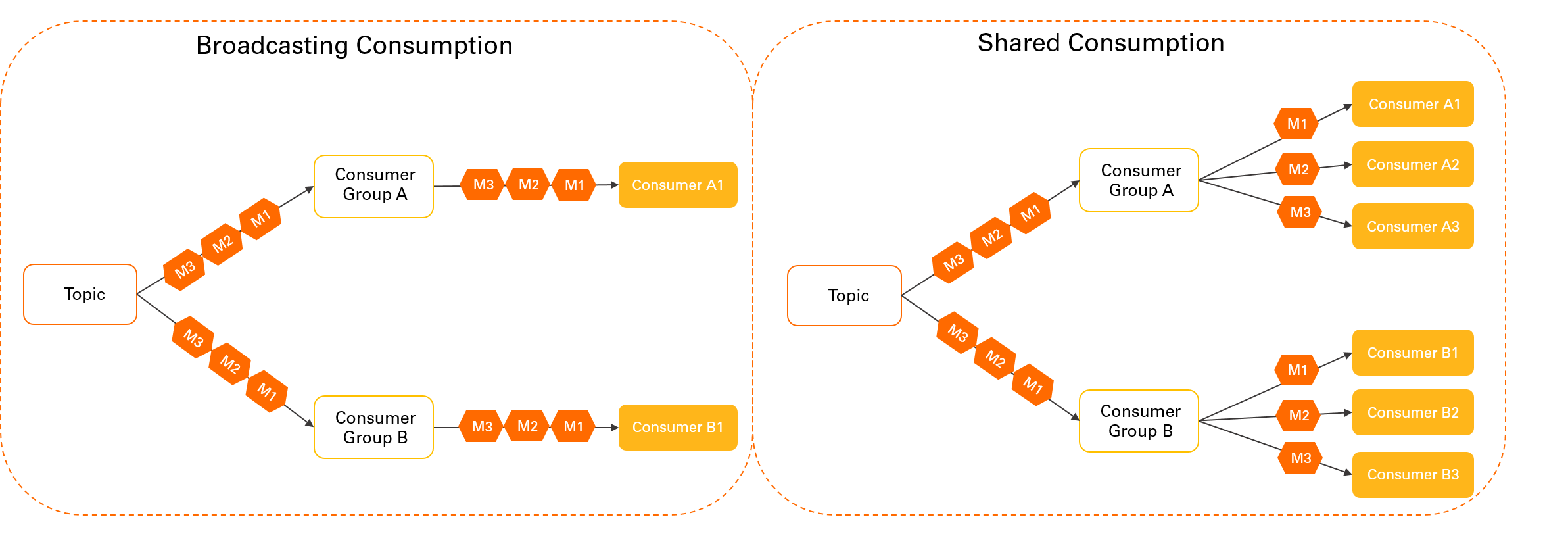
Broadcast consumption across consumer groups: This scenario is illustrated on the left side of the preceding figure. Each consumer group initializes its own consumer who consumes all messages. Messages are delivered to multiple subscribers from topics in a one-to-many relationship.
This mode is typically used in scenarios such as gateway push and configuration push.
Cluster consumption within a consumer group: This scenario is illustrated on the right side of the preceding figure. Each consumer group initializes multiple consumers, and the messages are sent to all consumers in the group. This is useful when you want to implement horizontal traffic partitioning and load balancing within the group.
This mode is suitable for microservice decoupling.
For 5.x series instances, you do not need to separately configure the client SDK code. You can achieve the broadcasting effect by designing the subscription relationship based on broadcasting consumption between consumer groups.
What is the maximum delay for a scheduled message in ApsaraMQ for RocketMQ?
5.x series instances:
Subscription and pay-as-you-go Standard Edition instances, and Serverless Standard and Professional Edition instances support a maximum delay of 7 days.
Subscription and pay-as-you-go Professional Edition and Platinum Edition instances support a maximum delay of 40 days.
4.x series instances: The maximum delay is 40 days.
You can set the
msg.setStartDeliverTimeparameter of a message to a point in time within the following 40 days. The value is in milliseconds. If you specify a value that is greater than 40 days, the broker cannot deliver the message.NoteA delay of 1 to 2 seconds exists between the scheduled time to send a scheduled message and the actual time to send the message.
Are there limits on the number of topics and groups for an instance?
5.x series instances
The limits on the number of topics and groups depend on the instance type that you purchase. For specific limits, see Instance specifications.
4.x series instances
Instance type
Topic limit
Group limit
Standard Edition instance
Unlimited
Note4.x series instances are charged based on the number of topics. To avoid extra fees, promptly delete topics that are no longer in use. For billing details, see Message sending and receiving pricing.
1,000
Enterprise Platinum Edition instance
Depends on the topic specification selected at purchase
1,000
Does ApsaraMQ for RocketMQ storage require mounting a disk?
No, it does not.
You need to select a storage space size only when you create a 4.x series Platinum Edition instance. The actual storage is configured based on the selected size.
For other instance types, billing is based on the actual amount of stored messages. You do not need to configure the storage.
Can I enable or disable the disk encryption feature for a purchased instance?
No, you cannot. The disk encryption feature can be enabled only when you create an instance. You cannot enable this feature for an existing instance. You also cannot disable this feature after it is enabled.