ApsaraMQ for RocketMQ provides two consumer types: Push consumer and Simple consumer. Each type handles message acquisition, concurrency, and retries differently. Choose the type that matches your processing model and reliability requirements.
Which consumer type to use
| Scenario | Recommended type | Reason |
|---|---|---|
| Predictable processing time, no custom threading | Push consumer | The SDK manages message fetching, concurrency, and retries. Register a listener, process each message, and return the result. |
| Variable processing time, custom workflows | Simple consumer | Your application controls when to fetch messages, how to distribute them across threads, and when to acknowledge completion. |
Switching consumer types does not affect existing ApsaraMQ for RocketMQ resources or business processing.
Message processing stages
Both consumer types follow a three-stage lifecycle:
Receive -- Fetch messages from the server.
Process -- Run business logic on each message.
Commit -- Report the result (success or failure) to the server.
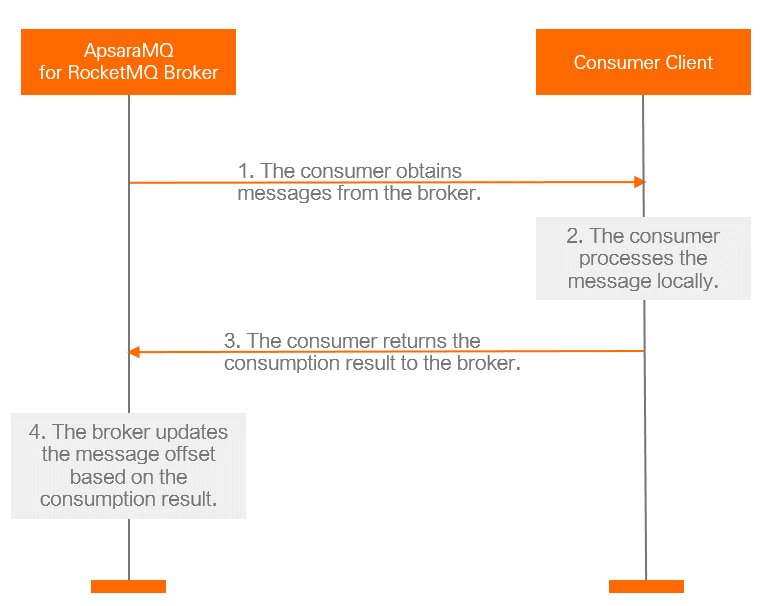
The two types differ in how each stage is handled:
| Feature | Push consumer | Simple consumer |
|---|---|---|
| Interface | Listener callback -- implement logic inside the listener and return a result | Application calls API operations to receive, process, and acknowledge messages |
| Concurrency | SDK-managed | Application-managed |
| Flexibility | Highly encapsulated, less flexible | Atomic operations, highly customizable |
| Best for | Standard consumption with predictable processing time | Custom workflows, async distribution, or batch consumption |
| SDK classes | PushConsumer, LitePushConsumer | SimpleConsumer |
Push consumers
A Push consumer encapsulates message fetching, threading, and retry logic. Register a message listener during initialization, and the SDK handles the rest.
How it works
The SDK uses a Reactor thread model internally:
A built-in long-polling thread pulls messages from the server asynchronously.
Messages are placed into an internal cache queue.
The SDK dispatches messages to consumer threads, which invoke your listener.
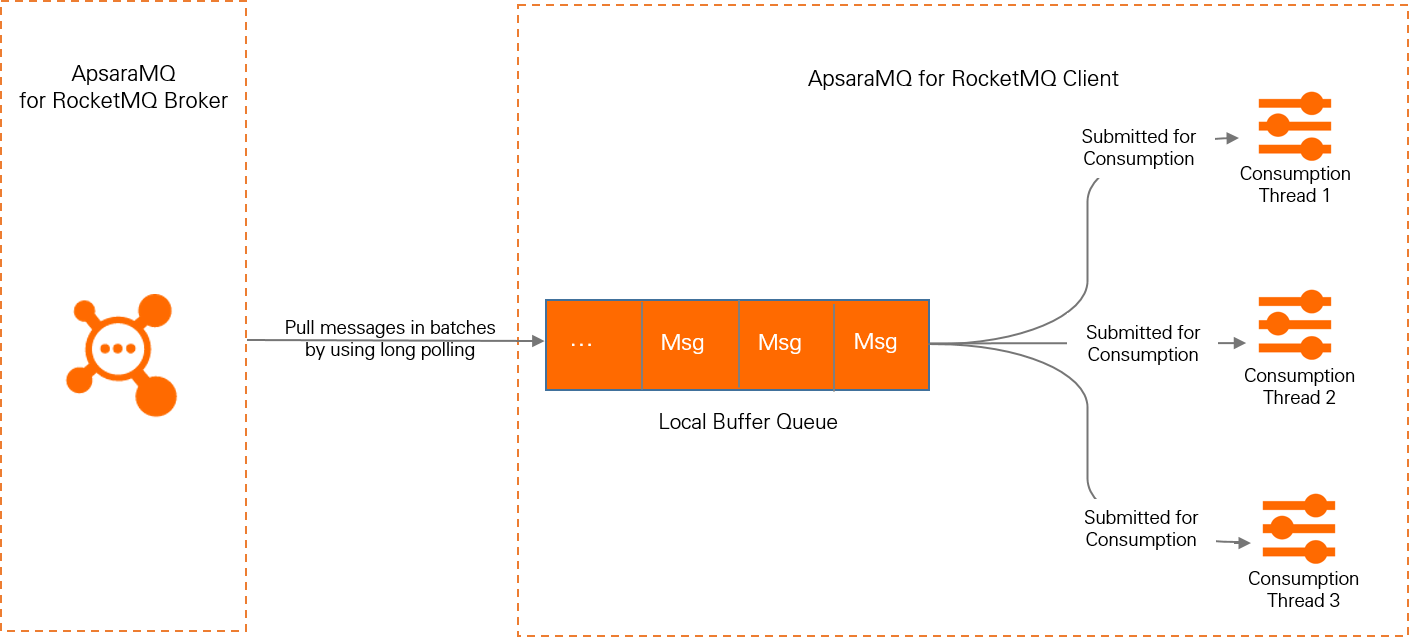
Listener results
The message listener must return one of the following results:
| Result | Java SDK constant | Behavior |
|---|---|---|
| Success | ConsumeResult.SUCCESS | The server updates the consumption progress. |
| Failure | ConsumeResult.FAILURE | The system retries based on the PushConsumer retry policy. |
| Exception thrown | (treated as failure) | Same retry behavior as an explicit failure. |
Timeout behavior
If processing logic blocks and prevents the message from completing within the allowed time, the SDK forcibly submits a failure result and handles the message according to the retry policy.
A timeout causes the SDK to submit a failure result, but the current processing thread may not respond to the interruption and can continue running.
Reliability constraints
The Push consumer determines success or failure strictly from the listener return value. To preserve this guarantee:
Process synchronously. Complete all processing before returning the result.
Do not redistribute messages. Do not hand off messages to other threads and return a result before those threads finish.
If the listener returns success before processing completes and processing later fails, the server considers the message consumed and does not retry.
Ordered message delivery
When a consumer group uses ordered consumption mode, the Push consumer invokes the listener in strict message order with no additional configuration. For more information, see Ordered messages.
Ordered delivery requires synchronous processing. Custom async distribution inside the listener voids the ordering guarantee.
When to use Push consumers
Push consumers work best when:
Processing time is predictable. Unpredictable durations trigger frequent timeouts, which cause duplicate messages through retries.
Standard consumption is sufficient. The SDK controls the thread model and delivers messages at maximum throughput. This simplifies development but does not support async processing or custom rate control.
SDK classes
ApsaraMQ for RocketMQ provides two SDK classes for Push consumers:
PushConsumer-- Consumes messages from standard (non-Lite) topics.LitePushConsumer-- Consumes messages from Lite-type topics, with consumption control at the Lite topic granularity.
PushConsumer example
// Consume normal messages with PushConsumer
ClientServiceProvider provider = ClientServiceProvider.loadService();
String topic = "<your-topic>";
FilterExpression filterExpression = new FilterExpression("<your-filter-tag>", FilterExpressionType.TAG);

PushConsumer pushConsumer = provider.newPushConsumerBuilder()
        // Set the consumer group
        .setConsumerGroup("<your-consumer-group>")
        // Set the access endpoint
        .setClientConfiguration(ClientConfiguration.newBuilder().setEndpoints("<your-endpoint>").build())
        // Bind the subscription
        .setSubscriptionExpressions(Collections.singletonMap(topic, filterExpression))
        // Register the message listener
        .setMessageListener(new MessageListener() {
            @Override
            public ConsumeResult consume(MessageView messageView) {
                // Process the message and return the result
                return ConsumeResult.SUCCESS;
            }
        })
        .build();
Replace the following placeholders with your actual values:
| Placeholder | Description | Example |
|---|---|---|
<your-topic> | Topic name | order-events |
<your-filter-tag> | Message tag for filtering | payment |
<your-consumer-group> | Consumer group name | order-service-group |
<your-endpoint> | Server access endpoint | -- |
LitePushConsumer example
// Consume normal messages with LitePushConsumer
ClientServiceProvider provider = ClientServiceProvider.loadService();

LitePushConsumer litePushConsumer = provider.newLitePushConsumerBuilder()
        // Set the access endpoint
        .setClientConfiguration(ClientConfiguration.newBuilder().setEndpoints("<your-endpoint>").build())
        // Set the topic
        .bindTopic("<your-topic>")
        // Set the consumer group
        .setConsumerGroup("<your-consumer-group>")
        // Register the message listener
        .setMessageListener(messageView -> {
            // Process the message and return the result
            return ConsumeResult.SUCCESS;
        })
        .build();

// Subscribe to Lite topics
litePushConsumer.subscribeLite("<your-lite-topic-1>");
litePushConsumer.subscribeLite("<your-lite-topic-2>");
Simple consumers
A Simple consumer provides atomic API operations for message processing. Your application controls message fetching, thread management, and acknowledgment directly.
How it works
Call
ReceiveMessageto pull a batch of messages from the server.Distribute messages to your business threads for processing.
Call
AckMessagefor each successfully processed message.
If processing fails, do not send an acknowledgment. The message becomes available again after the message invisibility duration expires, triggering a retry. For more information, see SimpleConsumer retry policy.
API operations
| Operation | Purpose | Key parameters |
|---|---|---|
ReceiveMessage | Pull messages from the server | Batch size: number of messages per request. Message invisibility duration: maximum processing time before the message is redelivered. |
AckMessage | Acknowledge successful consumption | None |
ChangeInvisibleDuration | Extend processing time for a message already received | Message invisibility duration: new value, typically used when processing takes longer than initially expected. |
The server uses distributed storage, so ReceiveMessage may return an empty result even when messages exist. To handle this, call ReceiveMessage again or increase call concurrency.
Failure handling
The following table describes how different failure scenarios affect message delivery:
| Failure scenario | Behavior |
|---|---|
| Processing fails (no ACK sent) | The message becomes visible again after the invisibility duration expires. The server redelivers it for retry. |
| Processing exceeds the invisibility duration | Same as no ACK -- the message becomes visible and is redelivered. Use ChangeInvisibleDuration to extend the processing window before the duration expires. |
| Consumer crashes before sending ACK | The message is redelivered after the invisibility duration expires. |
Ordered message delivery
A Simple consumer processes ordered messages in storage order. For a group of messages that must stay in sequence, the next message cannot be retrieved until the preceding one is processed.
When to use Simple consumers
Simple consumers work best when:
Processing time is unpredictable. Specify an initial message invisibility duration when calling
ReceiveMessage, then extend it withChangeInvisibleDurationif needed.Custom workflows are required. The SDK imposes no threading model -- implement async distribution, batch consumption, or any custom pattern.
Rate control matters. Your code decides when and how often to call
ReceiveMessage, providing direct control over throughput.
SDK class
ApsaraMQ for RocketMQ provides one SDK class for Simple consumers: SimpleConsumer. This class cannot consume messages from Lite topics.
SimpleConsumer example
// Consume normal messages with SimpleConsumer
ClientServiceProvider provider = ClientServiceProvider.loadService();
String topic = "<your-topic>";
FilterExpression filterExpression = new FilterExpression("<your-filter-tag>", FilterExpressionType.TAG);

SimpleConsumer simpleConsumer = provider.newSimpleConsumerBuilder()
        // Set the consumer group
        .setConsumerGroup("<your-consumer-group>")
        // Set the access endpoint
        .setClientConfiguration(ClientConfiguration.newBuilder().setEndpoints("<your-endpoint>").build())
        // Bind the subscription
        .setSubscriptionExpressions(Collections.singletonMap(topic, filterExpression))
        .build();

try {
    // Pull up to 10 messages, wait up to 30 seconds
    List<MessageView> messageViewList = simpleConsumer.receive(10, Duration.ofSeconds(30));
    messageViewList.forEach(messageView -> {
        System.out.println(messageView);
        // Acknowledge each message after successful processing
        try {
            simpleConsumer.ack(messageView);
        } catch (ClientException e) {
            e.printStackTrace();
        }
    });
} catch (ClientException e) {
    // Handle failures such as throttling, then retry the receive call
    e.printStackTrace();
}
Best practices
Control processing time for Push consumers
Keep message processing within the timeout threshold. Frequent timeouts cause unnecessary retries and duplicate messages. If your application regularly handles long-running tasks, switch to a Simple consumer and set an appropriate message invisibility duration.
Migrate from LitePullConsumer to SimpleConsumer
LitePullConsumer was a consumer type in the Apache RocketMQ 4.x Remoting SDK. It has been removed in the 5.x gRPC SDK, and the Go, Java, and Python 5.x SDKs do not provide this type.
If you previously used LitePullConsumer for pull-based consumption, migrate to SimpleConsumer after upgrading to the 5.x SDK. SimpleConsumer provides the following operations:
ReceiveMessage: pulls messages from the server on demand.AckMessage: acknowledges successful consumption.ChangeInvisibleDuration: changes the message invisibility duration to control the retry interval.
In the Go SDK, the corresponding methods are Receive and Ack. In the Java SDK, the corresponding methods are receive and ack.