A consumer group is a load balancing group of consumers that share identical consumption behavior. By adding consumers to a group, you scale out message processing and enable high-availability disaster recovery.
Consumer groups are logical resources, not running processes. Individual consumers handle the actual message processing, but the group defines *how* those consumers behave: what they subscribe to, in what order they receive messages, and what happens when consumption fails.
Key concepts
| Concept | Description |
|---|---|
| Consumer group | A logical grouping of consumers that share identical consumption behavior and load-balance message processing |
| Subscription | The topics a consumer group subscribes to, plus any message filtering rules |
| Delivery order | Whether the broker delivers messages sequentially (ordered) or in parallel (concurrent) |
| Consumption retry policy | The rules for retrying failed messages, including maximum retry count and retry interval |
| Consumption pattern | The consumption mode: CLUSTERING (default) or LITE_SELECTIVE |
| Dead-letter queue | A queue that stores messages that still fail after all retries are exhausted. Messages may also be discarded instead of being sent to the dead-letter queue. |
How it works
The following diagram shows where consumer groups fit in the ApsaraMQ for RocketMQ message flow:
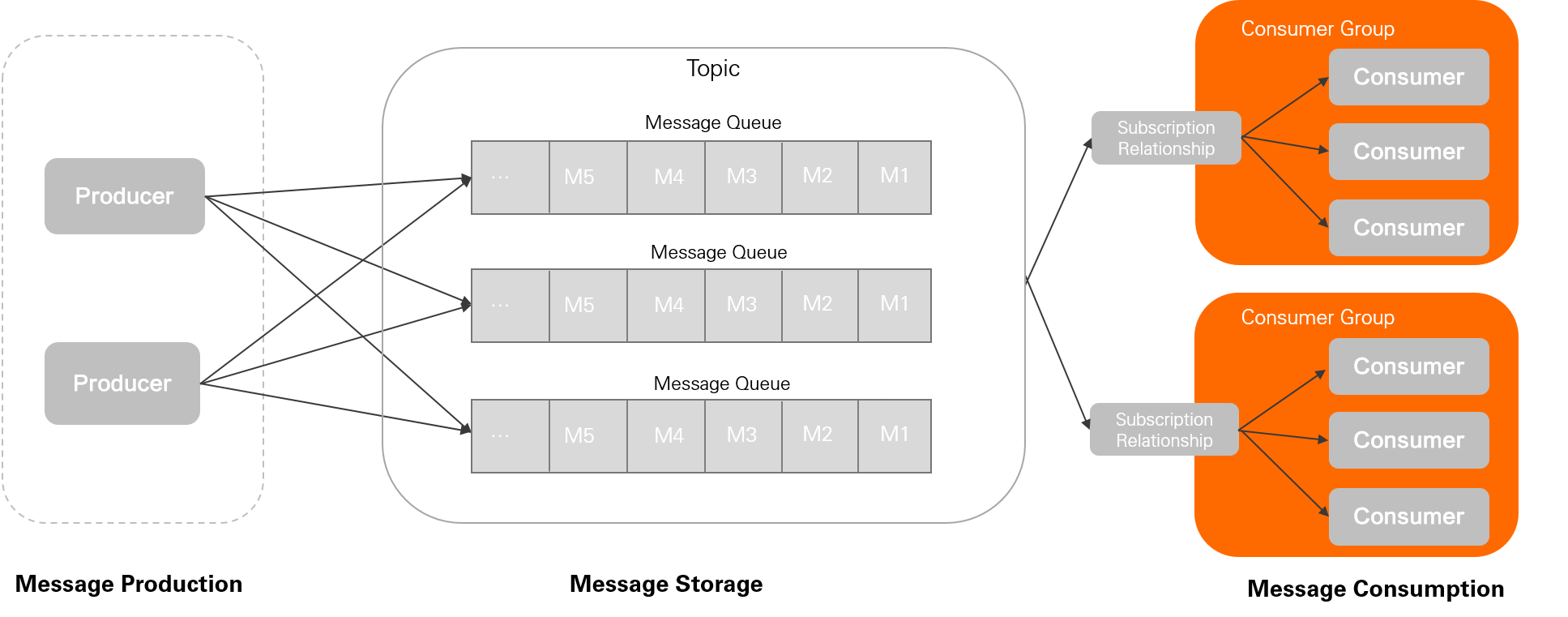
Producers send messages to the ApsaraMQ for RocketMQ broker.
The broker stores messages in the queue specified by the topic, in the order received.
Consumers in a consumer group pull and process messages based on the group's subscriptions.
All consumers within the same group share three behaviors defined at the group level:
Subscription: The broker manages subscriptions at the consumer group level. Each consumer dynamically registers its subscription upon connecting, and the broker persists this information to track consumption progress. For more information, see Subscriptions.
Delivery order: The broker delivers messages to consumers either in strict order or concurrently. This setting is configured at the consumer group level and cannot be changed after creation. For more information, see Ordered messages.
Consumption retry policy: When a consumer fails to process a message, the broker redelivers it based on the retry policy. The policy defines the maximum number of retries and the retry interval. Messages that still fail after all retries are sent to a dead-letter queue or discarded. For more information, see Consumption retries.
Attributes
Consistency requirements
All consumers in the same group must use identical settings for:
Delivery order -- either ordered or concurrent, not a mix of both.
Consumption retry policy -- the same maximum retry count and retry interval.
How these settings are enforced depends on your broker version:
| Broker version | Behavior |
|---|---|
| ApsaraMQ for RocketMQ 5.x | Consumers inherit the delivery order and retry policy from the consumer group. No client-side configuration is needed. |
| ApsaraMQ for RocketMQ 3.x / 4.x | Delivery order and retry policy are set through client-side API operations. Make sure all consumers in the group use the same settings. |
If you connect to a 5.x broker with an earlier SDK version, the consumption behavior is determined by the client-side API configuration, not the consumer group settings.
Best practices
Separate groups by business domain
Consumers and topics have a many-to-many relationship. Follow these guidelines when designing consumer groups:
| Guideline | Recommendation |
|---|---|
| Match delivery order | All consumers in a group must use the same delivery order. Do not mix ordered and concurrent consumption in the same group. |
| One group per business domain | Different business domains typically need different filtering rules and retry policies. Create separate consumer groups for each domain. |
| Limit topic subscriptions | A single consumer group should subscribe to no more than 10 topics. |
Avoid using automated mechanisms to manage consumer groups
Each consumer group carries persistent state: consumption progress, message backlogs, and monitoring metrics. Treat them as managed infrastructure in production:
Avoid using automated mechanisms to create, delete, or modify consumer groups.
Do not arbitrarily add, delete, modify, or query consumer groups in production environments.
Monitor consumption progress and message backlogs to detect issues early.