On the Tenant Management page, you can view the information of tenants in the following columns: Tenant Name/ID, Tenant Specifications, Tenant Mode, Created At, Primary Zone, Disk Usage, Tags, and Status. You can also view the details of connections to a tenant, modify the specifications of a tenant, switch the primary zone, refresh the plan cache, and delete a tenant.
Tenants
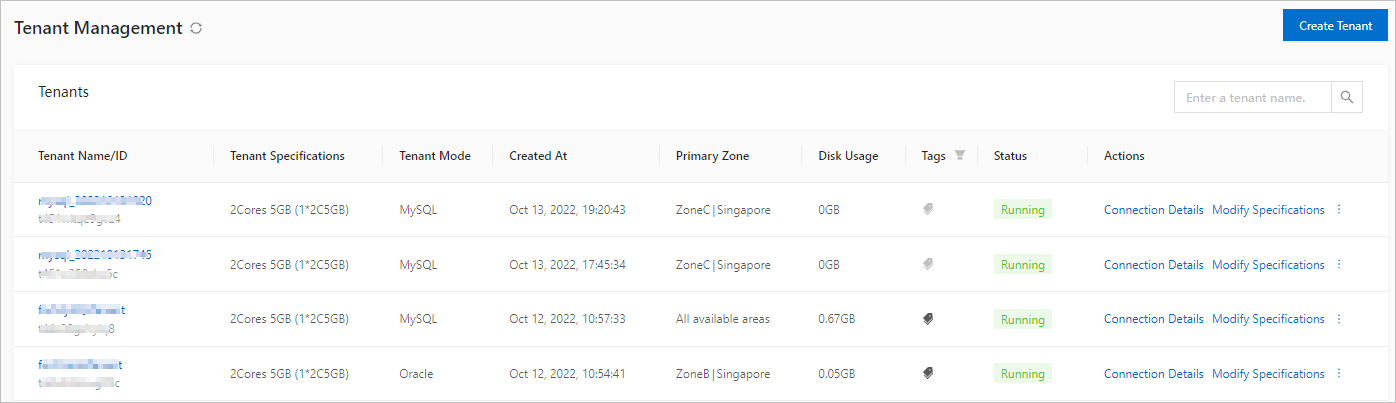
The tenant list on this page contains the following columns.
Column | Description |
Tenant Name/ID | The name and ID of the tenant. You can click the name of a tenant to go to the Tenant Workspace page of the tenant. For more information, see Tenant workspace. |
Tenant Specifications | The specifications specified when the tenant was created. |
Tenant Mode | The mode of the current tenant. Valid values: Oracle and MySQL. |
Parameter Template | The parameter template used by the current tenant. Valid values: Simple online transaction processing (OLTP), complex OLTP, hybrid transaction/analytical processing (HTAP), and online analytical processing (OLAP). Note You can configure a parameter template only for OceanBase Database V4.3.3 and later. For more information, see Parameter templates. |
Created At | The time when the tenant was created. |
Primary Zone | The zone specified when the tenant was created. |
Disk Usage | The used disk space of the tenant, in GB. |
Tags | You can add, view, edit, delete, and manage tags of the tenant.
Note The tag names can contain Unicode letters, digits, and the following special characters: |
Status | The status of the tenant. The current status and the ongoing operations of the tenant are displayed. Valid status values: Creating, Running, Modifying Specifications, and Switching Primary Zone. |
Actions | The Actions column displays the supported operations. You can view the details of connections to the tenant, modify the tenant specifications, switch the primary zone, refresh the plan cache, and delete the tenant. |