Automatic scale-up monitors CPU utilization on your ApsaraDB MyBase for MySQL instance and increases its specifications when a threshold is exceeded — keeping your workloads stable during peak hours without manual intervention.
This feature is available for instances of the High-availability Edition that use Enhanced SSDs (ESSDs).
Prerequisites
Before you begin, ensure that you have:
-
An ApsaraDB MyBase for MySQL instance of the High-availability Edition that uses ESSDs
How it works
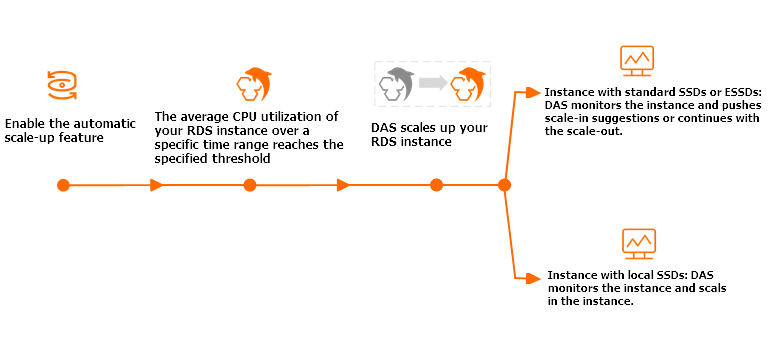
Database Autonomy Service (DAS) triggers a scale-up when all of the following conditions are met:
-
The average CPU utilization of your instance exceeds the CPU trigger threshold during an observation window.
-
The instance has not yet reached the Maximum Specifications you configured.
When scale-up is triggered, DAS scales the instance to the next higher specification. DAS then continues monitoring the instance — if the threshold is exceeded again in the next observation window, another scale-up occurs. This repeats until the instance reaches your configured maximum.
Limitations
-
No automatic scale-down: After scale-up, the instance does not automatically return to its original specifications. Subscribe to scale-down suggestions and scale down manually when your workload decreases.
-
Specification ceiling: The instance cannot scale beyond the Maximum Specifications you configure.
Before enabling: connection impact
When new specifications are applied, a transient disconnection of approximately 30 seconds may occur once or twice. Make sure your application handles reconnection automatically — for example, by implementing connection retry logic with exponential backoff.
Enable automatic scale-up
You can enable automatic scale-up from either the ApsaraDB for MyBase console or the DAS console. Both methods configure the same underlying feature.
Method 1: ApsaraDB for MyBase console
-
Log on to the ApsaraDB for MyBase console.
-
In the upper-left corner, select the region where your instance is deployed.
-
In the left-side navigation pane, choose Instances > MySQL.
-
Find your instance and click Details in the Actions column.
-
Click Basic Information and scroll to the Configuration Information section.
-
Click Settings next to Automatic Scale-up.
-
In the dialog box, configure the following parameters.
Parameter Description Automatic Scale-up Turn on to enable automatic scale-up. Observation Window The time range over which DAS calculates average CPU utilization. Valid values: 5 mins, 20 mins, 30 mins, 40 mins, 60 mins. CPU Trigger Threshold The average CPU utilization percentage that triggers a scale-up. Valid values: 50–90, in increments of 10. Upper Limit of Specifications The maximum specifications the instance can scale up to. DAS will not scale the instance beyond this limit. -
Click OK.
In the Configuration Information section, the status of Automatic Scale-up changes to Enabled.
Method 2: DAS console
-
From the instance Details page, in the left-side navigation pane, choose Autonomy Center > Performance Trend.
-
In the upper-right corner, click Autonomy Service Settings.
-
On the Settings tab, configure the following parameters.
Parameter Description Enable Autonomy Service Turn on to activate DAS autonomy features for this instance. Automatic Scale-up Turn on to enable automatic scale-up. CPU Utilization The average CPU utilization percentage that triggers a scale-up. Valid values: 50–90, in increments of 10. Maximum Specifications The maximum specifications the instance can scale up to. DAS will not scale the instance beyond this limit. Observation Window The time range over which DAS calculates average CPU utilization. Valid values: 5 mins, 20 mins, 30 mins, 40 mins, 60 mins. Automatic Scale-down/in When enabled, if CPU utilization stays below 30% for more than 99% of a quiescent period, DAS triggers a scale-down after the quiescent period ends. The instance scales down to its original specifications in small increments. -
Click OK.