This topic describes common issues and solutions for using ApsaraVideo Player SDK for iOS.
License issues
For issues such as an invalid or expired license, see License FAQ.
Common issues for players on different clients
For issues that may occur on any client, see Common player FAQ.
If you have development experience, you can also troubleshoot playback exceptions on your own.
Development issues
Errors occur when you package an app with Xcode 14 and submit it to the App Store for review
Bitcode-related errors
Symptom: When you package an app with Xcode 14 and submit it to the App Store for review, a bitcode-related error occurs. The following code shows an example of the error message:
ITMS-90482: Invalid Executable - The executable 'xxx.app/Frameworks/alivcffmpeg.framework/alivcffmpeg' contains bitcode.Solution: You can run the xcrun bitcode_strip command to manually remove bitcode from the framework. In the following example, ${framework_path} is the path of the binary file of the framework.
xcrun bitcode_strip ${framework_path} -r -o ${framework_path}cURL-related errors
Symptom: When you package an app with Xcode 14 and submit it to the App Store for review, a cURL-related error occurs. The following code shows an example of the error message:
ITMS-90338: Non-public API usage - The app references non-public symbols in Frameworks/AliyunPlayer.framework/AliyunPlayer: _curl_multi_poll, _curl_multi_wakeup. If method names in your source code match the private Apple APIs listed above, altering your method names will help prevent this app from being flagged in future submissions. In addition, note that one or more of the above APIs may be located in a static library that was included with your app. If so, they must be removed. For further information, visit the Technical Support Information at http://developer.apple.com/support/technical/Solution:
If your project integrates only the ApsaraVideo Player SDK (AliPlayerSDK_iOS), upgrade the SDK to a version later than 5.4.9.2.
If your project integrates both the ApsaraVideo Player SDK (AliPlayerPartSDK_iOS) and the short video SDK, upgrade the ApsaraVideo Player SDK to a version later than 5.4.9.2, alivcffmpeg (QuCore-ThirdParty) to version 4.3.6, and the short video SDK to a version later than 3.26.
Errors about non-public APIs
Symptom: When you package an app with Xcode 14 and submit it to the App Store for review, an error about non-public APIs occurs. The following figure shows an example of the error message: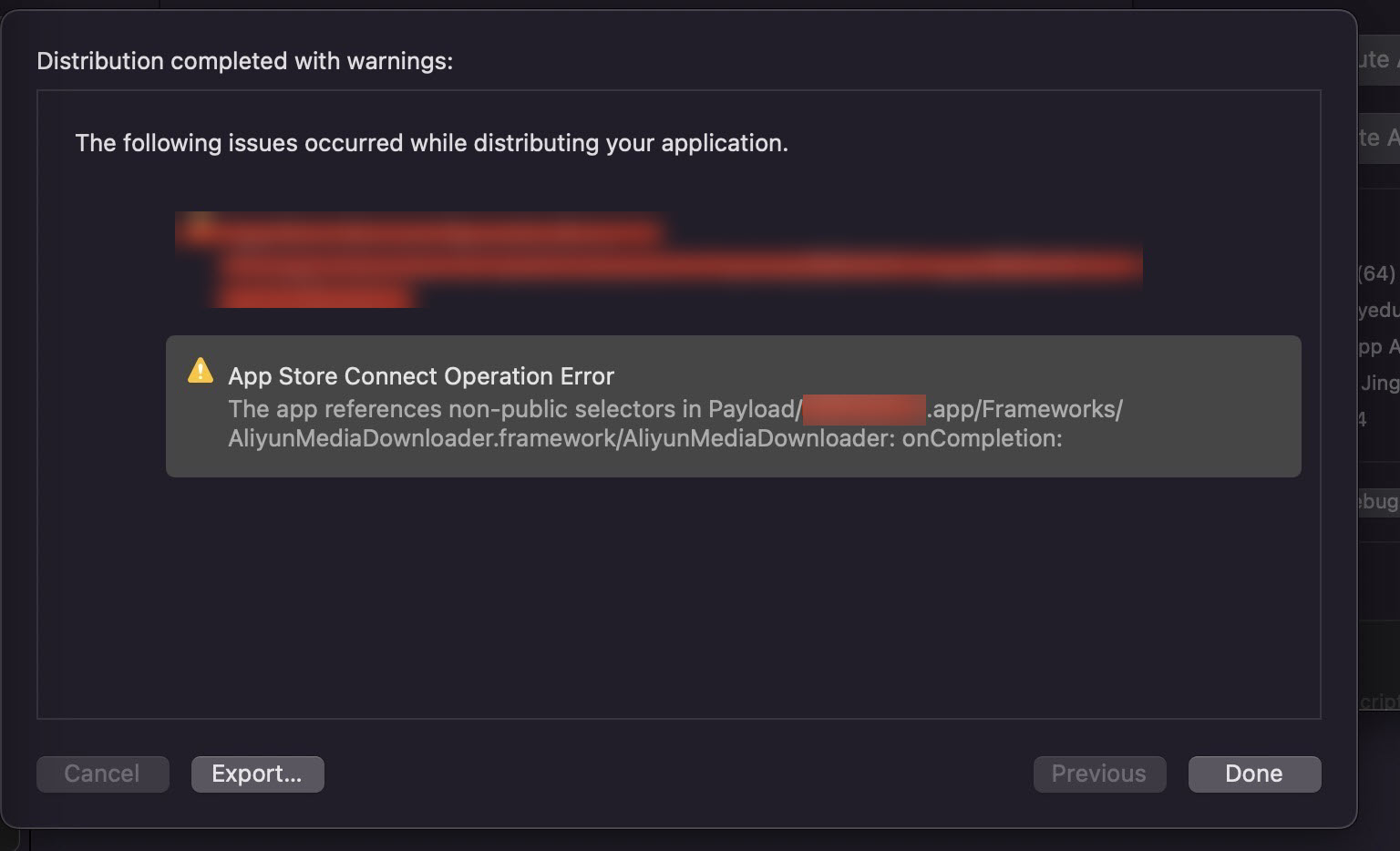
Solution: The preceding error is a warning from Xcode 14 builds. In most cases, if the project can be built, the warning does not affect the release. If you cannot release the app, use Xcode 13 for the release.
Errors related to post-processing plugins such as mpf_filter.framework and vfi_filter.framework for frame interpolation and sharpening
Symptom: When you package an app with Xcode 14 and submit it to the App Store for review, an error related to post-processing plugins such as mpf_filter.framework and vfi_filter.framework for frame interpolation and sharpening occurs. The following figure shows an example of the error message: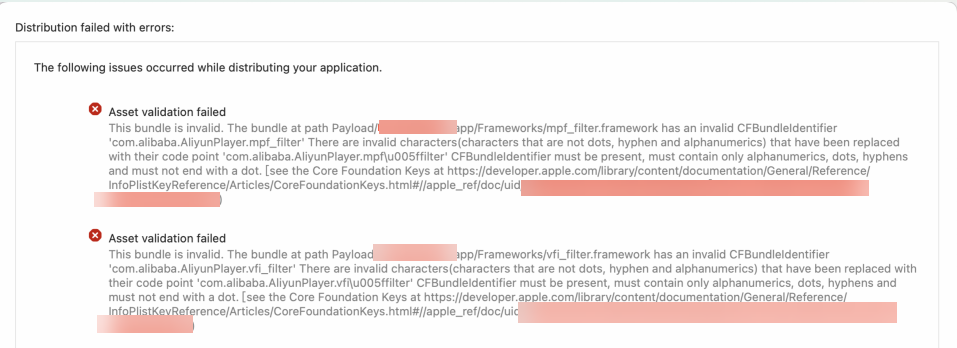
Solution:
If your project does not use the plugin that is mentioned in the error message, you can delete the plugin. This does not affect the player's features and can reduce the package size.
If your project must use the plugin mentioned in the error, you can temporarily remove the
"_"from the value string in the"Bundle identifier"key-value pair in the Info.plist file under the framework path, and then compile and build the project.You can upgrade to version 5.5.2.0 or later, in which the naming is corrected.
What do I do if the "Xcode Error: PhaseScriptExecution failed with a nonzero exit code" error occurs when I compile and run the iOS demo?
Follow these steps:
1. Go to the project directory.
2. Run pod deintegrate.
3. Run pod install.
After I integrate ApsaraVideo Player SDK for iOS, can I debug and run my app on an Xcode emulator?
ApsaraVideo Player SDK for iOS does not support debugging on emulators. You must use a physical iPhone to debug and run your app.
How to get the current playback progress
By default, the ApsaraVideo Player SDK calls back the playback progress every 500 ms. You can change the callback interval. Shorten the interval to obtain the current playback progress more frequently. The following code provides an example:
AVPConfig *config = [self.player getConfig];
config.positionTimerIntervalMs = 100; // Change the callback interval. Unit: ms.
[self.player setConfig:config];

/**
 @brief: The callback for the current playback position.
 @param player: The player pointer.
 @param position: The current playback position.
 */
- (void)onCurrentPositionUpdate:(AliPlayer*)player position:(int64_t)position {
    // The current playback progress.
    long currentPosition = position;
}
How to get the width and height of a video
You can use one of the following three methods:
Method 1: After the prepare method is called for the AliPlayer instance for iOS and the player is prepared (AVPEventPrepareDone), you can directly obtain the width and height of the AliPlayer instance.
-(void)onPlayerEvent:(AliPlayer*)player eventType:(AVPEventType)eventType {
    if (eventType == AVPEventPrepareDone) {
      NSLog(@"Video width: %d, height: %d", player.width, player.height);
    }
}
Method 2: Listen for the callback that is returned when the video size changes. This callback directly returns the width and height of the video.
- (void)onVideoSizeChanged:(AliPlayer*)player width:(int)width height:(int)height rotation:(int)rotation {
    NSLog(@"Video width: %d, height: %d", width, height);
}
Method 3: Listen for the callback that is returned when track information is obtained. Obtain the videoWidth and videoHeight from the AVPTrackInfo returned in the info array.
NoteListening for the track information callback involves a network request. The success of obtaining the video width and height depends on the network quality. Use Method 1 or Method 2 to obtain the video width and height for better reliability.
- (void)onTrackReady:(AliPlayer*)player info:(NSArray<AVPTrackInfo*>*)info {
    for (int i=0; i<info.count; i++) {
      AVPTrackInfo *trackInfo = info[i];
      NSLog(@"Video width: %d, height: %d", trackInfo.videoWidth, trackInfo.videoHeight);
  }
}
The progress bar jumps back after a seek operation
Cause: The player uses inaccurate seek by default. After a seek operation, the player starts playback from a keyframe near the seek point.
Solution: Switch to the accurate seek mode.
How to switch between accurate and inaccurate seek modes
The following code provides an example of how to switch the seek mode:
// Switch to inaccurate seek.
[self.player seekToTime:1000 seekMode:AVP_SEEKMODE_INACCURATE];
// Switch to accurate seek.
[self.player seekToTime:1000 seekMode:AVP_SEEKMODE_ACCURATE];
The progress bar still jumps back after I switch to the accurate seek mode
Cause: Accurate seek takes longer than inaccurate seek. If the distance from the seek point to the nearest keyframe is too large and exceeds the maximum interval for accurate seek, the ApsaraVideo Player SDK automatically switches to inaccurate seek. This causes the progress bar to jump back.
Solution: You can call an API to set a larger maximum interval for accurate seek. This reduces the frequency at which the player switches from accurate seek to inaccurate seek and improves seek accuracy. However, if the distance from the seek point to the nearest keyframe is too large, the seek operation takes longer. Set the maximum interval for accurate seek as needed. The following code provides an example:
// Unit: ms.
[self.player setMaxAccurateSeekDelta:10000];
Error during video caching: encrypt check fail
Caching is the same as downloading. If secure download is enabled, make sure that the encryption verification file matches the app information. You must download the encryption verification file generated in Offline download and save it to the ApsaraVideo Player SDK. For more information, see Video download. Otherwise, caching or downloading fails.
Obtain audio and video source data
The following code provides an example of how to obtain audio and video source data:
// Set the rendering callback.
self.player.renderingDelegate = self;

// Listen for the rendering callback.
- (BOOL)onRenderingFrame:(CicadaFrameInfo*) frameInfo {
    if (frameInfo.frameType == Cicada_FrameType_Video) { // Underlying video data.

    } else if (frameInfo.frameType == Cicada_FrameType_Audio) { // Underlying audio data.

    }
    return NO;
}
How do I get the pixels of each video frame in the player?
ApsaraVideo Player SDK for iOS: You can obtain the pixels by listening for the onRenderingFrame callback.
player.renderingDelegate = self;


#pragma mark CicadaRenderingDelegate
- (BOOL)onRenderingFrame:(CicadaFrameInfo*) frameInfo{
    if(frameInfo.frameType==Cicada_FrameType_Video){
        // Video
        NSLog(@"receive HW frame:%p pts:%ld foramt %d", frameInfo.video_pixelBuffer, frameInfo.pts, CVPixelBufferGetPixelFormatType(frameInfo.video_pixelBuffer));

    } else if (frameInfo.frameType==Cicada_FrameType_Audio){
        // Audio
    }
    return NO;
}
Adaptive bitrate switching logic
After you enable adaptive bitrate switching by calling the [self.player selectTrack:SELECT_AVPTRACK_TYPE_VIDEO_AUTO]; API, the ApsaraVideo Player SDK collects statistics on the current network speed. If the network speed reaches the next bitrate level within 10 seconds, the player switches to that bitrate. If the network speed does not reach the next bitrate level within 10 seconds, the player does not switch.
When switching from a high bitrate to a low bitrate, if the network speed reaches the next bitrate level within 10 seconds, the player switches after the cached content at the high bitrate is played.
When switching from a low bitrate to a high bitrate, if the network speed reaches the next bitrate level within 10 seconds, the player switches immediately.
Custom retry logic
For network retries, the ApsaraVideo Player SDK retries a failed operation twice by default. The network timeout period is 15 seconds. If the retries fail, the Error callback is triggered.
You can customize the retry logic. When a retry is triggered, a retry event is sent to an external module, which determines the specific retry logic. The following code provides an example:
AVPConfig *config = [self.player getConfig];
config.networkRetryCount = 0; // Set the number of retries. In this example, the value is set to 0.
[self.player setConfig:config];

/**
 @brief: The callback for player events.
 @param player: The player pointer.
 @param eventWithString: The player event type.
 @param description: The description of the player event.
 @see AVPEventType
 */
-(void)onPlayerEvent:(AliPlayer*)player eventWithString:(AVPEventWithString)eventWithString description:(NSString *)description {
    if (eventWithString == EVENT_PLAYER_NETWORK_RETRY) { // Network error. A retry is required.
        // TODO: Add the processing logic.
    }
}
A 403 error is reported and playback of an HLS stream fails after local caching is configured
Symptom: When you play an HLS (M3U8) video stream using VidAuth and enable local caching, playback fails and a 403 error is reported.
Cause: After local caching is enabled, if you exit playback before the video is fully cached, the player uses the expired VidAuth information from the previous session to request the uncached part of the video when you start playback again. This causes authentication to fail with a 403 error.
Solution: For ApsaraVideo Player SDK V5.5.4.0 and later, if the video playback URL contains authentication parameters and the playback protocol is HLS, you can set the AVPConfig.enableStrictAuthMode field to select an authentication mode. The default value is false.
Non-strict signing (`false`): Signing is also cached. If only part of the media was cached last time, the player uses the cached signing to initiate a request when playing the non-cached part next time. If the validity period of the URL signing is very short, this causes playback exceptions.
Strict signing (`true`): Signing is not cached. Signing is performed every time playback starts. This causes playback to fail without a network connection.
Audio preemption prevents ApsaraVideo Player SDK for iOS from playing videos
Symptom: Your code-based project uses both ApsaraVideo Player SDK for iOS and other audio playback controls. When you use the ApsaraVideo Player SDK for iOS to play a video, issues such as no sound or video stuttering occur, and the video cannot be played.
Cause: The AVAudioSession audio control in iOS is a singleton. If multiple audio playback controls are not configured in a unified manner, audio preemption may occur. This prevents the ApsaraVideo Player SDK for iOS from playing videos.
Solution: You can configure AVAudioSession in a unified manner at an appropriate location in your project. For example, you can configure the audio session of the app as the playback category and allow mixing with other apps. You can also configure the audio session of the app as the PlayAndRecord category for recording and playback scenarios. If an error occurs during the operation, the error message is stored in the err variable.
[[AVAudioSession sharedInstance] setCategory:AVAudioSessionCategoryPlayback withOptions:AVAudioSessionCategoryOptionMixWithOthers error:&err];At the same time, on the ApsaraVideo Player SDK for iOS side, you can customize the proxy for AVAudioSession and not use the AVAudioSession logic defined inside the SDK. This helps avoid the risk of audio preemption that might be caused by the ApsaraVideo Player SDK for iOS. The following code shows an example of the configuration on the ApsaraVideo Player SDK for iOS side:
Set the proxy.
[AliPlayer setAudioSessionDelegate:self];Set the listener for the proxy.
return TRUEindicates that the SDK no longer configuresAVAudioSessioninternally.#pragma mark CicadaAudioSessionDelegate - (BOOL)setActive:(BOOL)active error:(NSError **)outError { return YES; } - (BOOL)setCategory:(NSString *)category withOptions:(AVAudioSessionCategoryOptions)options error:(NSError **)outError { return YES; } - (BOOL)setCategory:(AVAudioSessionCategory)category mode:(AVAudioSessionMode)mode routeSharingPolicy:(AVAudioSessionRouteSharingPolicy)policy options:(AVAudioSessionCategoryOptions)options error:(NSError **)outError { return YES; }
A stack crash that points to the SDK occurs when ApsaraVideo Player SDK for iOS is running
If a stack crash that points to the SDK occurs when you use ApsaraVideo Player SDK for iOS, you can use the following methods to resolve the issue:
If you are not using the latest version of ApsaraVideo Player SDK for iOS, upgrade to the latest version. ApsaraVideo Player SDK for iOS is continuously updated to improve stability. For more information about how to obtain the latest SDK, see SDK introduction.
If the crash persists after you upgrade to the latest version, provide the complete crash information to Alibaba Cloud technical support. For more information about how to get technical support, see Get technical support.
Does ApsaraVideo Player SDK for iOS support downloading while playing?
No. ApsaraVideo Player SDK for iOS lets you enable the local caching feature to cache and download video files during playback. The next time you play the video, the cached file is played directly. The SDK does not support playing a local cached video file that is stored in a file directory.
Does ApsaraVideo Player SDK for iOS support getting the buffering progress of a video?
Yes. ApsaraVideo Player SDK for iOS supports obtaining the buffering speed, real-time rendering frame rate, audio and video bitrates, and network download bitrate of a video. For more information, see Get playback information.
A crash occurs while the player is running
You can follow these steps to identify the cause of the issue:
Check whether the crash occurs in the ApsaraVideo Player SDK.
Check whether the crash stack contains the
AliyunPlayerprefix. If it does, the issue occurs in the ApsaraVideo Player SDK.Upgrade to the latest version of the ApsaraVideo Player SDK and verify whether the issue is resolved.
If the issue persists, prepare the relevant crash files (including all threads), crash logs, and crash scenarios. For more information, see How to obtain logs.
A crash related to program initialization or preloading occurs when ApsaraVideo Player SDK V5.4.6.0 is running
Upgrade the ApsaraVideo Player SDK to a version later than V5.4.7.1. To maintain the stability of V5.4.6.0, you can also use the hotfix version pod 5.4.6.0-25587639.
How to enable full-screen playback
ApsaraVideo Player SDK for iOS does not provide an API for full-screen playback. You need to implement this feature based on the system. The ApsaraVideo Player SDK for iOS demo for versions 5.5.0.0 and later is adapted to the full-screen method of iOS 16.0 and later.
The following code provides an example of how to implement this feature:
After you run the system's full-screen method, you must also adjust the frame of the playerView set for the Aliplayer instance based on the screen.
UIInterfaceOrientation orientation = UIInterfaceOrientationLandscapeLeft; // Rotate to full screen
......

// For iOS 16.0 and later
if (@available(iOS 16.0, *)) {
    @try {
            NSArray *array = [[[UIApplication sharedApplication] connectedScenes] allObjects];
      UIWindowScene *ws = (UIWindowScene *)array[0];
        Class GeometryPreferences = NSClassFromString(@"UIWindowSceneGeometryPreferencesIOS");
      id geometryPreferences = [[GeometryPreferences alloc]init];
      UIInterfaceOrientationMask orientationMask = UIInterfaceOrientationMaskLandscapeRight;
      if (orientation == UIInterfaceOrientationPortrait) {
          orientationMask = UIInterfaceOrientationMaskPortrait;
      }
      [geometryPreferences setValue:@(orientationMask) forKey:@"interfaceOrientations"];
      SEL sel_method = NSSelectorFromString(@"requestGeometryUpdateWithPreferences:errorHandler:");
      void (^ErrorBlock)(NSError *err) = ^(NSError *err){
            NSLog(@"Screen rotation error:%@", [err debugDescription]);
      };
      if ([ws respondsToSelector:sel_method]) {
          (((void (*)(id, SEL,id,id))[ws methodForSelector:sel_method])(ws, sel_method,geometryPreferences,ErrorBlock));
      }
  } @catch (NSException *exception) {
      NSLog(@"Screen rotation error:%@", exception.reason);
  } @finally {
  }
} else { // For systems earlier than iOS 16.0
  if ([[UIDevice currentDevice] respondsToSelector:@selector(setOrientation:)]) {
      SEL selector = NSSelectorFromString(@"setOrientation:");
      NSInvocation *invocation = [NSInvocation invocationWithMethodSignature:[UIDevice instanceMethodSignatureForSelector:selector]];
      [invocation setSelector:selector];
      [invocation setTarget:[UIDevice currentDevice]];
      [invocation setArgument:&Orientation atIndex:2];
      [invocation invoke];
  }
  [[UIApplication sharedApplication]setStatusBarOrientation:orientation animated:YES];
}
Black bars appear during video playback
You can follow these steps to identify the cause of the issue:
Check whether the video source itself has black bars.
You can call the following API to adjust the scaling mode of the player.
/*
AVP_SCALINGMODE_SCALEASPECTFILL: The video is scaled to fill the screen. The video may be cropped.
AVP_SCALINGMODE_SCALEASPECTFIT: The video is scaled to fit the screen. Black bars may appear.
AVP_SCALINGMODE_SCALETOFILL: The video is scaled to fill the screen without preserving the aspect ratio. The video may be distorted.
*/
self.player.scalingMode = AVP_SCALINGMODE_SCALETOFILL;
If the scaling mode does not meet your requirements, you can adjust the width and height of the custom view for
self.player.playerViewby modifying theframeofself.player.playerView.
Audio plays but no video is displayed, and the log reports "log[AFVTBDecoder] :IOS8VT: throw frame"
You can follow these steps to identify the cause of the issue:
Use another player to play the video and check whether it is an audio-only file.
If the video plays normally on another player and the video dimensions change, you can switch to software decoding. The following code shows how to switch to software decoding:
player.enableHardwareDecoder = NO
Stuttering and audio-video desynchronization occur during RTS stream pulling on an iOS client
Solution: Integrate the latest version of the ultra-low latency component of the player to resolve this issue. For more information, see Implement RTS stream pulling on an iOS client.
When an iOS app is in the background or not started, audio plays but no video is displayed if the user enters the app through a notification.
Solution: You can remove UIApplicationStateActive == [[UIApplication sharedApplication] applicationState].
- (AliPlayer *)aliPlayer{
    if (!_aliPlayer && UIApplicationStateActive == [[UIApplication sharedApplication] applicationState]) {
        _aliPlayer = [[AliPlayer alloc] init];
        _aliPlayer.scalingMode =  AVP_SCALINGMODE_SCALEASPECTFIT;
        _aliPlayer.rate = 1;
        _aliPlayer.delegate = self;
        _aliPlayer.playerView = self.playerView;
    }
    return _aliPlayer;
}
When a live stream is played, the log reports a standard error: "-5, IO error (Input/Output (I/O))"
When you play a live stream, use the default values for the cache and latency control settings (startBufferDuration, highBufferDuration, and maxBufferDuration in AVPConfig). Do not customize these settings. For more information, see Configure cache and latency control to check whether you have customized the cache and latency control settings.
After I pause playback, navigate away, and then return to resume playback, an audio-related error is reported in the log: "Deactivating an audio session that has running I/O." or "All I/O should be stopped or paused prior to deactivating the audio session."
Symptom: On the video playback page, you pause playback and navigate to another page that has audio. When you return, you cannot resume playback, and an audio-related error such as "Deactivating an audio session that has running I/O." or "All I/O should be stopped or paused prior to deactivating the audio session." is reported in the log.
Solution: Check for conflicts in audio settings (AudioSession properties). For example, when you exit another page with audio, the audio resources may not be released in time (the related recording or audio playback is not stopped promptly).
An error occurs when AliListPlayer is used to play an HLS (m3u8) video
Versions of the ApsaraVideo Player SDK earlier than V5.4.5.0 do not support using the list player AliListPlayer to play HLS (m3u8) videos. Versions V5.4.5.0 and later support playing HLS (m3u8) videos, but you must enable local caching. For more information about how to enable local caching, see Local caching.
Cannot play a video in the background
Symptom: ApsaraVideo Player SDK for iOS does not support background video playback (the video continues to play after the user presses the Home button). The demo also fails to play videos in the background.
Solution:
Enable the background data collection feature in Xcode. The following figure shows an example:
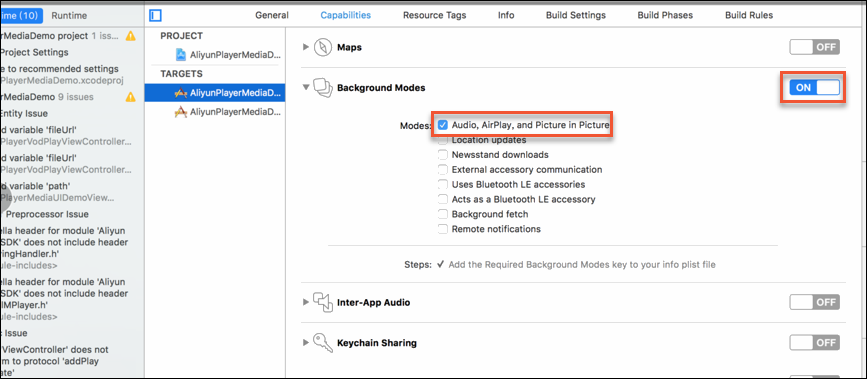
If you implemented app foreground/background monitoring methods, comment out the related pause and resume methods.
// Add an observer to detect when the app enters the background
[[NSNotificationCenter defaultCenter] addObserver:self selector:@selector(applicationEnterBackground) name: UIApplicationWillResignActiveNotification object:nil];
// This method is called when the app enters the foreground from the background
[[NSNotificationCenter defaultCenter] addObserver:self selector:@selector(applicationDidBecomeActive) name: UIApplicationDidBecomeActiveNotification object:nil];

// The pause method that needs to be commented out
- (void)applicationEnterBackground {
   // [self.player pause];
}
// The restart method that needs to be commented out
- (void)applicationDidBecomeActive {
   // [self.player start];
}
The "Redirect to a url" error occasionally occurs during video playback
This error may occur because the video source is hijacked. Enable the HTTPDNS feature of the player to handle this issue. For more information, see Configure HTTPDNS for an iOS client.
An unsupported protocol error occurs when you play an ARTC stream
Cause 1: The bridge layer between the player and the RTS component (AlivcArtc) and the RTS component (RtsSDK) are not integrated, even though the ApsaraVideo Player SDK is integrated.
Solution: For information about how to integrate the components, see Implement RTS stream pulling on an iOS client.
Cause 2: The version of the bridge layer between the player and the RTS component (AlivcArtc) is inconsistent with the version of the player.
Solution: The bridge layer between the player and the RTS component (AlivcArtc) and the player must have the same version number. For more information about the implementation, see Implement RTS stream pulling on an iOS client.
If a video is transcoded into multiple definitions, which definition does the ApsaraVideo Player SDK play by default?
The default playback order of definitions is FD, LD, SD, HD, 2K, 4K, and OD. For information about the definitions, see Definition. The ApsaraVideo Player SDK searches for definitions in this order and plays the video in the first definition that it finds.
How to specify the default definition for video playback
The following code provides an example:
// The following code provides an example of playback using VidSts.
AVPVidStsSource *stsSource = [[AVPVidStsSource alloc] init];
stsSource.vid = @"<vid>";
stsSource.accessKeyId = @"<accessKeyId>";
stsSource.securityToken = @"<securityToken>";
stsSource.accessKeySecret = @"<accessKeySecret>";
stsSource.quality = @""; // The expected definition for playback. Valid values: FD, LD, SD, HD, 2K, 4K, and OD.
stsSource.forceQuality = NO; // Specifies whether to forcibly play the video in the expected definition. NO: The video is not forcibly played in the expected definition. The player searches for definitions in the default order and plays the video in the first definition that it finds. YES: The video is forcibly played in the expected definition. If the expected definition is not found, the video is not played.
If a definition has multiple streams, which stream does the ApsaraVideo Player SDK play?
If a definition has multiple streams, the ApsaraVideo Player SDK plays the latest stream.
How to configure a video to be played without a watermark but downloaded with a watermark?
Transcode the video into multiple definitions. Play the definition without a watermark and download the definition with a watermark.
Landscape mode does not take effect
ApsaraVideo Player SDK for iOS does not provide a method to implement landscape mode. You need to implement this feature based on the iOS system API. When you implement landscape mode, make sure to properly set the frame of aliplayer.playerView.
How to obtain logs
When you request technical support from Alibaba Cloud, submit the logs to help us resolve your issue more efficiently. The following section describes how to obtain logs:
Obtain the logs.
Set the log level to
LOG_LEVEL_TRACEbefore you obtain logs. For more information, see Obtain SDK logs.Provide the generated logs to Alibaba Cloud technical support.
For more information, see Get technical support.