This guide walks you through building a retrieval-augmented generation (RAG) application with AnalyticDB for PostgreSQL (ADBPG) using its OpenAPI and Python SDK. By the end, you will have a working pipeline that ingests documents, retrieves relevant chunks by vector or full-text search, and returns grounded answers through LangChain.
How it works
AnalyticDB for PostgreSQL uses its self-developed FastANN vector engine to power RAG workflows. Its OpenAPI encapsulates the full AI service stack:
Document processing: load, split, embed, and handle multi-modal content
Search: vector search, full-text index, and reranking
Multi-tenant management: isolate data by namespace
The RAG architecture connects an information retrieval system to a large language model (LLM), grounding model responses in your own documents.
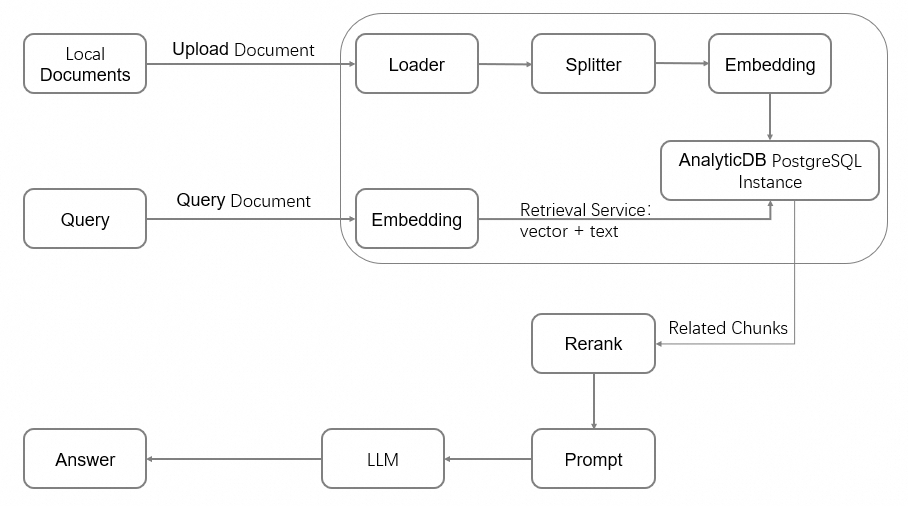
Workflow overview
This guide covers the following steps in order:
Step | Task | Description |
1 | Provision an ADBPG instance with the vector engine enabled | |
2 | Set up a privileged database account | |
3 | Install the Python SDK and configure environment variables | |
4 | Initialize the vector database, create a namespace, and create a document collection | |
5 | Upload documents and monitor processing jobs | |
6 | Query the knowledge base by vector search or full-text index | |
7 | Connect the retrieval layer to an LLM for question answering |
Prerequisites
Before you begin, ensure that you have:
An Alibaba Cloud account (register at the Alibaba Cloud official website if you don't have one)
The AliyunGPDBFullAccess permission granted to your Alibaba Cloud account or RAM user
An AccessKey pair created
The first time you use AnalyticDB for PostgreSQL, you must authorize the creation of a service-linked role. Log on to the AnalyticDB for PostgreSQL console, click Create Instance in the upper-right corner, and click OK in the Create Service Linked Role dialog.
Billing
Creating an instance incurs charges for compute and storage resources. For pricing details, see Pricing.
Free trial: Alibaba Cloud offers a free trial for Storage-elastic Mode instances to new users. Visit Alibaba Cloud Free Trial to apply. If you are not eligible, follow the steps below to create a pay-as-you-go instance.
Step 1: Create an instance
Log on to the AnalyticDB for PostgreSQL console.
In the upper-right corner, click Create Instance to open the purchase page.
Configure the following parameters. Keep the default values for other parameters. For full parameter descriptions, see Create an instance.
Parameter | Description | Example |
Product type | Select Pay-as-you-go for short-term use (billed hourly). Select Subscription for long-term use (pay upfront at a discount). | Pay-as-you-go |
Region and zone | The geographic location of the instance. Must match the region of any ECS instances you want to connect to over the internal network. Cannot be changed after creation. | China (Hangzhou): Zone J |
Instance resource type | Elastic Storage Mode: supports independent disk scale-out. Serverless Pro: specify only compute resources without reserving storage. | Elastic Storage Mode |
Database engine version | Select 7.0 Standard Edition for the richest feature set. 6.0 Standard Edition is also supported. | 7.0 Standard Edition |
Instance edition | High-performance (Basic Edition): suitable for most business analytics. High-availability Edition: recommended for core business services. | High-performance (Basic Edition) |
Vector engine optimization | Select Enable to activate the FastANN vector engine required for RAG workloads. | Enable |
Virtual Private Cloud | Select the VPC ID. To connect to an ECS instance over the internal network, select the same VPC. | vpc-xxxx |
vSwitch | Select a vSwitch in the VPC. If none are available in the current zone, switch zones or create a new vSwitch. | vsw-xxxx |
Click Buy Now, confirm the order, and click Activate Now.
After payment, click Management Console to view the instance list.
Instance initialization takes a few minutes. Wait for the instance status to change to Running before proceeding.
Step 2: Create an initial account
AnalyticDB for PostgreSQL has two user types:
Privileged user: the initial account with the
RDS_SUPERUSERrole, which grants full operational permissions on the database.Regular user: no permissions by default. A privileged user must explicitly grant permissions. See Create and manage users.
In the left navigation pane, click Account Management.
Click Create Account. In the Create Account window, configure the following parameters and click OK.
Parameter | Requirements |
Account | Lowercase letters, digits, and underscores ( |
New password and Confirm password | At least three of: uppercase letters, lowercase letters, digits, and special characters ( |
Change your password regularly and avoid reusing old passwords.
Step 3: Set up the development environment
Check the Python environment
This guide uses Python 3. Run the following commands to verify that Python 3.9 or later and pip are installed.
python -V
pip --version
If Python is not installed or the version doesn't meet the requirements, install Python.
Install the SDK
Install the alibabacloud_gpdb20160503 and alibabacloud_tea_openapi packages:
pip install --upgrade alibabacloud_gpdb20160503 alibabacloud_tea_openapiConfigure environment variables
Store your credentials and instance details as environment variables to avoid hardcoding sensitive information.
Linux and macOS
Open
~/.bashrc(or~/.bash_profileon macOS):vim ~/.bashrcAdd the following lines. Get your AccessKey ID and Secret from the RAM User List page. Get the instance ID and region from the AnalyticDB for PostgreSQL console.
export ALIBABA_CLOUD_ACCESS_KEY_ID="<your-access-key-id>"
export ALIBABA_CLOUD_ACCESS_KEY_SECRET="<your-access-key-secret>"
export ADBPG_INSTANCE_ID="<your-instance-id>"        # e.g., gp-bp166cyrtr4p*****
export ADBPG_INSTANCE_REGION="<your-region-id>"      # e.g., cn-hangzhou
Save and exit (press
Esc, then type:wq), then apply the changes:source ~/.bashrcOn macOS, run
source ~/.bash_profile.
Windows
Run the following commands in CMD to set environment variables for the current session:
set ALIBABA_CLOUD_ACCESS_KEY_ID=<your-access-key-id>
set ALIBABA_CLOUD_ACCESS_KEY_SECRET=<your-access-key-secret>
set ADBPG_INSTANCE_ID=<your-instance-id>
set ADBPG_INSTANCE_REGION=<your-region-id>
Step 4: Prepare the database environment
This step initializes the vector database, creates a namespace, and creates a document collection to store chunked text and vector data.
What this step does:
Build a client — authenticates with the ADBPG API
Initialize the vector database — creates the
knowledgebasedatabase, grants read/write permissions, and sets up Chinese tokenizer and full-text index features (run once per instance)Create a namespace — a logical tenant boundary for document libraries
Create a document collection — stores chunked text and vector data
Before running, replace account and account_password with your actual database account and password.
from alibabacloud_tea_openapi import models as open_api_models
from alibabacloud_gpdb20160503.client import Client
from alibabacloud_gpdb20160503 import models as gpdb_20160503_models
import os

# Read credentials and instance info from environment variables
ALIBABA_CLOUD_ACCESS_KEY_ID = os.environ['ALIBABA_CLOUD_ACCESS_KEY_ID']
ALIBABA_CLOUD_ACCESS_KEY_SECRET = os.environ['ALIBABA_CLOUD_ACCESS_KEY_SECRET']
ADBPG_INSTANCE_ID = os.environ['ADBPG_INSTANCE_ID']
ADBPG_INSTANCE_REGION = os.environ['ADBPG_INSTANCE_REGION']


def get_client():
    """Build and return an AnalyticDB for PostgreSQL API client."""
    config = open_api_models.Config(
        access_key_id=ALIBABA_CLOUD_ACCESS_KEY_ID,
        access_key_secret=ALIBABA_CLOUD_ACCESS_KEY_SECRET
    )
    config.region_id = ADBPG_INSTANCE_REGION
    # Shared endpoint for major Chinese mainland regions and Singapore
    if ADBPG_INSTANCE_REGION in ("cn-beijing", "cn-hangzhou", "cn-shanghai", "cn-shenzhen", "cn-hongkong",
                                 "ap-southeast-1"):
        config.endpoint = "gpdb.aliyuncs.com"
    else:
        config.endpoint = f'gpdb.{ADBPG_INSTANCE_REGION}.aliyuncs.com'
    return Client(config)


def init_vector_database(account, account_password):
    """Initialize the vector database. Run once per instance."""
    request = gpdb_20160503_models.InitVectorDatabaseRequest(
        region_id=ADBPG_INSTANCE_REGION,
        dbinstance_id=ADBPG_INSTANCE_ID,
        manager_account=account,
        manager_account_password=account_password
    )
    response = get_client().init_vector_database(request)
    print(f"init_vector_database response code: {response.status_code}, body:{response.body}")


def create_namespace(account, account_password, namespace, namespace_password):
    """Create a namespace (tenant boundary) for document libraries."""
    request = gpdb_20160503_models.CreateNamespaceRequest(
        region_id=ADBPG_INSTANCE_REGION,
        dbinstance_id=ADBPG_INSTANCE_ID,
        manager_account=account,
        manager_account_password=account_password,
        namespace=namespace,
        namespace_password=namespace_password
    )
    response = get_client().create_namespace(request)
    print(f"create_namespace response code: {response.status_code}, body:{response.body}")


def create_document_collection(account,
                               account_password,
                               namespace,
                               collection,
                               metadata: str = None,
                               full_text_retrieval_fields: str = None,
                               parser: str = None,
                               embedding_model: str = None,
                               metrics: str = None,
                               hnsw_m: int = None,
                               pq_enable: int = None,
                               external_storage: int = None):
    """Create a document collection to store chunked text and vector data."""
    request = gpdb_20160503_models.CreateDocumentCollectionRequest(
        region_id=ADBPG_INSTANCE_REGION,
        dbinstance_id=ADBPG_INSTANCE_ID,
        manager_account=account,
        manager_account_password=account_password,
        namespace=namespace,
        collection=collection,
        metadata=metadata,
        full_text_retrieval_fields=full_text_retrieval_fields,
        parser=parser,
        embedding_model=embedding_model,
        metrics=metrics,
        hnsw_m=hnsw_m,
        pq_enable=pq_enable,
        external_storage=external_storage
    )
    response = get_client().create_document_collection(request)
    print(f"create_document_collection response code: {response.status_code}, body:{response.body}")


if __name__ == '__main__':
    account = "testacc"                      # Initial database account
    account_password = "Test1234"            # Password for the initial account
    namespace = "ns1"                        # Namespace name
    namespace_password = "ns1password"       # Namespace password (used for data read/write operations)
    collection = "dc1"                       # Document collection name
    metadata = '{"title":"text", "page":"int"}'
    full_text_retrieval_fields = "title"
    embedding_model = "m3e-small"            # See Embedding models for supported options

    init_vector_database(account, account_password)
    create_namespace(account, account_password, namespace, namespace_password)
    create_document_collection(account, account_password, namespace, collection,
                               metadata=metadata,
                               full_text_retrieval_fields=full_text_retrieval_fields,
                               embedding_model=embedding_model)
Parameters
Parameter | Description |
| The initial database account of the AnalyticDB for PostgreSQL instance. |
| The password for the initial account. |
| The name of the namespace to create. |
| The namespace password, used for subsequent data read and write operations. |
| The name of the document collection to create. |
| Custom map-structured metadata. The key is the field name and the value is the field type. |
| Comma-separated fields for full-text indexing. Fields must be keys defined in |
| Tokenizer for the full-text index. Default: |
| The embedding model. See Embedding models for supported options. |
| The vector index similarity algorithm. See Vector index for supported values. |
| Maximum number of neighbors in the HNSW algorithm. Range: 1–1000. |
| Whether to enable product quantization (PQ) dimensionality reduction. |
| Whether to use mmap to build the HNSW index. Note Supported in version 6.0 only; not supported in version 7.0. |
Verify the table schema
After the code runs successfully, verify the result by logging on to the database:
Go to the AnalyticDB for PostgreSQL console and open the target instance.
Click Log On to Database in the upper-right corner.
On the Log on to Instance page, enter your database account and password, then click Log on.
A new database named knowledgebase appears in the instance. Within it, a schema named ns1 is created, and a table named dc1 is created under that schema. The table has the following fields:
Field | Type | Source | Description |
| text | Fixed | Primary key. The UUID of a single text chunk. |
| real[] | Fixed | Vector data array. Length matches the dimensions of the selected embedding model. |
| text | Fixed | Document name. |
| text | Fixed | A single text chunk produced by the document loader and splitter. |
| json | Fixed | Metadata from the document loader. |
| TSVECTOR | Fixed | Full-text index data. Sources: the |
| text | Metadata | User-defined. |
| int | Metadata | User-defined. |
Step 5: Manage documents
Upload a document
This example uploads a local document asynchronously. The upload job performs document loading, splitting, embedding, and storage.
import time
import io
from typing import Dict, List, Any
from alibabacloud_tea_util import models as util_models
from alibabacloud_gpdb20160503 import models as gpdb_20160503_models

def upload_document_async(
        namespace,
        namespace_password,
        collection,
        file_name,
        file_path,
        metadata: Dict[str, Any] = None,
        chunk_overlap: int = None,
        chunk_size: int = None,
        document_loader_name: str = None,
        text_splitter_name: str = None,
        dry_run: bool = None,
        zh_title_enhance: bool = None,
        separators: List[str] = None):
    with open(file_path, 'rb') as f:
        file_content_bytes = f.read()
    request = gpdb_20160503_models.UploadDocumentAsyncAdvanceRequest(
        region_id=ADBPG_INSTANCE_REGION,
        dbinstance_id=ADBPG_INSTANCE_ID,
        namespace=namespace,
        namespace_password=namespace_password,
        collection=collection,
        file_name=file_name,
        metadata=metadata,
        chunk_overlap=chunk_overlap,
        chunk_size=chunk_size,
        document_loader_name=document_loader_name,
        file_url_object=io.BytesIO(file_content_bytes),
        text_splitter_name=text_splitter_name,
        dry_run=dry_run,
        zh_title_enhance=zh_title_enhance,
        separators=separators,
    )
    response = get_client().upload_document_async_advance(request, util_models.RuntimeOptions())
    print(f"upload_document_async response code: {response.status_code}, body:{response.body}")
    return response.body.job_id


def wait_upload_document_job(namespace, namespace_password, collection, job_id):
    def job_ready():
        request = gpdb_20160503_models.GetUploadDocumentJobRequest(
            region_id=ADBPG_INSTANCE_REGION,
            dbinstance_id=ADBPG_INSTANCE_ID,
            namespace=namespace,
            namespace_password=namespace_password,
            collection=collection,
            job_id=job_id,
        )
        response = get_client().get_upload_document_job(request)
        print(f"get_upload_document_job response code: {response.status_code}, body:{response.body}")
        return response.body.job.completed
    while True:
        if job_ready():
            print("successfully load document")
            break
        time.sleep(2)


if __name__ == '__main__':
    job_id = upload_document_async("ns1", "Ns1password", "dc1",
                                   "test.pdf", "/root/test.pdf")
    wait_upload_document_job("ns1", "Ns1password", "dc1", job_id)
Parameters
Parameter | Description |
| The name of the namespace where the document collection resides. |
| The namespace password. |
| The document collection name. |
| The document name, including the file extension. |
| The local document path. Maximum file size: 200 MB. |
| Document metadata. Must match the metadata defined when creating the document collection. |
| The amount of overlapping data between consecutive chunks. Cannot exceed |
| The size of each chunk. Maximum: 2048. |
| The document loader. Auto-selected from the file extension if not specified. See Document loaders. |
| The text splitter. See Document chunking. |
|
|
|
|
| Custom separators for chunking. Leave blank in most cases. |
More document operations
List documents
def list_documents(namespace, namespace_password, collection):
    request = gpdb_20160503_models.ListDocumentsRequest(
        region_id=ADBPG_INSTANCE_REGION,
        dbinstance_id=ADBPG_INSTANCE_ID,
        namespace=namespace,
        namespace_password=namespace_password,
        collection=collection,
    )
    response = get_client().list_documents(request)
    print(f"list_documents response code: {response.status_code}, body:{response.body}")


if __name__ == '__main__':
    list_documents("ns1", "Ns1password", "dc1")
Get document details
def describe_document(namespace, namespace_password, collection, file_name):
    request = gpdb_20160503_models.DescribeDocumentRequest(
        region_id=ADBPG_INSTANCE_REGION,
        dbinstance_id=ADBPG_INSTANCE_ID,
        namespace=namespace,
        namespace_password=namespace_password,
        collection=collection,
        file_name=file_name
    )
    response = get_client().describe_document(request)
    print(f"describe_document response code: {response.status_code}, body:{response.body}")


if __name__ == '__main__':
    describe_document("ns1", "Ns1password", "dc1", "test.pdf")
The response includes the following fields:
Field | Description |
| The number of chunks the document is split into. |
| The text splitter used. |
| The document loader used. |
| The file extension. |
| The MD5 hash of the document. |
| The latest upload time. |
| The file size in bytes. |
| The document version (integer). Increments each time the document is uploaded or updated. |
Delete a document
def delete_document(namespace, namespace_password, collection, file_name):
    request = gpdb_20160503_models.DeleteDocumentRequest(
        region_id=ADBPG_INSTANCE_REGION,
        dbinstance_id=ADBPG_INSTANCE_ID,
        namespace=namespace,
        namespace_password=namespace_password,
        collection=collection,
        file_name=file_name
    )
    response = get_client().delete_document(request)
    print(f"delete_document response code: {response.status_code}, body:{response.body}")


if __name__ == '__main__':
    delete_document("ns1", "Ns1password", "dc1", "test.pdf")
Step 6: Retrieve content
The following example queries the document collection using plain text. ADBPG automatically converts the query to a vector and searches for similar chunks.
To compare retrieval modes, the example below shows both vector-only and hybrid retrieval side by side:
def query_content(namespace, namespace_password, collection, top_k,
                  content,
                  filter_str: str = None,
                  metrics: str = None,
                  use_full_text_retrieval: bool = None):
    request = gpdb_20160503_models.QueryContentRequest(
        region_id=ADBPG_INSTANCE_REGION,
        dbinstance_id=ADBPG_INSTANCE_ID,
        namespace=namespace,
        namespace_password=namespace_password,
        collection=collection,
        content=content,
        filter=filter_str,
        top_k=top_k,
        metrics=metrics,
        use_full_text_retrieval=use_full_text_retrieval,
    )
    response = get_client().query_content(request)
    print(f"query_content response code: {response.status_code}, body:{response.body}")


if __name__ == '__main__':
    # Vector search only (default)
    query_content('ns1', 'Ns1password', 'dc1', 10, 'What is ADBPG?')

    # Hybrid retrieval: vector search + full-text index
    query_content('ns1', 'Ns1password', 'dc1', 10, 'What is ADBPG?',
                  use_full_text_retrieval=True)
Parameters
Parameter | Description |
| The name of the namespace where the document collection resides. |
| The namespace password. |
| The document collection name. |
| The number of top results to return. |
| The query text. |
| A filter expression to apply before retrieval. |
| The vector distance algorithm. Leave blank to use the algorithm specified when the index was created. |
|
|
Response fields
Field | Description |
| The UUID of the matched chunk. |
| The source document name. |
| The matched text chunk. |
| Metadata generated during document upload. |
| User-defined metadata. |
| The retrieval path that produced this result: |
| The similarity score based on the distance algorithm. |
Step 7: Integrate LangChain
LangChain is an open-source framework for building LLM-powered applications. This section shows how to wrap ADBPG's retrieval API as a LangChain retriever and build a question-answering chain.
Install dependencies
pip install --upgrade langchain openai tiktokenBuild a custom retriever
from langchain_core.retrievers import BaseRetriever
from langchain_core.callbacks import CallbackManagerForRetrieverRun
from langchain_core.documents import Document


class AdbpgRetriever(BaseRetriever):
    namespace: str = None
    namespace_password: str = None
    collection: str = None
    top_k: int = None
    use_full_text_retrieval: bool = None

    def query_content(self, content) -> List[gpdb_20160503_models.QueryContentResponseBodyMatchesMatchList]:
        request = gpdb_20160503_models.QueryContentRequest(
            region_id=ADBPG_INSTANCE_REGION,
            dbinstance_id=ADBPG_INSTANCE_ID,
            namespace=self.namespace,
            namespace_password=self.namespace_password,
            collection=self.collection,
            content=content,
            top_k=self.top_k,
            use_full_text_retrieval=self.use_full_text_retrieval,
        )
        response = get_client().query_content(request)
        return response.body.matches.match_list

    def _get_relevant_documents(
            self, query: str, *, run_manager: CallbackManagerForRetrieverRun
    ) -> List[Document]:
        match_list = self.query_content(query)
        return [Document(page_content=i.content) for i in match_list]
Build a Q&A chain
from langchain_openai import ChatOpenAI
from langchain_core.prompts import ChatPromptTemplate
from langchain.schema import StrOutputParser
from langchain_core.runnables import RunnablePassthrough

OPENAI_API_KEY = "YOUR_OPENAI_API_KEY"
os.environ["OPENAI_API_KEY"] = OPENAI_API_KEY

template = """Answer the question based only on the following context:

{context}

Question: {question}
"""
prompt = ChatPromptTemplate.from_template(template)
model = ChatOpenAI()


def format_docs(docs):
    return "\n\n".join([d.page_content for d in docs])


retriever = AdbpgRetriever(
    namespace='ns1',
    namespace_password='Ns1password',
    collection='dc1',
    top_k=10,
    use_full_text_retrieval=True
)
chain = (
    {"context": retriever | format_docs, "question": RunnablePassthrough()}
    | prompt
    | model
    | StrOutputParser()
)
Run a query
chain.invoke("What is AnalyticDB PostgreSQL?")

# Response:
# AnalyticDB PostgreSQL is a cloud-native Online Analytical Processing (OLAP) service provided by Alibaba Cloud. Based on the open-source PostgreSQL database extension, it delivers a high-performance, high-capacity data warehouse solution.
# It combines PostgreSQL's flexibility and compatibility with high concurrency and high-speed query capabilities for data analytics and reporting.
#
# AnalyticDB PostgreSQL is particularly well-suited for processing large-scale datasets, supporting real-time analytics and decision support. It serves as a powerful tool for enterprises to perform data mining, business intelligence (BI), reporting, and data visualization.
# As a managed service, it simplifies data warehouse management and operations and maintenance (O&M), enabling users to focus on data analytics rather than underlying infrastructure.
# Key features include the following:
#
# High-performance analytics — Uses columnar storage and Massively Parallel Processing (MPP) architecture to quickly query and analyze large volumes of data.
# Easy scalability — Resources can be easily scaled horizontally and vertically based on data volume and query performance requirements.
# PostgreSQL compatibility — Supports PostgreSQL SQL language and most tools in the PostgreSQL ecosystem, making it easy for existing PostgreSQL users to migrate and adapt.
# Security and reliability — Provides features such as data backup, recovery, and encryption to ensure data security and reliability.
# Cloud-native integration — Tightly integrated with other Alibaba Cloud services such as data integration and data visualization tools.
# In summary, AnalyticDB PostgreSQL is a high-performance, scalable cloud data warehouse service that enables enterprises to perform complex data analytics and reporting in cloud environments.
Appendix
Full-text index
AnalyticDB for PostgreSQL supports full-text search in addition to vector similarity. Both can run together in a dual-path retrieval workflow to improve accuracy.
Define full-text index fields
Specify which fields serve as full-text index sources when creating the document collection. The content field is indexed by default. Specify additional custom metadata fields in full_text_retrieval_fields.
Tokenization
Set the parser parameter when creating the document collection. The default tokenizer is zh_cn (Chinese). For custom tokenization requirements, contact Alibaba Cloud technical support.
When a document is inserted, the tokenizer splits the specified full-text fields by delimiter and stores the result in to_tsvector for subsequent full-text queries.
Embedding models
AnalyticDB for PostgreSQL supports the following embedding models:
| Dimensions | Description |
| 512 | From moka-ai/m3e-small. Supports Chinese only, not English. |
| 768 | From moka-ai/m3e-base. Supports Chinese and English. |
| 1024 | From GanymedeNil/text2vec-large-chinese. Supports Chinese and English. |
| 1536 | Alibaba Cloud Model Studio general text embedding. Supports Chinese and English. |
| 1536 | Upgraded version of |
| 512 | Open-source multimodal model with image support. |
Custom embedding models are not supported yet. For a full list of supported models, see Create a document collection.
Vector index
Parameter | Description |
| The similarity distance algorithm. |
| The maximum number of neighbors in the HNSW algorithm. The API sets this automatically based on vector dimensions. |
| Whether to enable product quantization (PQ) dimensionality reduction. |
| Whether to use mmap to build the HNSW index. Note Supported in version 6.0 only; not supported in version 7.0. |
Document loaders
AnalyticDB for PostgreSQL automatically selects a loader based on the file extension. For document types with multiple supported loaders (such as PDF), specify one explicitly using document_loader_name.
Loader | Supported formats |
|
|
|
|
|
|
|
|
|
|
|
|
|
|
|
|
|
|
Document chunking
Chunking behavior is controlled by chunk_overlap, chunk_size, text_splitter_name, and separators. The following text splitters are supported:
Text splitter | Description |
| Inherits from |
| Uses |
| Uses |
| Splits Markdown files by header level: |