The Alibaba Cloud account is the owner of Alibaba Cloud resources. If the Alibaba Cloud account is disclosed, your resources are at risk. You can create a trail in the ActionTrail console to deliver events to Simple Log Service. Then, you can configure alert rules to monitor the use of your Alibaba Cloud account.
Prerequisites
Simple Log Service is activated.
If Simple Log Service is not activated, log on to the Simple Log Service console and follow the on-screen instructions to activate the service.
Step 1: Create a trail
This section describes how to create a single-account trail to deliver events to Simple Log Service.
Log on to the ActionTrail console.
In the left-side navigation pane, click Trails.
In the top navigation bar, select the region where you want to create a single-account trail.
NoteThe region that you select becomes the home region of the trail that you want to create.
On the Trails page, click Create Trail.
On the Create Trail page, configure the parameters.
In the Basic Information section, configure the basic information about the trail.
Parameter
Description
Trail Name
The name of the trail. The name must be unique within your Alibaba Cloud account.
Trail Event Type
The default value is Management Event.
In the Management Event Delivery Settings section, perform the following operations:
Select All for Read/Write Type.
Select Delivery to Simple Log Service.
Select Delivery to Current Account for Destination Account.
Select New Project for Project. Then, configure Logstore Region and Project Name.
Click Confirm.
Step 2: Query events and configure an alert rule
In the ActionTrail console, click Trails.
Find the required trail, move the pointer over SLS or OSS&SLS in the Storage Service column, and then click the name of the Logstore.
In the upper-right corner of the page that appears, click Last 15 Minutes and specify a time range.
In the search box, enter the
event.userIdentity.type:"root-account"| select count(1) as use_rootquery statement. Then, click Search & Analyze.Click the Save Search icon or the Save as Alert icon.
Save Search: Click the Save Search icon in the upper-right corner. In the Saved Search Details panel, set the Saved Search Name parameter and click OK.
NoteAfter you save the query, you can select it in the Simple Log Service console to initiate the query.
For more information, see Saved search.
Save as Alert: Click the
For more information about how to configure alert rules, see Configure an alert rule.
NoteAfter you configure the alert rule, you can receive alert notifications when the alert is triggered.
What to do next
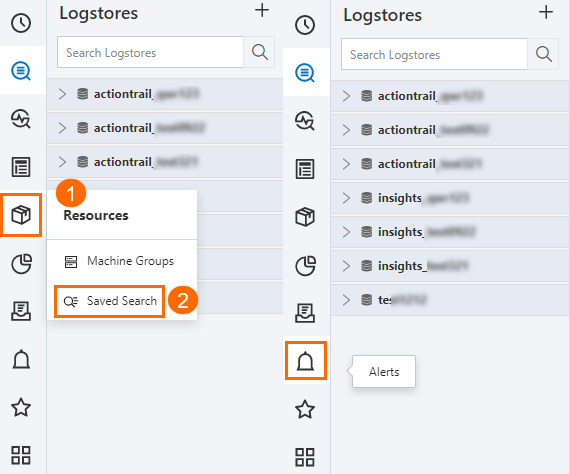
You can manage saved searches and alert rules in the Simple Log Service console.
References
After you deliver events to Simple Log Service, you can use other methods to configure alert rules in the Simple Log Service console. This allows you to implement monitoring and alerting for your Alibaba Cloud account. For more information, see Configure an alert monitoring rule in Simple Log Service.
After you deliver events to Simple Log Service, you can configure alert rules in the ActionTrail console. For more information, see Enable and configure alerts.