ack-secret-manager syncs secrets from Key Management Service (KMS) to your Container Service for Kubernetes (ACK) cluster as Kubernetes Secrets. Applications mount these Secrets through the file system to access up-to-date KMS credentials without managing them directly.

How it works
Two custom resource definition (CRD) types drive the sync process:
SecretStore (namespace-level) / ClusterSecretStore (cluster-level): defines how
ack-secret-managerauthenticates to KMSExternalSecret (namespace-level) / ClusterExternalSecret (cluster-level): defines which KMS secrets to sync and where to store them in the cluster
When ack-secret-manager processes an ExternalSecret, it reads the referenced SecretStore for authentication credentials, retrieves the specified KMS secret, and creates or updates a Kubernetes Secret with the same name and namespace as the ExternalSecret.
Security considerations
File-based secret reading has compatibility issues with direct KMS access, and ack-secret-manager resolves these. Before enabling secret synchronization, assess the following risks:
File system traversal: Secrets mounted through the file system can be exposed if flawed applications are exploited to perform directory traversal attacks.
Debug and log exposure: Misconfigured debug breakpoints or overly permissive log access can leak Secrets. Referencing Secrets through environment variables is insecure and not recommended.
Excessive permissions: Apply the least privilege principle when granting
ack-secret-manageraccess to KMS.
If your application doesn't need to persist secrets locally, grant pods minimal permissions by using RRSA and call GetSecretValue directly from the application. This avoids exposing secrets in the pod file system or Kubernetes Secrets entirely.
Prerequisites
You have an ACK cluster. Supported cluster types:
ACK dedicated cluster
ACK Edge cluster
Step 1: Install ack-secret-manager
On the ACK Clusters page, click the name of your cluster. In the left navigation pane, click .
On the Helm page, click Deploy. In the Chart section of the Deploy panel, find and select ack-secret-manager, then click Next.
In the confirm dialog, the chart installs to the
kube-systemnamespace by default. Click Yes to proceed. To use a custom namespace, configure Application Name and Namespace in the Basic Information step.In the Parameters step, select the latest chart version and configure the following parameters as needed, then click OK.
Category
Parameter
Description
RRSA authentication
rrsa.enableSet to
trueto enable RAM Roles for Service Accounts (RRSA). This allowsack-secret-managerto authenticate using a service account identity without managing AccessKey pairs.Scheduled sync
command.disablePollingSet to
falseto enable periodic secret synchronization.command.pollingIntervalSync frequency. Default is
120s.Throttling
command.maxConcurrentKmsSecretPullsMaximum concurrent KMS secret pulls per second. Default is
10. Prevents KMS or RAM throttling in clusters with manyExternalSecrets.KMS endpoint
command.kmsEndpointGlobal KMS endpoint for all requests. Secret-level endpoints can also be configured. See Configure KMS endpoint addresses.
Cross-namespace control
command.enableCrossNamespaceSecretStoreSet to
falseto prevent anExternalSecretfrom referencing aSecretStorein a different namespace.command.enableCrossNamespaceAuthRefSet to
falseto prevent aSecretStorefrom referencing authentication resources in a different namespace.Cluster-level CRDs
crds.createClusterSecretStoreSet to
trueto install theClusterSecretStoreCRD.crds.createClusterExternalSecretSet to
trueto install theClusterExternalSecretCRD.command.processClusterSecretStoreSet to
trueto enable the controller to processClusterSecretStoreresources.command.processClusterExternalSecretSet to
trueto enable the controller to processClusterExternalSecretresources.
After installation, the ACK console redirects to the ack-secret-manager page. Verify the installation by checking that the expected resources are created.

Step 2: Configure authentication for ack-secret-manager
Create a SecretStore to define how ack-secret-manager authenticates to KMS. Choose one of the following four authorization methods based on your cluster type and security requirements.
Method | Applicable cluster types | Key advantage |
ACK managed clusters and ACK Serverless clusters running Kubernetes 1.22 or later | Provides strict namespace/pod-level isolation. Best for multi-tenant architectures. No AccessKeys required. | |
ACK managed clusters and ACK Serverless clusters running Kubernetes 1.22 or later | Simple RRSA setup for single-tenant clusters. Grants global KMS access to the add-on. No AccessKeys required. | |
ACK managed clusters, ACK dedicated clusters, and registered clusters | Easiest setup. Uses existing node roles. No additional credentials or | |
All cluster types | Universally supported across all environments. |
Fine-grained RRSA per ServiceAccount
This method achieves KMS access isolation across different namespaces and ServiceAccounts, which is ideal for multi-tenant scenarios.
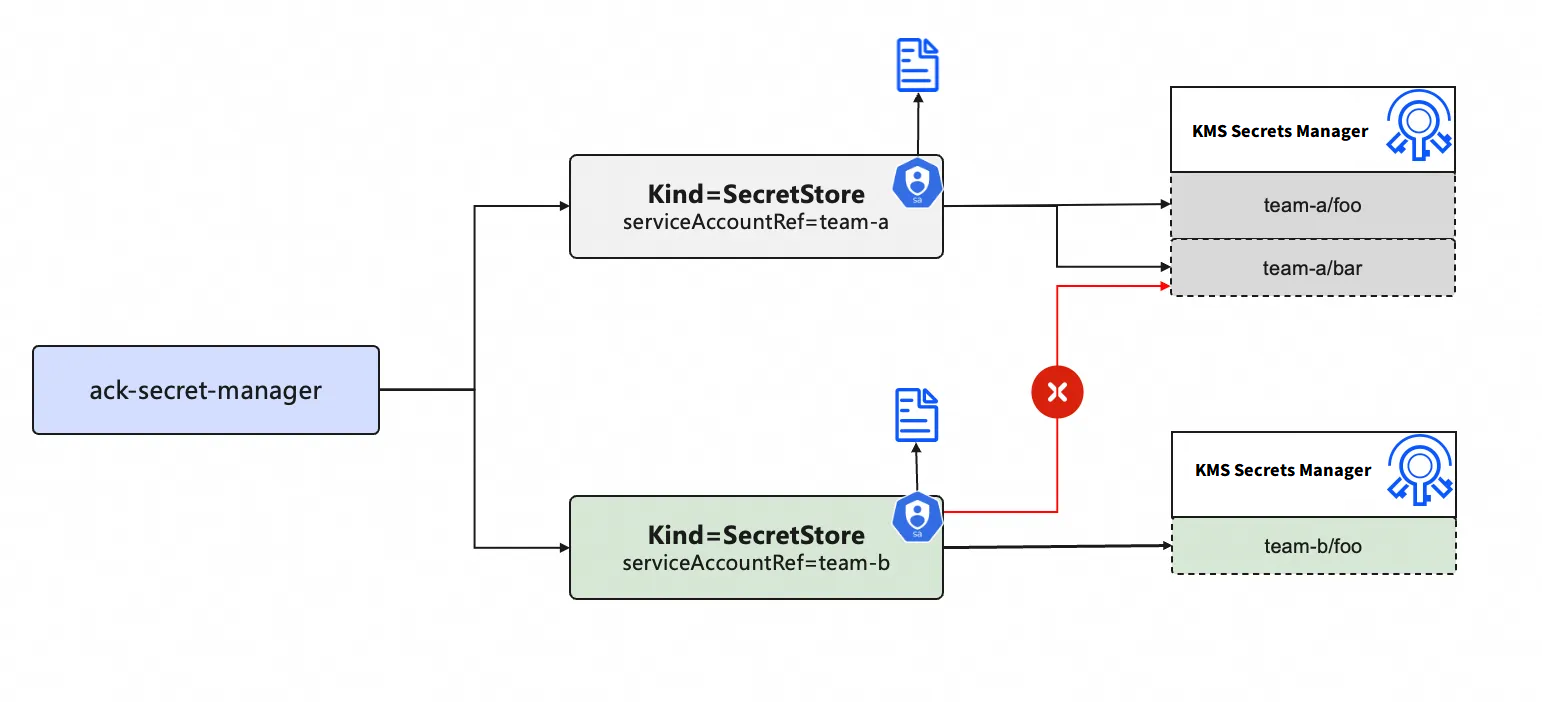
Enable RRSA OIDC for the cluster in the ACK console. See Enable RRSA for your cluster.
NoteSet
rrsa.enabletotruein the ack-secret-manager configuration.Create separate RAM roles for different ServiceAccounts. Set Principal Type to Identity Provider and configure the following parameters. For details, see Create a RAM role for an OIDC IdP.
Parameter
Description
Identity Provider Type
Select OIDC.
Identity Provider
Select
ack-rrsa-<CLUSTER_ID>, where<CLUSTER_ID>is your cluster ID.Condition
oidc:iss: Keep the default setting.
oidc:aud: Keep the default setting.
oidc:sub: Manually add this condition.
Key: Select oidc:sub.
Operator: Select StringEquals.
Value: Enter
system:serviceaccount:<NAMESPACE>:<SERVICEACCOUNT_NAME>, where<NAMESPACE>is the namespace of ack-secret-manager, and<SERVICEACCOUNT_NAME>is the service account name. In this example, entersystem:serviceaccount:kube-system:ack-secret-manager.
Create and attach the KMS access policy to the RAM role.
Create the following policy. For details, see Create a custom policy.
{
  "Version": "1",
  "Statement": [
    {
      "Action": [
        "kms:GetSecretValue",
        "kms:Decrypt"
      ],
      "Resource": "acs:kms:<REGION_ID>:<ACCOUNT_ID>:secret/xxxx",  // The ARN of the KMS secret.
      "Effect": "Allow"
    }
  ]
}
Attach the policy to the RAM role. For details, see Grant permissions to a RAM role.
Create a ServiceAccount in your application's namespace, annotated with the RAM role ARN.
apiVersion: v1
kind: ServiceAccount
metadata:
  annotations:
    ack.alibabacloud.com/role-arn: acs:ram::<ACCOUNT_ID>:role/<ROLE_NAME> # ARN of the RAM role
  name: <SERVICEACCOUNT_NAME>     # Must match the <SERVICEACCOUNT_NAME> in the oidc:sub condition of the RAM role.
  namespace: <NAMESPACE>         # Must match the <NAMESPACE> in the oidc:sub condition of the RAM role.
Create a SecretStore that references this ServiceAccount.
Create a file named
secretstore-rrsa.yamlwith the following content. Replace the placeholders as described.<NAME>: The name of the SecretStore.<NAMESPACE>: The target Kubernetes namespace.<SERVICEACCOUNT_NAME>: The name of theServiceAccountcreated in the previous step.apiVersion: alibabacloud.com/v1alpha1 kind: SecretStore metadata: name: <NAME> namespace: <NAMESPACE> spec: KMS: KMSAuth: serviceAccountRef: name: <SERVICEACCOUNT_NAME>
Apply the SecretStore.
kubectl apply -f secretstore-rrsa.yaml
Global RRSA for ack-secret-manager
This method grants global KMS access to the add-on itself.
Enable RRSA OIDC for the cluster in the ACK console. See Enable RRSA for your cluster.
NoteSet
rrsa.enabletotruein the ack-secret-manager configuration.Create a RAM role for ack-secret-manager.
Set Principal Type to Identity Provider and configure the following parameters. For details, see Create a RAM role for an OIDC identity provider.
Parameter
Description
Identity Provider Type
Select OIDC.
Identity Provider
Select
ack-rrsa-<CLUSTER_ID>, where<CLUSTER_ID>is your cluster ID.Condition
oidc:iss: Keep the default setting.
oidc:aud: Keep the default setting.
oidc:sub: Manually add this condition.
Key: Select oidc:sub.
Operator: Select StringEquals.
Value: Enter
system:serviceaccount:<NAMESPACE>:<SERVICEACCOUNT_NAME>, where<NAMESPACE>is the namespace of ack-secret-manager, and<SERVICEACCOUNT_NAME>is the service account name. In this example, entersystem:serviceaccount:kube-system:ack-secret-manager.
Create and attach the KMS access policy to the RAM role.
Create the following policy. For details, see Create a custom policy.
{
    "Version": "1",
    "Statement": [
        {
            "Action": [
                "kms:GetSecretValue",
                "kms:Decrypt"
            ],
            "Resource": [
                "*"
            ],
            "Effect": "Allow"
        }
    ]
}
Attach the policy to the RAM role. For details, see Manage permissions for a RAM role.
Create and deploy a
SecretStore.Create a file named
secretstore-rrsa.yaml.<ACCOUNT_ID>: The ID of the Alibaba Cloud account used to sync KMS secrets.<CLUSTER_ID>: The ID of your ACK cluster.<ROLE_NAME>: The name of the RAM role created in Step 2.apiVersion: alibabacloud.com/v1alpha1 kind: SecretStore metadata: name: scdemo-rrsa spec: KMS: KMSAuth: oidcProviderARN: "acs:ram::<ACCOUNT_ID>:oidc-provider/ack-rrsa-<CLUSTER_ID>" ramRoleARN: "acs:ram::<ACCOUNT_ID>:role/<ROLE_NAME>"
Run the following command to deploy
SecretStore.kubectl apply -f secretstore-rrsa.yaml
Grant permissions to the worker RAM role
Create a custom RAM policy with the following content. For details, see Create custom policies.
{
    "Version": "1",
    "Statement": [
        {
            "Action": [
                "kms:GetSecretValue",
                "kms:Decrypt"
            ],
            "Resource": [
                "*"
            ],
            "Effect": "Allow"
        }
    ]
}
Attach the policy to the worker RAM role of the cluster. For details, see Grant permissions to the worker RAM role.
When using this method, you do not need to configure a
SecretStore. ThesecretStoreReffield in yourExternalSecretcan also be omitted.
Specify an AccessKey pair to assume a RAM role
Create a RAM role with your Alibaba Cloud account as the trusted entity for the ack-secret-manager add-on to use.
When selecting the trusted Alibaba Cloud account, select Current Account.
Create a custom RAM policy that grants access to KMS secrets, then attach it to the RAM role.
Create a custom policy with the following content. For details, see Create custom policies.
{
    "Version": "1",
    "Statement": [
        {
            "Action": [
                "kms:GetSecretValue",
                "kms:Decrypt"
            ],
            "Resource": [
                "*"
            ],
            "Effect": "Allow"
        }
    ]
}
Attach the policy to the RAM role. For details, see Grant permissions to a RAM role.
Create a custom RAM policy that allows a RAM user to assume the RAM role, then attach it to the RAM user.
Create a policy with the following content. For more information, see Create a custom policy.
Replace
<account-id>with the Alibaba Cloud account ID that owns the RAM role, and replace<role-name>with the RAM role name. For details on finding the role ARN, see How do I view the ARN of a RAM role?{ "Statement": [ { "Action": "sts:AssumeRole", "Effect": "Allow", "Resource": "acs:ram:*:<account-id>:role/<role-name>" } ], "Version": "1" }Attach the policy to the RAM user. For details, see Grant permissions to RAM users.
Create a Kubernetes Secret to store the RAM user's AccessKey pair.
Create a file named
ramuser.yamlwith the following content. Replace theAccessKey IDandAccessKey Secretwith their Base64-encoded values.apiVersion: v1 data: accessKey: {AccessKey ID encoded in Base64} accessKeySecret: {AccessKey secret encoded in Base64} kind: Secret metadata: name: ramuser namespace: kube-system type: OpaqueApply the Secret.
kubectl apply -f ramuser.yaml
Create a
SecretStoreusing the AccessKey pair.Create a file named
secretstore-ramrole.yamlwith the following content. Replace the placeholders as described.<ACCOUNT_ID>: ID of the Alibaba Cloud account used to sync KMS secrets.<ROLE_NAME>: Name of the RAM role created in Step 1.<SECRET_NAME>: Name of the Kubernetes Secret storing the AccessKey pair.<SECRET_NAMESPACE>: Namespace of the Kubernetes Secret.<SECRET_KEY_AK>and<SECRET_KEY_SK>: The keys in the Secret'sdatafield that store the AccessKey ID and AccessKey Secret.<ROLE_SESSION_NAME>: Role session name (any custom string).apiVersion: alibabacloud.com/v1alpha1 kind: SecretStore metadata: name: scdemo-ramrole spec: KMS: KMSAuth: accessKey: name: <SECRET_NAME> namespace: <SECRET_NAMESPACE> key: <SECRET_KEY_AK> accessKeySecret: name: <SECRET_NAME> namespace: <SECRET_NAMESPACE> key: <SECRET_KEY_SK> ramRoleARN: "acs:ram::<ACCOUNT_ID>:role/<ROLE_NAME>" ramRoleSessionName: <ROLE_SESSION_NAME>
Apply the SecretStore.
kubectl apply -f secretstore-ramrole.yaml
Step 3: Sync KMS secrets to the cluster
Create an ExternalSecret to specify which KMS secrets to sync.
The namespace and name of the resulting Kubernetes Secret match the ExternalSecret exactly.
Create a file named
external.yamlwith the following content. Replace the placeholders as described.Placeholder
Description
<KMS_SECRET_NAME>Required. Name of the KMS secret to sync.
<KUBERNETES_SECRET_KEY>Required. Key name in the Kubernetes Secret where the KMS secret value is stored.
<KMS_SECRET_VERSION_STAGE>Optional. Version stage label of the KMS secret, such as
ACSCurrent. To use a version ID instead, replaceversionStagewithversionId. RDS, PolarDB, Redis/Tair, RAM, and ECS secrets only supportACSPreviousandACSCurrentand ignoreversionId. For details, see Secret elements.<KMS_SERVICE_ENDPOINT>Optional. KMS request endpoint. Overrides global and default endpoint configurations. For supported endpoint formats, see Configure KMS endpoint addresses.
<SECRET_STORE_NAME>Optional. Name of the
SecretStorecreated in Step 2. Not required when using the worker RAM role.<SECRET_STORE_NAMESPACE>Optional. Namespace of the
SecretStore. Not required when using the worker RAM role.apiVersion: alibabacloud.com/v1alpha1 kind: ExternalSecret metadata: name: esdemo spec: provider: kms # Sync from KMS. Can be omitted or set to kms. data: - key: <KMS_SECRET_NAME> name: <KUBERNETES_SECRET_KEY> versionStage: <KMS_SECRET_VERSION_STAGE> secretStoreRef: # Omit when using the worker RAM role. name: <SECRET_STORE_NAME> namespace: <SECRET_STORE_NAMESPACE> - key: <KMS_SECRET_NAME> name: <KUBERNETES_SECRET_KEY> versionStage: <KMS_SECRET_VERSION_STAGE> kmsEndpoint: <KMS_SERVICE_ENDPOINT>Apply the ExternalSecret.
kubectl apply -f external.yamlCheck whether a Kubernetes Secret exists.
kubectl get secret esdemoIf a Kubernetes Secret exists, the KMS secret is synchronized from KMS to your cluster.
Advanced configurations
Sync KMS secrets across Alibaba Cloud accounts
Use this configuration to allow an ACK cluster in Account B to access a KMS instance in Account A. ack-secret-manager uses RRSA to assume a RAM role in Account A through an OIDC provider in Account B, then imports the KMS secret into the cluster.
Configure permissions in Account A
Use Account A to create a RAM role with Account B as the trusted entity. Select Other Account and enter the ID of Account B. For details, see Create a RAM role for a trusted Alibaba Cloud account.
Create a custom RAM policy that grants access to KMS secrets. For more information, see Create a custom policy.
{
    "Version": "1",
    "Statement": [
        {
            "Action": [
                "kms:GetSecretValue",
                "kms:Decrypt"
            ],
            "Resource": [
                "*"
            ],
            "Effect": "Allow"
        }
    ]
}
Attach the policy to the RAM role. For details, see Grant permissions to a RAM role.
Configure permissions in Account B
Enable RRSA OIDC for the cluster in the ACK console. See Enable RRSA for your cluster.
NoteSet
rrsa.enabletotruein the ack-secret-manager configuration.Create a RAM role for ack-secret-manager.
Set Principal Type to Identity Provider and configure the following parameters. For details, see Create a RAM role for an OIDC identity provider.
Parameter
Description
Identity Provider Type
Select OIDC.
Identity Provider
Select
ack-rrsa-<CLUSTER_ID>, where<CLUSTER_ID>is your cluster ID.Condition
oidc:iss: Keep the default setting.
oidc:aud: Keep the default setting.
oidc:sub: Manually add this condition.
Key: Select oidc:sub.
Operator: Select StringEquals.
Value: Enter
system:serviceaccount:<NAMESPACE>:<SERVICEACCOUNT_NAME>, where<NAMESPACE>is the namespace of ack-secret-manager, and<SERVICEACCOUNT_NAME>is the service account name. In this example, entersystem:serviceaccount:kube-system:ack-secret-manager.
Create a custom RAM policy in Account B that allows assuming the RAM role in Account A, then attach it to the Account B RAM role.
Create a policy with the following content, where
Resourceis the ARN of the RAM role created in Account A. For details on finding the ARN, see How do I view the ARN of a RAM role?{ "Statement": [ { "Action": "sts:AssumeRole", "Effect": "Allow", "Resource": "acs:ram:*:<account-id>:role/<role-name>" } ], "Version": "1" }Attach the policy to the RAM role created in Account B. For details, see Manage permissions for a RAM role.
Create a
SecretStorefor cross-account access.Create a file named
secretstore-ramrole.yamlwith the following content. Replace the placeholders as described.<ACK-accountID>: ID of Account B (the account with the ACK cluster).<clusterID>: ID of your ACK cluster.<ACK-roleName>: Name of the RAM role created in Account B.<KMS-accountID>: ID of Account A (the account with the KMS instance).<KMS-roleName>: Name of the RAM role created in Account A.<roleSessionName>: Role session name (any custom string).apiVersion: alibabacloud.com/v1alpha1 kind: SecretStore metadata: name: scdemo-cross-account spec: KMS: KMSAuth: oidcProviderARN: "acs:ram::<ACK-accountID>:oidc-provider/ack-rrsa-<clusterID>" ramRoleARN: "acs:ram::<ACK-accountID>:role/<ACK-roleName>" remoteRamRoleARN: "acs:ram::<KMS-accountID>:role/<KMS-roleName>" remoteRamRoleSessionName: <roleSessionName>
Create an
ExternalSecretto specify the sync details. For details, see Step 3: Sync KMS secrets to the cluster.
Parse JSON and YAML secrets
Extract specific fields from a JSON secret
Use jmesPath to extract specific key-value pairs from a KMS secret stored in JSON format.
For example, given the following JSON secret stored in KMS Secrets Manager:
{"name":"tom","friends":[{"name":"lily"},{"name":"mark"}]}Create an ExternalSecret with jmesPath to extract specific fields:
path: Required. JMESPath expression to extract the field. See the JMESPath specification.objectAlias: Required. Key name in the resulting Kubernetes Secret.
apiVersion: alibabacloud.com/v1alpha1
kind: ExternalSecret
metadata:
  name: es-json-demo
spec:
  provider: kms
  data:
    - key: {KMS secret name}
      versionStage: {KMS secret version stage}
      secretStoreRef:
        name: {secret store name}
        namespace: {secret store namespace}
      jmesPath:
        - path: "name"              # Extracts: "tom"
          objectAlias: "myname"
        - path: "friends[0].name"   # Extracts: "lily"
          objectAlias: "friendname"
Auto-parse a JSON secret
If the JSON structure is unknown or variable, use dataProcess.extract to automatically parse all key-value pairs from a JSON secret. Use dataProcess.replaceRule to rename keys that don't conform to Kubernetes Secret key naming requirements.
For example, given the following JSON secret with non-conforming key names:
{"/name-invalid":"lily","name-invalid/":[{"name":"mark"}]}Create an ExternalSecret with jmesPath to extract specific fields:
apiVersion: alibabacloud.com/v1alpha1
kind: ExternalSecret
metadata:
  name: extract-secret
spec:
  provider: kms
  dataProcess:
    - extract:
        key: {KMS secret name}
        versionStage: ACSCurrent
        secretStoreRef:
          name: {secret store name}
          namespace: {secret store namespace}
      replaceRule:
        - source: "^/.*d$"   # Keys starting with / and ending with d -> "tom"
          target: "tom"
        - source: "^n.*/$"   # Keys starting with n and ending with / -> "mark"
          target: "mark"
Extract specific fields from a YAML secret
Use jmesPath to extract specific key-value pairs from a KMS secret stored in YAML format.
For example, given the following YAML secret stored in KMS Secrets Manager:
name: tom
friends:
  - name: lily
  - name: mark
Create an ExternalSecret with jmesPath to extract specific fields:
path: Required. JMESPath expression to extract the field. See the JMESPath specification.objectAlias: Required. Key name in the resulting Kubernetes Secret.
apiVersion: alibabacloud.com/v1alpha1
kind: ExternalSecret
metadata:
  name: es-yaml-demo
spec:
  provider: kms
  data:
    - key: {KMS secret name}
      versionStage: {KMS secret version stage}
      secretStoreRef:
        name: {secret store name}
        namespace: {secret store namespace}
      jmesPath:
        - path: "name"              # Extracts: "tom"
          objectAlias: "myname"
        - path: "friends[0].name"   # Extracts: "lily"
          objectAlias: "friendname"
Auto-parse a YAML secret
If the YAML structure is unknown or variable, use dataProcess.extract to auto-parse all key-value pairs. Use dataProcess.replaceRule to handle non-conforming key names.
For example, given the following YAML secret:
/name-invalid: lily
name-invalid/:
  - name: mark
Create an ExternalSecret with jmesPath to extract specific fields:
apiVersion: 'alibabacloud.com/v1alpha1'
kind: ExternalSecret
metadata:
  name: extract-secret
spec:
  provider: kms
  dataProcess:
    - extract:
        key: {KMS secret name}
        versionStage: ACSCurrent
        secretStoreRef:
          name: {secret store name}
          namespace: {secret store namespace}
      replaceRule:
        - source: "^/.*d$"   # Keys starting with / and ending with d -> "tom"
          target: "tom"
        - source: "^n.*/$"   # Keys starting with n and ending with / -> "mark"
          target: "mark"
Configure KMS endpoint addresses
ack-secret-manager resolves the KMS endpoint using the following priority order:
Type | Field | Priority | Description |
Secret-level |
| Highest | Applies to a specific secret; overrides global and default configurations. |
Global |
| Medium | Applies to all KMS requests that don't have a secret-level endpoint. |
Default | None | Lowest | Uses |
The following example shows how secret-level and global endpoints interact:
apiVersion: "alibabacloud.com/v1alpha1"
kind: ExternalSecret
metadata:
  name: esdemo
spec:
  provider: kms
  data:
    - key: test-hangzhou # Uses the global endpoint if configured. Otherwise, defaults to kms-vpc.{region}.aliyuncs.com
      name: hangzhou-vpc
      versionId: v1
    - key: test-hangzhou # Uses the endpoint explicitly specified by the kmsEndpoint field (kms.cn-hangzhou.aliyuncs.com)
      name: hangzhou-public
      versionId: v1
      kmsEndpoint: kms.cn-hangzhou.aliyuncs.com
Supported endpoint formats:
Gateway type | Domain type | Endpoint format | Requirements |
Dedicated gateway | KMS private domain |
| KMS secret instance and cluster in the same region and VPC. KMS instance version 3.0 or later. |
Shared gateway | VPC domain |
| KMS secret and cluster in the same region. This is the default endpoint. |
Shared gateway | Public domain |
| Cluster can access the public internet. |
For more information, see Differences between shared and dedicated gateways for accessing KMS.
CRD resources
SecretStore: Namespace-level resource. Defines authentication configurations (RRSA, AK, etc.).
ClusterSecretStore: Cluster-level resource. Functions similar to
SecretStorebut can be referenced byExternalSecretresources across all namespaces. Supports access control throughspec.conditions.ExternalSecret: Namespace-level resource. Defines which KMS secret to sync and references a
SecretStore.ClusterExternalSecret: Cluster-level resource. Automatically provisions
ExternalSecretresources into multiple namespaces based onspec.namespaceSelectors.
Cluster-level resources
ClusterExternalSecret
apiVersion: "alibabacloud.com/v1alpha1"
kind: ClusterExternalSecret
metadata:
  name: cluster-kms
spec:
  externalSecretSpec:
    provider: kms
    data:
      - key: test
        name: test
        versionId: v1
        secretStoreRef:
          name: alibaba-credentials
          kind: ClusterSecretStore
  externalSecretName: kms
  externalSecretMetadata:
    labels:
      app: "my-app"
      team: "backend"
    annotations:
      annotation-key1: "annotation-value1"
      annotation-key2: "annotation-value2"
  namespaceSelectors:
  - matchLabels:
      kubernetes.io/metadata.name: default
  - matchExpressions:
    - key: kubernetes.io/metadata.name
      operator: In
      values:
      - test
  rotationInterval: 10s
spec fields
Field | Description | Required |
| The specifications of the | Yes |
| The name of the | No |
| The metadata of the | No |
| A list of label selectors used to match target namespaces. | No |
| The interval at which the controller checks namespace labels and reconciles objects. | No |
externalSecretMetadata fields
Use the externalSecretMetadata field to automatically add extra metadata to the ExternalSecret resources created by the ClusterExternalSecret.
Field | Description | Required |
| Annotations for the generated | No |
| Labels for the generated | No |
ClusterSecretStore
apiVersion: alibabacloud.com/v1alpha1
kind: ClusterSecretStore
metadata:
  name: alibaba-credentials
spec:
  conditions:
    - namespaceSelector:
        matchLabels:
          kubernetes.io/metadata.name: test
  KMS:
    KMSAuth:
      oidcProviderARN: acs:ram::<role-name>:oidc-provider/ack-rrsa-<cluster-id>
      serviceAccountRef:
        name: test-serviceaccount-auth
        namespace: test
spec fields
Field | Description | Required |
| Defines conditions to restrict access to specific namespaces. | Yes |
| Connects to KMS to retrieve secrets. | No |
| Connects to Operation Orchestration Service (OOS) to retrieve encrypted parameters. | No |
conditions fields
Field | Description | Required |
| A label selector used to match allowed namespaces. | Yes |
| An explicit list of allowed namespace names. | No |
| A list of regular expressions used to match allowed namespace names. | No |
Cross-namespace access control
Enhance security by restricting cross-namespace references.
SecretStore references for ExternalSecret
Use the
command.enableCrossNamespaceSecretStoreparameter to control whether an ExternalSecret can reference a SecretStore in a different namespace.The default value is
true, which allows cross-namespace references.When set to
false, an ExternalSecret can only reference a SecretStore in the same namespace.
Authentication resource references for SecretStore
Use the
command.enableCrossNamespaceAuthRefparameter to control whether a SecretStore can reference authentication resources (ServiceAccount, AccessKey Secret) in a different namespace.The default value is
true, which allows cross-namespace references.When set to
false, a SecretStore can only reference authentication resources in the same namespace.
ClusterSecretStore access control
Use the
spec.conditionsfield to limit which namespaces can access the ClusterSecretStore.The following three access control methods are supported. Conditions are evaluated with OR logic:
namespaceSelector: Matches allowed namespaces using a label selector.namespaces: Explicitly lists the names of allowed namespaces.namespaceRegexes: Matches allowed namespace names using regular expressions.
  conditions:
    - namespaceSelector:
        matchLabels:
          app: myapp
        matchExpressions:
        - key: environment
          operator: In
          values:
          - dev
    - namespaces:
      - default
      - test
    - namespaceRegexes:
      - "kube-.*"
Recommendations
Recommended approach for cross-namespace access
For cross-namespace access, the following combinations are recommended:
ClusterSecretStore + ExternalSecret: Use when multiple namespaces need to share the same authentication configuration.
ClusterSecretStore + ClusterExternalSecret: Use when you need to automatically create ExternalSecrets with the same configuration across multiple namespaces.
Security best practices
Principle of least privilege: If cross-namespace access is not required, disable
enableCrossNamespaceSecretStoreandenableCrossNamespaceAuthRef. Always prioritize namespace-level resources (SecretStore) over cluster-level ones.Restrict ClusterSecretStore: Never create a
ClusterSecretStorewithout configuringspec.conditions.Avoid AccessKey exposure: Prioritize RRSA or ServiceAccount-based authentication over statically storing AccessKey pairs in Kubernetes Secrets.
Limit ClusterExternalSecret: Use
ClusterExternalSecretonly when absolutely necessary, and strictly definenamespaceSelectorsto prevent unintended secret proliferation.
What's next
To protect Kubernetes Secrets synced from KMS and stored in etcd, enable Secret encryption. For details, see Use KMS to encrypt Kubernetes Secrets.