Deploy ack-ingress-nginx-v1 in the cloud and edge node pools of an ACK Edge cluster to provide independent load balancing for each edge unit.
The open source Ingress NGINX project will no longer be maintained after March 2026. As a result, Container Service for Kubernetes will stop maintaining the NGINX Ingress Controller component. Be aware of the associated risks. See [Product Announcement] End of Maintenance for the NGINX Ingress Controller Component.
Background
Alibaba Cloud ACK Edge provides capabilities such as edge autonomy, edge units, traffic management, and native API support. It supports unified application lifecycle management and resource scheduling for edge computing scenarios.
Usage notes
Note the following when you deploy ack-ingress-nginx-v1 in cloud and edge node pools:
-
The ACK Edge cluster must be version 1.19 or later.
-
Deploy the component multiple times in the same ACK Edge cluster, but use a unique release name for each deployment. Use a separate namespace for each deployment for easier management.
-
With default settings, ack-ingress-nginx-v1 deploys to the default node pool of the ACK Edge cluster.
Procedure
Log on to the ACK console. In the left navigation pane, click .
-
On the Marketplace tab of the App Catalog page, search for and select ack-ingress-nginx-v1.
-
On the ack-ingress-nginx-v1 component page, click Deploy.
-
In the panel, select a Cluster and a Namespace, and enter a Release Name.
NoteWhen deploying ack-ingress-nginx-v1 in a node pool, name the release in the format ack-ingress-nginx-v1-{node-pool-name}. For example: ack-ingress-nginx-v1-edge-hangzhou.
-
Click Next and configure parameters on the Parameters page.
On the ACK console, go to your cluster's management page and choose in the left-side navigation pane. Find the IDs of your cloud and edge node pools for the
nodeSelectorconfiguration.-
To deploy in a cloud node pool, configure the following parameters:
-
In the
nodeSelectorparameter, add the cloud node pool label:alibabacloud.com/nodepool-id: {node-pool-id}.NoteIn the
nodeSelectorfield, keep onlyalibabacloud.com/nodepool-id: {node-pool-id}.
-
In the
ingressClassResourceparameter, setnameandcontrollerValue.NoteIf you deploy ack-ingress-nginx-v1 multiple times in the same ACK Edge cluster, ensure that the
nameandcontrollerValueare unique for each deployment. Recommended naming conventions:-
name:ack-nginx-{node-pool-name}. For example:ack-nginx-edge-hangzhou. -
controllerValue:"k8s.io/ack-ingress-nginx-{node-pool-name}". For example:"k8s.io/ack-ingress-nginx-edge-hangzhou".
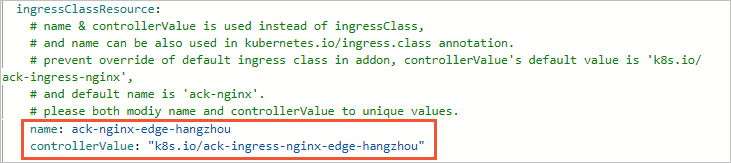
-
-
-
To deploy in an edge node pool, configure the following parameters:
-
In the
nodeSelectorparameter, add the edge node pool label:alibabacloud.com/nodepool-id: {node-pool-id}.NoteIn the
nodeSelectorfield, keep onlyalibabacloud.com/nodepool-id: {node-pool-id}. -
Set
global. edgeNodePooltotrue. This triggers:-
The NGINX Ingress Controller Service type changes from
LoadBalancertoNodePort. To expose edge services to the internet, separately configure a load balancer with a public IP. -
The NGINX Ingress Controller image switches to a public registry to avoid image pull failures on edge nodes.

-
-
In the
ingressClassResourceparameter, setnameandcontrollerValue.NoteIf you deploy ack-ingress-nginx-v1 multiple times in the same ACK Edge cluster, ensure that the
nameandcontrollerValueare unique for each deployment. Recommended naming conventions:-
name:ack-nginx-{node-pool-name}. For example:ack-nginx-edge-hangzhou. -
controllerValue:"k8s.io/ack-ingress-nginx-{node-pool-name}". For example:"k8s.io/ack-ingress-nginx-edge-hangzhou".
-
-
-
-
Click OK.
-
In the left-side navigation pane of the cluster's management page, choose .
The Helm page confirms that the NGINX Ingress Controller is deployed.