This topic explains how to integrate API Gateway with Function Compute by using Function Compute 3.0 as an example.
Prerequisites
You have created an API Gateway instance. For information about instance selection, see Instance Type and Selection Guide.
Overview
API Gateway supports two types of Function Compute functions: HTTP functions and event functions.
Integrate an HTTP function with API Gateway
Step 1: Create a web function
Before you configure API Gateway, you must create a web function on the Function Compute 3.0 console. For more information, see Create a web function.
Step 2: Create a backend service
Define a backend service in API Gateway and set its address to your Function Compute service.
-
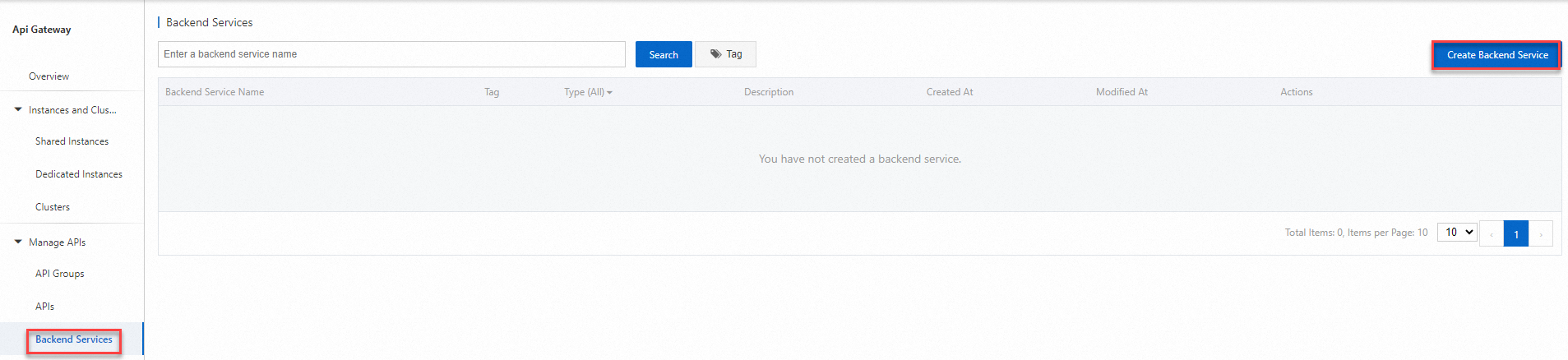
Log on to the API Gateway console. In the navigation pane on the left, choose . In the top navigation bar, select a region and click Create Backend Service.
-
In the Create Backend Service dialog box, configure the parameters and click OK.
Set Name to
FC-backend. Set Type to Function Compute, Product Version to Function Compute 3.0, and Function Type to HTTP function. -
On the Backend Services page, click the backend service that you just created. On the service definition page that appears, select the Production tab. In the Basic Information section, click Create.
-
On the Basic Information page, configure the access address for the trigger path and click Publish.
The access address is the URL of the HTTP function. Example:
https://helloworld-xxx-hangzhou-vpc.fcapp.run.
Step 3: Create an API
Create an API on the API Gateway console. For more information, see Create an API.
-
Select an API group. We recommend that you create it in the same region as the Function Compute function.
If the Function Compute function and the API are in different regions, API Gateway routes requests to your Function Compute service over the internet, which may incur data transfer costs. If data security and network latency are critical, make sure that the API and the Function Compute function are in the same region.
Create and define the API. In the Define Backend Service step, configure the following parameters:
Backend Configuration: Use an existing backend service.
Backend Service Type: Function Compute.
Product Version: Function Compute 3.0.
Function Type: HTTP function.
Backend Service: Select the name of the backend service that you created.
Backend Request Path: You can specify a custom path. Otherwise, enter a forward slash (/).
HTTP Method: Select the method supported by the backend Function Compute function. If multiple methods are supported, select ANY.
Use a function from another account
API Gateway can invoke a Function Compute function that belongs to a different Alibaba Cloud account. This section describes how an API Gateway instance in Account A can invoke a function in Account B.
-
Account B must grant the API Gateway instance in Account A permission to invoke the Function Compute function.
Step 1: Log on to the Resource Access Management (RAM) console as Account B and create a RAM role. For more information, see Create a RAM role for a trusted Alibaba Cloud account.
Step 2: Grant the RAM role created in Step 1 permission to invoke the Function Compute function. Attach the system policy named AliyunFCInvocationAccess. For more information, see Grant permissions to a RAM role.
Step 3: Edit the trust policy of the RAM role created in Step 1. For more information, see Edit the trust policy of a RAM role. Add the ID of Account A, for example, 123456789012****, to the trust policy. The modified trust policy is as follows:
{
  "Statement": [
    {
      "Action": "sts:AssumeRole",
      "Effect": "Allow",
      "Principal": {
        "Service": [
          "123456789012****@apigateway.aliyuncs.com"
        ]
      }
    }
  ],
  "Version": "1"
}
Step 4: Account B provides the Alibaba Cloud Resource Name (ARN) of the RAM role created in Step 1 to Account A. For more information, see RAM role overview.
-
On the API Gateway console, Account A adds a backend service that accesses the Function Compute function of Account B. For the trigger path, enter the access URL of the function in Account B. For the role ARN, enter the ARN provided by Account B.
When an HTTP function is used as the backend service, the client's Authorization header is overwritten by API Gateway. We recommend that you use a different parameter name on the client.
Integrate an event function with API Gateway
Step 1: Create an event-triggered function
To create an event function on the Function Compute 3.0 console, see Create an event-triggered function.
Step 2: Create a backend service
Define a backend service in API Gateway and set its address to your Function Compute service.
-
Log on to the API Gateway console. Select a region. In the navigation pane on the left, choose . In the upper-right corner, click Create Backend Service.
Set Name to
FC-mobile. Set Type to Function Compute, Product Version to Function Compute 3.0, and Function Type to event function. -
On the Backend Services page, click the backend service that you just created. On the service definition page that appears, select the Production tab. In the Basic Information section, click Create.
-
Select the name of the event function that you created, and then click Publish.
Set Region to China (Hangzhou) and Function Alias to LATEST.
Step 3: Create an API
Create an API on the API Gateway console. For more information, see Create an API.
-
Select an API group. We recommend that you create it in the same region as the Function Compute function.
If the Function Compute function and the API are in different regions, API Gateway routes requests to your Function Compute service over the internet, which may incur data transfer costs. If data security and network latency are critical, make sure that the API and the Function Compute function are in the same region.
Backend Configuration: Use an existing backend service.
Backend Service Type: Function Compute.
Product Version: Function Compute 3.0.
Function Type: event function.
Backend Service: Select the name of the backend service that you created.
Event function data formats
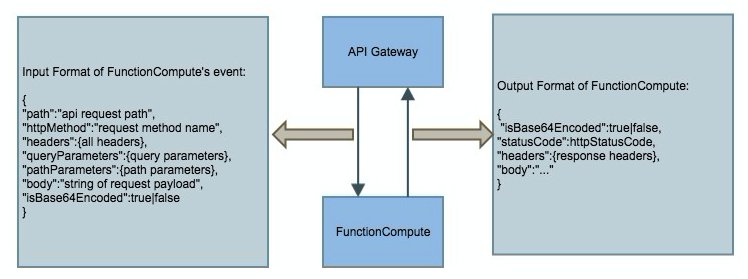
When API Gateway invokes an event function, it converts API-related data into a map format and passes the data to the Function Compute service. After processing, the function returns data such as a status code, headers, and a body in the output format shown in the following figure. API Gateway then maps this returned content to the status code, header, and body of the response sent to the client.
Request payload format (API Gateway to Function Compute)
When you use Function Compute as the backend service for an API, API Gateway passes the request parameters in a fixed map structure to the event input parameter of the function. The function can then obtain and process the parameters from this structure.
{
        "path":"api request path",
        "httpMethod":"request method name",
        "headers":{all headers,including system headers},
        "queryParameters":{query parameters},
        "pathParameters":{path parameters},
        "body":"string of request payload",
        "isBase64Encoded":"true|false, indicate if the body is Base64-encode"
}-
If the value of
"isBase64Encoded"is"true", API Gateway passes a Base64-encoded body, which the function must decode before processing. -
If the value of
"isBase64Encoded"is"false", API Gateway does not Base64-encode the body content.
Response payload format (Function Compute to API Gateway)
The function must return the output in the following JSON format so that API Gateway can parse it.
{
        "isBase64Encoded":true|false,
        "statusCode":httpStatusCode,
        "headers":{response headers},
        "body":"..."
}-
If the body content is binary, you must Base64-encode it in the function and set the value of
"isBase64Encoded"to"true". If the body content does not need to be Base64-encoded, set the value of"isBase64Encoded"to"false". API Gateway decodes any body content where"isBase64Encoded"is"true"before it returns the response to the client. -
In a Node.js environment, the function sets the callback based on different outcomes.
-
Successful request:
callback(null,{"statusCode":200,"body":"..."}) -
Exception:
callback(new Error('internal server error'),null) -
Client error:
callback(null,{"statusCode":400,"body":"param error"})
-
-
If the function returns a result that does not match the required format, API Gateway returns a 503 Service Unavailable error to the client.
Event function invocation examples
The following section provides samples of event function code, a request, and an API Gateway response.
Event function code sample
The following code sample can be configured on the code execution page of the function.
module.exports.handler = function(event, context, callback) {
    var responseCode = 200;
    console.log("request: " + JSON.stringify(event.toString()));
    // Convert the event to a JSON object.
    event=JSON.parse(event.toString());
    var isBase64Encoded=false;
        // Return a response based on the statusCode entered by the user. This can be used to test different status codes.
    if (event.queryParameters !== null && event.queryParameters !== undefined) {
        if (event.queryParameters.httpStatus !== undefined && event.queryParameters.httpStatus !== null && event.queryParameters.httpStatus !== "") {
            console.log("Received http status: " + event.queryParameters.httpStatus);
            responseCode = event.queryParameters.httpStatus;
        }
    }
    // If the body is Base64-encoded, decode the body in Function Compute.
    if(event.body!==null&&event.body!==undefined){
            if(event.isBase64Encoded!==null&&event.isBase64Encoded!==undefined&&event.isBase64Encoded){
                    event.body=new Buffer(event.body,'base64').toString();
            }
    }
    // The input is the content sent from API Gateway to Function Compute.
    var responseBody = {
        message: "Hello World!",
        input: event
    };
        // Base64-encode the body content as needed.
    var base64EncodeStr=new Buffer(JSON.stringify(responseBody)).toString('base64');
        // The response from Function Compute to API Gateway must be in the required format. The isBase64Encoded setting depends on whether the body is Base64-encoded.
    var response = {
                isBase64Encoded:true,
                statusCode: responseCode,
                headers: {
                "x-custom-header" : "header value"
                },
                body: base64EncodeStr
    };
    console.log("response: " + JSON.stringify(response));
    callback(null, response);
};
Event function request sample
The following sample shows a POST request to an API with the following path:
/fc/test/invoke/[type] POST http://test.alicloudapi.com/fc/test/invoke/test?param1=aaa¶m2=bbb
"X-Ca-Signature-Headers":"X-Ca-Timestamp,X-Ca-Version,X-Ca-Key,X-Ca-Stage",
"X-Ca-Signature":"TnoBldxxRHrFferGlzzkGcQsaezK+ZzySloKqCOsv2U=",
"X-Ca-Stage":"RELEASE",
"X-Ca-Timestamp":"1496652763510",
"Content-Type":"application/x-www-form-urlencoded; charset=utf-8",
"X-Ca-Version":"1",
"User-Agent":"Apache-HttpClient\/4.1.2 (java 1.6)",
"Host":"test.alicloudapi.com",
"X-Ca-Key":"testKey",
"Date":"Mon, 05 Jun 2017 08:52:43 GMT","Accept":"application/json",
"headerParam":"testHeader"
{"bodyParam":"testBody"} API Gateway response sample
200
Date: Mon, 05 Jun 2017 08:52:43 GMT
Content-Type: application/json; charset=UTF-8
Content-Length: 429
Access-Control-Allow-Origin: *
Access-Control-Allow-Methods: GET,POST,PUT,DELETE,HEAD,OPTIONS , PATCH
Access-Control-Allow-Headers: X-Requested-With, X-Sequence,X-Ca-Key,X-Ca-Secret,X-Ca-Version,X-Ca-Timestamp,X-Ca-Nonce,X-Ca-API-Key,X-Ca-Stage,X-Ca-Client-DeviceId,X-Ca-Client-AppId,X-Ca-Signature,X-Ca-Signature-Headers,X-Forwarded-For,X-Ca-Date,X-Ca-Request-Mode,Authorization,Content-Type,Accept,Accept-Ranges,Cache-Control,Range,Content-MD5
Access-Control-Max-Age: 172800
X-Ca-Request-Id: 16E9D4B5-3A1C-445A-BEF1-4AD8E31434EC
x-custom-header: header value
{"message":"Hello World!","input":{"body":"{\"bodyParam\":\"testBody\"}","headers":{"X-Ca-Api-Gateway":"16E9D4B5-3A1C-445A-BEF1-4AD8E31434EC","headerParam":"testHeader","X-Forwarded-For":"100.81.146.152","Content-Type":"application/x-www-form-urlencoded; charset=UTF-8"},"httpMethod":"POST","isBase64Encoded":false,"path":"/fc/test/invoke/test","pathParameters":{"type":"test"},"queryParameters":{"param1":"aaa","param2":"bbb"}}}
FAQ
-
Why can't I select my existing function?
Make sure that the service name and function name you enter match the names of the service and function that you created on the Function Compute console.
-
When I use Function Compute as a backend service for an API, can API Gateway connect to the backend service over an internal network?
If you use an event function and both API Gateway and Function Compute are in the same region, API Gateway uses the internal network by default.