All Products
Search
Document Center

Container Service for Kubernetes:Deploy an SGLang inference service with Prefill/Decode separation

Last Updated:Sep 09, 2025

This topic uses the Qwen3-32B model as an example to demonstrate how to deploy a model inference service in ACK using the SGLang inference engine with Prefill/Decode separation.

Background

  • Qwen3-32B

    Qwen3-32B represents the latest evolution in the Qwen series, featuring a 32.8B-parameter dense architecture optimized for both reasoning efficiency and conversational fluency.

    Key features:

    • Dual-mode performance: Excels at complex tasks like logical reasoning, math, and code generation, while remaining highly efficient for general text generation.

    • Advanced capabilities: Demonstrates excellent performance in instruction following, multi-turn dialog, creative writing, and best-in-class tool use for AI agent tasks.

    • Large context window: Natively handles up to 32,000 tokens of context, which can be extended to 131,000 tokens using YaRN technology.

    • Multilingual support: Understands and translates over 100 languages, making it ideal for global applications.

    For more information, see the blog, GitHub, and documentation.

  • SGLang

    SGLang is an inference engine that combines a high-performance backend with a flexible frontend, designed for both LLM and multimodal workloads.

    High-performance backend:

    • Advanced caching: Features RadixAttention (an efficient prefix cache) and PagedAttention to maximize throughput during complex inference tasks.

    • Efficient execution: Uses continuous batching, speculative decoding, PD separation, and multi-LoRA batching to efficiently serve multiple users and fine-tuned models.

    • Full parallelism and quantization: Supports TP, PP, DP, and EP parallelism, along with various quantization methods (FP8, INT4, AWQ, GPTQ).

    Flexible frontend:

    • Powerful programming interface: Enables developers to easily build complex applications with features such as chained generation, control flow, and parallel processing.

    • Multimodal and external interaction: Natively supports multimodal inputs (such as text and images) and allows for interaction with external tools, making it ideal for advanced agent workflows.

    • Broad model support: Supports generative models (Qwen, DeepSeek, Llama), embedding models (E5-Mistral), and reward models (Skywork).

    For more information, see SGLang GitHub.

  • Prefill/Decode separation

    The Prefill/Decode separation architecture is a mainstream optimization technique for large language model (LLM) inference. It resolves the resource conflict between the two core stages of the inference process. The LLM inference process has two stages:

    • Prefill (prompt processing) stage: In this stage, the model processes the entire user prompt at once. It calculates the attention for all input tokens in parallel and generates the initial key-value (KV) cache. This process is compute-intensive and runs only once at the beginning of a request.

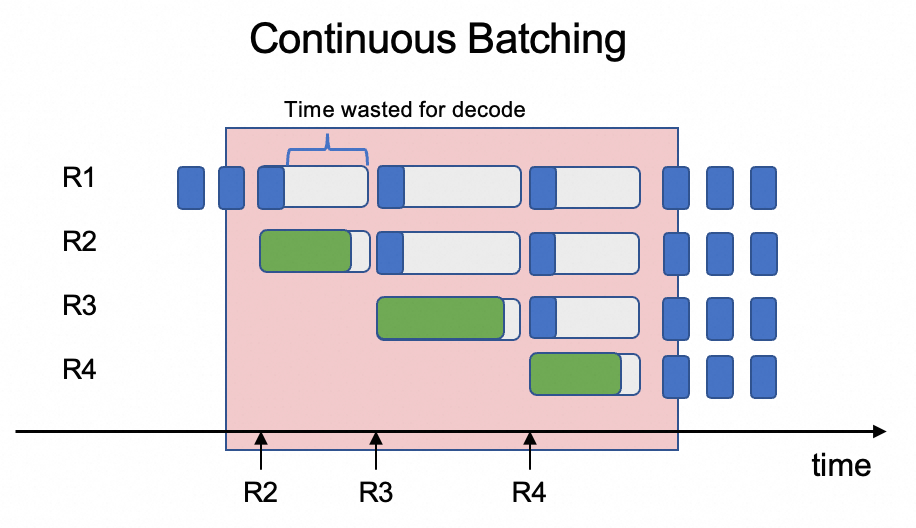
    • Decode (token generation) stage: This is an autoregressive process where the model generates new tokens one by one based on the existing KV cache. Each step involves a small amount of computation but requires repeatedly loading large model weights and the KV cache from GPU memory. This makes the process memory-bound.image.png

    The core conflict is that scheduling these two different types of tasks on the same GPU is inefficient. When an inference engine handles multiple user requests, it often uses continuous batch processing to schedule the Prefill and Decode stages of different requests in the same batch. The Prefill stage processes the full prompt and is computationally complex. The Decode stage generates a single token and is computationally simple. If scheduled in the same batch, the Decode stage experiences increased latency due to sequence length differences and resource competition. This increases overall system latency and reduces throughput.

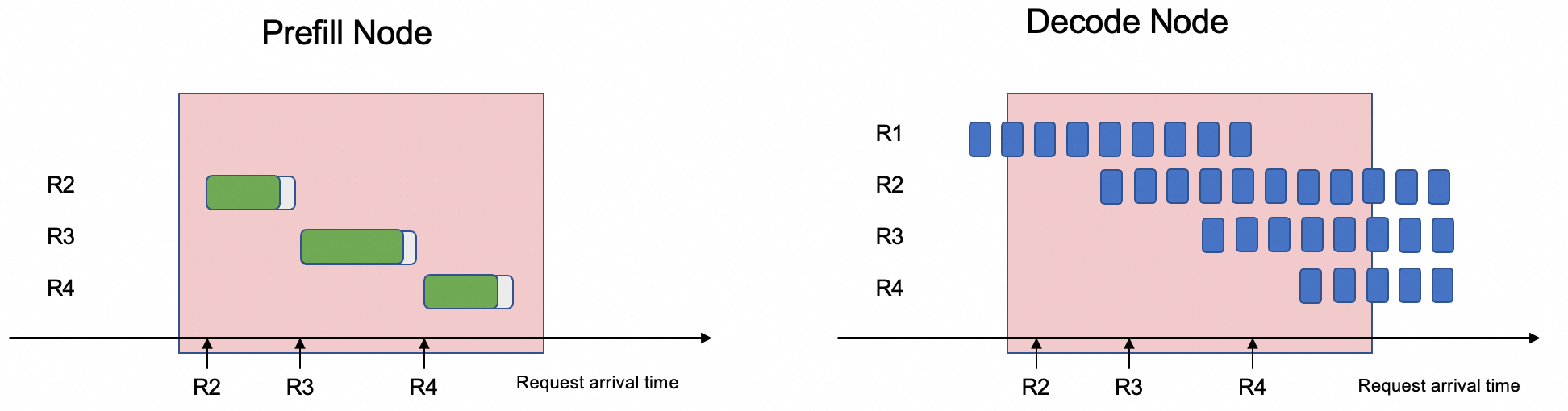
    image.png

    The Prefill/Decode separation architecture solves this problem by decoupling the two stages and deploying them on different GPUs. This separation allows the system to optimize for the different characteristics of the Prefill and Decode stages and avoids resource competition. As a result, the average time per output token (TPOT) is significantly reduced, and system throughput is increased.

  • RoleBasedGroup

    RoleBasedGroup (RBG) is a new, open-source workload from the Alibaba Cloud Container Service for Kubernetes (ACK) team. It is designed to address the challenges of large-scale deployment and O&M for the Prefill/Decode separation architecture in Kubernetes clusters. For more information, see the RBG GitHub project.

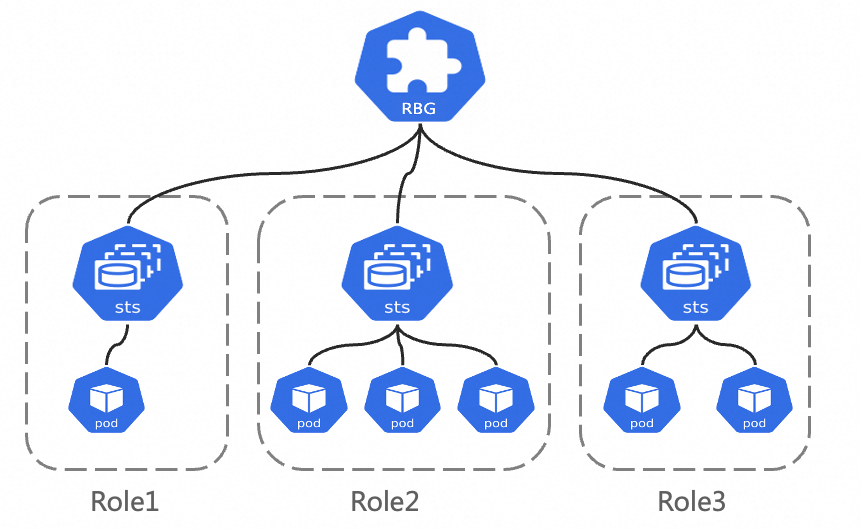
    The RBG API design is shown in the following figure. It consists of a group of roles. Each role can be built based on a StatefulSet, deployment, or LWS. Its core features are as follows:

    • Flexible multi-role definition: RBG lets you define any number of roles with any names. You can define dependencies between roles to start them in a specific order. You can also scale roles elastically.

    • Runtime: It provides automatic service discovery within the group. It also supports multiple restart policies, rolling updates, and gang scheduling.

      image.png

Prerequisites

  • An ACK managed cluster of version 1.22 or later has been created, and GPU nodes have been added to the cluster. For more information, see Create an ACK managed cluster and Add GPU nodes to a cluster.

    • The SGLang Prefill/Decode separation framework requires a cluster with at least six GPUs, where each GPU has at least 32 GB of memory. The framework relies on GPUDirect Remote Direct Memory Access (RDMA) for data transmission. The node specifications that you select must support elastic RDMA (eRDMA). We recommend using the ecs.ebmgn8is.32xlarge specification. For more information, see ECS Bare Metal Instance types.

    • Operating system image: To use eRDMA, you need the eRDMA software stack. When you create a node pool, we recommend selecting the Alibaba Cloud Linux 3 64-bit image from Alibaba Cloud Marketplace, which comes pre-installed with the required software stack. For more information, see Add eRDMA nodes in ACK.

  • Install and configure the ACK eRDMA Controller component in the cluster. For more information, see Use eRDMA to accelerate container networks.

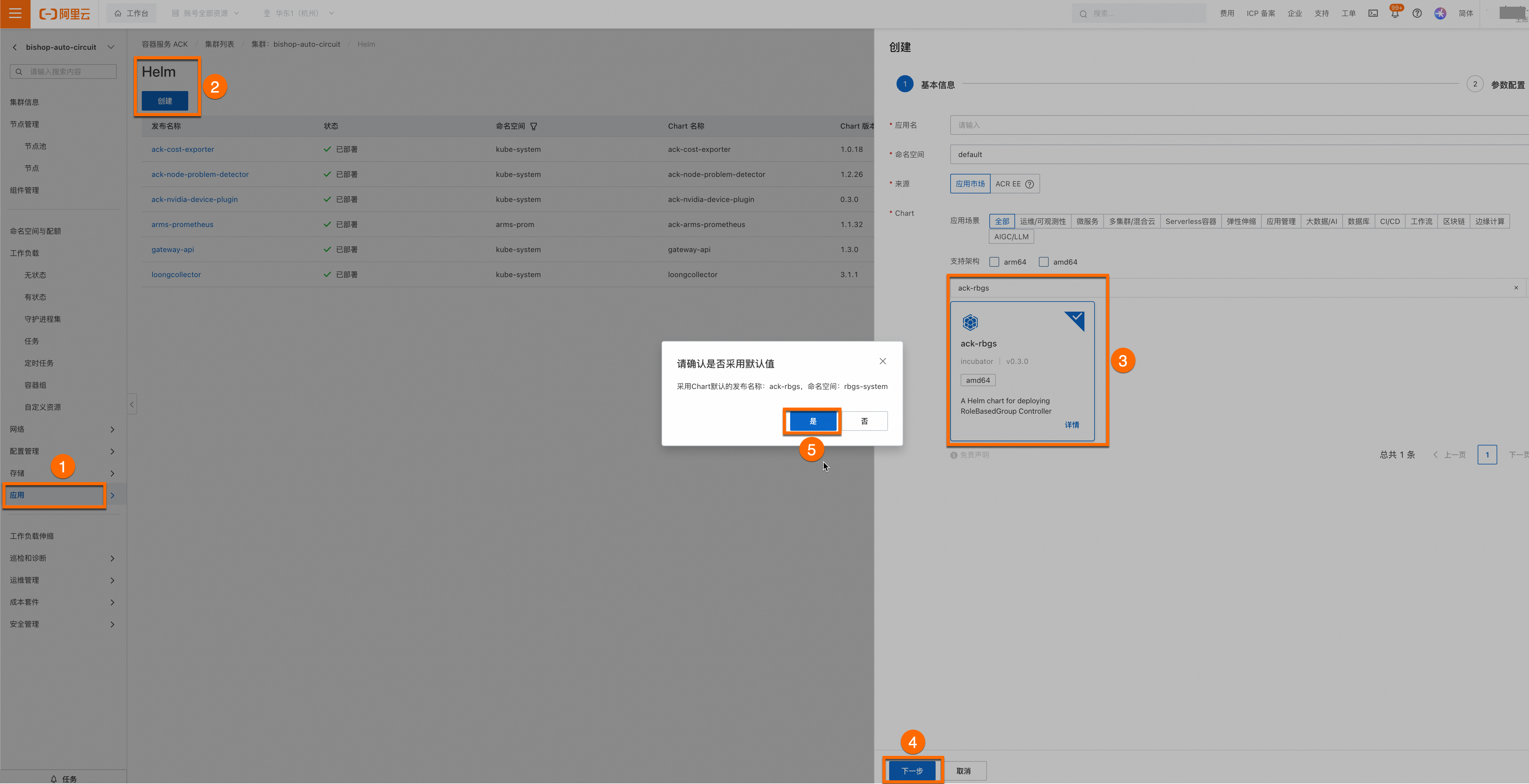
  • The ack-rbgs component is installed. You can perform the following steps to install the component.

    Log on to the Container Service Management Console. In the navigation pane on the left, select Cluster List. Click the name of the target cluster. On the cluster details page, install the ack-rbgs component using Helm. You do not need to configure an Application Name or Namespace for the component. After you click Next, the Please Confirm dialog box appears. Click Yes to accept the default application name (ack-rbgs) and namespace (rbgs-system). Then, select the latest Chart version and click OK to complete the installation.

    image

Model deployment

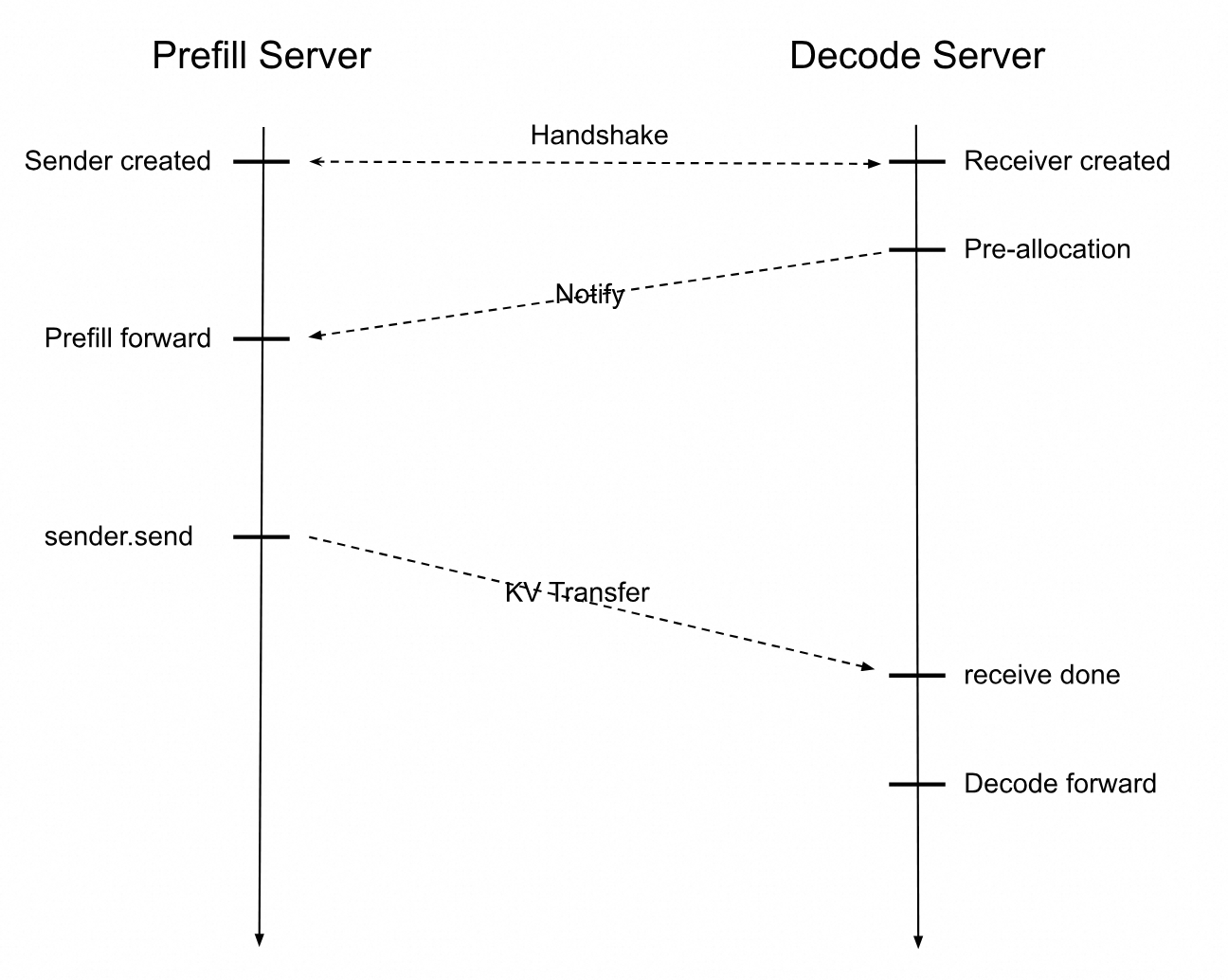
Deploy the inference service with the Prefill/Decode separation architecture. The following time series chart shows the interaction between the SGLang Prefill Server and Decode Server.

  • When a user inference request is received, the Prefill Server creates a Sender object, and the Decode Server creates a Receiver object.

  • The Prefill and Decode servers establish a connection through a handshake. The Decode Server first allocates a GPU memory address to receive the KV cache. After the Prefill Server completes its computation, it sends the KV cache to the Decode Server. The Decode Server then continues to compute subsequent tokens until the user's inference request is complete.

image.png

Step 1: Prepare the Qwen3-32B model files

  1. Run the following command to download the Qwen3-32B model from ModelScope.

    If the git-lfs plugin is not installed, run yum install git-lfs or apt-get install git-lfs to install it. For more installation methods, see Installing Git Large File Storage.
    git lfs install
    GIT_LFS_SKIP_SMUDGE=1 git clone https://www.modelscope.cn/Qwen/Qwen3-32B.git
    cd Qwen3-32B/
    git lfs pull
  2. Log on to the OSS console and record the name of your bucket. If you haven't created one, see Create buckets. Create a directory in Object Storage Service (OSS) and upload the model to it.

    For more information about how to install and use ossutil, see Install ossutil.
    ossutil mkdir oss://<your-bucket-name>/Qwen3-32B
    ossutil cp -r ./Qwen3-32B oss://<your-bucket-name>/Qwen3-32B
  3. Create a persistent volume (PV) named llm-model and a persistent volume claim (PVC) for your cluster. For detailed instructions, see Create a PV and a PVC.

    Example using console

    1. Create a PV

      • Log on to the ACK console. In the navigation pane on the left, click Clusters.

      • On the Clusters page, find the cluster you want and click its name. In the left-side pane, choose Volumes > Persistent Volumes.

      • In the upper-right corner of the Persistent Volumes page, click Create.

      • In the Create PV dialog box, configure the parameters that are described in the following table.

        The following table describes the basic configuration of the sample PV:

        Parameter

        Description

        PV Type

        In this example, select OSS.

        Volume Name

        In this example, enter llm-model.

        Access Certificate

        Configure the AccessKey ID and AccessKey secret used to access the OSS bucket.

        Bucket ID

        Select the OSS bucket you created in the preceding step.

        OSS Path

        Enter the path where the model is located, such as /Qwen3-32B.

    2. Create a PVC

      • On the Clusters page, find the cluster you want and click its name. In the left-side pane, choose Volumes > Persistent Volume Claims.

      • In the upper-right corner of the Persistent Volume Claims page, click Create.

      • In the Create PVC dialog box, configure the parameters that are described in the following table.

        The following table describes the basic configuration of the sample PVC.

        Configuration Item

        Description

        PVC Type

        In this example, select OSS.

        Name

        In this example, enter llm-model.

        Allocation Mode

        In this example, select Existing Volumes

        Existing Volumes

        Click the Select PV hyperlink and select the PV that you created.

    Example using kubectl

    1. Use the following YAML template to create a file named llm-model.yaml, containing configurations for a Secret, a static PV, and a static PVC.

      apiVersion: v1
      kind: Secret
      metadata:
        name: oss-secret
      stringData:
        akId: <your-oss-ak> # The AccessKey ID used to access the OSS bucket.
        akSecret: <your-oss-sk> # The AccessKey secret used to access the OSS bucket.
      ---
      apiVersion: v1
      kind: PersistentVolume
      metadata:
        name: llm-model
        labels:
          alicloud-pvname: llm-model
      spec:
        capacity:
          storage: 30Gi 
        accessModes:
          - ReadOnlyMany
        persistentVolumeReclaimPolicy: Retain
        csi:
          driver: ossplugin.csi.alibabacloud.com
          volumeHandle: llm-model
          nodePublishSecretRef:
            name: oss-secret
            namespace: default
          volumeAttributes:
            bucket: <your-bucket-name> # The bucket name.
            url: <your-bucket-endpoint> # The endpoint, such as oss-cn-hangzhou-internal.aliyuncs.com.
            otherOpts: "-o umask=022 -o max_stat_cache_size=0 -o allow_other"
            path: <your-model-path> # In this example, the path is /Qwen3-32B/.
      ---
      apiVersion: v1
      kind: PersistentVolumeClaim
      metadata:
        name: llm-model
      spec:
        accessModes:
          - ReadOnlyMany
        resources:
          requests:
            storage: 30Gi
        selector:
          matchLabels:
            alicloud-pvname: llm-model
    2. Create the Secret, static PV, and static PVC.

      kubectl create -f llm-model.yaml

Step 2: Deploy the SGLang inference service with Prefill/Decode separation

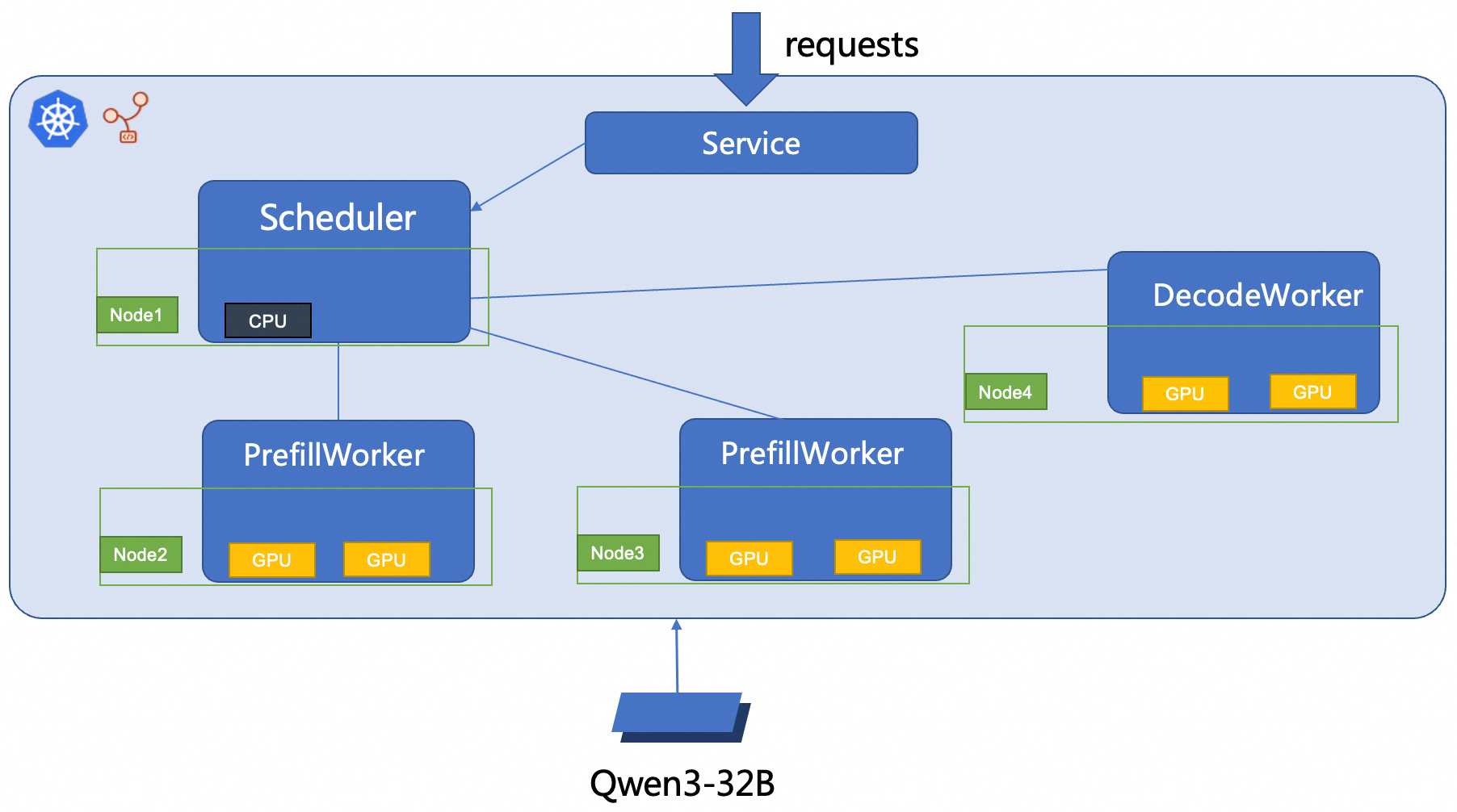
This topic uses RBG to deploy a 2P1D SGLang inference service. The deployment architecture is shown in the following figure.

image.png

  1. Create an sglang_pd.yaml file.

    Expand to view the sample YAML code.

    apiVersion: workloads.x-k8s.io/v1alpha1
    kind: RoleBasedGroup
    metadata:
      name: sglang-pd
    spec:
      roles:
        - name: scheduler
          replicas: 1
          dependencies: [ "decode", "prefill" ]
          template:
            spec:
              volumes:
                - name: model
                  persistentVolumeClaim:
                    claimName: llm-model
              containers:
                - name: scheduler
                  image: anolis-registry.cn-zhangjiakou.cr.aliyuncs.com/anolis-docker-images/docker-temp:0.3.4.post2-sglang0.4.10.post2-pytorch2.7.1.8-cuda12.8.1-py312-alinux3.2104
                  command:
                    - sh
                    - -c
                    - python3 -m sglang.srt.disaggregation.mini_lb --prefill http://sglang-pd-prefill-0.sglang-pd-prefill:8000 http://sglang-pd-prefill-1.sglang-pd-prefill:8000 --prefill-bootstrap-ports 34000 34000 --decode http://sglang-pd-decode-0.sglang-pd-decode:8000 --host 0.0.0.0 --port 8000
                  volumeMounts:
                    - mountPath: /models/Qwen3-32B/
                      name: model
    
        - name: prefill
          replicas: 2
          template:
            metadata:
              labels:
                alibabacloud.com/inference-workload: sglang-pd-prefill
                alibabacloud.com/inference_backend: sglang
            spec:
              volumes:
                - name: model
                  persistentVolumeClaim:
                    claimName: llm-model
                - name: dshm
                  emptyDir:
                    medium: Memory
                    sizeLimit: 15Gi
              containers:
                - name: sglang-prefill
                  image: anolis-registry.cn-zhangjiakou.cr.aliyuncs.com/anolis-docker-images/docker-temp:0.3.4.post2-sglang0.4.10.post2-pytorch2.7.1.8-cuda12.8.1-py312-alinux3.2104
                  imagePullPolicy: Always
                  env:
                    - name: POD_IP
                      valueFrom:
                        fieldRef:
                          fieldPath: status.podIP
                  command:
                    - sh
                    - -c
                    - python3 -m sglang.launch_server --tp 2 --model-path /models/Qwen3-32B/ --disaggregation-mode prefill --port 8000 --disaggregation-bootstrap-port 34000 --host $(POD_IP) --enable-metrics
                  ports:
                    - containerPort: 8000
                      name: http
                    - containerPort: 34000
                      name: bootstrap
                  readinessProbe:
                    initialDelaySeconds: 30
                    periodSeconds: 10
                    tcpSocket:
                      port: 8000
                  resources:
                    limits:
                      nvidia.com/gpu: "2"
                      aliyun/erdma: 1
                      memory: "16Gi"
                      cpu: "4"
                    requests:
                      nvidia.com/gpu: "2"
                      aliyun/erdma: 1
                      memory: "16Gi"
                      cpu: "4"
                  volumeMounts:
                    - mountPath: /models/Qwen3-32B/
                      name: model
                    - mountPath: /dev/shm
                      name: dshm
    
        - name: decode
          replicas: 1
          template:
            metadata:
              labels:
                alibabacloud.com/inference-workload: sglang-pd-decode
                alibabacloud.com/inference_backend: sglang
            spec:
              volumes:
                - name: model
                  persistentVolumeClaim:
                    claimName: llm-model
                - name: dshm
                  emptyDir:
                    medium: Memory
                    sizeLimit: 15Gi
              containers:
                - name: sglang-decode
                  image: anolis-registry.cn-zhangjiakou.cr.aliyuncs.com/anolis-docker-images/docker-temp:0.3.4.post2-sglang0.4.10.post2-pytorch2.7.1.8-cuda12.8.1-py312-alinux3.2104
                  imagePullPolicy: Always
                  env:
                    - name: POD_IP
                      valueFrom:
                        fieldRef:
                          fieldPath: status.podIP
                  command:
                    - sh
                    - -c
                    - python3 -m sglang.launch_server --tp 2 --model-path /models/Qwen3-32B/ --disaggregation-mode decode --port 8000 --host $(POD_IP) --enable-metrics
                  ports:
                    - containerPort: 8000
                      name: http
                  readinessProbe:
                    initialDelaySeconds: 30
                    periodSeconds: 10
                    tcpSocket:
                      port: 8000
                  resources:
                    limits:
                      nvidia.com/gpu: "2"
                      aliyun/erdma: 1
                      memory: "16Gi"
                      cpu: "4"
                    requests:
                      nvidia.com/gpu: "2"
                      aliyun/erdma: 1
                      memory: "16Gi"
                      cpu: "4"
                  volumeMounts:
                    - mountPath: /models/Qwen3-32B/
                      name: model
                    - mountPath: /dev/shm
                      name: dshm
    ---
    apiVersion: v1
    kind: Service
    metadata:
      labels:
        app: sglang-pd
      name: sglang-pd
      namespace: default
    spec:
      ports:
        - name: http
          port: 8000
          protocol: TCP
          targetPort: 8000
      selector:
        rolebasedgroup.workloads.x-k8s.io/name: sglang-pd
        rolebasedgroup.workloads.x-k8s.io/role: scheduler
      type: ClusterIP
    
  2. Deploy the SGLang inference service with Prefill/Decode separation.

    kubectl create -f sglang_pd.yaml

Step 3: Verify the inference service

  1. Run the following command to establish port forwarding between the inference service and your local environment.

    Important

    Port forwarding established by kubectl port-forward lacks production-grade reliability, security, and scalability. It is suitable for development and debugging purposes only and should not be used in a production environment. For production-ready network solutions in Kubernetes clusters, see Ingress management.

    kubectl port-forward svc/sglang-pd 8000:8000

    Expected output:

    Forwarding from 127.0.0.1:8000 -> 8000
    Forwarding from [::1]:8000 -> 8000
  2. You can run the following command to send a sample inference request to the model inference service.

    curl http://localhost:8000/v1/chat/completions -H "Content-Type: application/json"  -d '{"model": "/models/Qwen3-32B", "messages": [{"role": "user", "content": "test"}], "max_tokens": 30, "temperature": 0.7, "top_p": 0.9, "seed": 10}'

    Expected output:

    {"id":"29f3fdac693540bfa7808fc1a8701758","object":"chat.completion","created":1753695366,"model":"/models/Qwen3-32B","choices":[{"index":0,"message":{"role":"assistant","content":"<think>\nOkay, the user wants me to do a test. I need to first confirm their specific needs. Maybe they want to test my functions, such as answering questions or generating content.","reasoning_content":null,"tool_calls":null},"logprobs":null,"finish_reason":"length","matched_stop":null}],"usage":{"prompt_tokens":10,"total_tokens":40,"completion_tokens":30,"prompt_tokens_details":null}}

    The output indicates that the model can generate a response based on the input test message.

References

  • Configure Prometheus monitoring for LLM inference services

    In a production environment, monitoring the health and performance of your LLM service is critical for maintaining stability. By integrating with Managed Service for Prometheus, you can collect detailed metrics to:

    • Detect failures and performance bottlenecks.

    • Troubleshoot issues with real-time data.

    • Analyze long-term performance trends to optimize resource allocation.

  • Accelerate model loading with Fluid distributed caching

    Large model files (>10 GB) stored in services like OSS or File Storage NAS can cause slow pod startups (cold starts) due to long download times. Fluid solves this problem by creating a distributed caching layer across your cluster's nodes. This significantly accelerates model loading in two key ways:

    • Accelerated data throughput: Fluid pools the storage capacity and network bandwidth of all nodes in the cluster. This creates a high-speed, parallel data layer that overcomes the bottleneck of pulling large files from a single remote source.

    • Reduced I/O latency: By caching model files directly on the compute nodes where they are needed, Fluid provides applications with local, near-instant access to data. This optimized read mechanism eliminates the long delays associated with network I/O.

  • Implement intelligent routing and traffic management by using Gateway with Inference Extension

    ACK Gateway with Inference Extension is a powerful ingress controller built on the Kubernetes Gateway API to simplify and optimize routing for AI/ML workloads. Key features include:

    • Model-aware load balancing: Provides optimized load balancing policies to ensure efficient distribution of inference requests.

    • Intelligent model routing: Routes traffic based on the model name in the request payload. This is ideal for managing multiple fine-tuned models (e.g., different LoRA variants) behind a single endpoint or for implementing traffic splitting for canary releases.

    • Request prioritization: Assigns priority levels to different models, ensuring that requests to your most critical models are processed first, guaranteeing quality of service.