HyperText Transfer Protocol Secure (HTTPS) is a secure version of HTTP that provides encrypted protection for transmitted data based on the SSL/TLS protocol. An HTTPS cipher suite is a set of encryption algorithms and protocols used to establish secure communication between a client, such as a browser, and a server. AI Gateway supports client selection of specified cipher suites to meet your security, compatibility, performance optimization, and other legal and compliance requirements when using the gateway.
Overview
An HTTPS cipher suite consists of the following components:
A key exchange algorithm used to securely exchange keys for encrypted communications. Common key exchange algorithms include Rivest-Shamir-Adleman (RSA), Diffie-Hellman (DH), and Elliptic curve Diffie-Hellman (ECDH).
A Message Authentication Code (MAC) algorithm used to ensure data integrity and authentication. Common MAC algorithms include HMAC-SHA256 and HMAC-SHA384.
A symmetric encryption algorithm used to encrypt the data itself. Common symmetric encryption algorithms include Advanced Encryption Standard (AES) and ChaCha20.
Supported suites
Suites supported by AI Gateway and their corresponding TLS versions.
Suite name | Supported TLS versions |
ECDHE-ECDSA-AES128-SHA | TLS 1.0, TLS 1.1, TLS 1.2, and TLS 1.3 |
ECDHE-ECDSA-AES256-SHA | TLS 1.0, TLS 1.1, TLS 1.2, and TLS 1.3 |
ECDHE-RSA-AES128-SHA | TLS 1.0, TLS 1.1, TLS 1.2, and TLS 1.3 |
ECDHE-RSA-AES256-SHA | TLS 1.0, TLS 1.1, TLS 1.2, and TLS 1.3 |
AES128-SHA | TLS 1.0, TLS 1.1, TLS 1.2, and TLS 1.3 |
AES256-SHA | TLS 1.0, TLS 1.1, TLS 1.2, and TLS 1.3 |
ECDHE-ECDSA-AES128-GCM-SHA256 | TLS 1.2 and TLS 1.3 |
ECDHE-ECDSA-CHACHA20-POLY1305 | TLS 1.2 and TLS 1.3 |
ECDHE-RSA-AES128-GCM-SHA256 | TLS 1.2 and TLS 1.3 |
ECDHE-RSA-CHACHA20-POLY1305 | TLS 1.2 and TLS 1.3 |
AES128-GCM-SHA256 | TLS 1.2 and TLS 1.3 |
ECDHE-ECDSA-AES256-GCM-SHA384 | TLS 1.2 and TLS 1.3 |
ECDHE-RSA-AES256-GCM-SHA384 | TLS 1.2 and TLS 1.3 |
AES256-GCM-SHA384 | TLS 1.2 and TLS 1.3 |
Procedure
Log on to the AI Gateway console.
In the navigation pane on the left, click . In the navigation bar at the top, select a region.
Click Add Domain Name or click Edit in the Actions column of the target domain name.
On the Add Domain Name or Edit Domain Name page, select the HTTPS protocol from the Domain Name drop-down list.
Click Advanced Options, select Custom in the Cipher Suite radio button. Select the algorithms you want to set from the available algorithm list, and click Create or OK.
Verify the configuration
Set the HTTPS domain name to use the specified cipher suite. In this example, the cipher suite is set to:
ECDHE-ECDSA-AES128-GCM-SHA256and successfully configured.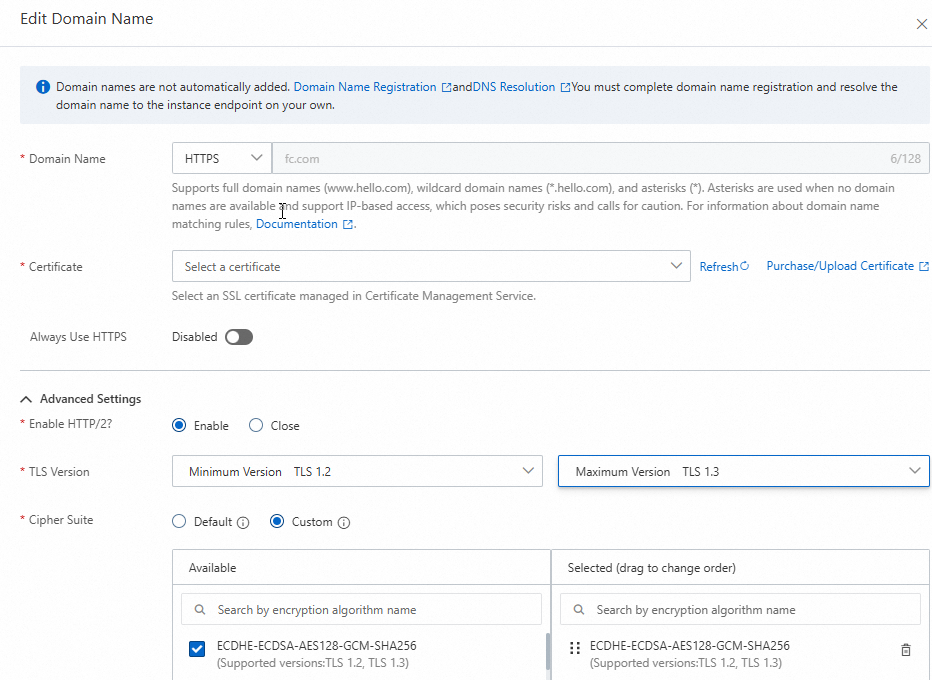
Access with the specified cipher suite
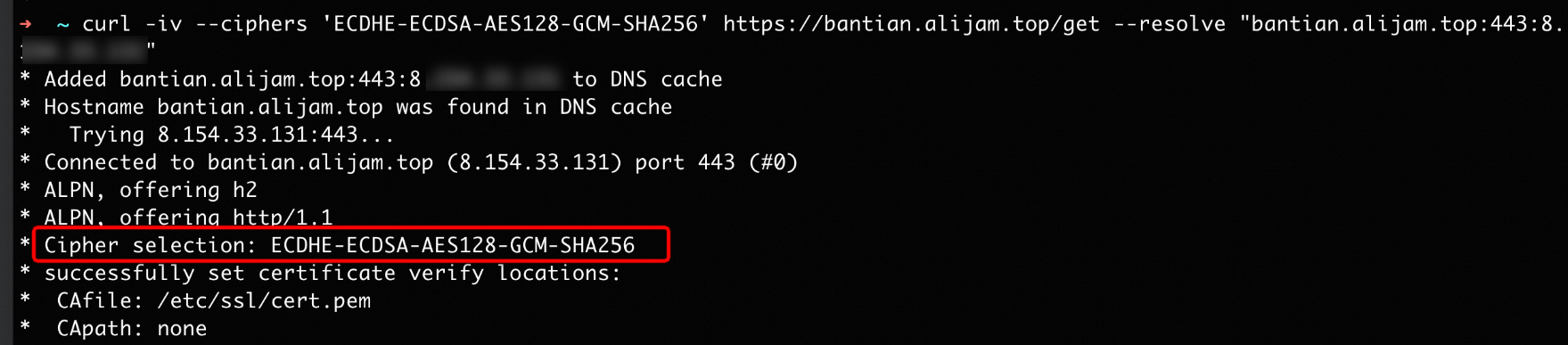
ECDHE-ECDSA-AES128-GCM-SHA256.
The request with the specified suite
ECDHE-ECDSA-AES128-GCM-SHA256returns successfully, and both parties negotiate to use the cipher suiteECDHE-ECDSA-AES128-GCM-SHA256.